

Page History
| Table of Contents |
|---|
RDK8 App Integration Use-case
Complete flow
| draw.io Diagram | ||||||||||||||||||||||
|---|---|---|---|---|---|---|---|---|---|---|---|---|---|---|---|---|---|---|---|---|---|---|
|
Development Stage: Sign the package using self-signed certificate
This section provides details about the process of signing a DAC App package - also known as a BOLT package - on the HOST machine using bolt-tools by generating a self-signed certificate.
draw.io Diagram border true diagramName rdk8 dac package simpleViewer false width links auto tbstyle top lbox true diagramWidth 1231 height 749 revision 1
CPE App Execution Flow: How an App gets launched on device
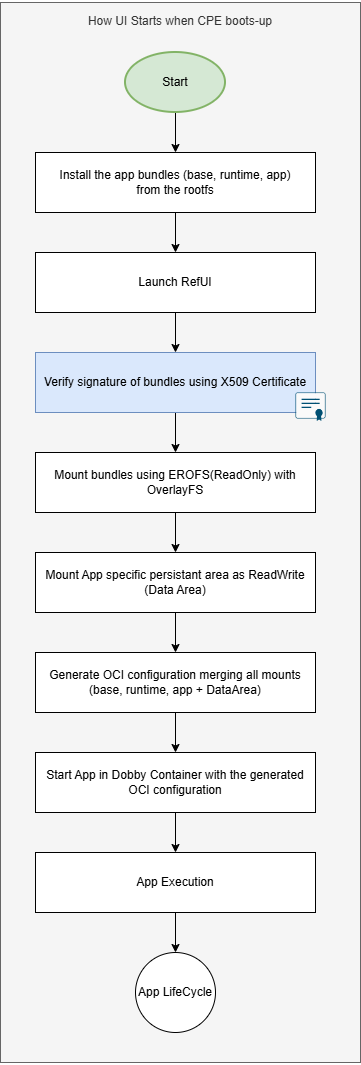
The libPackage library at runtime uses all the compatible certificates present in DAC_APP_CERT_PATH for verifying the signature of the bolt package. DAC_APP_CERT_PATH is unique to device build configuration
Reference Commands and Tools
Signing-key Generation
Generate private key
Generates a 2048-bit RSA private key and saves it to private_key.pem. When prompted, input the Secret Passphrase.
| Code Block | ||
|---|---|---|
| ||
openssl genrsa -out private_key.pem 2048 |
Extract the public key
This step extracts the public key from the private key and saves it to public.pem
| Code Block | ||
|---|---|---|
| ||
openssl rsa -in private_key.pem -pubout -out public.pem |
Generate a self-signed certificate with 10yr validity
Creates a self-signed X.509 certificate using the private key (private_key.pem) and saves it to certificate.pem
| Code Block | ||
|---|---|---|
| ||
openssl req -new -x509 -key private_key.pem -out certificate.pem -days 3650 -subj "/C=US/ST=Pennsylvania/L=Philadelphia/O=RDKM/OU=RDKE MW/CN=RDKM" |
Create a PKCS#12 File
This P12 file (signing.p12) contains the private key and the certificate. Used for securely storing and transporting private keys and certificates. When prompted, input the same Secret Passphrase.
| Code Block | ||
|---|---|---|
| ||
openssl pkcs12 -export -out signing.p12 -inkey private_key.pem -in certificate.pem |
Check the private key
This verifies the integrity of the private key (private_key.pem)
| Code Block | ||
|---|---|---|
| ||
openssl rsa -in private_key.pem -check |
Inspect the Certificate
Displays the details of the certificate (certificate.pem) in a human-readable format without outputting the raw certificate.
openssl x509 -in certificate.pem -text -noout
| Code Block | ||
|---|---|---|
| ||
$ openssl x509 -in certificate.pem -text -noout
Certificate:
    Data:
        Version: 3 (0x2)
        Serial Number:
            15:e2:80:96:13:7d:25:28:9e:a2:b6:3a:42:97:a6:67:de:bc:ab:3e
        Signature Algorithm: sha256WithRSAEncryption
        Issuer: C = US, ST = Pennsylvania, L = Philadelphia, O = RDKM, OU = RDKE MW, CN = RDKM
        Validity
            Not Before: Dec 10 15:31:52 2025 GMT
            Not After : Dec  8 15:31:52 2035 GMT
        Subject: C = US, ST = Pennsylvania, L = Philadelphia, O = RDKM, OU = RDKE MW, CN = RDKM
        Subject Public Key Info:
            Public Key Algorithm: rsaEncryption
                Public-Key: (2048 bit)
                Modulus:
                    00:a2:6a:45:97:40:12:24:51:ae:ed:8f:d7:2a:29:
                    c7:97:d1:1b:89:0c:e3:cd:8b:cd:08:d0:5f:a3:9c:
                    0f:65:17:0f:1f:60:5b:ec:7f:16:f0:10:95:c4:40:
                    f3:82:c4:00:57:0c:f9:26:88:cf:8d:69:d2:a1:cd:
                    ae:c1:a6:ea:e4:8c:87:b7:78:dc:5e:82:04:23:2b:
                    2f:fd:4e:7b:32:05:1f:8d:49:b6:97:9c:9a:95:4e:
                    61:d5:24:d6:56:2f:04:8e:87:b9:c8:4c:f1:31:2a:
                    3d:b0:60:0a:72:30:0d:d9:12:71:b8:f1:ec:6b:09:
                    e3:bb:51:02:46:d6:06:e6:69:54:41:41:07:a3:45:
                    28:b8:c2:b5:32:85:da:0b:03:20:b4:2e:d2:ec:47:
                    71:2f:60:8b:07:dd:e3:ad:35:27:d5:df:da:39:87:
                    a6:59:c8:6f:2b:96:25:71:80:3b:eb:01:76:2c:90:
                    4d:f0:ed:7c:7c:49:f2:81:d9:ee:d7:57:bf:c4:b4:
                    20:1b:0a:08:97:54:8e:4e:b1:6c:91:76:9c:70:b3:
                    7f:9d:8c:f4:d5:8b:7b:c1:c0:22:a8:17:8b:14:d4:
                    be:63:db:fc:4b:37:74:fb:28:91:d4:d0:84:54:30:
                    dd:5f:79:04:32:43:26:37:42:10:de:48:98:a6:f7:
                    37:89
                Exponent: 65537 (0x10001)
        X509v3 extensions:
            X509v3 Subject Key Identifier:
                51:B7:65:8D:43:C9:01:37:47:99:B0:6B:2B:2C:67:06:CD:DA:FD:35
            X509v3 Authority Key Identifier:
                51:B7:65:8D:43:C9:01:37:47:99:B0:6B:2B:2C:67:06:CD:DA:FD:35
            X509v3 Basic Constraints: critical
                CA:TRUE
    Signature Algorithm: sha256WithRSAEncryption
    Signature Value:
        60:da:37:fe:30:ef:3a:8c:3d:c3:31:f0:a6:d2:07:82:c2:f1:
        9b:07:d8:0f:89:54:50:e9:e0:c4:04:b1:d4:a5:7c:e8:4d:10:
        39:49:2e:3c:ca:7e:dc:71:3d:c2:46:2f:d0:be:36:39:32:9a:
        fd:8b:e8:ab:68:53:e3:4e:e1:ec:62:3d:6e:d1:6b:6a:05:bd:
        1d:a8:81:c5:4e:cb:83:e0:b5:ac:e2:cc:42:30:f5:be:ef:9c:
        0c:33:b3:95:1b:1d:42:de:13:8b:13:e7:86:47:fb:ff:06:90:
        cd:46:c8:77:6a:20:d8:86:fe:27:0f:55:c4:f9:4a:9e:98:c8:
        e7:c5:3c:90:ac:fd:fd:42:2d:6c:da:75:59:03:e8:88:52:9f:
        4e:27:fc:a6:46:ed:48:89:2e:ac:ea:de:67:4f:b6:98:36:34:
        3b:e6:8e:02:d6:86:a4:61:63:c3:fd:19:b2:7b:2f:60:db:60:
        43:5d:c6:8a:55:21:35:70:69:36:25:e1:69:be:a2:7d:4d:be:
        a3:e2:72:84:8b:45:23:41:05:76:08:b6:c9:a5:68:c0:8e:65:
        5b:cb:f3:54:c6:86:a1:1c:10:25:37:6a:7a:37:10:1e:4a:40:
        1c:08:5c:35:a7:29:1b:48:5b:71:01:c0:99:a3:50:76:4b:b9:
bd:4d:62:da |
Bundle Signing Process - Generate the signed bundle
Using ralfpack utility we shall sign the bolt bundles from the HOST using the generated certificates.
Prerequisite: HOST machine with ralfpack support. Refer https://github.com/rdkcentral/ralfpack for details.
Sign a single bundle using ralfpack
ralfpack sign --pkcs12=signing.p12 --passphrase=<Secret Passphrase> <bolt package>
| Code Block | ||
|---|---|---|
| ||
ralfpack sign --pkcs12=signing.p12 --passphrase="<Secret Passphrase>" com.rdkcentral.base+0.0.2.bolt Successfully signed com.rdkcentral.base+0.0.2.bolt |
Verify the signed bundle using ralfpack
Two ways - using public key as well as with the root CA
ralfpack verify --key=public.pem <signed bolt package>
| Code Block | ||
|---|---|---|
| ||
ralfpack verify --key=public.pem com.rdkcentral.base+0.0.2.bolt Package signature verification succeeded |
ralfpack verify --ca-roots=certificate.pem <signed bolt package>
| Code Block | ||
|---|---|---|
| ||
ralfpack verify --ca-roots=certificate.pem com.rdkcentral.base+0.0.2.bolt Package signature verification succeeded |
Batch-sign bundles using ralfpack (optional)
Using bolt-pkg-sign.sh script, we can generate multiple signed bundles in batch mode. Use this self-signed certificate for development activities.
| Code Block | ||
|---|---|---|
| ||
d35@d35:/mnt/vmShared/joseSignPkg/source$ ./bolt-pkg-sign.sh certs/com.rdkcentral.ralf.p12 <Secret Passphrase> $PWD signed/ Found 6 package(s) to sign Output directory: signed/ Signing com.rdkcentral.AmazonPrime+0.1.0.bolt... Successfully signed com.rdkcentral.AmazonPrime+0.1.0.bolt Success... Signing com.rdkcentral.base+0.1.0.bolt... Successfully signed com.rdkcentral.base+0.1.0.bolt Success... Signing com.rdkcentral.cobalt+0.1.0.bolt... Successfully signed com.rdkcentral.cobalt+0.1.0.bolt Success... Signing com.rdkcentral.refui+0.0.2.bolt... Successfully signed com.rdkcentral.refui+0.0.2.bolt Success... Signing com.rdkcentral.wpe-develop+0.1.0.bolt... Successfully signed com.rdkcentral.wpe-develop+0.1.0.bolt Success... Signing com.rdkcentral.youtube+0.1.0.bolt... Successfully signed com.rdkcentral.youtube+0.1.0.bolt Success... All packages signed successfully! Signed packages are in: signed/ d35@d35:/mnt/vmShared/joseSignPkg/source$ |
Verifying the signature of bolt bundle at DUT
This section explains how to verify the signature information of a DAC bundle on the device side. The flow is explained with respect to the FactoryApp launch flow diagram.
CPE device should have the public key in it's DAC_APP_CERT_PATH directory which will be used by libPackage to verify each bundles signature.
A sample test application named ralfinfocan be used to inspect the bundle details on the DUT which closely mimics the behavior of the plugin based runtime logic.
| Code Block | ||
|---|---|---|
| ||
root@ipstb-mediabox-rtd1325:/mnt/signed-bundles# ralfinfo -p com.rdkcentral.wpe+0.0.2.bolt -v -c certificate.pem Successfully opened package: com.rdkcentral.wpe+0.0.2.bolt Package information: ******************************************************** Package format: Package::Format::Ralf Package ID: com.rdkcentral.wpe Package version: 0.0.2 Certificate Subject: CN=RDKM,OU=RDKE MW,O=RDKM,L=Philadelphia,ST=Pennsylvania,C=US Certificate Issuer: CN=RDKM,OU=RDKE MW,O=RDKM,L=Philadelphia,ST=Pennsylvania,C=US Certificate Is Valid: 1 Metadata information: ******************************************************** ID com.rdkcentral.wpe Version 0.0.2 Type Runtime Platform Architecture unknown Platform variant unknown Platform OS unknown Is Mountable ? Yes Mime Type runtime/unknown Title WPE WebKit Entry Point Path /usr/bin/cog-launcher Dependencies: com.rdkcentral.base : 0.0.2 - 0.0.3 Icons: None No Application Info present. Service Info Present: No Runtime Info: Present Yes Vendor Config Keys: Auxiliary metadata keys: ******************************************************** root@ipstb-mediabox-rtd1325:/mnt/signed-bundles# |
Overview
Community Forums
Content Tools
Tasks