
Rialto includes extensive instrumentation across its different modules allowing fine grained control of the logging produced by each component.
Each line of logging has an associated log level and is associated with a component based on the source file in which the log is located. Each level of logging can be enabled or disabled on a per component basis.
Log levels:
Components:
Default log levels are set for each component in the source code and will dictate the initial logging of the Rialto system. This would typically be used to set a low level of logging for production builds and more default logging in development builds. By default Rialto logs to journald.
The environment variable RIALTO_DEBUG can be used to override the compiled in log level settings. The numeric values set the log levels as follows:
Value | Logs enabled |
|---|---|
| 0 | FATAL |
| 1 | FATAL, ERROR |
| 2 | FATAL, ERROR, WARNING |
| 3 | FATAL, ERROR, WARNING, MILESTONE |
| 4 | FATAL, ERROR, WARNING, MILESTONE, INFO |
| 5 | FATAL, ERROR, WARNING, MILESTONE, INFO, DEBUG |
These levels can be applied to all components as follows:
RIALTO_DEBUG=3 # Will enable FATAL, ERROR, WARNING and MILESTONE logs to all components
or using a string value:
RIALTO_DEBUG="*:3" # Will enable FATAL, ERROR, WARNING and MILESTONE logs to all components
Log levels can all be set for specific components, available components are: client, sessionserver, ipc, servermanager. To set log level for single component, we can use its name. Level of the rest of components will be DEFAULT:
RIALTO_DEBUG="servermanager:5" # Will enable all logs for servermanager, default for other components
Set log levels for multiple components:
RIALTO_DEBUG="servermanager:5;ipc:4" # Will enable all logs for servermanager, INFO for IPC, default for other components
Asterix wildcard can also be used:
RIALTO_DEBUG="servermanager:5;ipc:4;*:0" # Will enable all logs for servermanager, INFO for IPC, FATAL for other components
The environment variable RIALTO_CONSOLE_LOG can be used for changing log target. When RIALTO_CONSOLE_LOG=1 is set, Rialto app will log to console.
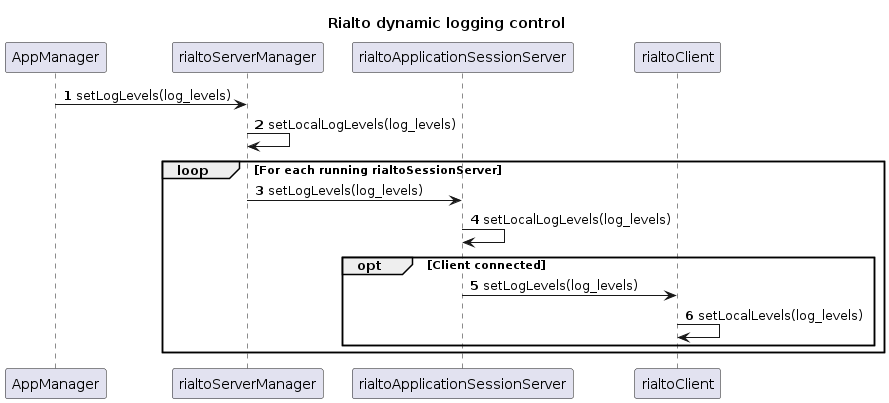
The Rialto Server Manager has an interface to allow the Application Manager to change the log levels at any time. A single call to this API will update the specified log levels for all running Rialto Components as follows:
If a new Rialto Application Session Server is subsequently launched the latest log levels will be set as part of the launch process.