WIP |
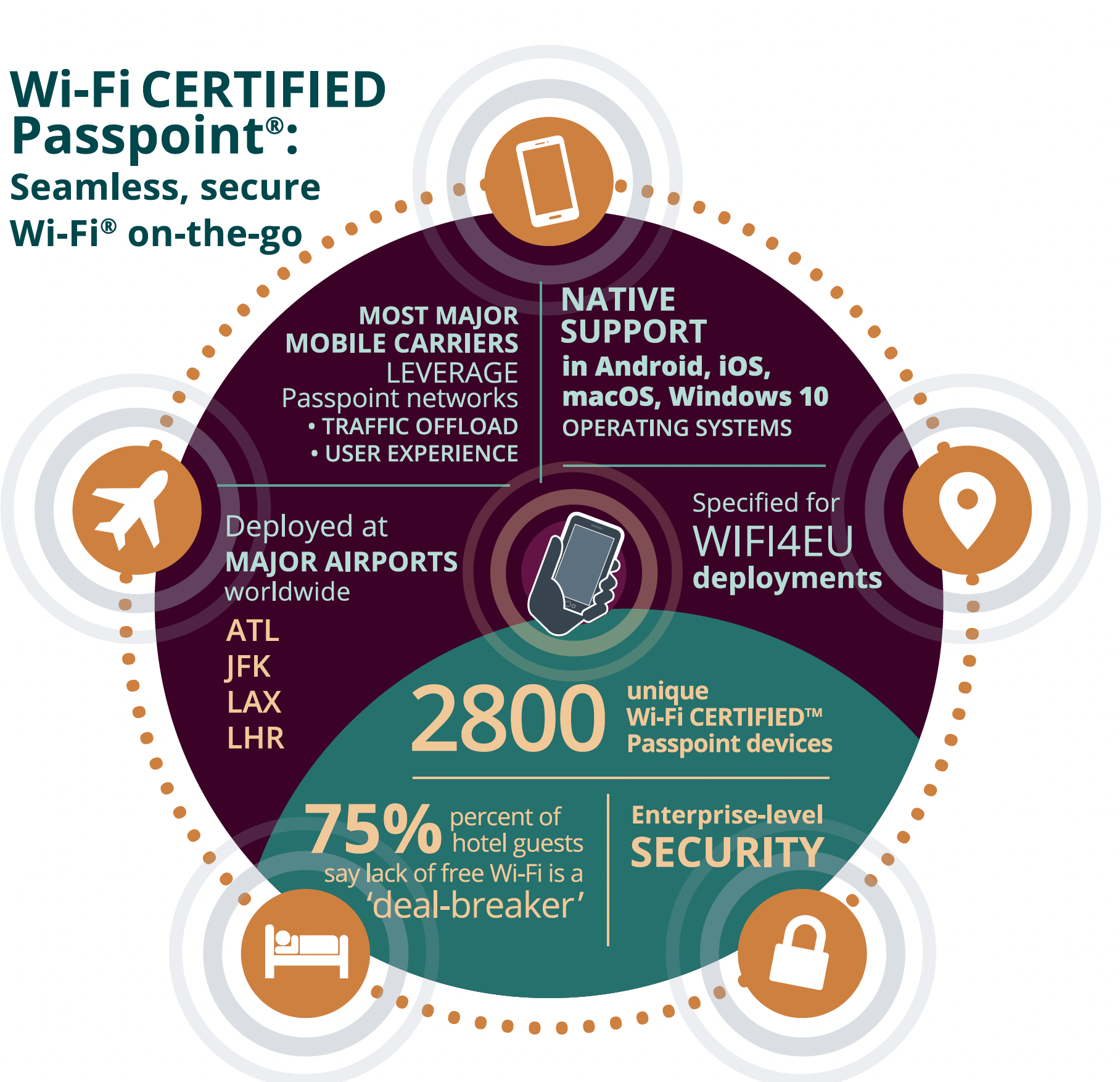
connecting to Wi-Fi networks, particularly public hotspots.It allows users to automatically and securely connect to Wi-Fi networks without needing to manually select SSIDs or enter credentials each time they connect to a new network
| Use case # | Auth Method |
|---|---|
| 1 | SIM-based authentication |
| 2 | Certificate-based authentication |
| 3 | Username and password authentication |
| 4 | EAP-AKA |
| Hotspot | Wifi passpoint(hotspot 2.0) |
|---|---|
|
|

wifi_pushApRoamingConsortiumElement
By default this feature is kept under distro and disabled.Operator has to work with OEM/SoC vendor and enable this feature in their platform and get the Platform api's from SoC/OEM to integrate end to end use case
wifi_applyGASConfiguration - this is been invoked by wifi_setGASConfiguration
/* GAS Configuration */
#define GAS_CFG_TYPE_SUPPORTED 1

/* GAS Configuration */
typedef struct _wifi_GASConfiguration_t{   // Values correspond to the dot11GASAdvertisementEntry field definitions; see 802.11-2016 Annex C.3.
    unsigned int AdvertisementID;
    bool PauseForServerResponse;
    unsigned int ResponseTimeout;
    unsigned int ComeBackDelay;
    unsigned int ResponseBufferingTime;
    unsigned int QueryResponseLengthLimit;
}__attribute__((packed))wifi_GASConfiguration_t;

typedef enum {
    wifi_anqp_element_name_reserved_0,
    wifi_anqp_element_name_query_list = 256,
    wifi_anqp_element_name_capability_list,
    wifi_anqp_element_name_venue_name,
    wifi_anqp_element_name_emergency_call_number,
    wifi_anqp_element_name_network_auth_type,
    wifi_anqp_element_name_roaming_consortium,
    wifi_anqp_element_name_ip_address_availabality,
    wifi_anqp_element_name_nai_realm,
    wifi_anqp_element_name_3gpp_cellular_network,
    wifi_anqp_element_name_geo_location,
    wifi_anqp_element_name_civic_location,
    wifi_anqp_element_name_loc_public_id,
    wifi_anqp_element_name_domain_name,
    wifi_anqp_element_name_emergency_alert_id,
    wifi_anqp_element_name_tdls_capability,
    wifi_anqp_element_name_emergency_nai,
    wifi_anqp_element_name_neighbor_report,
    wifi_anqp_element_name_venue_url,
    wifi_anqp_element_name_advice_of_charge,
    wifi_anqp_element_name_local_content,
    wifi_anqp_element_name_network_auth_type_with_timestamp,
    wifi_anqp_element_name_reserved_1 = 273,
    wifi_anqp_element_name_vendor_specific = 56797,
    wifi_anqp_element_name_reserved_2
} wifi_anqp_element_name_t;
typedef enum {
    wifi_anqp_element_hs_subtype_reserved_0,
    wifi_anqp_element_hs_subtype_hs_query_list,
    wifi_anqp_element_hs_subtype_hs_capability_list,
    wifi_anqp_element_hs_subtype_operator_friendly_name,
    wifi_anqp_element_hs_subtype_wan_metrics,
    wifi_anqp_element_hs_subtype_conn_capability,
    wifi_anqp_element_hs_subtype_nai_home_realm_query,
    wifi_anqp_element_hs_subtype_op_class_ind,
    wifi_anqp_element_hs_subtype_osu_providers_list,
    wifi_anqp_element_hs_subtype_reserved_1,
    wifi_anqp_element_hs_subtype_icon_request,
    wifi_anqp_element_hs_subtype_icon_bin_file,
    wifi_anqp_element_hs_subtype_op_icon_metadata,
    wifi_anqp_element_hs_subtype_op_providers_nai_list,
    wifi_anqp_element_hs_subtype_reserved_2
} wifi_anqp_element_hs_subtype_t;
typedef enum {
    wifi_anqp_id_type_anqp,
    wifi_anqp_id_type_hs
} wifi_anqp_id_type_t;
typedef struct {
    wifi_anqp_id_type_t     type;
    union {
        wifi_anqp_element_name_t        anqp_elem_id;
        wifi_anqp_element_hs_subtype_t  anqp_hs_id;
    } u;
    UINT    len;
    UCHAR   *data;
} wifi_anqp_elem_t;
typedef struct wifi_anqp_node {
    struct wifi_anqp_node    *next;
    wifi_anqp_elem_t    *value;
} wifi_anqp_node_t;


typedef struct {
    UCHAR    wifiRoamingConsortiumCount;
    UCHAR    wifiRoamingConsortiumOui[3][15+1];//only 3 OIS is allowed in beacon and probe responses OIS length is variable between 3-15
    UCHAR    wifiRoamingConsortiumLen[3];
}__attribute__((packed)) wifi_roamingConsortiumElement_t;


typedef struct {
   // wifi_InterworkingElement_t   interworking;
    wifi_roamingConsortiumElement_t roamingConsortium;
    //wifi_anqp_settings_t        anqp;                   //should not be implemented in the hal
    //wifi_passpoint_settings_t   passpoint;
}__attribute__((packed)) wifi_interworking_t;

//----------------------------------------------------------
int enablePassPointSettings(int ap_index, bool passpoint_enable, bool downstream_disable, bool p2p_disable, bool layer2TIF)
{
        printf("enablePassPointSettings.\n");
#ifdef CKP
    if (ap_index < 0 || ap_index > MAX_AP_INDEX)
    {
        wifi_anqp_dbg_print(1, "%s:%d:Invalid ap index:   %d\n", __func__, __LINE__, ap_index);
        return RETURN_ERR;
    }
    if(!hs2SettingsStored)
    {
        hs2SettingsStored = TRUE;
        wifi_storeInitialPassPointSettings();
    }
    if (passpoint_enable)
    {
        wifi_anqp_dbg_print(1, "%s:%d:Enabling HS2 Settings for ap index:   %d\n", __func__, __LINE__, ap_index);
        wifi_setCountryIe(ap_index, passpoint_enable);
        wifi_setProxyArp(ap_index, passpoint_enable);
        wifi_setLayer2TrafficInspectionFiltering(ap_index, layer2TIF);
        wifi_setDownStreamGroupAddress(ap_index, downstream_disable);
        wifi_setBssLoad(ap_index, passpoint_enable);
        wifi_setP2PCrossConnect(ap_index, p2p_disable);
    }
    else
    {
        //set the values initially stored in hs2settings for ap index.
        wifi_anqp_dbg_print(1, "%s:%d:Disabling HS2 Settings for ap index:   %d\n", __func__, __LINE__, ap_index);
        wifi_setCountryIe(ap_index, hs2Settings[ap_index].countryIe);
        wifi_setProxyArp(ap_index, hs2Settings[ap_index].proxyArp);
        wifi_setLayer2TrafficInspectionFiltering(ap_index, hs2Settings[ap_index].layer2TIF);
        wifi_setDownStreamGroupAddress(ap_index, hs2Settings[ap_index].downStreamGroupAddress);
        wifi_setBssLoad(ap_index, hs2Settings[ap_index].bssLoad);
    }
    if(wifi_pushApHotspotElement(ap_index,passpoint_enable)!= RETURN_OK)
    {
        return RETURN_ERR;
    }
#endif
        return 1;
}

int wifi_setGASConfiguration(unsigned int advertisementID, wifi_GASConfiguration_t *input_struct)
{
        printf("wifi_setGASConfiguration.\n");
        return 1;
}

// Dummy function to simulate callback registration
int wifi_anqp_request_callback_register(wifi_anqp_request_callback_t callback) {
    // Dummy implementation: just print a message and return success
    printf("ANQP request callback registered.\n");
    return 1;
}

// Example of a dummy callback function
void anqpRequest_callback(int apIndex, mac_address_t sta, unsigned char token, wifi_anqp_node_t *list) {
    // Dummy callback implementation
    printf("ANQP request received for AP index: %d, token: %u\n", apIndex, token);
}


int wifi_anqpSendResponse(unsigned int apIndex, mac_address_t sta, unsigned char token, wifi_anqp_node_t *list)
{
        printf("Called  with apIndex: %d\n", apIndex);
     // Dummy implementation, just returning 1
    return 1;
}

int wifi_pushApInterworkingElement(int apIndex, wifi_InterworkingElement_t *infoElement) {
     printf("Called wifi_pushApInterworkingElement with apIndex: %d\n", apIndex);
     // Dummy implementation, just returning 1
    return 1;
}

// Dummy function implementation
int wifi_pushApRoamingConsortiumElement(int apIndex, wifi_roamingConsortiumElement_t *infoElement) {
// Log the input values (optional, for debugging)
    printf("Called wifi_pushApRoamingConsortiumElement with apIndex: %d\n", apIndex);

    // Optionally print contents of infoElement for debugging (if fields exist)
    if (infoElement != NULL) {
        //printf("Info Element some_field: %d\n", infoElement->some_field);
    }

    // Dummy function, always returns true
    return 1;
}
Note: Add all necessary structures |
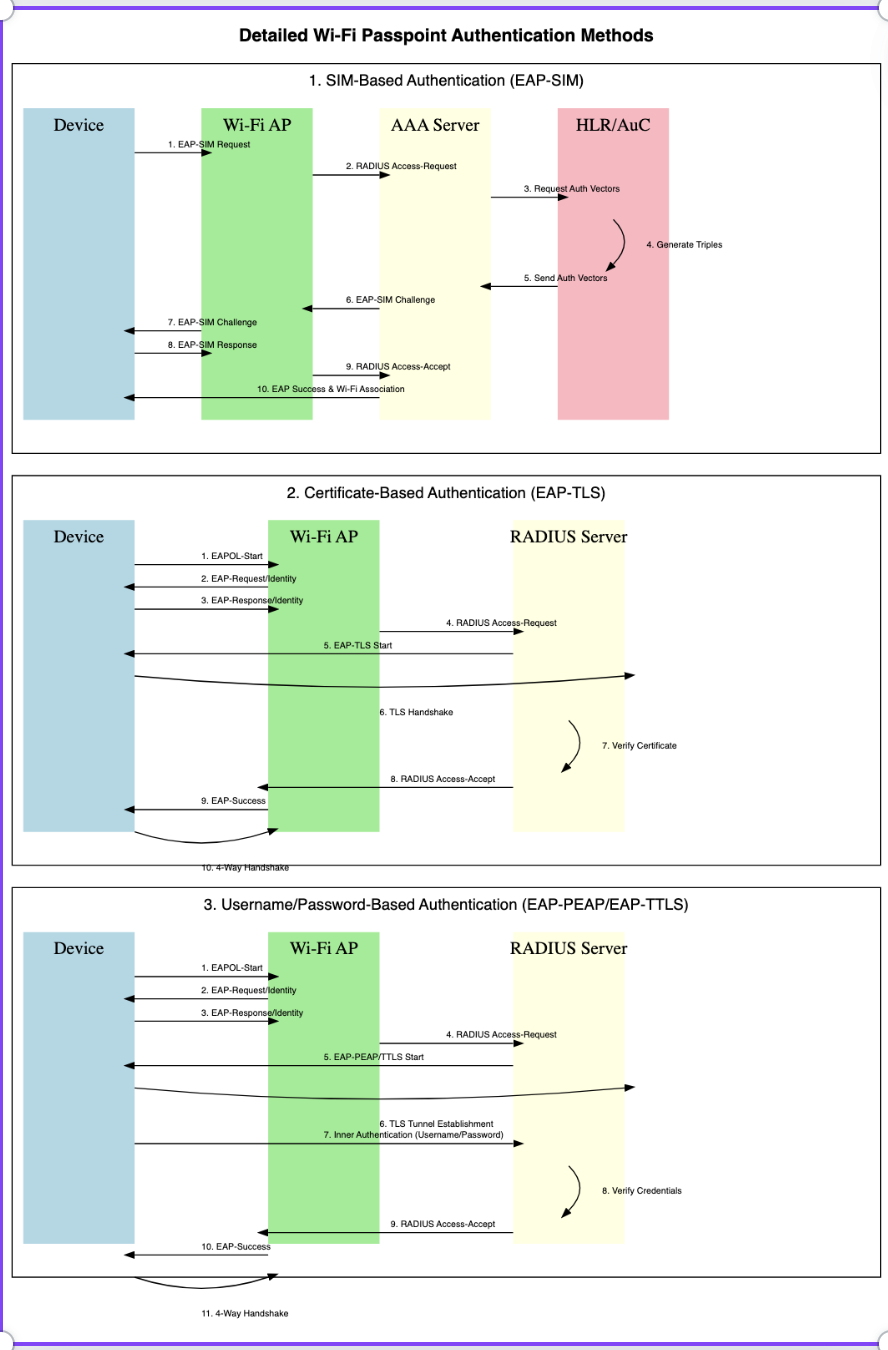
SIM-based authentication in Wi-Fi Passpoint, also known as EAP-SIM (Extensible Authentication Protocol - Subscriber Identity Module), allows users with mobile SIM cards to automatically authenticate and connect to Wi-Fi networks without manually entering credentials like usernames or passwords. This method is widely used in cellular offloading scenarios, where mobile devices automatically switch from cellular data to Wi-Fi networks provided by their carrier or trusted roaming partners
Configure Wi-Fi Network to Support EAP-SIM:
Steps:
Wi-Fi Passpoint Network Configuration:
Steps:
Device-Side Configuration:
Steps:
Authentication Process (EAP-SIM):
Steps:
SIM-Based Roaming:
Advantages of SIM-Based Authentication in Passpoint:
Example Workflow of SIM-Based Authentication with Passpoint
This method allows with Wi-Fi Passpoint involves using EAP-TLS (Extensible Authentication Protocol - Transport Layer Security), where client devices authenticate to the Wi-Fi network using digital certificates rather than usernames, passwords, or SIM credentials. This ensures a high level of security, especially in environments such as enterprises, or public Wi-Fi hotspots
Understanding EAP-TLS (Certificate-Based Authentication):
Components Involved in EAP-TLS Authentication with Passpoint:
Steps to Implement Certificate-Based Authentication in Wi-Fi Passpoint:
Set Up a Certificate Authority (CA):
Steps:
Configure the RADIUS Server to Support EAP-TLS:
Steps:
Configure the Wi-Fi Access Point for WPA2/WPA3-Enterprise:
Steps:
Configure the Passpoint Profile for Certificate-Based Authentication:
Steps:
Install Certificates on Client Devices:
Steps:
Example on Windows/macOS/Linux:
EAP-TLS Authentication Workflow: When a client with a Passpoint profile and a client certificate attempts to connect to a Passpoint-enabled network that supports EAP-TLS, the following occurs:
Steps:
Advantages of Certificate-Based Authentication in Passpoint:
To map Wi-Fi Passpoint with Username and Password Authentication, you would typically use EAP-TTLS (Tunneled Transport Layer Security) or EAP-PEAP (Protected Extensible Authentication Protocol). These authentication methods allow the use of usernames and passwords securely over Wi-Fi networks. In these protocols, an outer TLS tunnel is established to protect the inner authentication, where the user credentials (username and password) are verified
1. Understanding EAP-TTLS and EAP-PEAP:
2. Components Involved:
3. Configure the RADIUS Server for EAP-TTLS or EAP-PEAP:
The RADIUS server must be configured to support EAP-TTLS or EAP-PEAP. The RADIUS server will authenticate the username and password against a backend database, such as LDAP, Active Directory, or a local user database.
Steps:
4.Configure the Wi-Fi Access Point:
The Wi-Fi AP must be configured to use WPA2-Enterprise (or WPA3-Enterprise) and must use EAP-TTLS or EAP-PEAP as the authentication methods.
Steps:
5. Configure the Passpoint Profile for Username and Password Authentication:
Steps:
6.Install the Passpoint Profile on Client Devices:
Steps:
7. EAP-TTLS or EAP-PEAP Authentication Workflow:
When the client with a Passpoint profile containing the username and password tries to connect to a Passpoint-enabled Wi-Fi network, the following occurs:
Steps:
8. User Experience:
Once the Passpoint profile with the username and password is configured, the client device can automatically connect to Passpoint-enabled networks that support EAP-TTLS or EAP-PEAP without needing to re-enter the credentials.
The client device will also automatically authenticate securely, ensuring a seamless and secure experience.