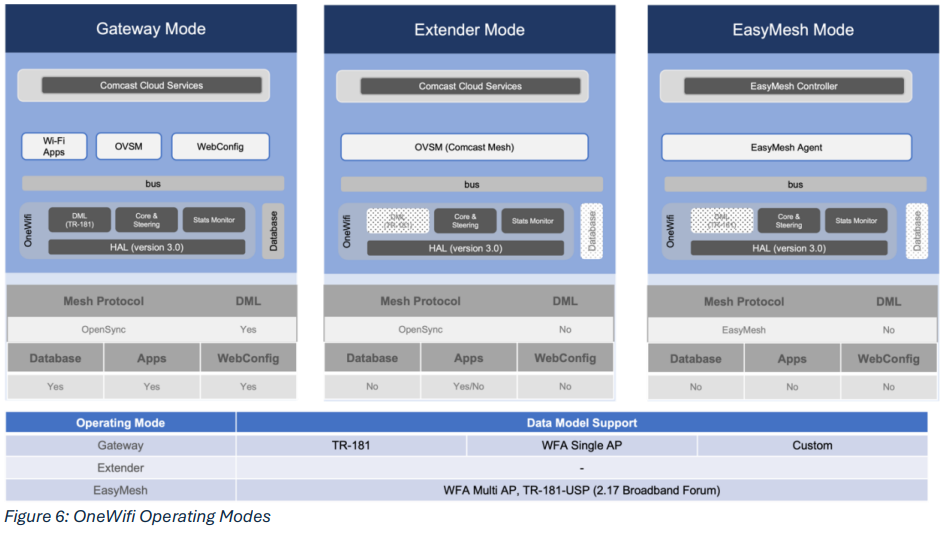
OneWifi was created to resolve the architectural problems and issues encountered during Wi-Fi features development and field deployment of its predecessor CcspWifiAgent. The earlier Wi-Fi stack was overlay of multiple Wi-Fi processes as seen in the left side of the above Figure 1. CcspWifiAgent and Wireless Manager processes being independent configuration components of Wi-Fi parameters, posed significant issues in synchronizing the states and data. A dedicated process Mesh Agent was the synchronizer entity. In case of anything detrimental happening to Mesh Agent, the two processes would be frequently out of sync. Along with that, the Stats Manager and Band Steering Manager being the other two entities of the Wi-Fi stack, the interfaces to and from the Wi-Fi driver and baseband were manyfold and thus caused reentrancy issues. Apart from the synchronization and reentrancy issues, there were other serious problems related to persistent storage, huge amount of vendor proprietary code and poor debugging, triaging toolings. |
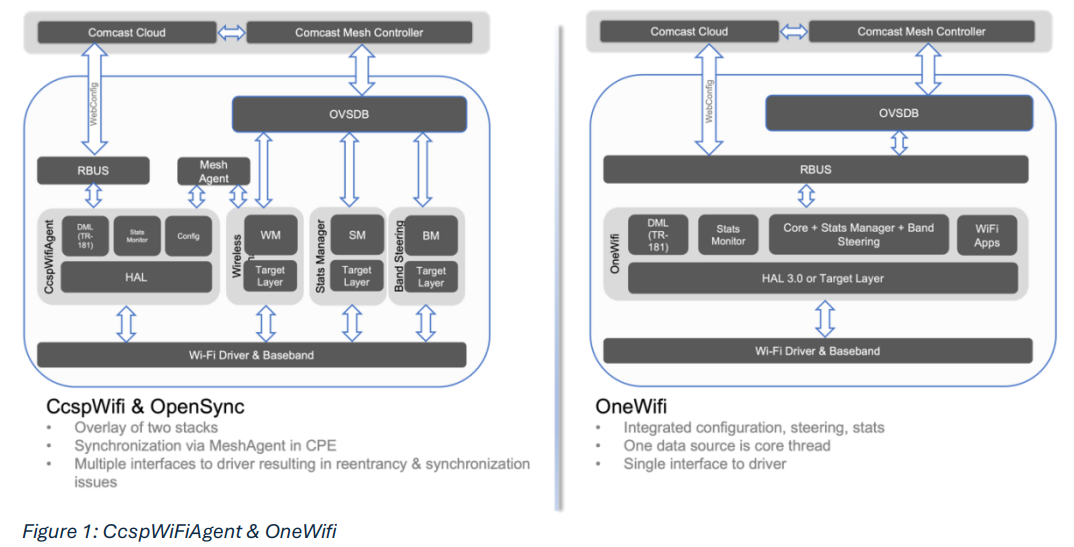
Wi-Fi DriverThe Wi-Fi driver, depicted in [1] of Figure 2: OneWifi Internal Architecture, is provided by SoC vendor as part of SDK and interacts with the baseband hardware primarily for lower MAC functionalities such as
Wi-Fi HALThe Wi-Fi HAL Layer, depicted in [2] of Figure 2: OneWifi Internal Architecture, implements abstraction functionalities for upper layer software entities to execute SoC independent function calls. Most of the implementation of this layer is architected with OpenSource software like HostAp and cfg80211/netlink80211 libraries. If the vendor provided driver is cfg80211 compliant, the existing HAL implementation should work seamlessly to provide all abstraction functionalities to upper layer. In case the driver is not compliant, the vendor needs to implement the HAL functions specified in HAL Specifications 3.0. Wi-Fi Core ControllerWi-Fi Core Controller, depicted in [3] of Figure 2: OneWifi Internal Architecture, is the heart and soul of OneWifi stack. This entity is responsible for interacting with Wi-Fi driver via HAL abstraction layer as far as the control plane and stats plane is concerned. The layer serializes all configuration and stats related queries to the driver ensuring a serialized driver access and thus preventing multiple reentrancy related issues. Services FrameworkServices framework, depicted in [4] of Figure 2: OneWifi Internal Architecture, provides ability to create, configure and modify Wi-Fi Virtual Access Point Services (Wi-Fi Networks). The types of network services that can be created are listed below.
Wi-Fi Apps FrameworkWi-Fi Applications framework, depicted in [5] of Figure 2: OneWifi Internal Architecture, is a registrar of Wi-Fi applications that can register with requirements of events, stats, periodicity of stats etc. The framework facilitates easy access to
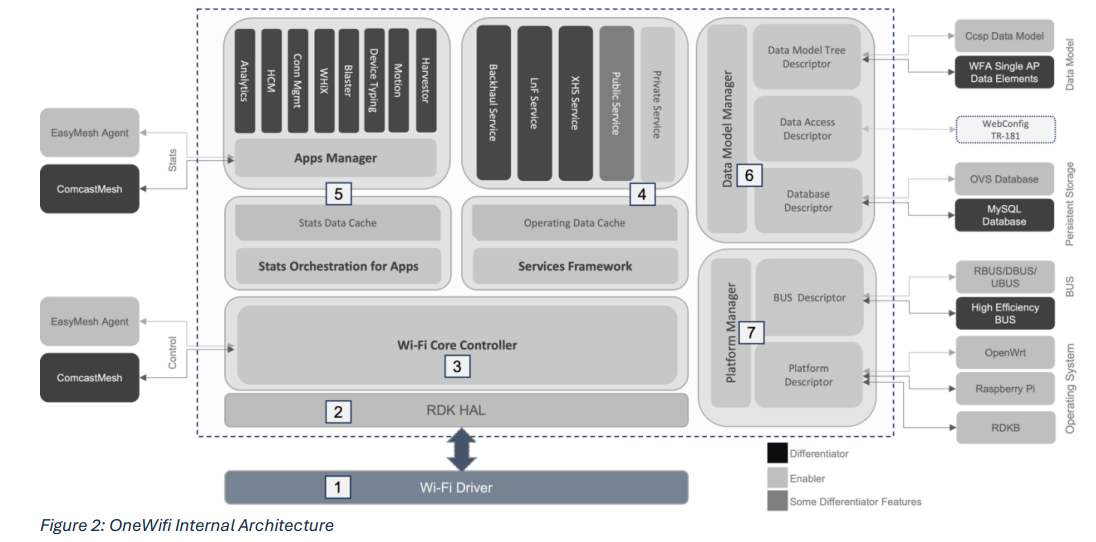
High level architecture of the technology is depicted in Figure 3: OneWifi Applications Framework. Applications can register with the framework specifying capability and start receiving events and statistics from core components of OneWifi stack and thereby algorithms in application can take appropriate course of actions. A wide of variety type of applications are currently supported and tested, some of the categories are:
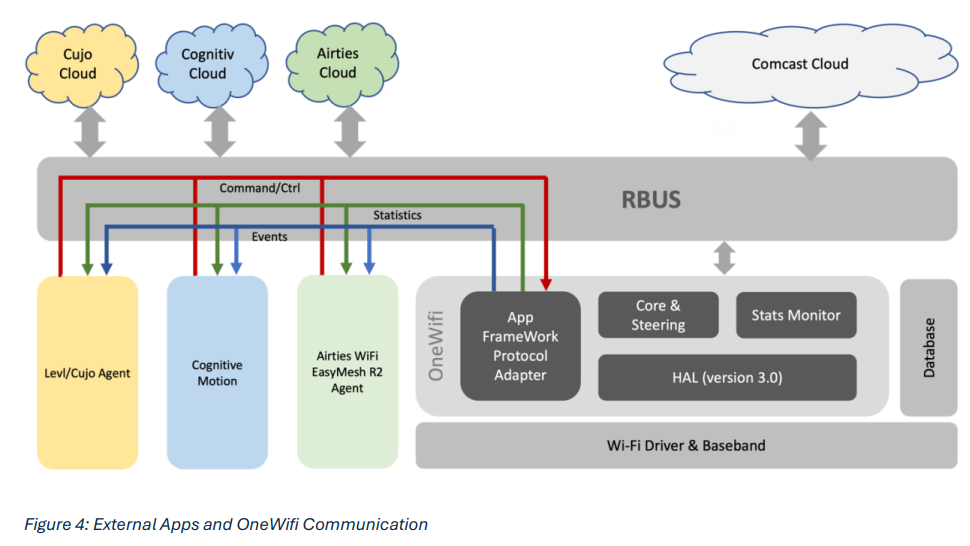
Applications can either be integral part of OneWifi process or can be executing as a process running in the CPE external to OneWifi in which case the framework creates a virtual adapter that facilitates seamless data communication between the stack and the application.
In case, the Wi-Fi application executes as a process outside OneWifi process, as the above Figure 4: External Apps and OneWifi Communication depicts, RBUS facilitates all categories of data exchanges between OneWifi stack and the application. Data Model ManagerData model manager, depicted in [6] of Figure 2: OneWifi Internal Architecture is an abstraction of various Wi-Fi data model specifications such as TR-181 or WFA MultiAP Data Elements or BBF Data models. This module also abstracts database technology used by OneWifi for persistent storage purposes. Data Model AbstractionTwo main data model specifications are supported by OneWifi.
Database AbstractionOneWifi needs to store configuration, RFC and some other operational parameters persistently. To achieve that, OneWifi uses a database abstraction layer that hides the intricacies of use of different relational database. This abstraction layer can work with any database like MySQL, OVS or Postgress that might be the deployed database technology of customer. OneWifi uses OVS database as its persistent storage mechanism. Platform ManagerPlatform manager, depicted in [6] of Figure 2: OneWifi Internal Architecture abstracts platform specific intricacies and differences. BUS AbstractionBus abstraction enables OneWifi run on multiple bus technologies. Current supported bus technologies are RBUSRBUS is the default working bus technology in OneWifi. All RDK builds automatically include RBUS as default unless overridden by macro definitions like USE_UBUS or USE_HEBUS in make files or build scripts. DBUSEnable macro definition namely USE_DBUS in make file or build script to build and run OneWifi version on DBUS. UBUSEnable macro definition namely USE_UBUS in make file or build script to build and run OneWifi version on UBUS. HEBUSThis is a high efficiency bus that enables high throughput data transfer mechanism between OneWifi and any application that requires high volume of Wi-Fi events data for its operating algorithm (e.g. Motion application). This can be enabled by using macro definition namely USE_HEBUS. OS AbstractionAbstracting OS specific functionalities allows OneWifi to run on multiple Operating Systems. Currently supported Operating Systems are
|
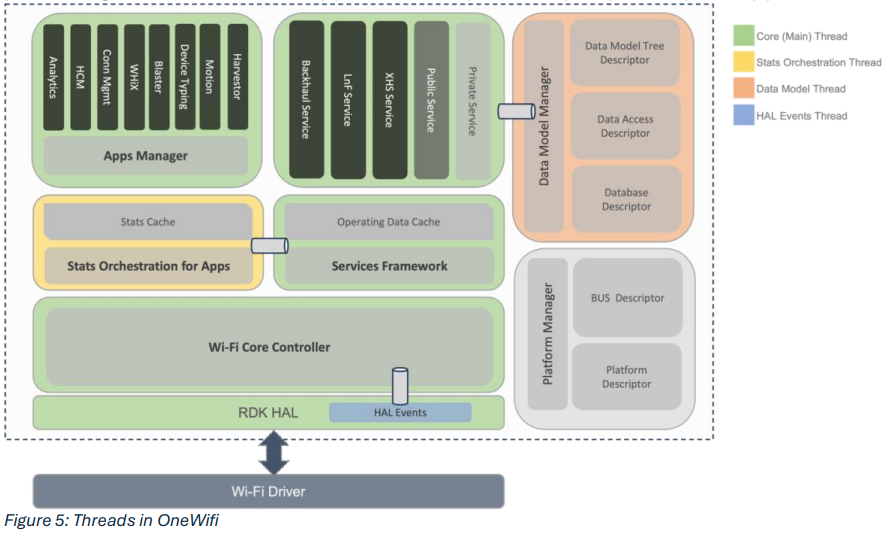
OneWifi process is multi-threaded. A color-coded model of the different threads is depicted in Figure 5: Threads in OneWifi. The different threads communicate with each other via priority enabled events queue. Core ThreadThe main thread is the Core thread (color-coded in green) that is responsible for interacting with lower layer entities (drivers etc.). This thread serializes all interactions with the driver whether the interaction is in control plane or stats plane. This thread is also responsible for publishing stats data to Wi-Fi applications at periodicity required by the applications.
Stats Orchestration ThreadThe stats orchestration thread (color-coded in yellow) is responsible for orchestrating stats and events requirements across all registered Wi-Fi applications. The thread maintains a stats cache that is periodically updated by the Core thread. The thread is responsible for organizing stats data in buckets as required by registered Wi-Fi applications. Data Model ThreadThe data model thread (color-coded in pink) is responsible for maintaining a data model cache that is updated by Core thread whenever a change in operational data occurs. The cache is also updated as and when some stats change. This thread is the handler implementation of the data model SET and GET functions. HAL Events ThreadThe HAL events thread (color-coded in sky blue) is a dormant thread that is woken up whenever an event occurs, or a management frame is received. The thread is responsible for submitting the event or frame to Core thread. |
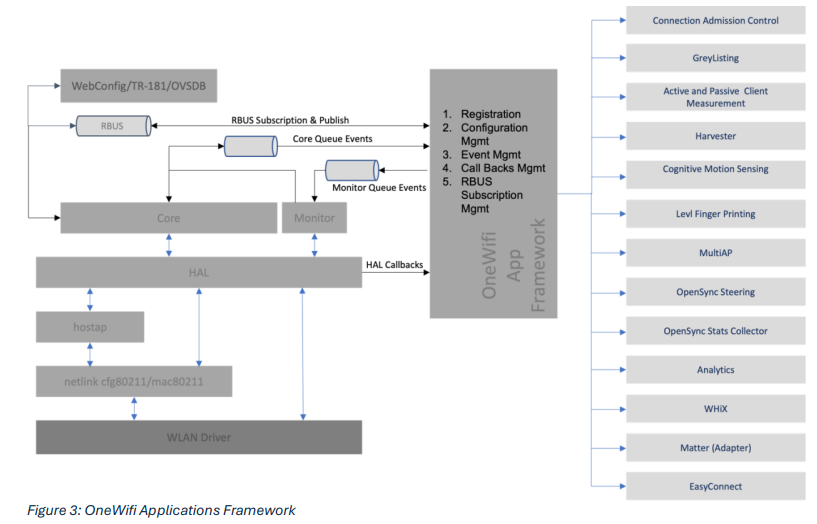
Operating Modes & Data Model
|