Target is to provide a IMP/Gateway speedtest reference implementation to RDK-B community as part of banana Pi R4

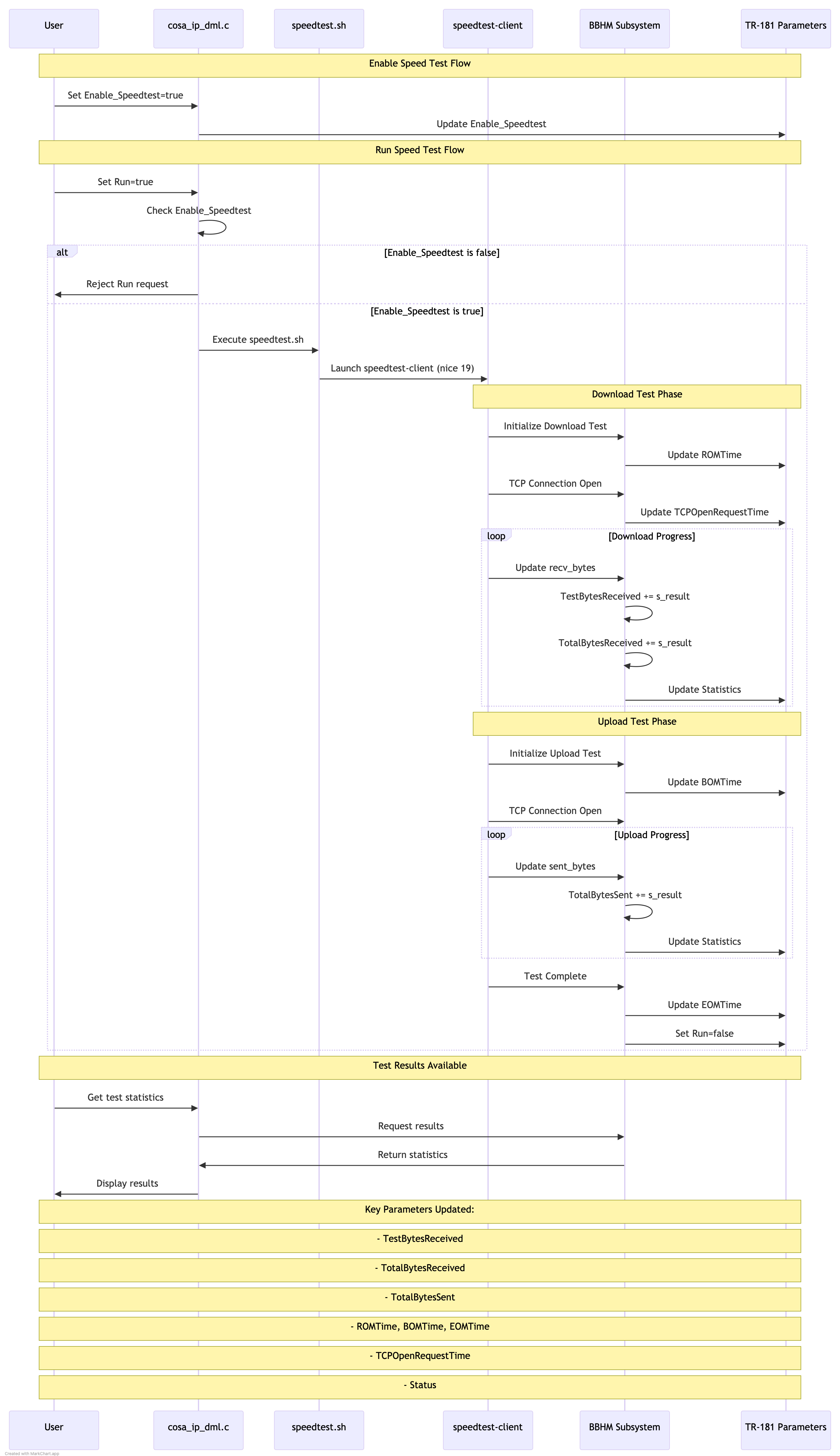
/usr/ccsp/tad/speedtest.sh # Launches with lowest priority
pStats->TestBytesReceived += s_result;
pStats->TotalBytesReceived += s_result;
pStats->TotalBytesSent += s_result;
The entire process is managed by the Test and Diagnostics framework, with:
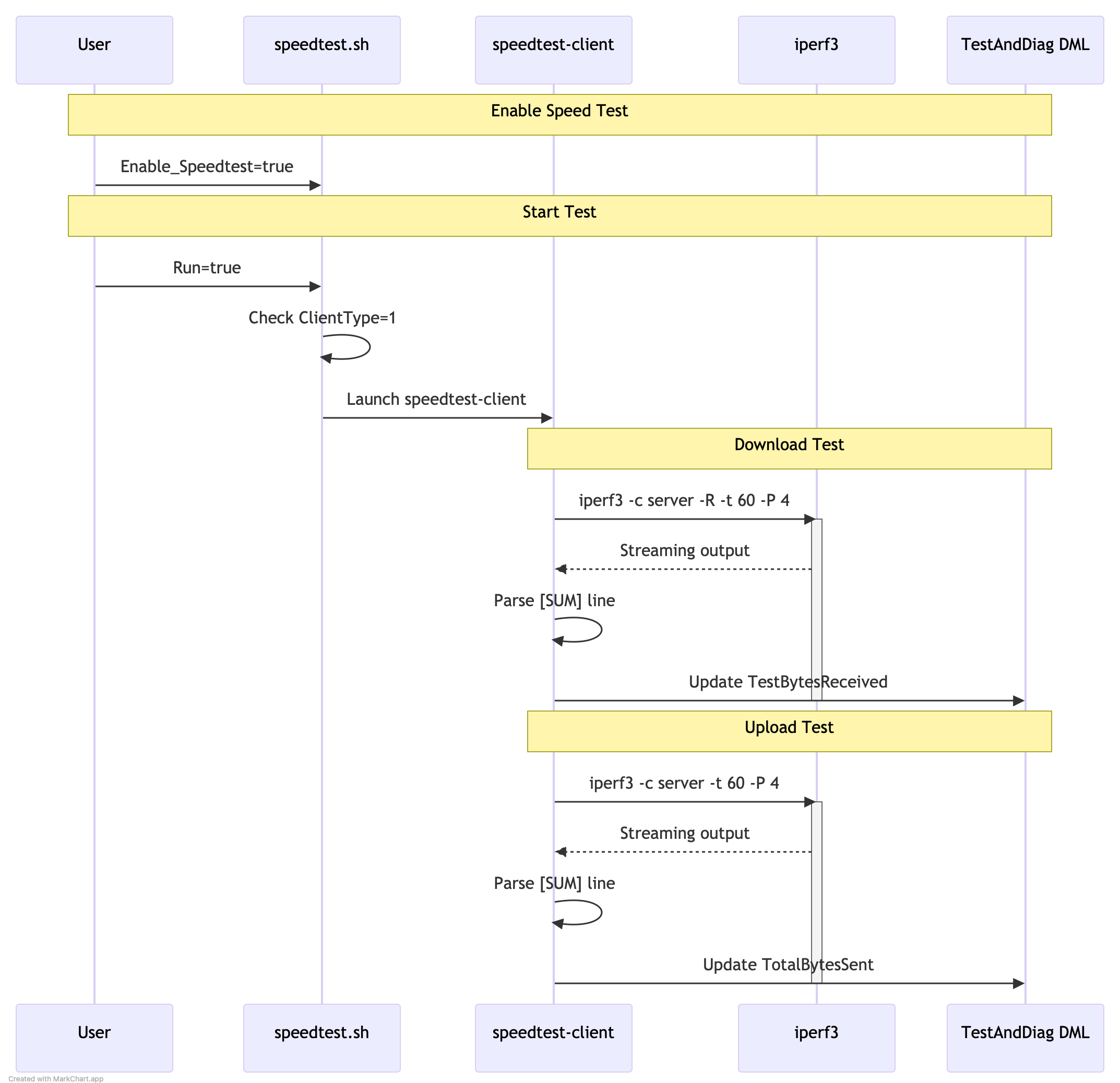
iperf3 -c 192.168.2.151 -t 60 -b 100M -P 4
root@RaspberryPi-Gateway:/# tail -n 25 /var/log/iperf3log.log [ 5] 0.00-60.00 sec 169 MBytes 23.6 Mbits/sec receiver [ 7] 0.00-60.00 sec 173 MBytes 24.2 Mbits/sec 150 sender [ 7] 0.00-60.00 sec 173 MBytes 24.2 Mbits/sec receiver [ 9] 0.00-60.00 sec 167 MBytes 23.3 Mbits/sec 152 sender [ 9] 0.00-60.00 sec 167 MBytes 23.3 Mbits/sec receiver [ 11] 0.00-60.00 sec 164 MBytes 23.0 Mbits/sec 159 sender [ 11] 0.00-60.00 sec 164 MBytes 23.0 Mbits/sec receiver [SUM] 0.00-60.00 sec 674 MBytes 94.2 Mbits/sec 621 sender [SUM] 0.00-60.00 sec 673 MBytes 94.1 Mbits/sec receiver
TEST STEPS
Pre test requirement : Ensure we have a iperf server on wan side in a ubuntu machine / windows machine.And is listening at port 5201
1. Using DMcli / webui set the Speedtest argument .In the string, give the server details is used to send the Iperf server, port number ( ex: 5201) , bandwidth (ex 200), timeout (ex 15) details .Example as below
Ex: dmcli eRT setv Device.IP.Diagnostics.X_RDKCENTRAL-COM_SpeedTest.Argument string "-t 15 -b 200 -P 6 -p 5201 67.xx.xx.xxx"
2. Enable the speed test : dmcli eRT setv Device.IP.Diagnostics.X_RDKCENTRAL-COM_SpeedTest.Enable_Speedtest bool true
3. Enable the SpeedRun DM : dmcli eRT setv Device.IP.Diagnostics.X_RDKCENTRAL-COM_SpeedTest.Run bool true
4.Once we enable the Speedtest.Run DM ,we can see the iperf test has been intiated by through ps o/p , also we can see the packets being sent from server and received by the gateway in the console
                    root@Filogic-GW:~# ps | grep speed
                    392379 root      3236 S    {speedtest.sh} /bin/sh /usr/ccsp/tad/speedtest.sh
                    392417 root      2180 SN   /usr/bin/speedtest-client xx.xx.xx.xxx
       5.Once the speedtest completes , check the TandD logs where there will be a logging for Iperf test results

                      cat TDMlog.txt.0
                       2025-03-06 10:43:48 : Iperf test results: 375000000 MBytes 200.000000 Mbits/sec sender
                       375000000 MBytes 200.000000 Mbits/sec receiver .

      6.Follow the steps to create a telemetery profile for the speedtest from the below link :

440323 root      3352 S    grep speed
FAQ's