Introduction
While considering a use case where cloud may have added support to groups/blobs which CPE doesn’t support, approach that was decided is to have a metadata header with a bitmask indicating supported features in CPE.
When CPE contacts cloud server to get the latest version of documents due a forced sync/bootup sync, then CPE may add a header X-System-Supported-Docs: to the request. This header will contain a bitmask string which indicates what feature is supported in CPE FW.
Within RDK, each feature will be supported by different components. Hence the subdocs may be arranged into groups to form a series of bit masked values separated by commas. Placeholder of each group in the header could be predefined and can be identified by the two MS nibbles. So, cloud may parse the bitstreams as per the group ID shared by RDK. Within each group’s bitmap, cloud can check the bits turned ON to identify supported feature.
Here RDK reserves two MS nibbles for identifying the group, hence it won’t change. Rest of the bits will be used to indicate a subdoc is supported or not.
To identify schema version supported by each group, a new metadata header will be added as X-System-Schema-Version with comma separated version numbers along with a bit mask subdoc id. That will ensure cloud knows the schema version of subdoc supported by CPE in each FW release. Versions in the header may not follow the same ordinal status of bitstream in the supported docs metadata. As all subdoc versions start from 1.0, RDK need not have to add this header or version of a subdoc in header until there is a change in version of a subdoc.
Both version and supported docs information is populated during build time. So, it won’t change during runtime in CPE.
Placeholders for each RDK subdoc group in the meta header
Metadata for supported features in CPE:
X-System-Supported-Docs: <Group1>,<Group2>,<Group3>,...,<GroupN> |
Points for future:
- New supported groups WILL NOT be added in between the existing list.
- If a group/component uses all 24 bits available, then we will have to use a new bitstream at the end of existing ones with a different Group Id(2 MS nibble).
- For simplicity, during initial rollouts, groups are segregated based on RDKB components but there is no hard rule to tie a subdoc to a group as subdocs are identified based on the group Id.
Version metadata:

Bitstream patterns:
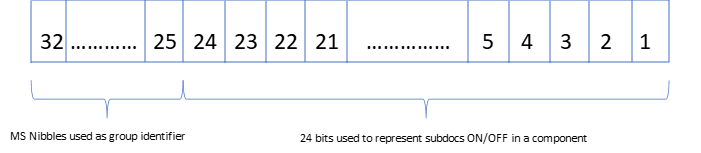
Fig 1: Bits arrangement in bitstream.
In supported subdoc metadata, bitmask will be a value considering all bits corresponding to supported subdocs turned ON in LS 6 nibbles.
In version metadata, bitmask value generated for identifying subdoc will be having only one bit turned ON in 6 LS nibbles.
As mentioned in figure above, MS two nibbles will be group identifier field.
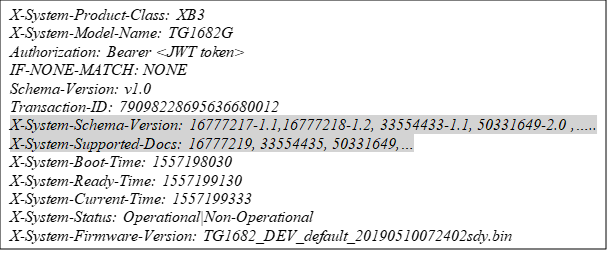
Sample Header with metadata
X-System-Supported-Docs:
Here, metadata for supported docs will be populated as per placeholder mentioned in Section 2.1.
As per the placeholders, in this sample request header
- 16777219 corresponds to Subdocs of Group-1 of RDK
- 33554435 corresponds to Subdocs of Group-2
- 50331649 corresponds to Subdocs of Group-3 and so on
Cloud will convert decimal bitmask to corresponding binary pattern for decoding.
For eg:
Bitmap conversion of 16777219: 00000001 0000 0000 0000 0000 0000 0011
Bitmap conversion of 33554435: 00000010 0000 0000 0000 0000 0000 0011
Bitmap conversion of 50331649: 00000011 0000 0000 0000 0000 0000 0001
Details of what subdoc corresponds to bit position is explained in Section 3.
If only two MS nibbles have bits turned ON, that means no feature is supported by that Group in that FW version
X-System-Schema-Version:
This header will hold comma separated strings where each string will have 2 parts.
First part, a bit mask generated from the combination of two MS nibbles and a subdoc position in the bitstream. Second part will be version supported by that subdoc.
For e.g.:
Considering 16777218-1.2 from above sample header
- 16777218 needs to be converted to binary as 00000001 0000 0000 0000 0000 0000 0010 and 1.2 is the version.
- Binary stream 00000001 0000 0000 0000 0000 0000 0010 indicates that it is the version of subdoc represented by 2nd last least significant bit of first group in the list of supported docs metadata.
16777217-1.1 from above sample header
- 16777217 needs to be converted to binary as 00000001 0000 0000 0000 0000 0000 0001 and 1.1 is the version.
- Binary stream 00000001 0000 0000 0000 0000 0000 0010 indicates that it is the version of subdoc represented by least significant bit of first group in the list of supported docs metadata.
Similarly, 33554433-1.1 can be decoded as
00000010 0000 0000 0000 0000 0000 0001– 1.1
Second component in the list and last subdoc of that component. Version is 1.1 for that subdoc.
Here, two MS nibbles can be directly translated to decimal to identify the position/group in the list represented by supported docs.

Component to feature mapping
Since cloud may not know about what RDK group hosts a particular subdoc, below table will give an idea of Group vs Feature mapping.
Table 1: Subdoc to bit position mapping
Group Identifier (MS nibble) | Subdocs of group |
00000001 | portforwarding
|
lan | |
wan | |
macbinding
| |
hotspot | |
bridge
| |
connectedbuilding | |
xmspeedboost | |
webui | |
00000010 | privatessid
|
homessid
| |
radio
| |
00000011 | moca |
00000100 | xdns
|
00000101 | advsecurity
|
00000110 | mesh
|
clienttosteeringprofile | |
meshsteeringprofiles | |
wifistatsconfig | |
mwoconfigs | |
interference | |
wifimotionsettings | |
00000111 | aker
|
00001000 | telemetry |
defaultrfc | |
rfc | |
00001001 | trafficreport
|
statusreport
| |
00001010 | radioreport
|
interfacereport
| |
00001011 | telcovoip |
telcovoice | |
00001100 | wanmanager |
wanfailover | |
00001101 | voiceservice |
00001110 | cellularconfig |
00001111 | gwfailover |
gwrestore | |
00010000 | prioritizedmacs |
00010001 | lldqoscontrol |
Feature lists for above table are taken from https://etwiki.sys.comcast.net/pages/viewpage.action?spaceKey=SMARTINT&title=WebConfig+Q3+priorities
Bit Pattern of supported features
This section will depict what feature/subdoc each bit field denotes in the bitmask:
Group-1

0000 0001 (Fixed Nibbles) | 0000 0000 0000 000 | webui | xmspeedboost | connectedbuilding | bridge
| hotspot | macbinding
| lan | wan | portforwarding
|
Group-2
0000 0010 | 0000 0000 0000 0000 0000 | 0 | radio
| homessid
| privatessid
|
Group-3
0000 0011 | 0000 | 0000 | 0000 | 0000 | 0000 | 000 | moca
|
Group-4
0000 0100 | 0000 | 0000 | 0000 | 0000 | 0000 | 000 | xdns
|
Group-5
0000 0101 | 0000 | 0000 | 0000 | 0000 | 0000 | 000 | advsecurity
|
Group-6
0000 0110 | 0000 0000 0000 0000 | 0 | wifimotionsettings | interference | mwoconfigs | wifistatsconfig | meshsteeringprofiles | clienttosteeringprofile | mesh
|
Group-7
0000 0111 | 0000 | 0000 | 0000 | 0000 | 0000 | 000 | aker
|
Group-8
0000 1000 | 0000 | 0000 | 0000 | 0000 | 0000 | 0 | rfc | defaultrfc | telemetry |
Group-9
0000 1001 | 0000 | 0000 | 0000 | 0000 | 0000 | 00 | statusreport
| trafficreport
|
Group-10
0000 1010 | 0000 | 0000 | 0000 | 0000 | 0000 | 00 | interfacereport
| radioreport
|
Group-11
0000 1011 | 0000 | 0000 | 0000 | 0000 | 0000 | 00 | telcovoice
| telcovoip |
Group-12
0000 1100 | 0000 | 0000 | 0000 | 0000 | 0000 | 00 | wanfailover | wanmanager
|
Group-13
0000 1101 | 0000 | 0000 | 0000 | 0000 | 0000 | 000 | voiceservice
|
Group-14
0000 1110 | 0000 | 0000 | 0000 | 0000 | 0000 | 000 | cellularconfig
|
Group-15
0000 1111 | 0000 | 0000 | 0000 | 0000 | 0000 | 00 | gwrestore | gwfailover |
Group-16
0001 0000 | 0000 | 0000 | 0000 | 0000 | 0000 | 000 | prioritizedmacs |
Group-17
0001 0001 | 0000 | 0000 | 0000 | 0000 | 0000 | 000 | lldqoscontrol |
Versioning in RDKB Components
This section is for RDKB component owners.
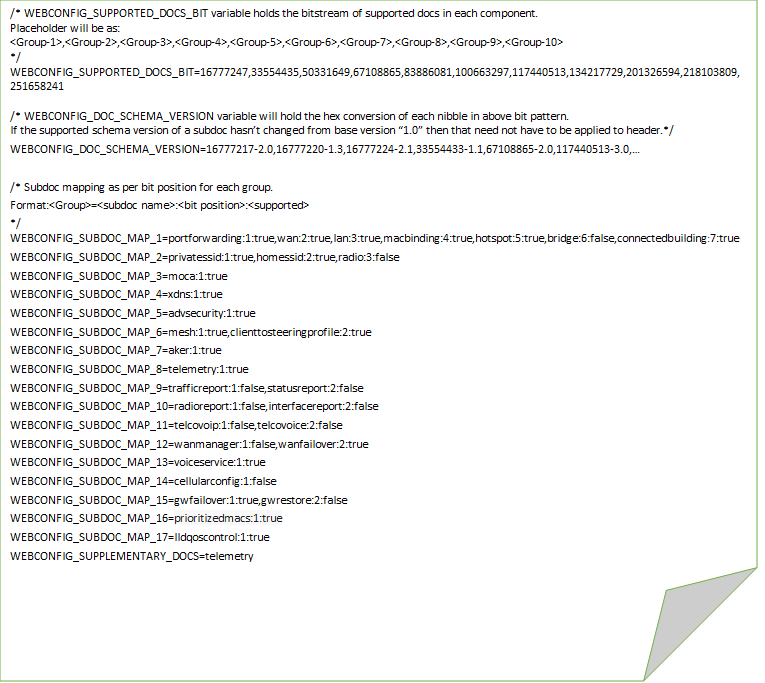
In RDKB, a common JSON file (webconfig_metadata.json) will be shared among components during build time. File webconfig_metadata.json will provide information of subdocs supported per platform. When a new feature is coming in for a platform, then that feature details has to be added under that specific platform during a code check-in of feature. Build scripts will convert the json to webconfig.properties and install into root file system.
webconfig_metadata.json will provide following details:
- Platform for which a subdoc is added
- Group Id
- Name of the subdoc
- Bit position in the 32-bit long bitstream for a group
- Whether support is enabled or not
- Version of schema
Sample json file: metadata.json.odt
Placeholder for each group is predefined, but component owner can decide bit position for a new subdoc added in that group. Bit position for all the defined features are identified and shown in Section 3.
As an example, how bitstream mapping will be considered to generate webconfig.properties is as shown below
Group-1 | Group-2 | Group-3 | Group-4 | Group-5 | Group-6 | Group-7 | Group-8 |
0000 0001 0000 0000 0000 0000 0000 0011 | 0010 0000 0000 0000 0000 0000 0000 0011 | 0011 0000 0000 0000 0000 0000 0000 0001 | 0100 0000 0000 0000 0000 0000 0000 0000 | 0101 0000 0000 0000 0000 0000 0000 0000 | 0110 0000 0000 0000 0000 0000 0000 0000 | 0111 0000 0000 0000 0000 0000 0000 0000 | 1000 0000 0000 0000 0000 0000 0000 0000 |
0000 0001 (Fixed Nibbles) | 0000 0000 0000 0000 | 00 | bridge
| hotspot | macbinding
| lan | wan | portforwarding
|
Group-1 bitstream as mentioned in Section 3
Sample webconfig.properties file with contents: