What is RFC?
RFC stands for RDK Feature Control.
It provides a mechanism to remotely enable, disable, or configure software features on RDK-based devices (CPEs).
RFC is primarily used by Release Management for controlled, staged rollouts of new features across production devices — ensuring stability and gradual deployment.
Source code
rdkcentral/rfc at main
How does RDK receive the RFC configuration?
The RFC configuration process involves multiple RDK components working together to fetch, process, and apply configuration updates.
The flow is summarized below:
1. Maintenance Manager
Periodically evaluates when to start the RFC task.
When conditions are met, it launches the RFC Manager to begin the configuration process.
2. RFC Manager → XConf
RFC Manager sends an HTTP request to the configured XConf URL, including key device identifiers:
STB MAC Address
Account ID
Partner ID
Firmware Version
XConf uses these identifiers to locate the appropriate configuration and returns it as a JSON payload.
3. Configuring the xconf server url
- At startup (especially on first run or after device recovery), the code uses Device.DeviceInfo.X_RDKCENTRAL-COM_RFC.Bootstrap.XconfUrl to get the xconf url.
- Bootstrap.XconfUrl is configured in tr69hostif/partners_defaults.json at main · rdkcentral/tr69hostif for specific partnerID.
- If no partnerID is set, the value from "default_boot" is used.
- If partnerID is set, but not available in the partners_default.json, then "default" block is used.
- If partnerID is set, and the corresponding partnerID is available in partners_default.json, then that partnerID block is used.
- For community devices, partnerID is set as "community" from sysint-hal repository. Example for RPI:
- For Comcast devices, this is set from AuthService.
- If
"Device.DeviceInfo.X_RDKCENTRAL-COM_RFC.Bootstrap.XconfUrl" is unavailable or empty, the code falls back to reading the RFC xconf URL from the properties file—by default, rfc.properties. - The parameter read is "RFC_CONFIG_SERVER_URL="
- Hence for testing purposes, update the rfc.properties file with the server url.
4. RFC Manager Processing
5. tr181 Set and RFC API
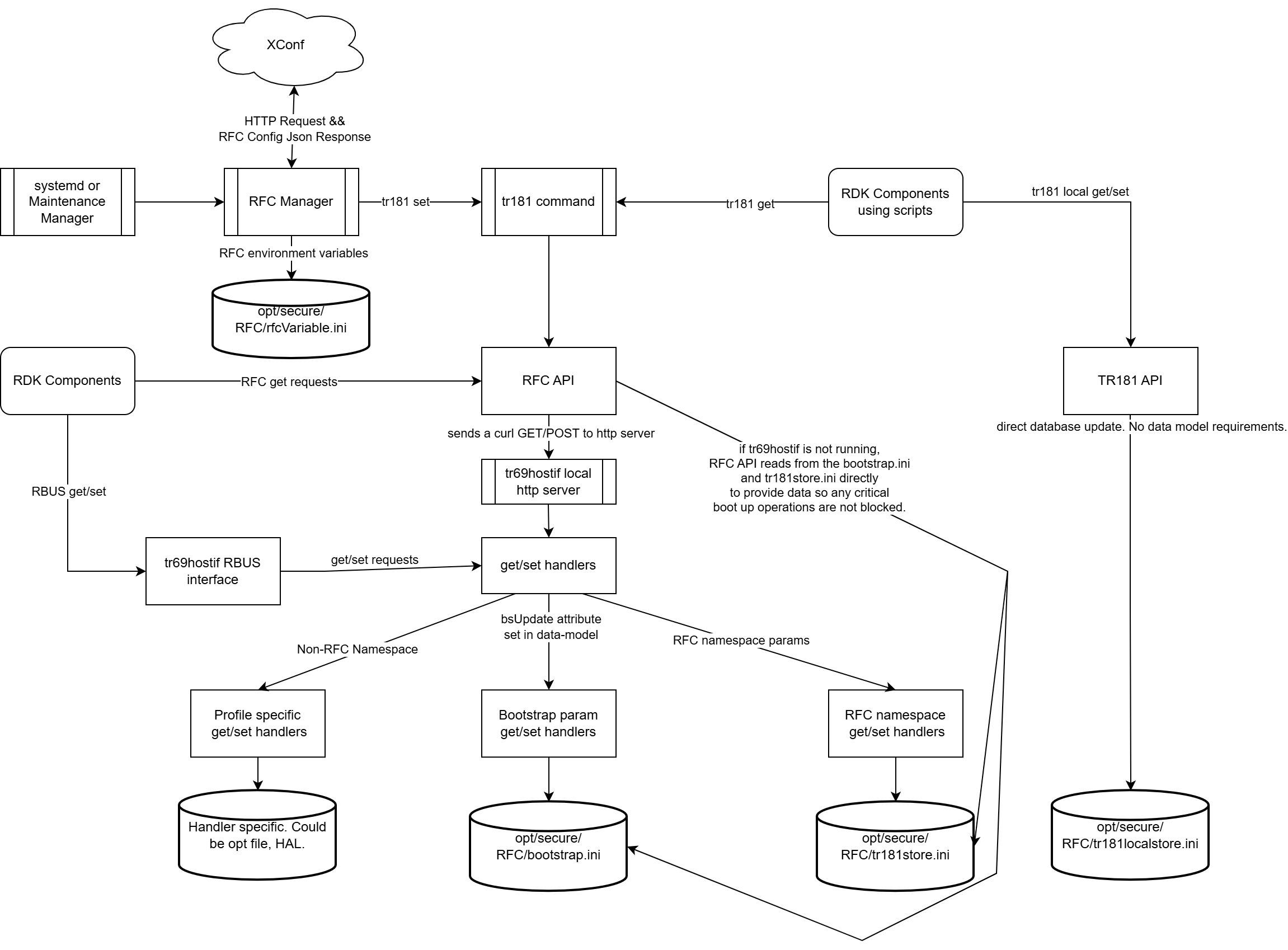
The tr181 set commands internally call the RFC API to perform parameter get/set operations.
The RFC API communicates with the local HTTP server running within tr69hostif using HTTP GET or POSTrequests.
tr69hostif uses the below files for storing the configuration:
/opt/secure/RFC/rfcVariable.ini | RFC environment variables | Contains environment-level variables derived from RFC config |
/opt/secure/RFC/tr181store.ini | RFC namespace TR-181 parameters | Contains TR-181 parameters managed within the RFC namespace |
/opt/secure/RFC/bootstrap.ini | Bootstrap TR-181 parameters | Contains TR-181 parameters with the bsUpdate attribute |
| Profile-specific storage | Non-RFC TR-181 parameters | Managed by respective profile handlers with their own storage mechanism |
6. tr69hostif Request Routing
7. mTLS support
- RDKE expects xconf connections to be secure. This expects RFC to use MTLS by default.
- Support to add MTLS to RDKM xconf server is under investigation.
- Until then, we are disabling MTLS support by not enabling rdkcertselector
- mTLS is enabled in the RFC code when the macro
LIBRDKCERTSELECTOR is defined.
Architecture Diagram:
- Example curl command sent from an RDK device to XConf:
- Example response json received from XConf. This is stored in /tmp/rfc-parsed.txt as part of the curl request's response.
{
"featureControl": {
"features": [
{
"name": "TC-NTP",
"enable": true,
"effectiveImmediate": true,
"configData": {
"tr181.Device.Time.NTPServer1": "time.google.com",
"tr181.Device.Time.NTPServer2": "time1.google.com",
"tr181.Device.Time.NTPServer3": "time2.google.com",
"tr181.Device.Time.NTPServer4": "time3.google.com", "tr181.Device.Time.NTPServer5": "time4.google.com"
},
"featureInstance": "TC-NTP"
}
]
}
} |
- The tr181store.ini contains all the RFC namespace configuration that is configured at XConf. It also contains all the local RFC settings that are done using the "tr181 -s" command. bootstrap.ini contains all the bootstrap namespace configurations from XConf.
root@raspberrypi4-64-rdke:~# cat /opt/secure/RFC/tr181.list
TR181: Device.DeviceInfo.X_RDKCENTRAL-COM_RFC.Feature.TR069support.Enable false
TR181: Device.Time.NTPServer1 time.google.com
TR181: Device.Time.NTPServer2 time1.google.com
TR181: Device.Time.NTPServer3 time2.google.com
TR181: Device.Time.NTPServer4 time3.google.com
TR181: Device.Time.NTPServer5 time4.google.com
root@raspberrypi4-64-rdke:~#
root@raspberrypi4-64-rdke:~#
root@raspberrypi4-64-rdke:~# cat /opt/secure/RFC/rfcFeature.list
TC-NTP=true,
root@raspberrypi4-64-rdke:~#
root@raspberrypi4-64-rdke:~# cat /opt/secure/RFC/rfcVariable.ini
export RFC_ENABLE_TC-NTP=true
export RFC_TC-NTP_effectiveImmediate=true
root@raspberrypi4-64-rdke:~#
root@raspberrypi4-64-rdke:~# cat /opt/secure/RFC/tr181store.ini
Device.DeviceInfo.X_RDKCENTRAL-COM_RFC.Control.XconfUrl=https://xconf.rdkcentral.com/featureControl/getSettings
Device.DeviceInfo.X_RDKCENTRAL-COM_RFC.Control.ConfigSetHash=18HWRXtCXc9e7oSb8M3AQ6sdA587hfs1V5
Device.DeviceInfo.X_RDKCENTRAL-COM_RFC.Control.XconfSelector=prod
Device.DeviceInfo.X_RDKCENTRAL-COM_RFC.Feature.TR069support.Enable=false
Device.DeviceInfo.X_RDKCENTRAL-COM_RFC.Feature.AccountInfo.AccountID=1234
Device.DeviceInfo.X_RDKCENTRAL-COM_RFC.Control.ConfigSetTime=1764012977
Device.DeviceInfo.X_RDKCENTRAL-COM_RFC.Control.ConfigChangeTime=1764012977
root@raspberrypi4-64-rdke:~#
root@raspberrypi4-64-rdke:~#
root@raspberrypi4-64-rdke:~# cat /opt/secure/RFC/bootstrap.ini | grep NTP
Device.Time.NTPServer2=time1.google.com
Device.Time.NTPServer1=time.google.com
Device.Time.NTPServer5=time4.google.com
Device.Time.NTPServer4=time3.google.com
Device.Time.NTPServer3=time2.google.com
root@raspberrypi4-64-rdke:~#
root@raspberrypi4-64-rdke:~#
|
- To force retrieving a new RFC configuration from XConf even when there is no change, invalidate the hash value with the below command.
tr181 -s -v invalidate Device.DeviceInfo.X_RDKCENTRAL-COM_RFC.Control.ConfigSetHash
|
Child pages