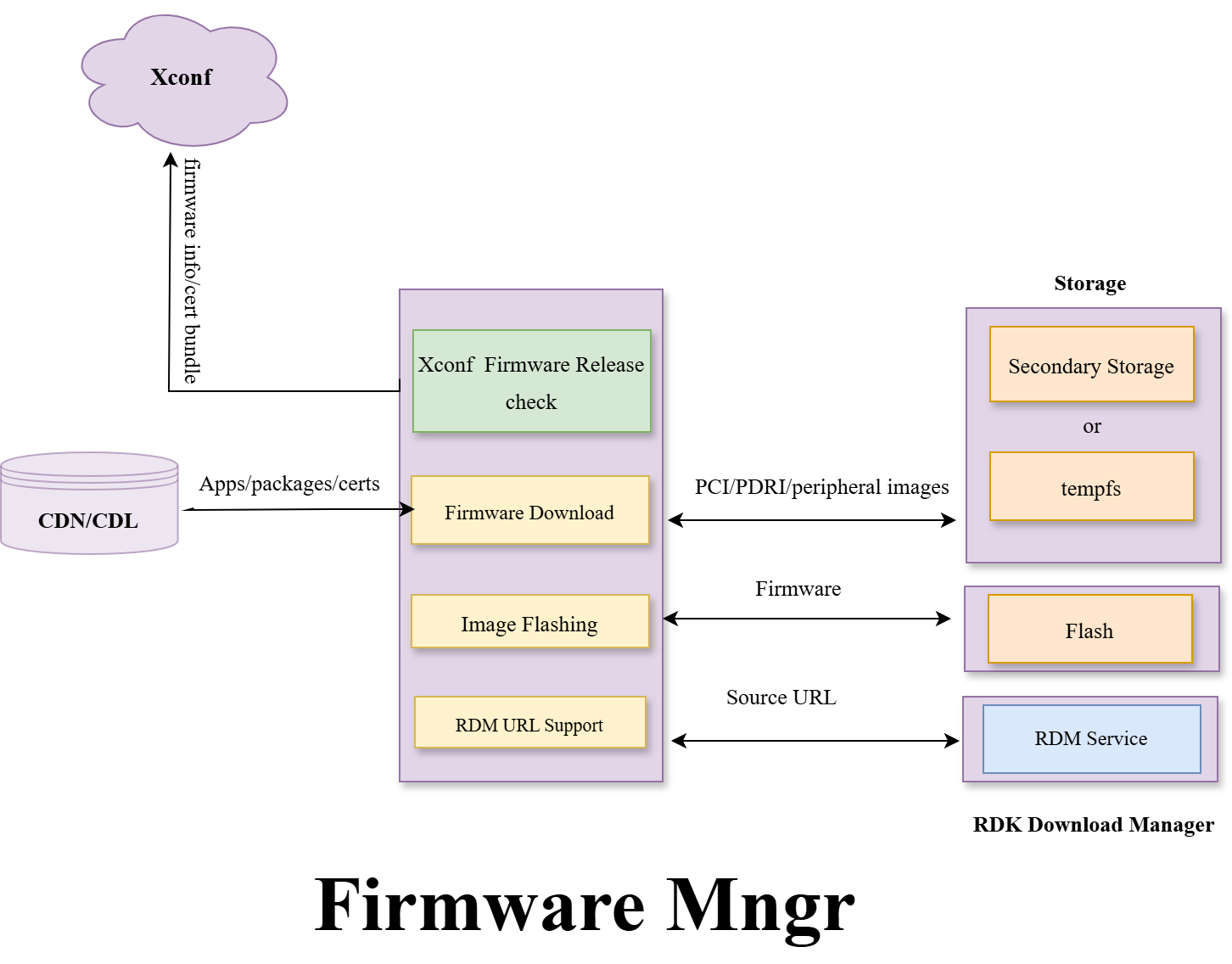
The RDK firmware upgrader, the RDK agent at the CPE device side with the goal to provide an efficient and safe way to upgrade Firmware on the Field boxes. The module has the capability to
The module supports the upgrade of multiple Firmware types to RDK unit (RDK Video and stream boxes.)
The module also does the latest firmware image verification of installed firmware on every boot cycle and during maintenance window time.
This framework is design and developed to download latest firmware from the SSR server by communication with XCONF server. When device boot up it communicate with XCONF server and get the firmware details as a response and then check either running/active firmware compare with XCONF response firmware. If the firmware is different then it proceeds for downloading new firmware and flashing to the device bank. The framework also supports to download and flash PDRI and peripheral firmware. If the firmware is same, then download won't start and firmware upgrader application exit. Same procedure is applicable during maintenance window time.
Here the firmware images are signed and deployed to SSR server during the build time and box will download the firmware from SSR server based on the XCONF response information available.
This service provides the download location (URL) required for RDK download Manager for dynamic Apps/packages/certs/tools installation. This module is responsible to trigger RDM Application. The module will do the security evaluation of the downloaded packages and verify the signature to ensure the installation of packages.
The App or binary name as part of rootfs is "rdkvfwupgrader". This module having below components
rdkv_main: This is the main process name for the module which will use all the below sub-components to collect the required data for xconf communication, download the image types from the SSR end points and flashing to the memory.
This component is responsible to get all device information like build info, partner id, mac address etc.
Below are the Function use to get device information.
BuildRemoteInfo: Formats the "periperalFirmwares" string for remote info part of xconf communication
getJsonRpc : This is the API use to get JSONRPC data. The first argument is http post data and second argument holds the downloaded data. As part of post data need to send curl header which contains content type and authorization token.
getInstalledBundleFileList: gets the list of bundles installed on a device
GetServURL - gets the correct XCONF URL based on device configuration.
GetTimezone: This function is use to get the timezone of the device.
GetAdditionalFwVerInfo: This function is use to get the PDRI image details from the device.
GetInstalledBundles: This function is use to extract the bundle installed in the device.
GetUTCTime: gets a formatted UTC device time.
GetCapabilities - gets the device capabilities.
GetPartnerId - gets the partner ID of the device.
GetTargetProposition - gets the TargetProposition of the device.
GetSerialNum - gets the serial number of the device.
GetExperience - gets the experience of the device.
GetAccountID - gets the account ID of the device.
GetModelNum - gets the model number of the device.
GetBuildType - gets the build type of the device in lowercase.
GetFirmwareVersion - gets the firmware version of the device.
GetEstbMac - gets the eSTB MAC address of the device.
GetRemoteInfo - gets the remote info of the device.
This component is responsible to flash the image to the flash memory after download completed. The download framework download the configured images into secondary/memory location and then using the manufacture API utilities to flash and update the boot loader parameters
This component provides an API interface to use IARM-related calls. The application uses init_event_handler() function to initialize and register IARM Event. IARM Event is used to receive the event from other modules. Here maintenance manager sends an event when the device mode changes. There are 2 modes foreground and background. If the mode is foreground the firmware download happens at limited speed which is called throttle mode and if the mode is background then the download happens at full speed which is un-throttle mode.
eventManager: This is used to send IARM broadcast events to other modules. This application sends firmware download status to maintenance manager and system manager.
All the firmware download state macro is defined as part of iarmInterface.h file
Broadcast Event For Maintenance Manager:
| EVENT NAME | VALUE |
|---|---|
| MAINT_FWDOWNLOAD_COMPLETE | 8 |
| MAINT_FWDOWNLOAD_ERROR | 9 |
| MAINT_FWDOWNLOAD_ABORTED | 10 |
| MAINT_CRITICAL_UPDATE | 11 |
| MAINT_REBOOT_REQUIRED | 12 |
| MAINT_FWDOWNLOAD_INPROGRESS | 15 |
| MAINT_FWDOWNLOAD_FG | 17 |
| MAINT_FWDOWNLOAD_BG | 18 |
Broadcast Event For System Service
| EVENT NAME | VALUE |
|---|---|
| FW_STATE_UNINITIALIZED | 0 |
| FW_STATE_REQUESTING | 1 |
| FW_STATE_DOWNLOADING | 2 |
| FW_STATE_FAILED | 3 |
| FW_STATE_DOWNLOAD_COMPLETE | 4 |
| FW_STATE_VALIDATION_COMPLETE | 5 |
| FW_STATE_PREPARING_TO_REBOOT | 6 |
| FW_STATE_ONHOLD_FOR_OPTOUT | 7 |
| FW_STATE_CRITICAL_REBOOT | 8 |
| FW_STATE_NO_UPGRADE_REQUIRED | 9 |
| IMAGE_FWDNLD_UNINITIALIZED | 0 |
| IMAGE_FWDNLD_DOWNLOAD_INPROGRESS | 1 |
| IMAGE_FWDNLD_DOWNLOAD_COMPLETE | 2 |
| IMAGE_FWDNLD_DOWNLOAD_FAILED | 3 |
| IMAGE_FWDNLD_FLASH_INPROGRESS | 4 |
| IMAGE_FWDNLD_FLASH_COMPLETE | 5 |
| IMAGE_FWDNLD_FLASH_FAILED | 6 |
This component is responsible for processing the xconf response and parse the json file. Then create a data structure to use further.
The firmware upgrader queries Xconf to check whether any upgrade is available for this device. The API is used to communicate with the Xconf and below are its typical parameters. The device details are fetched using the APIs as part of the deviceutils component.
Function Name | Parameter | Description |
|---|---|---|
MakeXconfComms | pResponse | Pointer to structure to receive output data Xconf Http status |
createJsonString | Char * pPostFieldOut, Size_t szPostFieldOut | The json string is looks like |
upgradeRequest | int upgrade_type, int server_type, const char* artifactLocationUrl, const void* dwlloc, char *pPostFields, int *pHttp_code | Use For requesting upgrade pci, pdri and xconf. Param-1: Upgrade type pci, pdri, xconf Param-2: Type of server. HTTP_XCONF_DIRECT, HTTP_XCONF_CODEBIG, HTTP_SSR_DIRECT, HTTP_SSR_CODEBIG Param-3: Download server url Param-4: To store download data Param-5: http code |
getXconfRespData | XCONFRES *pResponse, char *pJsonStr | The response looks like below {"firmwareDownloadProtocol":"http","firmwareFilename":"lib32-application-test-image-RPI4-raspberrypi4-64-rdke-feature-RDKECOREMW-863-OTA.wic.tar.gz","firmwareLocation":"https://tools.rdkcentral.com:8443/images/","firmwareVersion":"lib32-application-test-image-RPI4-raspberrypi4-64-rdke-feature-RDKECOREMW-863-OTA.wic.tar.gz","mandatoryUpdate":false,"rebootImmediately":false} |
The response from Xconf is processed as part of the jsonparser Component. This is a typical response from the Xconf.
{
"firmwareDownloadProtocol":"http",
"firmwareFilename":"lib32-application-test-image-RPI4-raspberrypi4-64-rdke-feature-RDKECOREMW-863-OTA.wic.tar.gz",
"firmwareLocation":"https://tools.rdkcentral.com:8443/images/",
"firmwareVersion":"lib32-application-test-image-RPI4-raspberrypi4-64-rdke-feature-RDKECOREMW-863-OTA.wic.tar.gz",
"mandatoryUpdate":false,
"rebootImmediately":false
} |
The key parameters of this json response are populated as part of this datastructure.
typedef struct xconf_response {
	char cloudFWFile[64];
	char cloudFWLocation[CLD_URL_MAX_LEN];
	char ipv6cloudFWLocation[CLD_URL_MAX_LEN];
	char cloudFWVersion[64];
	char cloudDelayDownload[8];
	char cloudProto[6];
	char cloudImmediateRebootFlag[12];
	char peripheralFirmwares[256];
 	char dlCertBundle[64];
	char cloudPDRIVersion[64];
	char rdmCatalogueVersion[512];
} XCONFRES; |
This component provided rfc api to use for getting rfc value and setting rfc value.
This component is responsible for reading the rfc value and writing the rfc value. Below are the rfc used in this module.
| RFC name | Description | Default Value |
|---|---|---|
| Device.DeviceInfo.X_RDKCENTRAL-COM_RFC.Feature.SWDLSpLimit.Enable | Use for throttle feature | FALSE |
Device.DeviceInfo.X_RDKCENTRAL-COM_RFC.Feature.SWDLSpLimit.TopSpeed | Use for set throttle speed | 1MB => 1 *1024 * 1024 |
Device.DeviceInfo.X_RDKCENTRAL-COM_RFC.Feature.IncrementalCDL.Enable | Use For Incremental Download | TRUE |
Device.DeviceInfo.X_RDKCENTRAL-COM_RFC.Feature.SWDLDirect.Enable | Use For Direct CDN Download | FALSE |
This a share library and provide all the download api using curl interface.
This is a share library and provide all the json parser api using cjson.
This is a share library and provide all the device specific information by reading device configure file or using some api.
RDK Firmware Upgrader Capability
Low Level Design Flow From Start To End
eStbMac=D8:3A:DD:0A:43:71&firmwareVersion=lib32-middleware-test-image-RPI4-20251118074027&env=dev&model=RPI4&manufacturer=RaspberryPi&partnerId=community&activationInProgress=false&osClass=Not Available&accountId=1234&serial=10000000e33bf0d4&localtime=Wed Nov 26 13:44:09 UTC 2025&dlCertBundle=&rdmCatalogueVersion=&timezone=Asia/Calcutta&capabilities=rebootDecoupled&capabilities=RCDL&capabilities=supportsFullHttpUrl |
|---|
{
"firmwareDownloadProtocol":"http",
"firmwareFilename":"lib32-application-test-image-RPI4-raspberrypi4-64-rdke-feature-RDKECOREMW-863-OTA.wic.tar.gz",
"firmwareLocation":"https://tools.rdkcentral.com:8443/images/",
"firmwareVersion":"lib32-application-test-image-RPI4-raspberrypi4-64-rdke-feature-RDKECOREMW-863-OTA.wic.tar.gz",
"mandatoryUpdate":false,
"rebootImmediately":false
} |
|---|
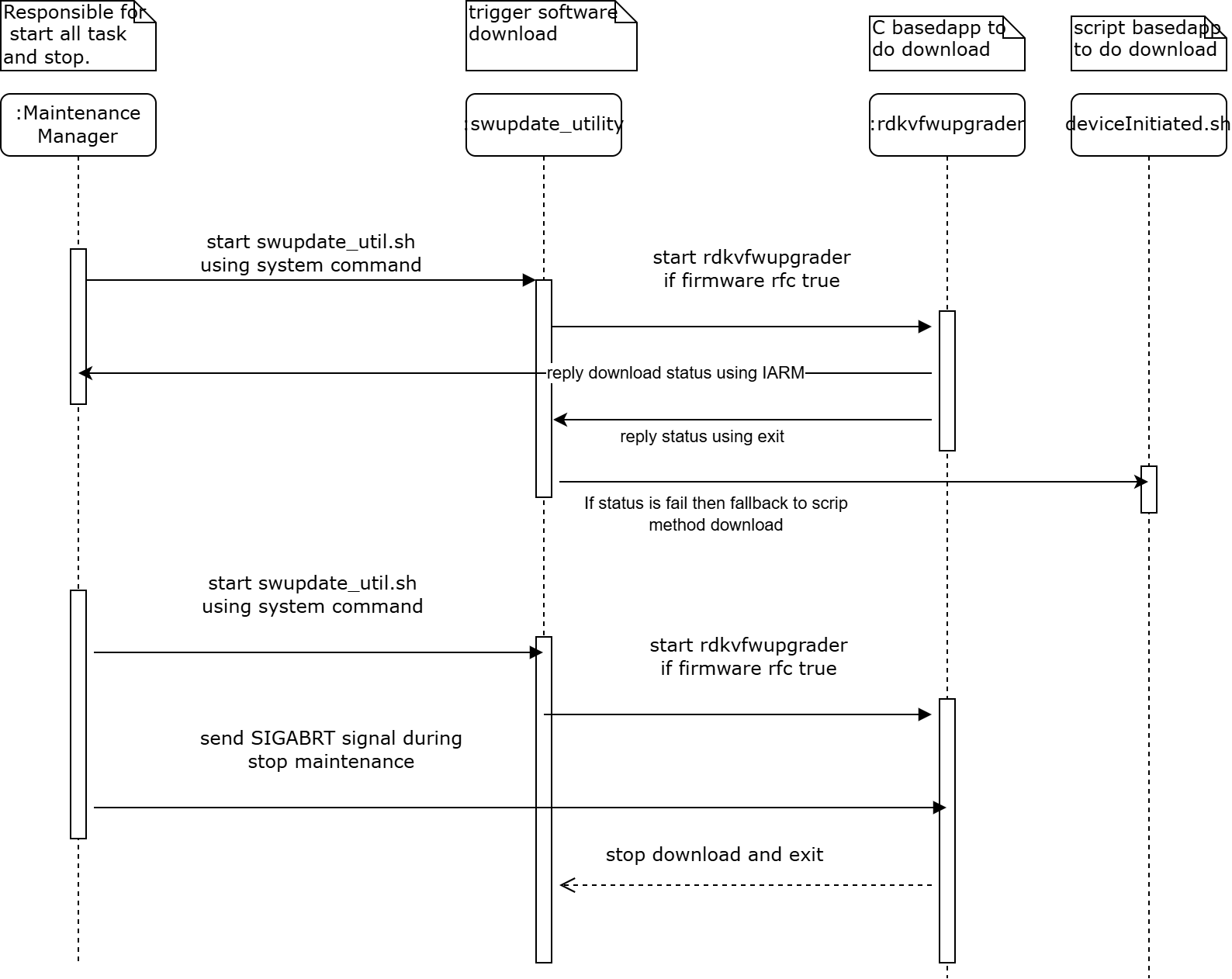
Below Sequence diagram is for device where maintenance manager is running
@startuml title Reference legend |<back:Green> | Libraries | |<back:Yellow> | Cloud Endpoints | |<back:Grey> | Daemon | end legend @enduml |
@startuml
participant mm
participant rdkvfwupdater
participant iarm
participant rfc
participant utilslib #Green
participant downloadlib #Green
participant xconfserver #Yellow
participant parsinglib #Green
participant ssrserver #Yellow
participant flashapp

mm -> rdkvfwupdater : trigger
rdkvfwupdater -> rdkvfwupdater : initial validation
alt validation success
    rdkvfwupdater -> utilslib : get device details
    utilslib --> rdkvfwupdater : device details
    rdkvfwupdater -> rfc : get rfc data
    rfc --> rdkvfwupdater : rfc data
    rdkvfwupdater -> downloadlib : connect to xconf server
    downloadlib -> xconfserver : request
    alt xconf response success
        xconfserver --> downloadlib : success response
        downloadlib --> rdkvfwupdater : success response
        rdkvfwupdater -> parsinglib : parse json data
        alt parsing success
            parsinglib --> rdkvfwupdater : success response
            rdkvfwupdater -> rdkvfwupdater : process json data
            alt new image different
                rdkvfwupdater -> downloadlib : download image
                downloadlib -> ssrserver : request
                ssrserver --> downloadlib : server status
                alt server status 0
                    downloadlib --> rdkvfwupdater : success response
                    rdkvfwupdater -> flashapp : flash image
                    flashapp --> rdkvfwupdater : flash status
                    rdkvfwupdater -> iarm : success status
                    iarm --> mm : success status
                else server status 18 or 28
                    downloadlib --> rdkvfwupdater : chunkdownload
                    rdkvfwupdater -> flashapp : flash image
                    flashapp --> rdkvfwupdater : flash status
                    rdkvfwupdater -> iarm : success status
                    iarm --> mm : success status
                else server status 58
                    rdkvfwupdater -> rdkvfwupdater : recovery download
                else other server status
                    downloadlib --> rdkvfwupdater : retry download
                    rdkvfwupdater -> iarm : fail status
                    iarm --> mm : fail status
                end
            else same image
                rdkvfwupdater -> iarm : success status
                iarm --> mm : success status
            end
        else parsing fail
            rdkvfwupdater -> iarm : fail status
            iarm --> mm : fail status
        end
    else xconf response fail
        xconfserver --> downloadlib : fail response
        downloadlib --> rdkvfwupdater : fail response
        rdkvfwupdater -> iarm : fail status
        iarm --> mm : fail status
    end
else validation fail
    rdkvfwupdater -> iarm : error status
    iarm --> mm : error status
end
@enduml |
@startuml
participant mm
participant rdkvfwupdater
participant iarmlib #Green
participant rfclib #Green
participant jsonlib #Green
participant upgradelib #Green
participant utilslib #Green
participant downloadlib #Green
participant xconfserver #Yellow
participant parsinglib #Green
participant ssrserver #Yellow
participant flashapp

mm -> rdkvfwupdater : trigger
rdkvfwupdater -> rdkvfwupdater : initial validation
alt validation success
    rdkvfwupdater -> utilslib : get device details
    utilslib --> rdkvfwupdater : device details
    rdkvfwupdater -> rfclib : get rfc data
    rfclib --> rdkvfwupdater : rfc data
    rdkvfwupdater -> jsonlib : create json request
    jsonlib -> parsinglib : generic JSON parse/construct
    parsinglib --> jsonlib : result
    jsonlib --> rdkvfwupdater : json payload
    rdkvfwupdater -> upgradelib : request xconf connection
    upgradelib -> downloadlib : connect to xconf server
    downloadlib -> xconfserver : request
    alt xconf response success
        xconfserver --> downloadlib : success response
        downloadlib --> upgradelib : success response
        upgradelib --> rdkvfwupdater : success response
        rdkvfwupdater -> jsonlib : parse json data
        jsonlib -> parsinglib : generic JSON parse/construct
        parsinglib --> jsonlib : result
        alt parsing success
            jsonlib --> rdkvfwupdater : success response
            rdkvfwupdater -> rdkvfwupdater : process json data
            alt new image different
                rdkvfwupdater -> upgradelib : download image
                upgradelib -> downloadlib : download image
                downloadlib -> ssrserver : request
                ssrserver --> downloadlib : server status
                alt server status 0
                    downloadlib --> upgradelib : success response
                    upgradelib --> rdkvfwupdater : success response
                    rdkvfwupdater -> flashapp : flash image
                    flashapp --> rdkvfwupdater : flash status
                    rdkvfwupdater -> iarmlib : success status
                    iarmlib --> mm : success status
                else server status 18 or 28
                    downloadlib --> upgradelib : chunkdownload
                    upgradelib --> rdkvfwupdater : chunkdownload
                    rdkvfwupdater -> flashapp : flash image
                    flashapp --> rdkvfwupdater : flash status
                    rdkvfwupdater -> iarmlib : success status
                    iarmlib --> mm : success status
                else server status 58
                    rdkvfwupdater -> rdkvfwupdater : recovery download
                else other server status
                    downloadlib --> upgradelib : retry download
                    upgradelib --> rdkvfwupdater : retry download
                    rdkvfwupdater -> iarmlib : fail status
                    iarmlib --> mm : fail status
                end
            else same image
                rdkvfwupdater -> iarmlib : success status
                iarmlib --> mm : success status
            end
        else parsing fail
            rdkvfwupdater -> iarmlib : fail status
            iarmlib --> mm : fail status
        end
    else xconf response fail
        xconfserver --> downloadlib : fail response
        downloadlib --> upgradelib : fail response
        upgradelib --> rdkvfwupdater : fail response
        rdkvfwupdater -> iarmlib : fail status
        iarmlib --> mm : fail status
    end
else validation fail
    rdkvfwupdater -> iarmlib : error status
    iarmlib --> mm : error status
end
@enduml |