Smart Reviewer is a feature designed to streamline the creation of effective, scriptless test cases. It helps in reviewing each and every test step of the test case just like how code review is done.
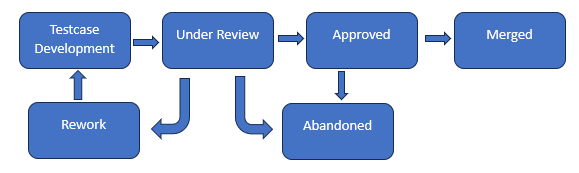
Under Review
Rework
Approved
Merged
Abandoned
Access

2. Click on 'Add configuration' shown on the top right corner of the System Configuration page and add the following configurations and click on save changes button.
| Parameter Name | Description |
|---|---|
| REVIEW_MANAGEMENT_SERVICE_URL | Review Management Service Base URL |
| REVIEW_MANAGEMENT_SERVICE_DNS_URL | Provide the DNS (Domain Name System) base URL of the Review Management Service application. |
| SCRIPTLESS_SERVICE_BASE_URL | Provide the Base URL of Scriptless Service (Rack Data Service). |
| Admin.func.testcase.reviewers |
|
| jira.url | Enter the base url of the Jira account |
| jira.username | Enter the username of the Jira service account |
| jira.password | Enter the password of the Jira service account |
Please refer Smart Review Management Service Setup to setup review management service using manual steps