MAC Filtering (Access Control List – ACL) is a security feature used to control device access to the WiFi network based on the device’s unique MAC (Media Access Control) address.
Each device connecting to the network has a unique MAC address. Using ACL, the system can:
In BPI platforms, MAC filtering is supported per radio band:
This allows independent access control policies for each band.
# For 2G dmcli eRT getv Device.WiFi.AccessPoint.1.X_CISCO_COM_MACFilter.Enable dmcli eRT getv Device.WiFi.AccessPoint.1.X_CISCO_COM_MacFilterTable. dmcli eRT getv Device.WiFi.AccessPoint.1.X_CISCO_COM_MACFilter.FilterAsBlackList dmcli eRT getv Device.WiFi.AccessPoint.1.X_COMCAST-COM_MAC_FilteringMode # For Adding MacFIlterTable dmcli eRT addtable Device.WiFi.AccessPoint.1.X_CISCO_COM_MacFilterTable. # For Deleting MacFIlterTable dmcli eRT deltable Device.WiFi.AccessPoint.1.X_CISCO_COM_MacFilterTable.*. [Here * refers the table number] # For 5G dmcli eRT getv Device.WiFi.AccessPoint.2.X_CISCO_COM_MACFilter.Enable dmcli eRT getv Device.WiFi.AccessPoint.2.X_CISCO_COM_MacFilterTable. dmcli eRT getv Device.WiFi.AccessPoint.2.X_CISCO_COM_MACFilter.FilterAsBlackList dmcli eRT getv Device.WiFi.AccessPoint.2.X_COMCAST-COM_MAC_FilteringMode # For Adding MacFIlterTable dmcli eRT addtable Device.WiFi.AccessPoint.2.X_CISCO_COM_MacFilterTable. # For Deleting MacFIlterTable dmcli eRT deltable Device.WiFi.AccessPoint.2.X_CISCO_COM_MacFilterTable.*. [Here * refers the table number] # For 6G dmcli eRT getv Device.WiFi.AccessPoint.17.X_CISCO_COM_MACFilter.Enable dmcli eRT getv Device.WiFi.AccessPoint.17.X_CISCO_COM_MacFilterTable. dmcli eRT getv Device.WiFi.AccessPoint.17.X_CISCO_COM_MACFilter.FilterAsBlackList dmcli eRT getv Device.WiFi.AccessPoint.17.X_COMCAST-COM_MAC_FilteringMode # For Adding MacFIlterTable dmcli eRT addtable Device.WiFi.AccessPoint.17.X_CISCO_COM_MacFilterTable. # For Deleting MacFIlterTable dmcli eRT deltable Device.WiFi.AccessPoint.17.X_CISCO_COM_MacFilterTable.*. [Here * refers the table number] |
true -> MAC filtering enabledfalse -> Disabledtrue -> Blacklist mode (block listed MACs)false -> Whitelist mode (allow only listed MACs)| Radio Band | Access Point Instance |
|---|---|
| 2.4GHz | AP 1 |
| 5GHz | AP 2 |
| 6GHz | AP 17 |
For MLO builds, Sharing the steps to test the MAC Filtering from both WebUI and DMCLI:
1. Select the SSID you want to apply MacFiltering and connect to a client, Here I have connect to 2G:
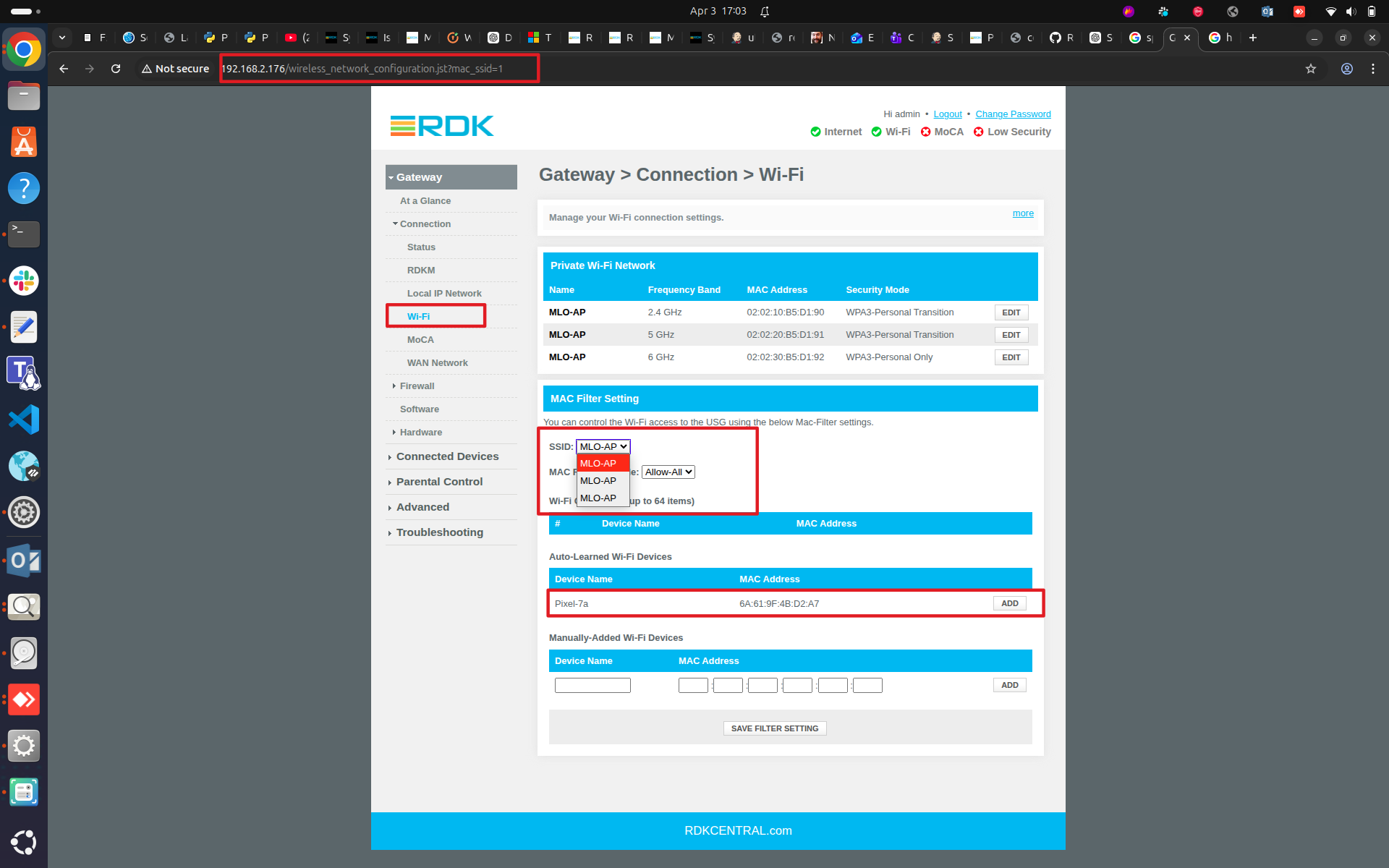
root@Filogic-GW:/tmp# dmcli eRT getv Device.WiFi.AccessPoint.1.X_CISCO_COM_MACFilter.Enable
CR component name is: eRT.com.cisco.spvtg.ccsp.CR
subsystem_prefix eRT.
Execution succeed.
Parameter    1 name: Device.WiFi.AccessPoint.1.X_CISCO_COM_MACFilter.Enable
               type:       bool,    value: false

root@Filogic-GW:/tmp# dmcli eRT getv Device.WiFi.AccessPoint.1.X_CISCO_COM_MacFilterTable.
CR component name is: eRT.com.cisco.spvtg.ccsp.CR
subsystem_prefix eRT.
Execution succeed.

root@Filogic-GW:/tmp# dmcli eRT getv Device.WiFi.AccessPoint.1.X_CISCO_COM_MACFilter.FilterAsBlackList
CR component name is: eRT.com.cisco.spvtg.ccsp.CR
subsystem_prefix eRT.
Execution succeed.
Parameter    1 name: Device.WiFi.AccessPoint.1.X_CISCO_COM_MACFilter.FilterAsBlackList
               type:       bool,    value: false

root@Filogic-GW:/tmp# dmcli eRT getv Device.WiFi.AccessPoint.1.X_COMCAST-COM_MAC_FilteringMode
CR component name is: eRT.com.cisco.spvtg.ccsp.CR
subsystem_prefix eRT.
Execution succeed.
Parameter    1 name: Device.WiFi.AccessPoint.1.X_COMCAST-COM_MAC_FilteringMode
               type:     string,    value: Allow-ALL

root@Filogic-GW:/tmp# |
2. Select from Auto-Learned Devices and click Add or enter the MAC Address and Device Name under Manually Added Wi-Fi Devices, then click Add. Then Click on Save Filter Settings to apply the settings.
WebUI: 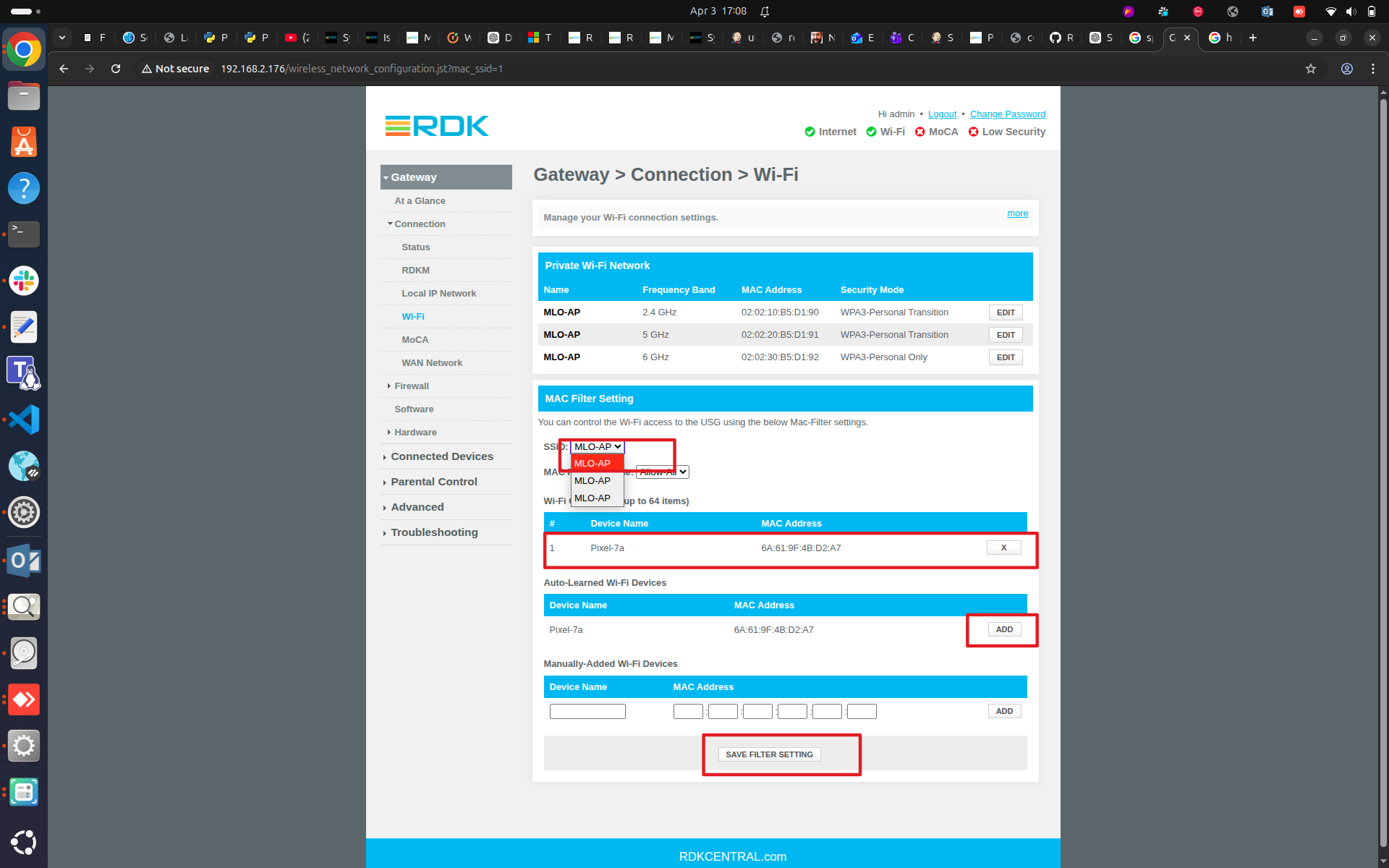
DMCLI:
root@Filogic-GW:/var/log# dmcli eRT getv Device.WiFi.AccessPoint.1.X_CISCO_COM_MACFilter.Enable
CR component name is: eRT.com.cisco.spvtg.ccsp.CR
subsystem_prefix eRT.
Execution succeed.
Parameter    1 name: Device.WiFi.AccessPoint.1.X_CISCO_COM_MACFilter.Enable
               type:       bool,    value: false

root@Filogic-GW:/var/log# dmcli eRT getv Device.WiFi.AccessPoint.1.X_CISCO_COM_MacFilterTable.
CR component name is: eRT.com.cisco.spvtg.ccsp.CR
subsystem_prefix eRT.
Execution succeed.
Parameter    1 name: Device.WiFi.AccessPoint.1.X_CISCO_COM_MacFilterTable.1.MACAddress
               type:     string,    value: 6A:61:9F:4B:D2:A7
Parameter    2 name: Device.WiFi.AccessPoint.1.X_CISCO_COM_MacFilterTable.1.DeviceName
               type:     string,    value: Pixel-7a

root@Filogic-GW:/var/log# dmcli eRT getv Device.WiFi.AccessPoint.1.X_CISCO_COM_MACFilter.FilterAsBlackList
CR component name is: eRT.com.cisco.spvtg.ccsp.CR
subsystem_prefix eRT.
Execution succeed.
Parameter    1 name: Device.WiFi.AccessPoint.1.X_CISCO_COM_MACFilter.FilterAsBlackList
               type:       bool,    value: false

root@Filogic-GW:/var/log# dmcli eRT getv Device.WiFi.AccessPoint.1.X_COMCAST-COM_MAC_FilteringMode
CR component name is: eRT.com.cisco.spvtg.ccsp.CR
subsystem_prefix eRT.
Execution succeed.
Parameter    1 name: Device.WiFi.AccessPoint.1.X_COMCAST-COM_MAC_FilteringMode
               type:     string,    value: Allow-ALL

root@Filogic-GW:/var/log# #If needed to add table from dmcli, please perform addtable command and then set the MacAdress and HostName like below for reference:

root@Filogic-GW:/var/log# dmcli eRT getv Device.WiFi.AccessPoint.1.X_CISCO_COM_MacFilterTable.
CR component name is: eRT.com.cisco.spvtg.ccsp.CR
subsystem_prefix eRT.
Execution succeed.
Parameter 1 name: Device.WiFi.AccessPoint.1.X_CISCO_COM_MacFilterTable.1.MACAddress
type: string, value: 6A:61:9F:4B:D2:A7
Parameter 2 name: Device.WiFi.AccessPoint.1.X_CISCO_COM_MacFilterTable.1.DeviceName
type: string, value: Pixel-7a

root@Filogic-GW:/var/log#
root@Filogic-GW:/var/log# dmcli eRT addtable Device.WiFi.AccessPoint.1.X_CISCO_COM_MacFilterTable.
CR component name is: eRT.com.cisco.spvtg.ccsp.CR
subsystem_prefix eRT.
addtable from/to component(eRT.com.cisco.spvtg.ccsp.wifi): Device.WiFi.AccessPoint.1.X_CISCO_COM_MacFilterTable.
Execution succeed.
Device.WiFi.AccessPoint.1.X_CISCO_COM_MacFilterTable.2. is added.

root@Filogic-GW:/var/log#
root@Filogic-GW:/var/log#
root@Filogic-GW:/var/log# dmcli eRT getv Device.WiFi.AccessPoint.1.X_CISCO_COM_MacFilterTable.
CR component name is: eRT.com.cisco.spvtg.ccsp.CR
subsystem_prefix eRT.
Execution succeed.
Parameter 1 name: Device.WiFi.AccessPoint.1.X_CISCO_COM_MacFilterTable.1.MACAddress
type: string, value: 6A:61:9F:4B:D2:A7
Parameter 2 name: Device.WiFi.AccessPoint.1.X_CISCO_COM_MacFilterTable.1.DeviceName
type: string, value: Pixel-7a
Parameter 3 name: Device.WiFi.AccessPoint.1.X_CISCO_COM_MacFilterTable.2.MACAddress
type: string, value: 00:00:00:00:00:00
Parameter 4 name: Device.WiFi.AccessPoint.1.X_CISCO_COM_MacFilterTable.2.DeviceName
type: string, value:

root@Filogic-GW:/var/log#
root@Filogic-GW:/var/log# dmcli eRT setv Device.WiFi.AccessPoint.1.X_CISCO_COM_MacFilterTable.2.MACAddress string 00:11:22:33:44:55
CR component name is: eRT.com.cisco.spvtg.ccsp.CR
subsystem_prefix eRT.
Execution succeed.

root@Filogic-GW:/var/log# dmcli eRT setv Device.WiFi.AccessPoint.1.X_CISCO_COM_MacFilterTable.2.DeviceName string Host-Name
CR component name is: eRT.com.cisco.spvtg.ccsp.CR
subsystem_prefix eRT.
Execution succeed.

root@Filogic-GW:/var/log# dmcli eRT getv Device.WiFi.AccessPoint.1.X_CISCO_COM_MacFilterTable.
CR component name is: eRT.com.cisco.spvtg.ccsp.CR
subsystem_prefix eRT.
Execution succeed.
Parameter 1 name: Device.WiFi.AccessPoint.1.X_CISCO_COM_MacFilterTable.1.MACAddress
type: string, value: 6A:61:9F:4B:D2:A7
Parameter 2 name: Device.WiFi.AccessPoint.1.X_CISCO_COM_MacFilterTable.1.DeviceName
type: string, value: Pixel-7a
Parameter 3 name: Device.WiFi.AccessPoint.1.X_CISCO_COM_MacFilterTable.2.MACAddress
type: string, value: 00:11:22:33:44:55
Parameter 4 name: Device.WiFi.AccessPoint.1.X_CISCO_COM_MacFilterTable.2.DeviceName
type: string, value: Host-Name

root@Filogic-GW:/var/log#
#############################################And for deleting a table, please peform the below commands to verify
root@Filogic-GW:/var/log# dmcli eRT deltable Device.WiFi.AccessPoint.1.X_CISCO_COM_MacFilterTable.2.
CR component name is: eRT.com.cisco.spvtg.ccsp.CR
subsystem_prefix eRT.
deltable from/to component(eRT.com.cisco.spvtg.ccsp.wifi): Device.WiFi.AccessPoint.1.X_CISCO_COM_MacFilterTable.2.
Execution succeed.

root@Filogic-GW:/var/log# dmcli eRT getv Device.WiFi.AccessPoint.1.X_CISCO_COM_MacFilterTable.
CR component name is: eRT.com.cisco.spvtg.ccsp.CR
subsystem_prefix eRT.
Execution succeed.
Parameter 1 name: Device.WiFi.AccessPoint.1.X_CISCO_COM_MacFilterTable.1.MACAddress
type: string, value: 6A:61:9F:4B:D2:A7
Parameter 2 name: Device.WiFi.AccessPoint.1.X_CISCO_COM_MacFilterTable.1.DeviceName
type: string, value: Pixel-7a

root@Filogic-GW:/var/log#
|
3. Set the Mode - ALLOW, DENY , ALLOW-ALL to be applied on ACL:
Once Selecting Allow Mode, click on save(It will Whitelist(allow) the device present in Control List and Blacklist(block) the other client devices)
WebUI: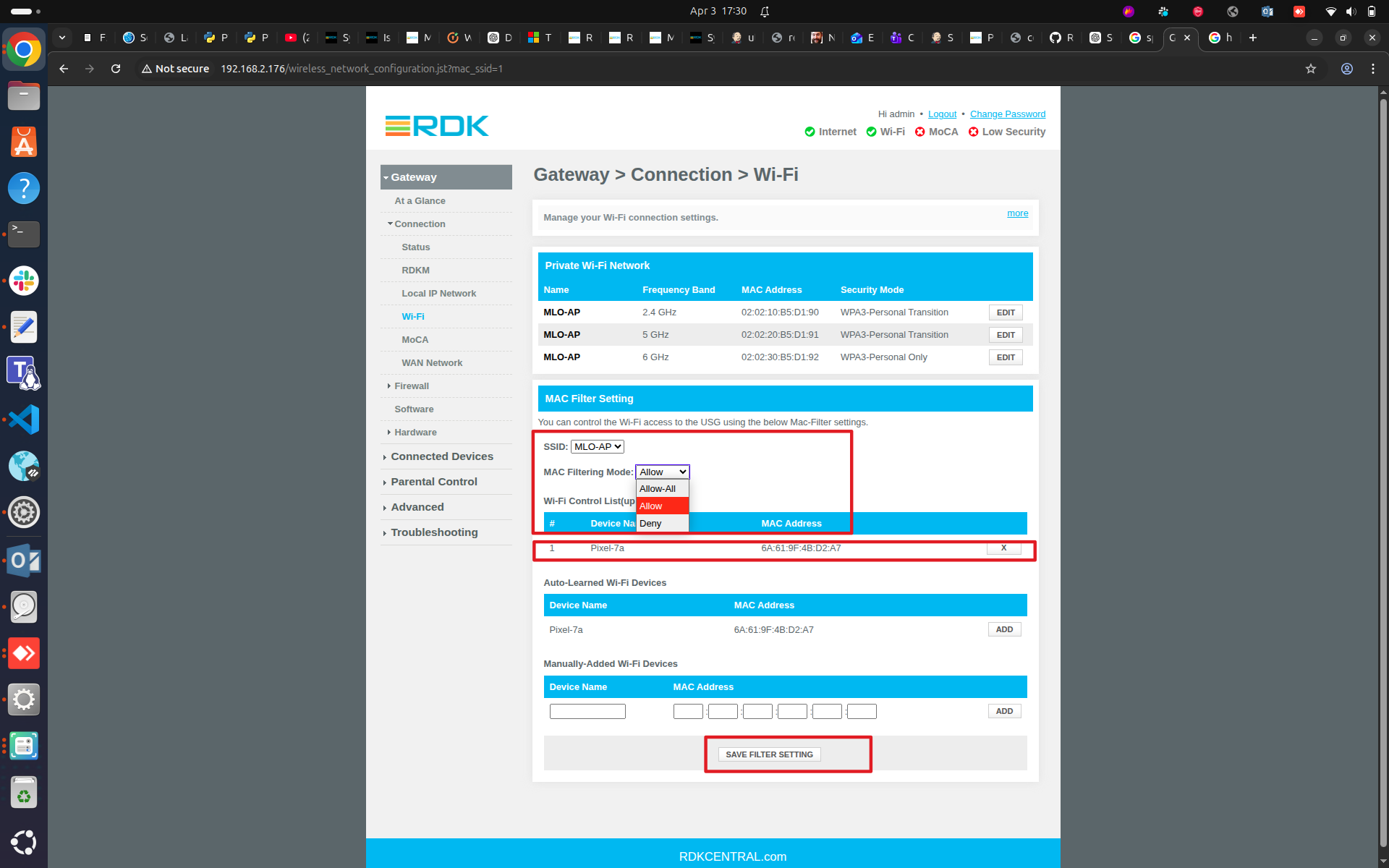
DMCLI:
root@Filogic-GW:/var/log# dmcli eRT getv Device.WiFi.AccessPoint.1.X_CISCO_COM_MACFilter.Enable
CR component name is: eRT.com.cisco.spvtg.ccsp.CR
subsystem_prefix eRT.
Execution succeed.
Parameter    1 name: Device.WiFi.AccessPoint.1.X_CISCO_COM_MACFilter.Enable
               type:       bool,    value: true

root@Filogic-GW:/var/log# dmcli eRT getv Device.WiFi.AccessPoint.1.X_CISCO_COM_MacFilterTable.
CR component name is: eRT.com.cisco.spvtg.ccsp.CR
subsystem_prefix eRT.
Execution succeed.
Parameter    1 name: Device.WiFi.AccessPoint.1.X_CISCO_COM_MacFilterTable.1.MACAddress
               type:     string,    value: 6A:61:9F:4B:D2:A7
Parameter    2 name: Device.WiFi.AccessPoint.1.X_CISCO_COM_MacFilterTable.1.DeviceName
               type:     string,    value: Pixel-7a

root@Filogic-GW:/var/log# dmcli eRT getv Device.WiFi.AccessPoint.1.X_CISCO_COM_MACFilter.FilterAsBlackList
CR component name is: eRT.com.cisco.spvtg.ccsp.CR
subsystem_prefix eRT.
Execution succeed.
Parameter    1 name: Device.WiFi.AccessPoint.1.X_CISCO_COM_MACFilter.FilterAsBlackList
               type:       bool,    value: false

root@Filogic-GW:/var/log# dmcli eRT getv Device.WiFi.AccessPoint.1.X_COMCAST-COM_MAC_FilteringMode
CR component name is: eRT.com.cisco.spvtg.ccsp.CR
subsystem_prefix eRT.
Execution succeed.
Parameter    1 name: Device.WiFi.AccessPoint.1.X_COMCAST-COM_MAC_FilteringMode
               type:     string,    value: Allow

root@Filogic-GW:/var/log# |
While Selecting Deny Mode, click on 'Save Filter Setting'(It will Blacklist(block) the Control List Device and WhileList(allow) the other Devices)
WebUI: 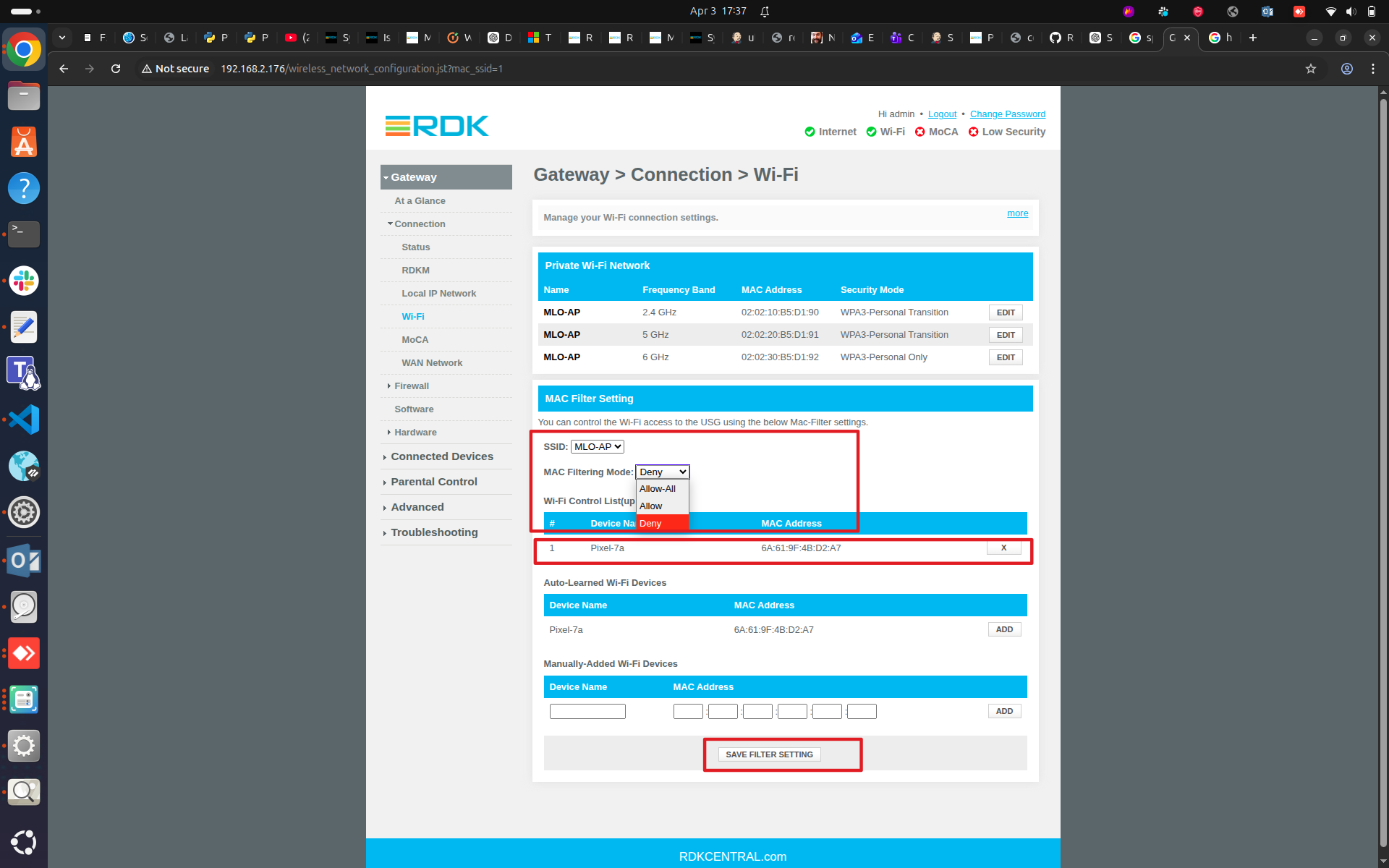
DMCLI:
root@Filogic-GW:/# dmcli eRT getv Device.WiFi.AccessPoint.1.X_CISCO_COM_MACFilter.Enable
CR component name is: eRT.com.cisco.spvtg.ccsp.CR
subsystem_prefix eRT.
Execution succeed.
Parameter    1 name: Device.WiFi.AccessPoint.1.X_CISCO_COM_MACFilter.Enable
               type:       bool,    value: true

root@Filogic-GW:/# dmcli eRT getv Device.WiFi.AccessPoint.1.X_CISCO_COM_MacFilterTable.
CR component name is: eRT.com.cisco.spvtg.ccsp.CR
subsystem_prefix eRT.
Execution succeed.
Parameter    1 name: Device.WiFi.AccessPoint.1.X_CISCO_COM_MacFilterTable.1.MACAddress
               type:     string,    value: 6A:61:9F:4B:D2:A7
Parameter    2 name: Device.WiFi.AccessPoint.1.X_CISCO_COM_MacFilterTable.1.DeviceName
               type:     string,    value: Pixel-7a

root@Filogic-GW:/# dmcli eRT getv Device.WiFi.AccessPoint.1.X_CISCO_COM_MACFilter.FilterAsBlackList
CR component name is: eRT.com.cisco.spvtg.ccsp.CR
subsystem_prefix eRT.
Execution succeed.
Parameter    1 name: Device.WiFi.AccessPoint.1.X_CISCO_COM_MACFilter.FilterAsBlackList
               type:       bool,    value: true

root@Filogic-GW:/# dmcli eRT getv Device.WiFi.AccessPoint.1.X_COMCAST-COM_MAC_FilteringMode
CR component name is: eRT.com.cisco.spvtg.ccsp.CR
subsystem_prefix eRT.
Execution succeed.
Parameter    1 name: Device.WiFi.AccessPoint.1.X_COMCAST-COM_MAC_FilteringMode
               type:     string,    value: Deny

root@Filogic-GW:/# |
Logs are provided for 2.4 GHz only. The same behavior applies to 5 GHz and 6 GHz; please refer to these logs.
Reference Ticket: