REFERENCE UI FOR DAC - DESIGN WIREFRAME
Scope
This document outlines the complete UI specification for the updated RDK Reference UI supporting DAC (Downloadable Application Container) applications. It provides a basic wireframe level design for restructuring the current Reference UI used in RDKM reference devices to accommodate the DAC (Downloadable Application Containers) based apps.
The purpose of this design is to enable a flexible, apps catalogue driven environment where users can install, update, launch, and uninstall DAC apps.
This document represents a wireframelevel specification intended to illustrate the foundational UI structure for the updated DACenabled environment. The visual design, styling, and aesthetic elements shown here are subject to refinement as development progresses. But core interaction behaviors, including UX principles and the navigation model, remain same as that present in the existing Reference UI. Additionally, all previously available system settings, such as WiFi configuration, display resolution, and related device settings, will continue to function exactly as before and are unaffected by this UI restructuring.
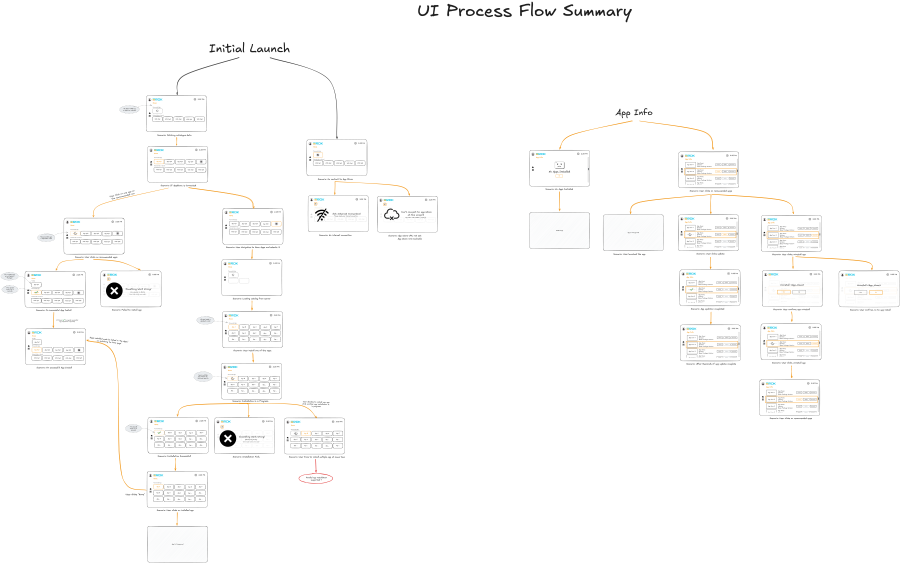
The process flows for all new UI actions have been documented and need to be reviewed, and several additional flows are still pending and will have to be updated later in this document.
Old UI v/s New UI – A comparison
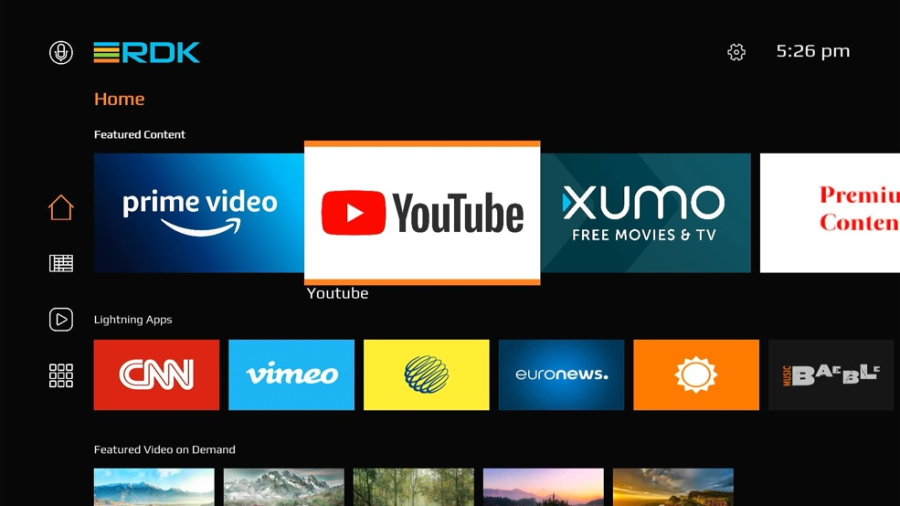
The non-DAC based Ref UI
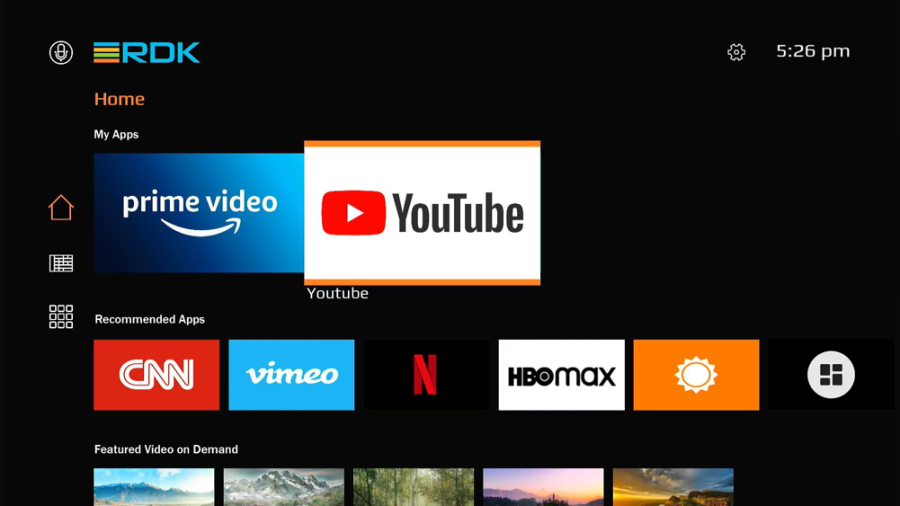
The DAC based Ref UI (For Illustration only, actual look may differ)
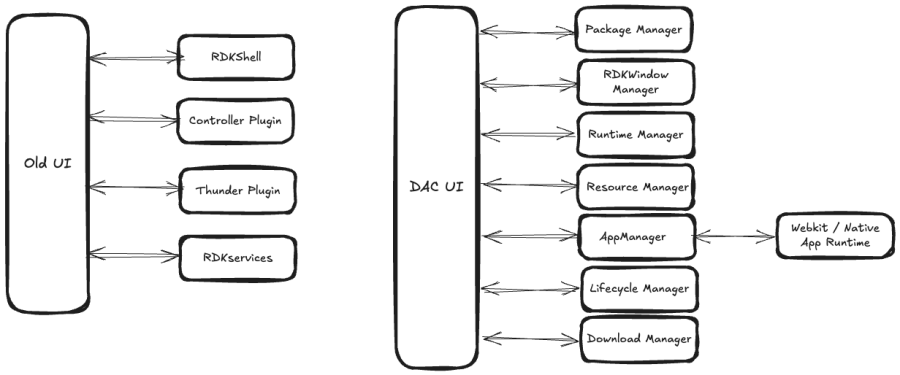
Architectural changes w.r.t UI
With the introduction of AI 2.0 and the DAC-based architecture, the design and operation of the new UI and associated applications will change significantly. All applications—including the UI—will now be delivered as DAC app bundles (Bolt packages). The UI will be shipped as a preinstalled bundle, while all other applications can be downloaded and installed by the user as needed. Some of the major change include:
App Management through Entservice Infra Plugins
All app-related operations—such as DAC package downloads, app launching, window creation, and lifecycle control—will now be handled through dedicated Entservice-infra plugins. These include Download Manager, Window Manager, Lifecycle Manager etc. (Full list : https://rdkcentral.github.io/entservices-apis/#/README)
Deprecation of RDKShell
The previously used RDKShell for window management will be deprecated. All windowing responsibilities will now be managed by the Window Manager plugin.
Firebolt & Rialto Compatibility
All DAC applications will support Rialto and be Firebolt-compatible. Instead of using RDKServices calls to retrieve platform data, applications will now access these values through Firebolt Apis. This interaction will be mediated by the App Gateway entservice.
New App Launching Model
Previously, native apps were launched and controlled through Thunder plugins. Under the new architecture, each DAC app runtime will include its own launcher, embedded directly within the DAC bundle. This applies even to the webkit browser runtime (which will contain its own browser launcher). The App Manager EntService will use the launcher as the entry point for app startup /kill etc. whereas the Lifecycle Manager will handle the app lifecycle endtoend.
The diagram (mentioned below) illustrates the shift from the old UI architecture to the new AI 2.0 / DAC architecture. This is not a process flow diagram; rather, it provides a high-level conceptual mapping.
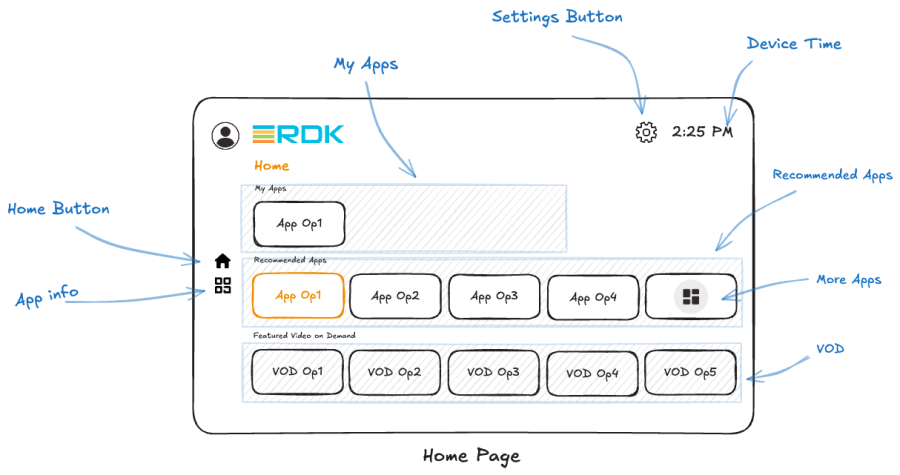
Default Home Page – A Look
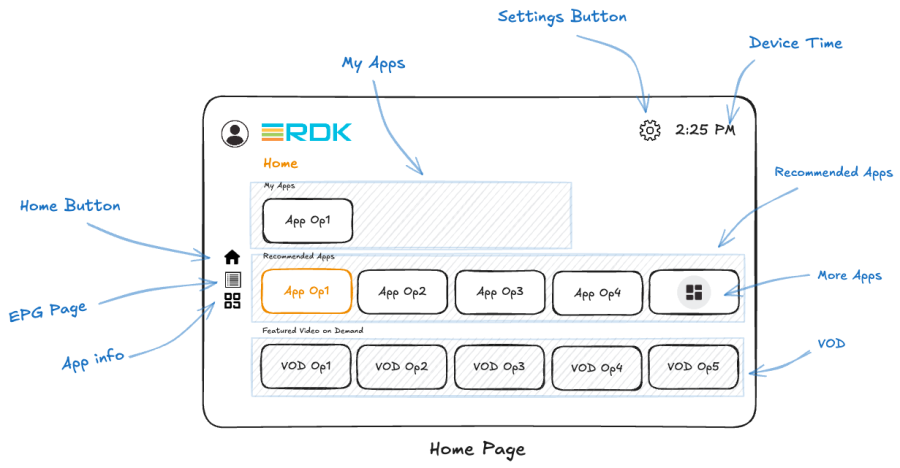
The Home Page of the restructured UI appears as shown above.
- There are three rows: 1. My Apps, 2. Recommended Apps, and 3. Featured Video on Demand (VOD).
- The My Apps row hosts those DAC apps that the user has installed on the device. It can be navigated horizontally to access all the apps the user has installed.
- The Recommended Apps row displays the information about the first four apps present in the upstream DAC Apps catalogue so that user has information about what apps they can locally download onto the device. The last tile in this row is reserved for the "More Apps" button so that the user can get the complete comprehensive list of apps served by the Apps Catalogue.
- The "More Apps" button takes the user to another page that lists all the applications currently present in the DAC Apps catalogue, which is described later in the document.
- The last row is the VoD Apps (Video-on-Demand) row, which contains VoD apps that are preinstalled on the device.
- On the left side of the UI, there are three additional buttons: Home, EPG and App Info.
- The Home button, as before, is a navigable button that returns the user to the Home Page; EPG button opens the EPG page – both its functionality remains unchanged.
- The App Info button is new. It lists all the installed DAC apps, along with information about each app and management options such as Launch, Update, and Uninstall. More details about this option are provided later in the document.
- At the top right corner, the Settings and Device Time indicators are displayed—both retain the same functionality as in the previous UI.
- The Settings button continues to retain the same options that it provided before , but additonaly there is a new option called - Connect to the Application Catalogue.
- This new option provides a standard username-password user input page , so that the user can enter the credentials to the reference app catalogue as soon as the RefUI is launched.
- Upon successful log in, the UI is routed back to the settings page and the home page would now display the apps hosted by the app catalogue and can be downloaded with a click on the icon.
- Please note that the pixel widths, tile dimensions, and other layout details remain the same as in the previous UI.
- Please Note: The My Apps row should be hidden to the user, when the user has no DAC apps on the device. ex. during a Factory reset or user intentionally uninstalls all apps etc. So, the only rows on the Home page would be – Recommended Apps and VoD Apps.
Note: The VoD row is expected to use the platform player like AAMP. However, in a DAC based environment, this is not still be entirely functional.
Overlay/Modal Types
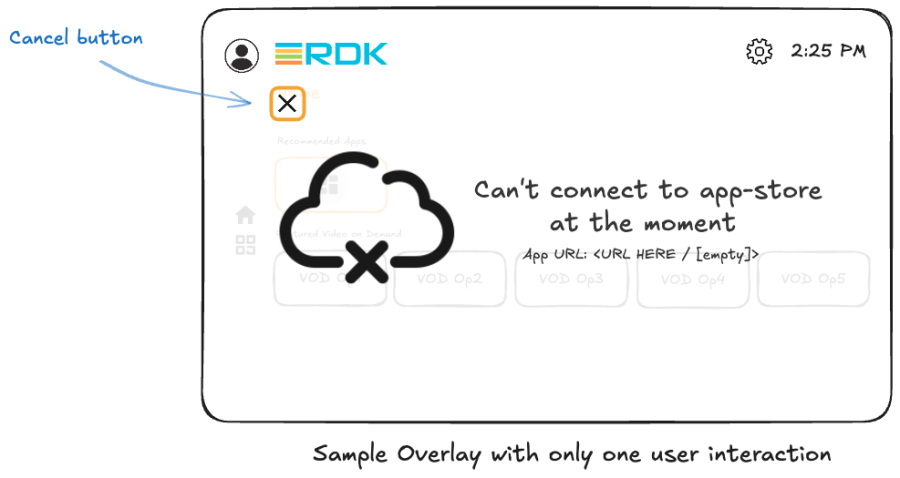
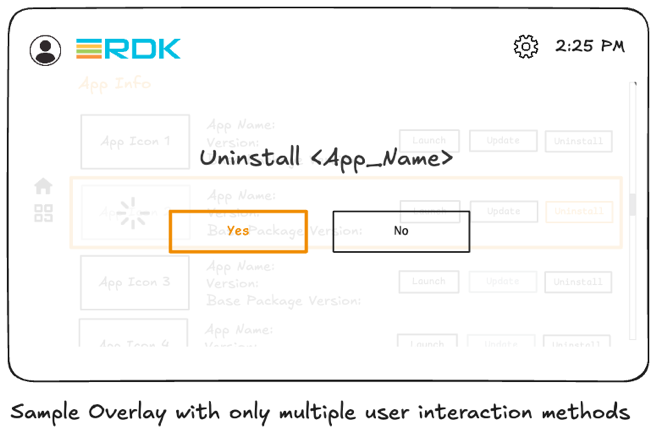
- Another feature required for the DACsupporting UI is the info/error overlays.
- These overlays are used to indicate when something has gone wrong or when additional information is needed from the user.
- There are two types of overlays: 1. Single choice overlay, 2. Multiple choice overlay.
- In the single choice overlay—used to indicate errors, additional information, or warnings— the user has no choice but to go back to Home page or the previous UI page (topmost picture) A Cancel button is available at the top left corner, and pressing it should exit the overlay and return the user to the previous UI page. The user should also be able to exit the overlay using the Back button on the remote or keyboard.
- In the multiple choice overlay (e.g., prompting the user for confirmation when uninstalling an app), there are two options, for ex. a "Yes" or a "No." Both should be navigable options when the overlay opens. Selecting either option should allow the UI to execute the appropriate next steps based on the user's choice and then exit the overlay.
- The overlay windows should have 60% opacity, allowing partial transparency so that the underlying page remains visible.
- It should occupy approximately onefourth (1/4) of the screen, centered both vertically and horizontally.
- If the overlay contains icons, they should occupy the 50% of the overlay window towards the left, while the right 50% should be allocated for error or informational text.
Home Page Actions
Reboot after a factory reset
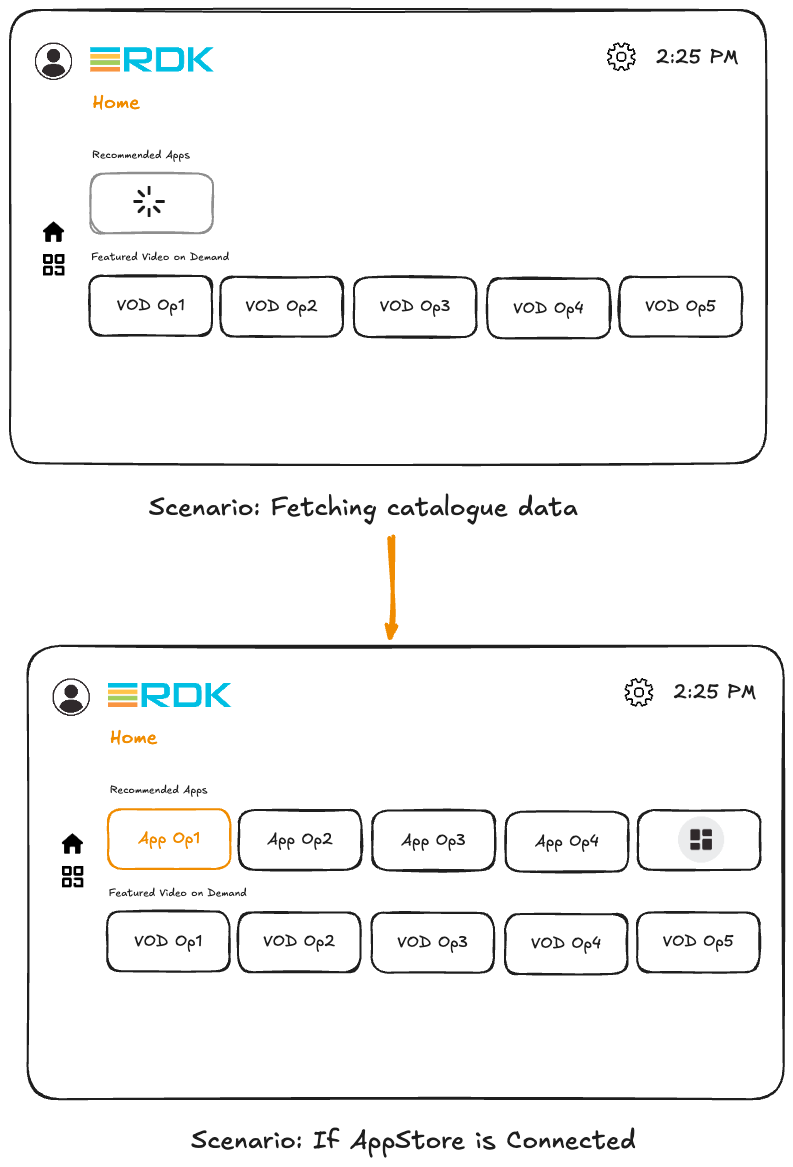
- After a factoryreset reboot or booting up for the very first time, the Home page of the UI will appear as shown above.
- The Home page contains two rows of applications: the top row displays Recommended Apps, while the bottom row displays Video on Demand (VoD) apps. My Apps row is hidden as there are no DAC apps installed yet.
- The Recommended Apps row lists applications that can be downloaded from the App Catalogue.
- On every device boot up, the UI should list the first four DAC apps from the App Catalogue in the tiles, along with a final tile for the "More Apps" option. The UI should download the meta-data and app icons related to the first four DAC apps to populate this row.
- The App Catalogue URL is set via an RFC parameter.
- The Recommended Apps row will display the first four apps from the catalogue, typically in alphabetical order, though this can later be optimized to reflect operator defined ordering.
- If app icons take time to load—for example, due to network latency—the UI should display a loading/buffering indicator until the Recommended Apps row data fully loads.
- Selecting the "More Apps" tile at the end of the Recommended Apps row should open a dedicated page listing all applications available in the DAC App Catalogue; details of this page are described later.
- The Recommended Apps row is populated by the UI contacting the App Catalogue during the first boot; on all subsequent Home page re-loads during the same boot cycle, it is populated using cached data.
Device Boot-up: Connection to App catalogue fails
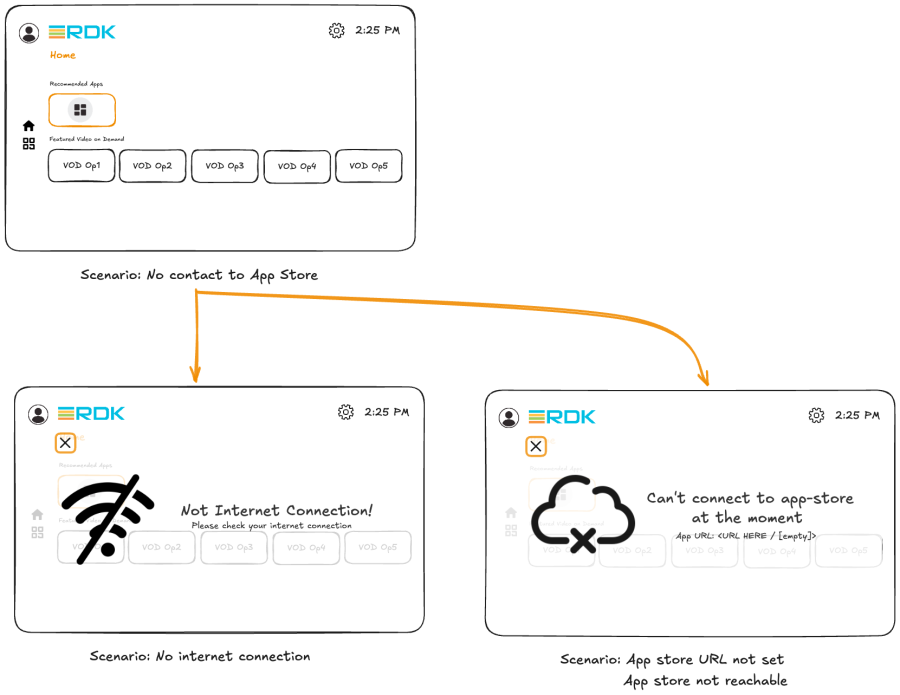
- When the device boots-up and it fails to establish a connection to the App Catalogue server for any reason, only one tile should appear in the Recommended Apps row — the "More Apps" tile.
- When the user selects the "More Apps" tile, an error dialog should be displayed.
- The dialog should provide a brief explanation of the issue to help the user understand what went wrong.
- Possible causes include network connectivity problems, an incorrect App Catalogue URL set by the user, or the App Catalogue server being temporarily unavailable. The error message shown should reflect the specific issue.
Downloading /Launching DAC apps from Home page
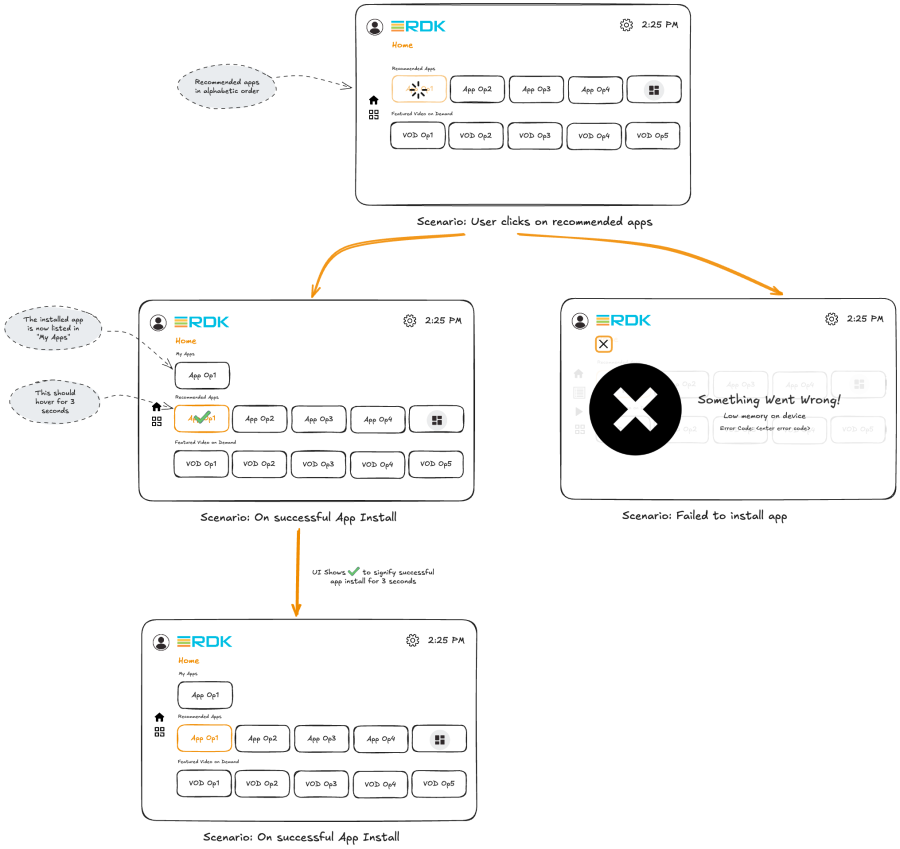
- When the user selects any app tile on the Recommended Apps row, the corresponding application must be downloaded and installed on the device.
- Upon selecting the app, the UI should send a request to the Package Manager to download and install the specific DAC bundle onto the device by providing the app bundle's remote URL information to the package manager.
- While the Package Manager downloads the bundle, a buffering/loading indicator should be displayed on the app tile.
- Once the bundle has been downloaded and installed, the Package Manager should notify the UI of a successful installation. At this point, a green tick icon should appear on the tile for approximately 2 seconds before disappearing.
- After installation, the UI should create a new topmost row called "My Apps", where the newly installed app will be displayed.
- The My Apps row should now start displaying all applications downloaded by the user henceforth.
- Any subsequent presses on the same app tile after the app is successfully installed, should always launch the app. (Either cold launch /hot launch based on the app's previous state).If App launch fails for any reason, there should be a error overlay indicating what went wrong.
- However, any user presses made while the application is in the download state should be ignored.
- Once installed, the DAC apps can be launched by pressing on any app tile anywhere – i.e. on the My Apps row or if the same app tile is present on the Recommended apps row.
- All apps downloaded by the user will remain accessible within this My Apps row and can be navigated horizontally for accessing. This may not be user friendly if many DAC apps are installed, as extensive horizontal navigation can become difficult. However, this behavior can be optimized in a future update.
- If an app fails to download—due to a network issue, a problem with the DAC server hosting the bundles, or insufficient device memory—the UI should display an error overlay explaining why the installation failed. This error information should be obtained from the Package Manager plugin.
- The error overlay dialog should contain a single-choice navigable cancel button/icon that allows the user to exit back to the Home page upon selection.
- On the next device reboot, device should show up the My Apps row as the topmost row, since the user has now installed DAC app(s) onto the device.
More Apps Button
Pressing "More Apps" on Recommended Apps row
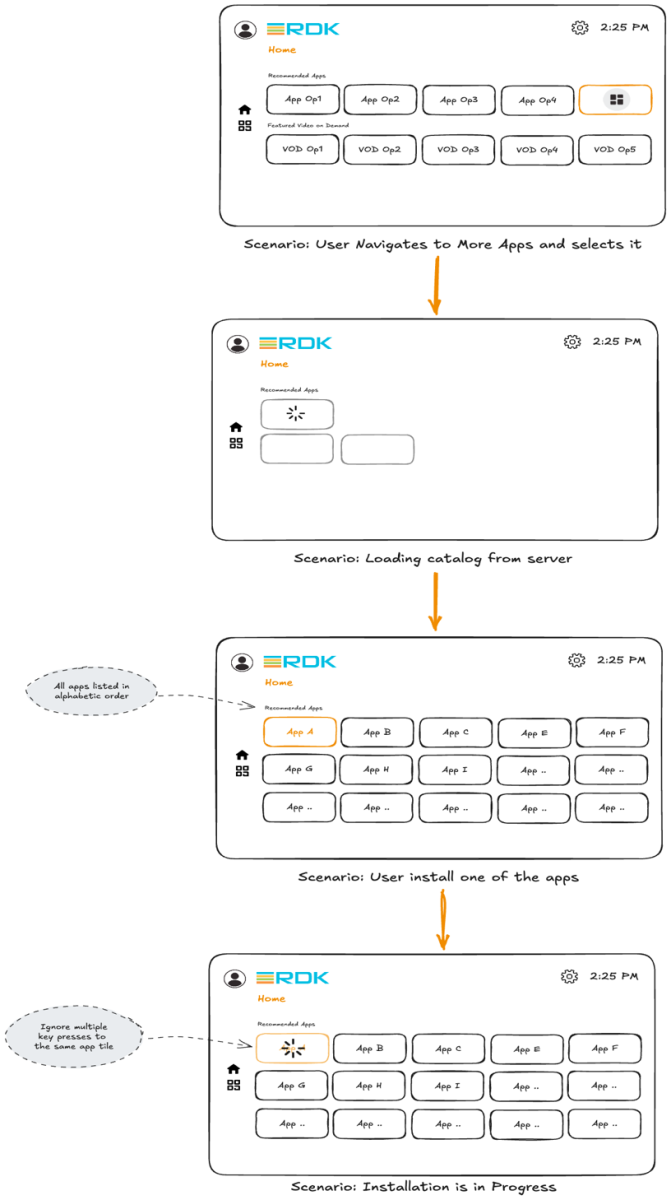
- As mentioned previously, there is a "More Apps" icon in the Recommended Apps row. When the user selects this icon, the UI should navigate to a dedicated page that displays the full list of applications hosted in the DAC App Catalogue.
- The UI should contact the App Catalogue and display the list of all the applications hosted in the Apps Catalogue.
- If the apps list /icons take time to load, the UI should display loading indicators on 3 blank placeholder tiles until the data is available.
- All applications provided by the DAC App Catalogue should be listed on this page in alphabetical order, arranged in a row column (n x 5) grid layout.
- When the user selects an app tile, the app should be downloaded and installed from the DAC App Catalogue if it is not already installed on the device.
- If the selected DAC app is already installed on the device, pressing the tile should launch the app, as described in the previous section about downloading and installing the app.
- If a user selects a DAC app that is already installed on the device, but a newer version is available in the Apps Catalogue, the app should automatically update to the latest version upon user selection.
Downloading /launching the app via the "More Apps" page.
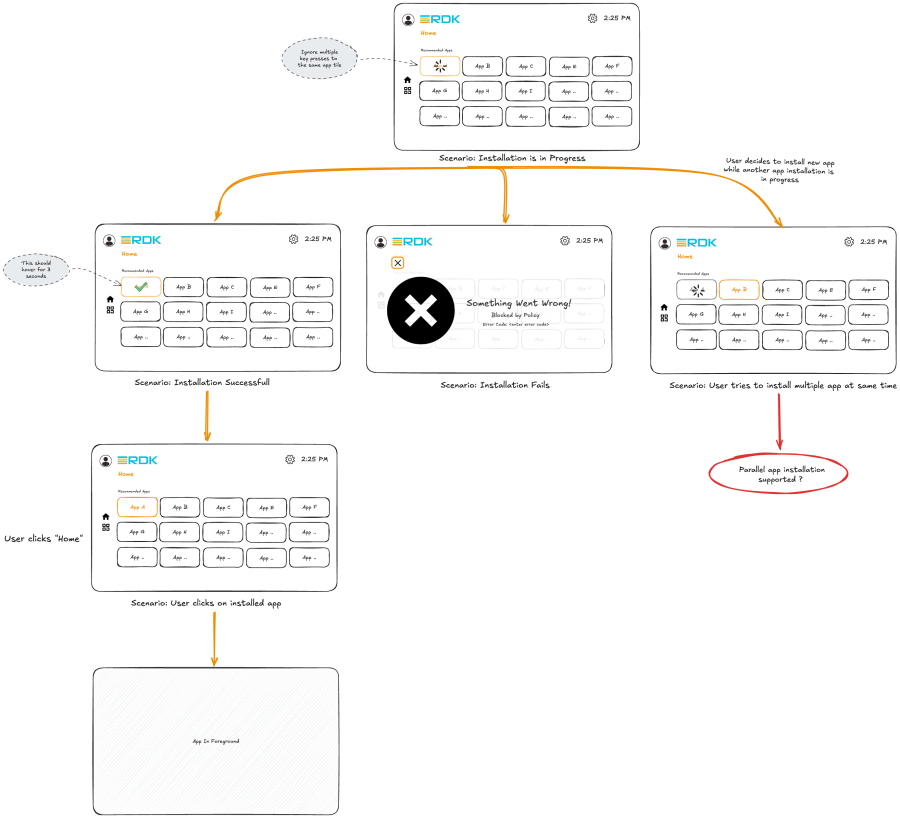
- Upon selecting any app tile on the "More Apps" page, if the app is not already downloaded or installed, the UI should initiate the download process.
- The download flow is identical to the DAC app download flow used on the Home page.
- The UI should request the necessary DAC bundles for download through the Package Manager by providing the app download URL.
- During the download process, a buffering/loading icon should be displayed on the app tile to indicate ongoing activity.
- If the download of any app fails, an error dialog should appear, showing the reason for the failure (e.g., network issues, catalogue server problem, insufficient memory).
- The user should be able to exit the error dialog by navigating to and selecting the Cancel button, or by pressing the Back button on the remote.
- Once the installation completes successfully, a green tick icon should be displayed on the app tile for approximately 2–3 seconds.
- Key presses to same tile during download is ignored.
- Any subsequent selection of that app tile should launch the installed DAC application.
- Like mentioned in previous section, Update flow should be invoked if there is a higher version of the app available on the catalogue.
- Multiple rapid key presses on different app tiles may overload the system by triggering multiple concurrent downloads. As per the current reference DAC store implementation, the multiple downloads are queued.
IApp Info Option Behaviors
Pressing the "Apps Info" button
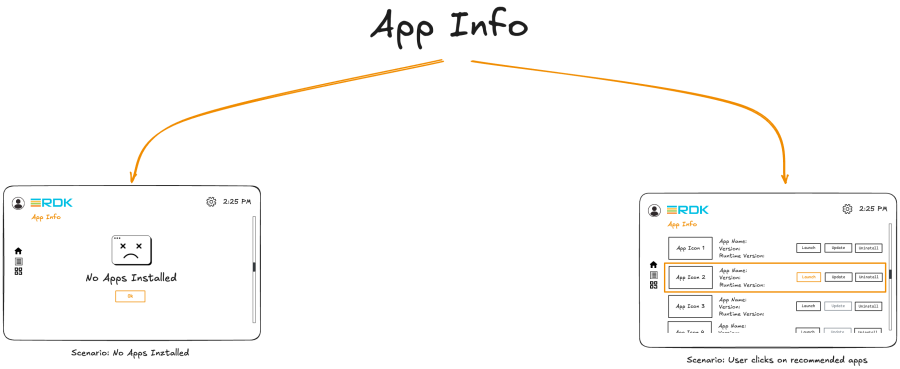
- To manage the installed DAC applications, a new "App Info" button is available on the left side of the Home page UI.
- When the user selects this button, the UI should open a dedicated App Info page. This page lists all DAC apps installed on the device, arranged in a rowbased layout that the user can navigate through.
- Each row displays the details of a specific application — including the app icon, app name, app version, runtime package version, and three management option – Launch, Update, and Uninstall.
- The UI should query the App icon for the App tile and version/name information from the DAC app's meta-data information.
- If no DAC apps are installed on the device, the App Info page should display an informational message stating "No apps installed." Upon selecting OK, the UI should return the user to the Home page.
- Each app row should occupy ~20% of screen height so that we can accommodate 4-5 app rows to be visible at a time without overcrowding.
- Inside each row, ~ 15 % screen width is dedicated for displaying App icon, ~35% screen width for displaying the App name, App version and Runtime package version details, rest ~50 % for the app management action buttons i.e. Launch, Update and Uninstall.INFO
Pressing the launch on "App Info" page
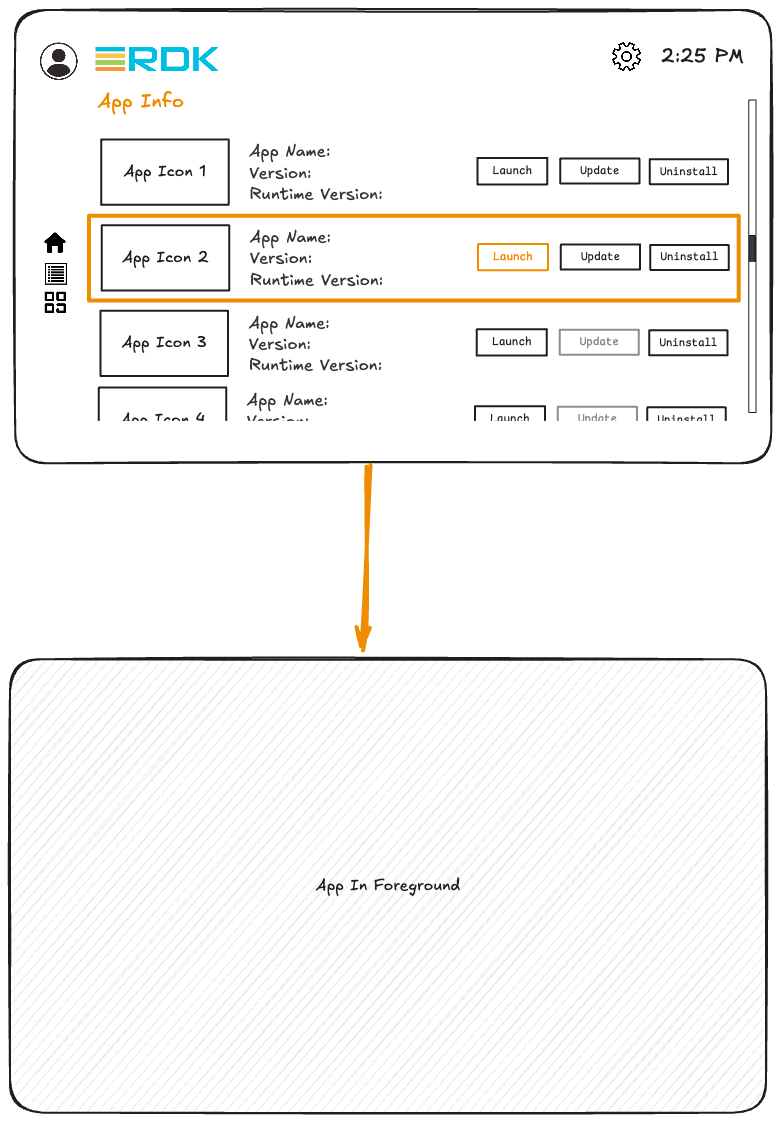
- As mentioned previously, the App Info page displays a list of all DAC applications that the user has downloaded onto the device.
- The first available action is Launch. When the user selects the Launch button for a particular application, that application should be started. The launch may be a cold launch or a hot launch, depending on the application's previous state.
- So far, we have 3 launch points to the App - Tile from Home page (My Apps row and Recommended Apps row if applicable), Tile from More Apps page, Launch button from App Info page.
Pressing the update button on "App Info" page
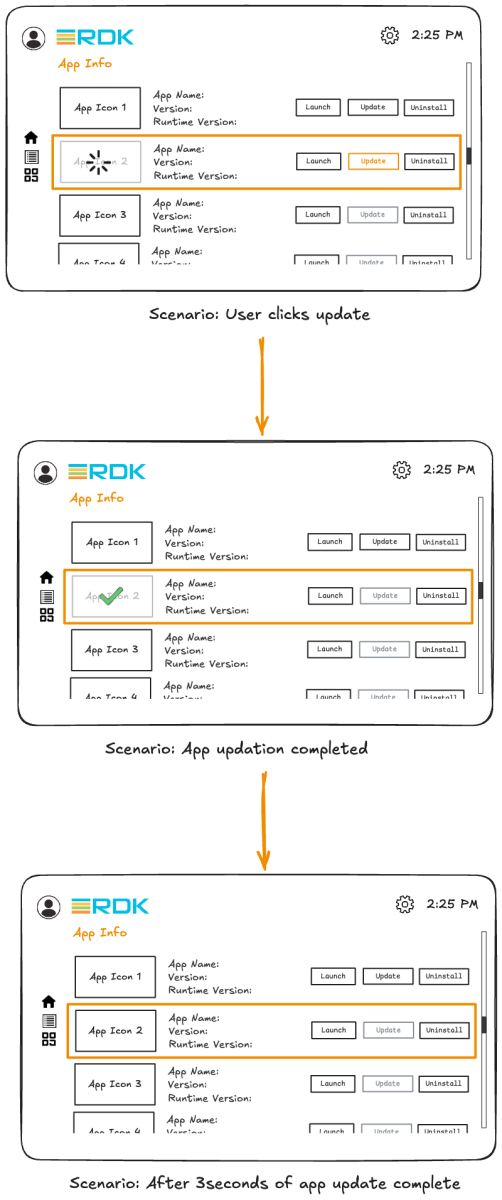
- The second available option is Application Upgrade/Update.
- Every time the App Info page loads, UI should query the Apps Catalogue to determine if any apps that the user has downloaded, had an application version that is higher than what is present currently on the device.
- Based on this versioning info, the Update button should be made active (usable) or greyed out to indicate app is already at the latest version as hosted in the Apps Catalogue.
- If a newer version exists, when user selects the same the latest app's updated DAC bundle should be downloaded and installed on the device replacing the older version of the DAC app.
- During the download process, a buffering/loading indicator should be shown on the app tile, and after the update completes successfully, a green tick icon should be displayed for approximately 2–3 seconds.
- For applications that are already on the latest available version, the Update button should be greyed out.
Pressing the uninstall button on "App Info" page
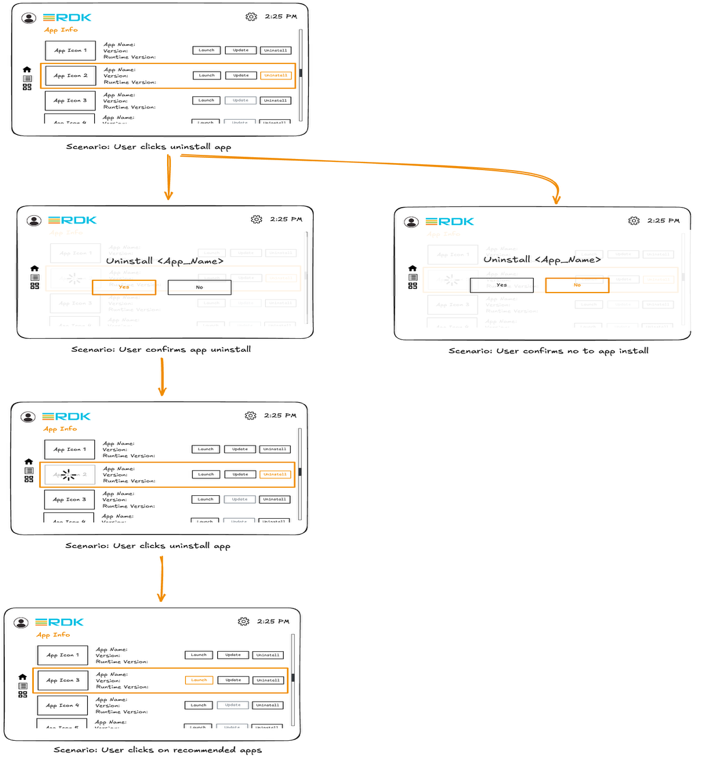
- The third available option is Uninstall. When the user selects this option, the DAC bundle and all associated data for that specific application must be removed from the device.
- When the user clicks Uninstall, a confirmation dialog should appear to verify whether the user truly intends to remove the application. If the user selects Yes, the UI should issue the appropriate command to the Package Manager to delete the DAC application.
- During the deletion process, a buffering/loading indicator should be displayed on the application tile. Once deletion is complete, the application should be removed from the list shown on the App Info page.
- The deleted application should also be removed from the My Apps row on the Home page when UI next re-loads the Home Page.
- If the user selects No when asked to confirm the uninstall action, focus should be returned to the App Info page.
DIAL support for DAC AppsThe UI interaction with DIAL should be tailored to fit into the DAC environment, since applications are no longer "static" on the platform. Users now have the flexibility to install or uninstall DAC Apps at any time, which means the set of DIALcapable applications on a device is dynamic.Therefore, the UI must be enhanced to register, enable, and deregister DIAL support based on the applications currently present on the device. Requirements now look like: - At bootup, the UI should enable DIAL support for all DAC applications that are already installed on the device.
- When a new DAC application is installed, the UI must automatically enable and register DIAL support for that application (provided DAC app is a DIAL enabled app)
- When a DAC application is uninstalled, the UI must deregister and remove DIAL support for that application to ensure the system does not expose any invalid DIAL endpoints.
|
Complete UI process flow