

Page History
...
| Code Block | ||
|---|---|---|
| ||
since buttons are associated with GPIO, we can do the export wps gpio using its number
→ In mt7988a-bananapi-bpi-r4-nand.dts file, we can see WPS is defined with 14
    wps {
                        label = "wps";
                        linux,code = <KEY_WPS_BUTTON>;
                        gpios = <&pio 14 GPIO_ACTIVE_LOW>;
                };
root@Filogic-GW:~# cd /sys/class/gpio/
export       gpiochip428/ unexport
→ Here by using 14+428=442, 428 (gpiochip428 refers to a GPIO controller that manages GPIO pins, starting from GPIO number 428.)
→ export the WPS pin number
root@Filogic-GW:/sys/class/gpio# echo 442 > /sys/class/gpio/export
root@Filogic-GW:/sys/class/gpio/gpio442# cat value
1
→ Whenever we press the WPS, this gpio442 value is changed to 0
root@Filogic-GW:/sys/class/gpio/gpio442# cat value
0 |
WPS Block diagram
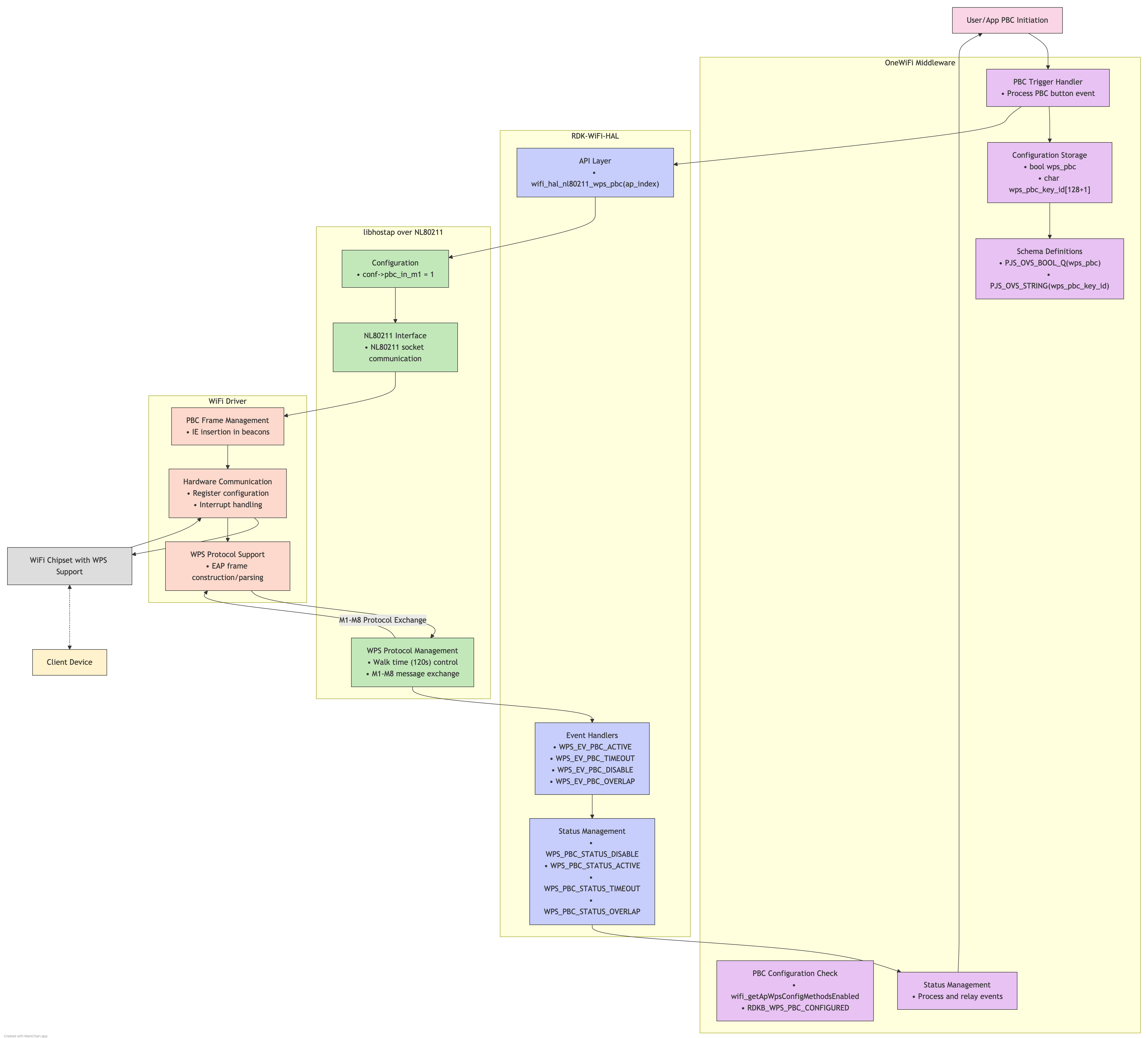
Concept
Conceptual Process
When a WPS PBC request is initiated in your system:
- PBC Activation:
- Your code calls the RDK-WiFi-HAL API for WPS PBC
- The HAL communicates this to hostapd via its control interface
- hostapd sets the access point into "WPS waiting" mode
- Registration Window:
- A 2-minute window opens where the access point is receptive to WPS registration
- The AP broadcasts its WPS capability in beacons
- The AP listens for probe requests with WPS information elements
- Device Discovery:
- When a client device (like your mobile phone) activates WPS PBC
- It sends probe requests with WPS information elements
- Your access point responds to these probes
- Credential Exchange:
- The client and AP establish an EAP (Extensible Authentication Protocol) session
- They perform a handshake to validate each other
- The AP sends the encrypted network credentials to the client
- The client configures itself with these credentials
- Connection Completion:
- The client connects to the network using the received credentials
- The AP notifies the system (through hostapd → nl80211 → RDK-WiFi-HAL) of successful registration
- The WPS PBC mode on the AP ends
- PBC Activation:
Technical Implementation Details
In your specific setup with RDK-WiFi-HAL and hostapd 2.10:
- RDK-WiFi-HAL WPS Functions:
- The HAL typically provides functions like
wifi_pushButtonPBC() - These functions handle the communication with hostapd
- The HAL typically provides functions like
- hostapd Control Communication:
- hostapd 2.10 provides a control interface via Unix domain sockets
- RDK-WiFi-HAL connects to this socket and sends "WPS_PBC" commands
- nl80211 Commands Used:
- hostapd uses
NL80211_CMD_START_WPSwith attributes:NL80211_ATTR_IFINDEX: Specifies the wireless interfaceNL80211_ATTR_WPS_MODE: Set toNL80211_WPS_PBCfor push button method
- hostapd uses
- Event Monitoring:
- WPS events flow back from the driver → nl80211 → hostapd → RDK-WiFi-HAL
- These events include connection attempts, successful registrations, and timeouts
- RDK-WiFi-HAL WPS Functions:
Overview
Community Forums
Content Tools
Tasks