

Page History
...
WPS stands for Wi-Fi Protected Setup. It is a wireless network security standard that tries to make connections between a router and wireless devices faster and easier. WPS works only for wireless networks that use a password that is encrypted with the WPA Personal or WPA2 Personal security protocols. WPS doesn't work on wireless networks that are using the deprecated WEP security, which can be cracked easily by any hacker with a basic set of tools and skills. Wi-Fi Users don't want to know the broadcasting ssid and password.
Push Button Configuration (PBC): In this method, a WPS physical button on the BPI and WPS option on the wireless client are pressed within a specific timeframe, initiating the connection without the need for entering a password.
Verifying of PBC HW button in BPI
Method 1
| Code Block | ||
|---|---|---|
| ||
→ Added configurations for support of gpio_keys module and evtest  - https://github.com/rdkcentral/meta-cmf-bananapi/pull/98
→ load the gpio-key module
root@Filogic-GW:/lib/modules/5.4.271-yocto-standard/kernel/drivers/input/keyboard# modprobe gpio_keys
root@Filogic-GW:/lib/modules/5.4.271-yocto-standard/kernel/drivers/input/keyboard# dmesg | grep gpio
[  163.696818] input: gpio-keys as /devices/platform/gpio-keys/input/input0
root@Filogic-GW:/lib/modules/5.4.271-yocto-standard/kernel/drivers/input/keyboard# cat /sys/kernel/debug/gpio
gpiochip0: GPIOs 428-511, parent: platform/1001f000.pinctrl, pinctrl_moore:
 gpio-428 (                    |tx-disable          ) in  lo
 gpio-430 (                    |los                 ) in  hi IRQ
 gpio-432 (                    |asm_sel             ) in  hi
 gpio-433 (                    |pca9545_rst         ) in  hi
 gpio-441 (                    |reset               ) in  lo IRQ ACTIVE LOW
 gpio-442 (                    |wps                 ) in  hi IRQ ACTIVE LOW
 gpio-482 (                    |los                 ) in  hi IRQ
 gpio-498 (                    |tx-disable          ) in  lo
 gpio-510 (                    |mod-def0            ) in  hi IRQ ACTIVE LOW
 gpio-511 (                    |mod-def0            ) in  hi IRQ ACTIVE LOW
→ run the evtest
root@Filogic-GW:/lib/modules/5.4.271-yocto-standard/kernel/drivers/input/keyboard# evtest
No device specified, trying to scan all of /dev/input/event*
Available devices:
/dev/input/event0:      gpio-keys
Select the device event number [0-0]: 0
Input driver version is 1.0.1
Input device ID: bus 0x19 vendor 0x1 product 0x1 version 0x100
Input device name: "gpio-keys"
Supported events:
  Event type 0 (EV_SYN)
  Event type 1 (EV_KEY)
    Event code 256 (BTN_0)
    Event code 529 (KEY_WPS_BUTTON)
Properties:
Testing ... (interrupt to exit)
Event: time 1739261802.084437, type 1 (EV_KEY), code 529 (KEY_WPS_BUTTON), value 1     # when HW WPS button pushed
Event: time 1739261802.084437, -------------- SYN_REPORT ------------
Event: time 1739261802.282856, type 1 (EV_KEY), code 529 (KEY_WPS_BUTTON), value 0     # when HW WPS button released
|
...
| Code Block | ||
|---|---|---|
| ||
since buttons are associated with GPIO, we can do the export wps gpio using its number
→ In mt7988a-bananapi-bpi-r4-nand.dts file, we can see WPS is defined with 14
    wps {
                        label = "wps";
                        linux,code = <KEY_WPS_BUTTON>;
                        gpios = <&pio 14 GPIO_ACTIVE_LOW>;
                };
root@Filogic-GW:~# cd /sys/class/gpio/
export       gpiochip428/ unexport
→ Here by using 14+428=442, 428 (gpiochip428 refers to a GPIO controller that manages GPIO pins, starting from GPIO number 428.)
→ export the WPS pin number
root@Filogic-GW:/sys/class/gpio# echo 442 > /sys/class/gpio/export
root@Filogic-GW:/sys/class/gpio/gpio442# cat value
1
→ Whenever we press the WPS, this gpio442 value is changed to 0
root@Filogic-GW:/sys/class/gpio/gpio442# cat value
0 |
WPS SM (In progress)
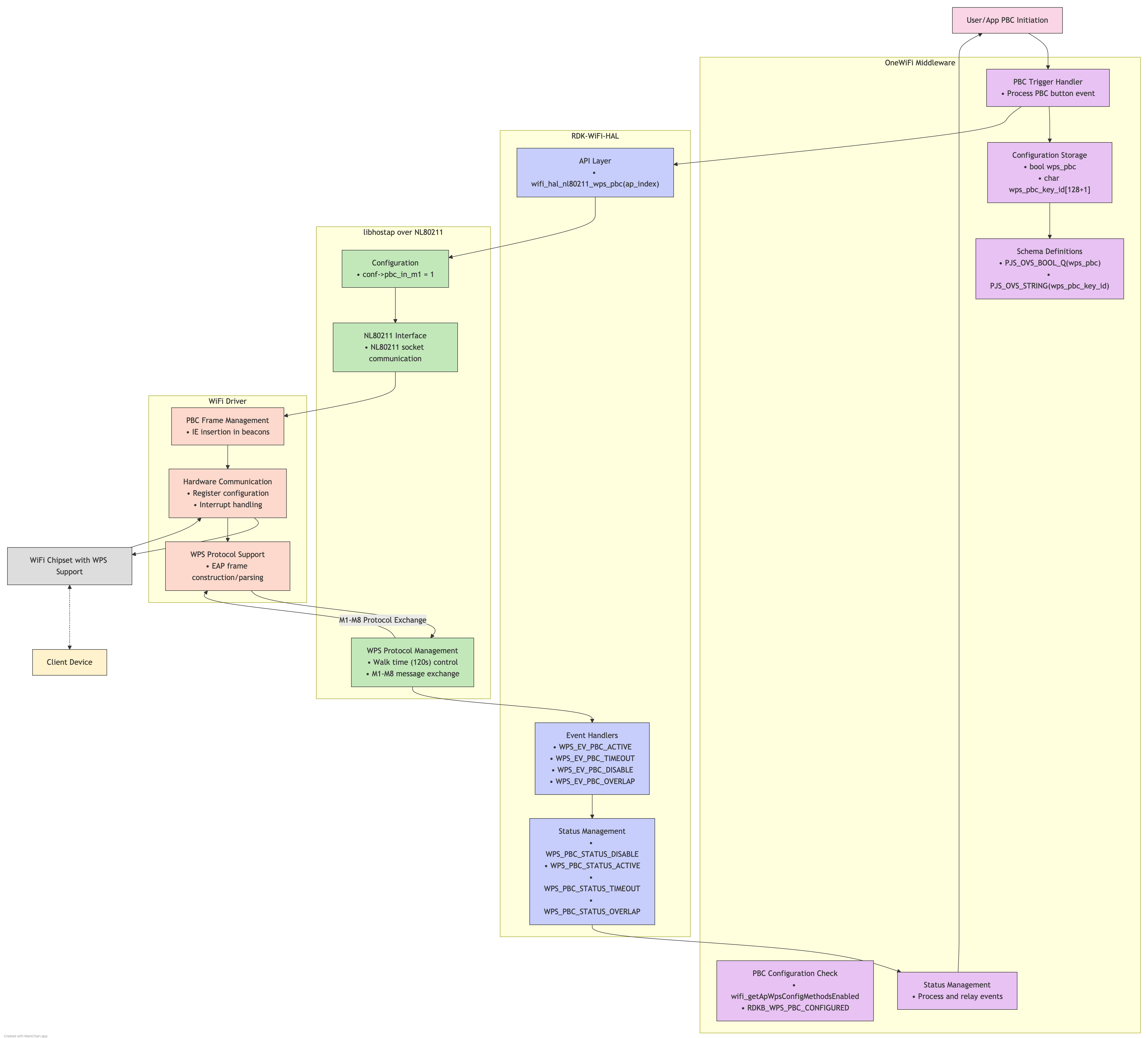
WPS HW button Monitor component design
...
Overview
Community Forums
Content Tools
Tasks