

Page History
<Work In Progress>
ByteBlower Integration with Automatics
Integration Goal
ByteBlower is a powerful network traffic generator and analyzer developed by Excentis, widely used in broadband gateway testing. It enables simulation of real-world Ethernet and Wi-Fi traffic to validate Broadband devices under various network conditions. It offers both low-level APIs for customized scenarios and a high-level Test Framework API for quick automation and standardized validations
...
Our goal is to leverage the API’s exposed by ByteBlower and integrate it with automatics for testing RDKB devices.
High level Integration approach overview
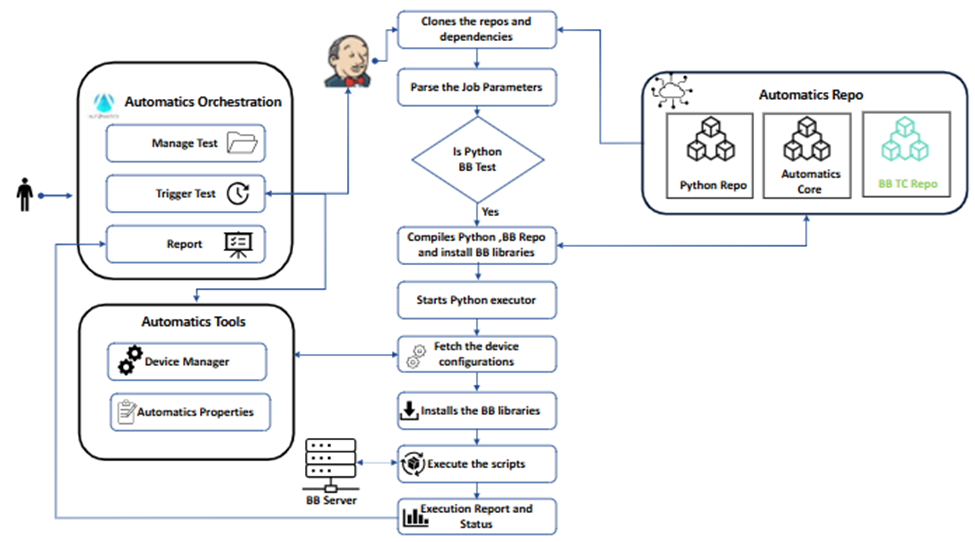
The above diagram depicts a high-level integration plan, outlining the components involved in the integration: Automatics Orchestration, Device Manager, Jenkins, the ByteBlower server, and the code repository.
Jenkins Configuration
- Please follow the same as mentioned in Jenkins Job configuration for script execution - RDK - RDK Central Wiki
- Include ‘pip install byteblowerll’ to access the Byte blower APIs from our script.
- Include ‘pip install scapy’ if packet capture is required in the test cases.
- Install Jpype pip install jpype1==1.4.1
- pip install byteblower_test_framework to access the API’s and reports.
- pip install <lib_path>/automaticsPythonLib-0.1-py3-none-any.whl [ Python lib]
Install HTML plugin in Jenkins using command line.
Jenkins Steps to upload the ByteBlower report to Jenkins.
- Add a Post-build Action to your Jenkins job.
- Add the plugin <HTML Publisher> to copy the report, mention the location where the report is available. (We have mentioned ‘Jenkins Artifcat location’ as the path )
Configuration of Devices
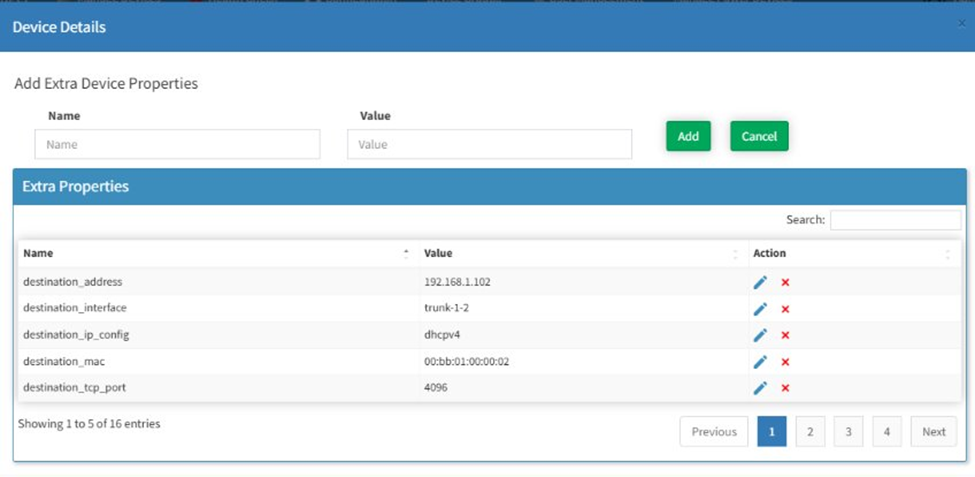
- The details of the server and the DUT is configured in Device Manager in Automatics.
- The Byteblower server and connected client details are configured under the extra properties.
- A dedicated infrastructure for the ByteBlower testcases is preferred.
Create a Repository for Byte Blower Testcases
A dedicated repository is created for ByteBlower test cases. Given that ByteBlower exposes over 2500 APIs, our strategy involves selecting only the most relevant ones for the test cases selected. We will define classes with methods, where each method represents a specific test case. These methods will encapsulate the chosen ByteBlower APIs.
Create a Byteblower Implementation class to define the common Python methods.
Create an implementation class with the common functions that will be used in multiple test cases. Each python test case can import this class so that the functions in it. A sample Python wrapper file in ByteBlower Repo where the implementations are defined.
| Code Block | ||
|---|---|---|
| ||
from byteblowerll.byteblower import ByteBlower |
...
import logging |
...
class ByteBlowerImplementation: |
...
def __init__(self, server_ip): |
...
self.byteblower_instance = ByteBlower.InstanceGet() or ByteBlower() |
...
self.server = None # Server |
...
self.server_ip = server_ip # Store server IP for later connection |
...
def connectToServer(self): |
...
try: |
...
self.server = self.byteblower_instance.ServerAdd(self.server_ip) |
...
logging.info('Successfully connected to ByteBlower Server %s', self.server.InfoGet()) |
...
return True |
...
except Exception as e: |
...
logging.error(f"Failed to connect to ByteBlower server at {self.server_ip}: {e}") |
...
self.server = None |
...
return False |
...
def start_traffic(self): |
...
"""Starts the traffic schedules on the connected ByteBlower server.""" |
...
try: self.byteblower_instance.SchedulesStart() |
...
logging.info("Traffic schedules started.") |
...
except Exception as e: |
...
logging.error(f"Failed to start traffic schedules: {e}") |
...
def stop_traffic(self): |
...
"""Stops the traffic schedules on the connected ByteBlower server.""" |
...
try: |
...
self.byteblower_instance.SchedulesStop() |
...
logging.info("Traffic schedules stopped.") |
...
except Exception as e: |
...
logging.error(f"Failed to stop traffic schedules: {e}") |
This ByteBlower Implementation class initializes a ByteBlower instance and stores the server IP. It provides a dedicated connectToServer method to establish the connection and then defines start_traffic and stop_traffic methods to control traffic schedules, encapsulating ByteBlower API calls within these functions. Similarly, you can add the common functions which will be used in multiple scripts.
The ByteBlower Test Framework API provides predefined test scenarios, including throughput and latency. It also offers enhanced flexibility for report generation via its built-in API.
Writing the testcase
Follow some guidelines while writing the testcase
- Import the Byte Blower Implementation class mentioned above.
- Separate Python file for each testcase which can use the functions in the above class.
- TestNG annotation should be mentioned above the function with the testcase ID [ e.g.: @TestCaseId('TC-BYTEBLOWER-TRAFFICFLOW-001').
- The corresponding wrapper function is invoked for each step and the result should be logged.
Sample Testcase file snippet.
| Code Block | ||
|---|---|---|
| ||
import ByteBlowerImplementation |
...
@TestCaseId('TC_BYTEBLOWER_TRAFFICFLOW_001') |
...
def testTrafficFlow(dut) : |
...
start_traffic(dut.getIpaddress) |
...
stop_traffic(dut.getIPaddress) |
Adding the testcase in Automatics
When the script is added to Automatics, ensure that the Test Script Type is selected as ‘Python’ on the “Manage Script” page. You can proceed with the same steps that you follow for other 1DOT0 test cases in Automatics.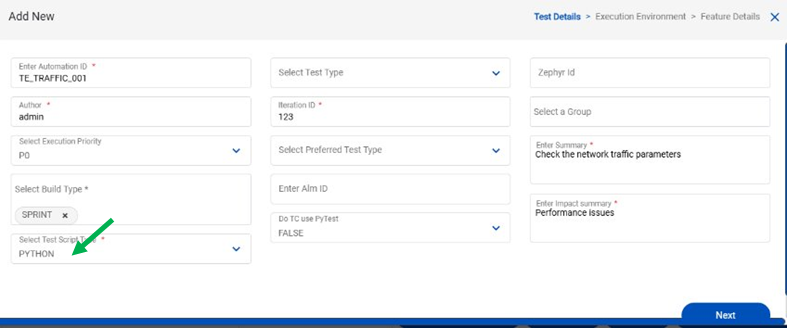
Dependencies
Since the scripts are written in python, please ensure that the dependencies below are met.
...
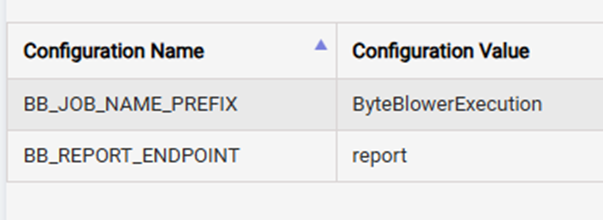
- In Settings > System Configurations Page user should add respective Configuration Value for Configuration Name
- BB_JOB_NAME_PREFIX - This Configuration Name is for Byteblower Jenkins Job
BB_REPORT_ENDPOINT - This Configuration Name is for endpoint of report generated by byteblower
Executing test case
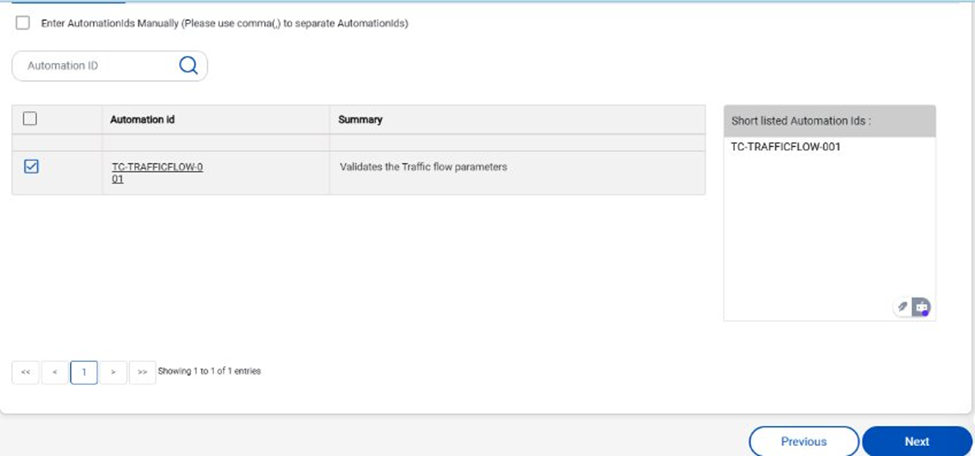
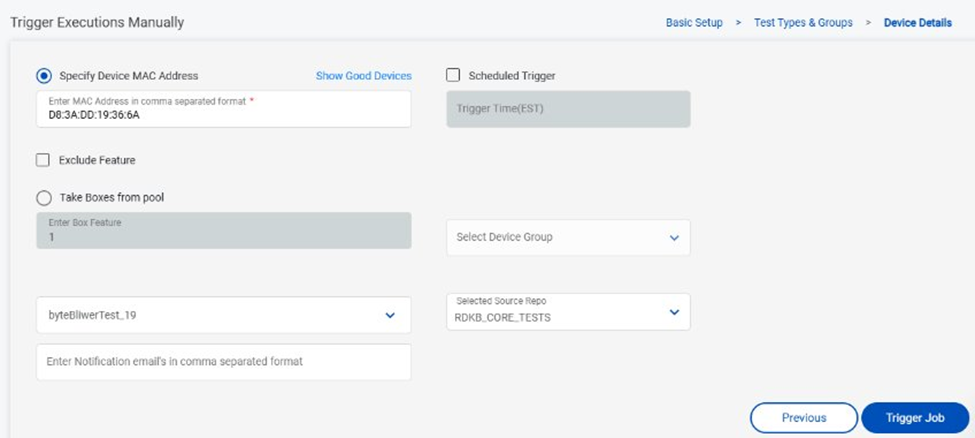
Tests can be executed from Automatics from the ‘Manage Test Trigger’ page.
- Under Manage Test Trigger, select “Trigger Execution Manually.”
- Enter the DUT details, select Test Source as “ByteBlower,” and Execution Environment Type as ‘RDK-B’
- On clicking NEXT, only the ByteBlower test cases will be listed. Select any one of the test cases and proceed further to select the device and trigger the test.
- Once the test is triggered, a Jenkins job will be created, which will install the ByteBlower libraries on the targeted execution machine.
- The executor uses the Automatics Python wrapper library for the test case execution
- The test scripts will then be executed, and their logs and reports will be recorded upon completion.
Execution Reports
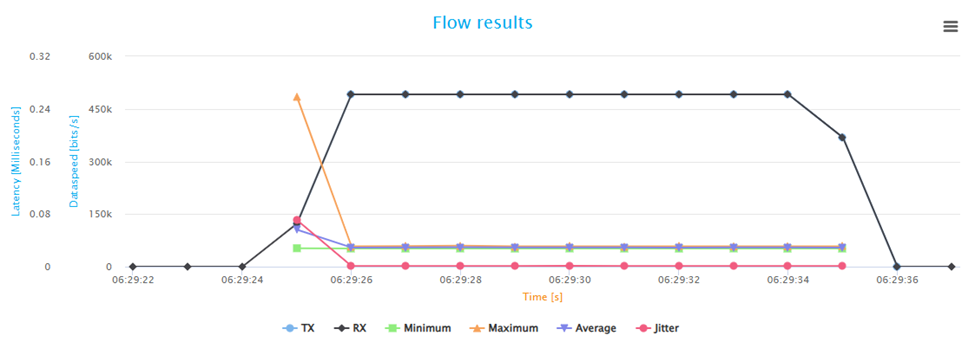
By default, ByteBlower will generate HTML and JSON reports. These reports will be copied to the Jenkins Artifacts folder, and a link to them will be provided alongside the results in Automatics when you click the ByteBlower icon. Additionally, individual step-by-step results are available by clicking the default Automatics Report button.
A ByteBlower report summarizes network performance tests, detailing metrics like throughput, latency, and packet loss for various traffic streams. It provides a comprehensive overview of network device behavior under specific load conditions.
A snippet of report which shows the chart is mentioned below
Challenges Faced
The following are the challenges faced
...
Overview
Community Forums
Content Tools
Tasks