

Page History
...
Clone the repository https://code.rdkcentral.com/r/admin/repos/rdk/tools/automatics/dev-ops(Please open the above url in browser and git clone url is available in the page) and navigate to the
jenkinsServerSetupdirectory:Code Block git clone <repository_url> cd dev-ops/jenkinsServerSetup
Execute the installation script as
sudo:Code Block sudo sh install_jenkins_server.sh
This script installs Docker, pulls the Jenkins server image from Docker Hub, and installs necessary dependencies like Maven and Jenkins plugins. It also creates Automatics Core & RDKB Utils build jobs and build and deployment jobs.
During script execution, provide inputs such as the port for the Jenkins server. After setup, access Jenkins via the browser using the public IP and port (e.g.,
192.168.91.44:8909).Configure Jenkins security:
- Go to "Manage Jenkins" → "Security".
- Under Security Realm, select Jenkins’ own user database.
- In the Authorization section, select "Logged-in users can do anything".
- Unselect "Allow anonymous read access".
- Click "Save".
Modify the necessary configurations in the pre-created Jenkins jobs (e.g., Maven repo URL, shell script file paths).
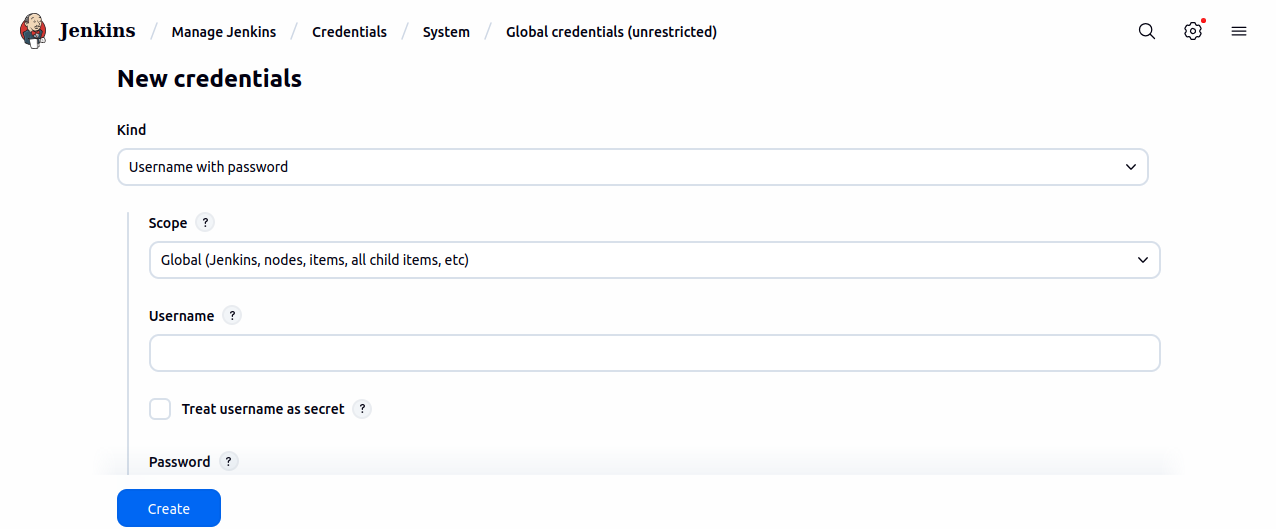
- Add the user credential under Manage Jenkins->Credentials->System→Global Credentials.
Running the jobs
Build Job
...
Overview
Community Forums
Content Tools
Tasks