

Page History
| Table of Contents | ||
|---|---|---|
|
This document defines the mechanism by which the CPE communicates its supported features to the cloud. To ensure compatibility, especially in cases where the cloud introduces support for new groups or blobs not yet implemented in the CPE, RDK adopts a metadata-based approach.
When the CPE contacts the cloud server to retrieve the latest version of documents, during either a forced sync or a bootup sync then it includes the header
Introduction
While considering a use case where cloud may have added support to groups/blobs which CPE doesn’t support, approach that was decided is to have a metadata header with a bitmask indicating supported features in CPE.
When CPE contacts cloud server to get the latest version of documents due a forced sync/bootup sync, then CPE may add a header X-System-Supported-Docs: to in the request. This header will contain a This header contains a bitmask string which indicates what feature is that indicates which features are supported in the CPE FWfirmware.
Within RDK, each feature will be supported by different components. Hence the subdocs may be arranged into groups to form a series of bit masked values separated by commas. Placeholder of each group in the header could be predefined and can be identified by the two MS nibbles. So, cloud may parse the bitstreams as per the group ID shared by RDK. Within each group’s bitmap, cloud can check the bits turned ON to identify supported feature.
Here RDK reserves two MS nibbles for identifying the group, hence it won’t change. Rest of the bits will be used to indicate a subdoc is supported or not.
To identify schema version supported by each group, a new metadata header will be added asdifferent features are managed by separate components. Accordingly, subdocs are organized into groups, each represented by a bit masked value. These values are comma-separated within the header. Each group’s position in the header is predefined and identified by its two most significant (MS) nibbles. The cloud can parse these bitstreams based on the group ID provided by RDK. Within each group’s bitmap, the cloud can check which bits are set to identify the supported features.
RDK reserves two MS nibbles for identifying the group; these remain constant. The remaining bits are used to indicate whether a specific subdoc is supported.
To specify the schema versions supported for each group, the metadata header X-System-Schema-Version
with comma separated version numbers along with a bit mask subdoc id. That will ensure cloud knows the schema version of subdoc supported by CPE in each FW release. Versions in the header may not follow the same ordinal status of bitstream in the supported docs metadata. As all subdoc versions start fromis included. This header contains comma-separated entries, each combining a bitmask subdoc ID with its corresponding version number. This allows the cloud to determine the schema version supported by the CPE for each subdoc in a given firmware release. The order of versions in this header may differ from the bitstream order used in the supported-docs metadata. Since all subdoc versions begin at 1.0, RDK
needdoes not
have to addinclude this header or
version of a subdoc in header until there is a change in version of a subdoc.Both version and supported docs information is populated during build time. So, it won’t change during runtime in CPE.
subdoc version information unless a version change has occurred.
Both version and supported-docs information are generated at build time and remain unchanged during CPE runtime.
RDK Subdoc Group Placeholders
Placeholders for each RDK subdoc group in the meta headerMetadata for supported features in CPE
:| Code Block | ||||
|---|---|---|---|---|
| ||||
X-System-Supported-Docs: <Group1>,<Group2>,<Group3>,...,<GroupN> |
Points for future:
- New supported groups WILL NOT be added in between the existing list.
- If a group/component uses all 24 bits available, then we will have to use a new bitstream at the end of existing ones with a different Group Id(2 MS nibble).
- For simplicity, during initial rollouts, groups are segregated based on RDKB components but there is no hard rule to tie a subdoc to a group as subdocs are identified based on the group Id.
Version metadata
| Code Block |
|---|
X-System-Schema-version: <bitmask1:version_1>,<bitmask2:version_2>,<bitmask3:version_3>,<bitmask4: |

version_4>,... |
Bitstream patterns
: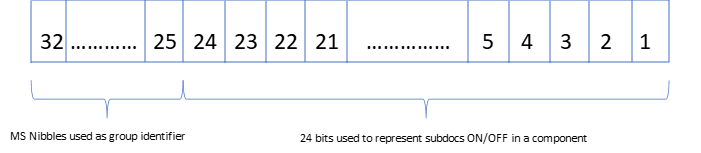
Fig 1: Bits arrangement in bitstream.
In supported supported subdoc metadatametadata, the bitmask will be represents a value considering in which all bits corresponding to supported subdocs turned ON in LS 6 nibbles. supported subdocs are set within the least significant (LS) 6 nibbles.
In version metadata, bitmask value generated for identifying subdoc will be having only one bit turned ON in 6 LS nibbles. will have only a single bit set within the 6 LS nibbles.
As illustrated in the figure above, the two most significant (MS) nibbles serve as the group identifier field.As mentioned in figure above, MS two nibbles will be group identifier field.
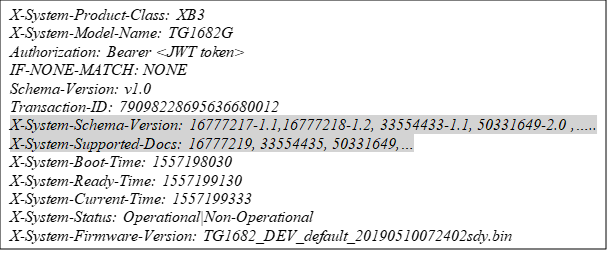
Sample Header with metadata
| Code Block | ||||
|---|---|---|---|---|
| ||||
X-System-Product-Class: XB3
X-System-Model-Name: BananapiBPI-R4
Authorization: Bearer <JWT token>
IF-NONE-MATCH:NONE
Schema-Version: v1.0
Transaction-ID: 79098228695636680012
X-System-Schema-Version: 16777217-1.1, 16777218-1.2, 33554433-1.1, 50331649-2.0,....
X-System-Supported-Docs: 16777247,33554435,50331649,67108865,...
X-System-Boot-Time: 1557198030
X-System-Ready-Time: 1557199130
X-System-Current-Time: 1557199333
X-System-Status: Operational\Non-Operational
X-System-Firmware-Version: rdkb-generic-broadband-image_rdkb-2025q2-kirkstone_20 |
X-System-Supported-Docs:
Here, metadata This header will contain metadata for supported docs will be populated as per placeholder mentioned in Section 2.1. docs, populated according to the placeholders defined in this section.
As per the placeholders, in this sample request header
- 16777219 corresponds to Subdocs of Group-1 of RDK
- 33554435 corresponds to Subdocs of Group-2
- 50331649 corresponds to Subdocs of Group-3 and so on
Cloud will convert decimal bitmask to corresponding binary pattern for decoding.
For eg:
Bitmap conversion of 16777219: 00000001 0000 0000 0000 0000 0000 0011
Bitmap conversion of 33554435: 00000010 0000 0000 0000 0000 0000 0011
Bitmap conversion of 50331649:The cloud converts each decimal bitmask value into its corresponding binary pattern for decoding the supported subdocs.
Example:
| Decimal Bitmask | Binary Conversion |
|---|---|
| 16777219 | 00000001 0000 0000 0000 0000 0000 0011 |
| 33554435 | 00000010 0000 0000 0000 0000 0000 0011 |
| 50331649 | 00000011 0000 0000 0000 0000 0000 0001 |
Details of what subdoc corresponds to bit position is explained in Section 3.
Each binary bit represents the enablement status of a specific subdoc within that group.
The mapping between bit positions and subdocs is explained here.
If only two MS nibbles have bits If only two MS nibbles have bits turned ON, that means no feature is supported by that Groupthat Group in that FW version
X-System-Schema-Version
:This header will hold comma separated strings where each string will have 2 parts. First part, a
- A bit mask generated from the combination of two MS nibbles and a subdoc position in the bitstream.
- The version supported by that subdoc.
For e.g.:
Considering 16777218-1.2 from above sample header
16777218 needs to be converted to binary asExample:
| Example (Decimal–Version) | Binary Conversion | Description |
|---|---|---|
| 16777218–1.2 | 00000001 0000 0000 0000 0000 0000 0010 |
- Binary stream 00000001 0000 0000 0000 0000 0000 0010 indicates that it is the version of subdoc represented by 2nd last least significant bit of first group in the list of supported docs metadata.
16777217-1.1 from above sample header
- 16777217 needs to be converted to binary as 00000001 0000 0000 0000 0000 0000 0001 and 1.1 is the version.
Represents the version of the subdoc corresponding to the second least significant bit of the first group in the supported docs metadata. | |
| 16777217–1.1 | 00000001 0000 0000 0000 0000 0000 00 |
| 01 | Represents the version of subdoc represented by least significant bit of first group in |
| the list of supported docs metadata. |
Version: 1.1 |
| 33554433–1.1 |
| 00000010 0000 0000 0000 0000 0000 0001 |
| Represents the version of the last subdoc of the second group in the list of supported docs. Version: 1.1 |
Here, two MS nibbles can be directly translated to decimal to identify the position/group in the list represented by supported docs.

| Note | ||||
|---|---|---|---|---|
| ||||
RDK may not include the version details of a supported subdoc in the header, if it supports default version 1.0. This is to reduce the string length that will be passed in header. |
Component to feature mapping
Since cloud may not know about what RDK group hosts a particular subdoc, below table will give an idea of Group vs Feature mapping.
The following table outlines the mapping between groups and features, as the cloud may not be aware of which RDK group is responsible for a specific subdoc.
Subdoc to bit position mappingTable 1: Subdoc to bit position mapping
Group Identifier (MS nibble) | Subdocs of group | |
00000001 | portforwarding
| |
lan | ||
wan | ||
macbinding
| ||
hotspot | ||
bridge
| ||
connectedbuilding | ||
xmspeedboost | ||
webui | ||
00000010 | privatessid | |
homessid
| ||
radio
| ||
00000011 | moca | |
00000100 | xdns | |
00000101 | advsecurity | |
| mesh
| |
clienttosteeringprofile | ||
meshsteeringprofiles | ||
wifistatsconfig | ||
mwoconfigs | ||
interference | ||
wifimotionsettings | ||
00000111 | aker
|
|
| telemetry | |
defaultrfc | ||
rfc | ||
00001001 | trafficreport
| |
statusreport
| ||
| radioreport | |
interfacereport
| ||
| telcovoip | |
telcovoice | ||
| wanmanager | |
wanfailover | ||
00001101 | voiceservice | |
00001110 | cellularconfig | |
00001111 | gwfailover | |
gwrestore | ||
00010000 | prioritizedmacs | |
00010001 | lldqoscontrol |
|
Bit Pattern
of supported featuresMapping
This section will depict what feature/subdoc each bit field denotes in the bitmask:
Group-1 
| Group Number | Group ID (1-8 digit) |
|---|
(Fixed |
|---|
Nibbles) | Bit Position for each subdoc (24 digit) | |||||||||
|---|---|---|---|---|---|---|---|---|---|---|
Group 1 | 0000 0001 | 0000 0000 0000 000 | webui | xmspeedboost | ||||||
| connectedbuilding | bridge |
| hotspot | macbinding |
| lan | wan | portforwarding |
| Group |
| 2 | 0000 0010 | 0000 0000 0000 |
000 | 0 | 0 | 0 | 0 | 0 |
| 0 | radio |
| homessid |
| privatessid |
| Group |
| 3 | 0000 0011 | 0000 0000 |
0000
0000
0000
0000
000
moca
0000 000 | 0 | 0 | 0 | 0 | 0 | 0 | 0 | 0 | moca |
| Group 4 | 0000 0100 | 0000 |
0000
0000
0000
0000
000
xdns
0000
0000
0000
0000
000
-0000 0000 000 | 0 | 0 | 0 | 0 | 0 | 0 | 0 | 0 | xdns |
| Group 5 | 0000 0101 | 0000 0000 |
0000 000 | 0 | 0 | 0 | 0 |
|
0 |
0 |
| 0 |
| 0 | advsecurity |
| Group |
| 6 |
0000 0110 | 0000 0000 0000 |
000 | 0 | 0 | wifimotionsettings | interference | mwoconfigs |
|
wifistatsconfig | meshsteeringprofiles |
clienttosteeringprofile | mesh |
| Group |
| 7 |
0000 0111 | 0000 0000 0000 000 | 0 | 0 | 0 |
0 |
0 |
0 |
| 0 |
| 0 | aker |
| Group |
| 8 |
0000
0000
0000
0000
-0000 1000 | 0000 0000 |
0000 000 | 0 | 0 |
|
0 |
0 |
0 | 0 |
rfc | defaultrfc | telemetry | |
Group |
9 |
0000 1001 | 0000 0000 0000 000 | 0 |
0 |
0 |
0 |
0000
0 | 0 | 0 | statusreport |
| trafficreport |
Group |
10 |
0000 1010 | 0000 0000 0000 000 | 0 |
0 |
0 |
0 | 0 |
0000
0 | 0 | interfacereport |
| radioreport |
| Group |
| 11 |
0000 |
1011 | 00000000 0000 000 | 0 |
0 |
0 |
0 | 0 |
0 |
0 | telcovoice |
| telcovoip |
| Group |
| 12 |
0000 1100 | 0000 0000 0000 000 | 0 |
0 |
0 |
0 |
0000
0 | 0 | 0 | wanfailover | wanmanager |
| Group |
| 13 |
0000 1101 | 0000 0000 0000 |
000 | 0 |
0 |
0 |
0 |
0 |
0 |
| 0 |
| 0 | voiceservice |
| Group |
| 14 |
0000 1110 |
0000
0000
0000
0000
0000
0000 0000 0000 000 | 0 | 0 | 0 | 0 | 0 | 0 | 0 | 0 |
| cellularconfig |
| Group |
| 15 |
0000 1111 | 0000 0000 0000 000 | 0 | 0 |
0 |
0 |
0 |
0 |
0 | gwrestore |
| gwfailover |
| Group |
| 16 |
0001 0000 | 0000 |
0000
0000
0000
0000
000
prioritizedmacs
Group-17
0000 0000 000 | 0 | 0 | 0 | 0 | 0 | 0 | 0 | 0 | prioritizedmacs |
| Group 17 | 0001 0001 | 0000 |
0000
0000
0000
0000
000
lldqoscontrol
0000 0000 000 | 0 | 0 | 0 | 0 | 0 | 0 | 0 | 0 | lldqoscontrol |
Component Versioning
In RDKB, a common JSON file named
Versioning in RDKB Components
This section is for RDKB component owners. In RDKB, a common JSON file (webconfig_metadata.json) will be is shared among components during build time. File webconfig_metadata.json will provide information of subdocs supported per platform. This file defines the subdocs supported for each platform. When a new feature is coming in for a platform, then that feature details has to be added under that specific platform during a is introduced for a specific platform, its corresponding details must be added under that platform’s section inwebconfig_metadata.jsonas part of the feature’s code check-in of feature. Build scripts will convert the json to .
During the build process, the scripts convert this JSON file into webconfig.properties
andand install
intoit into the root file system.
webconfig_metadata.json will provide following details:
- Platform for which a subdoc is added
- Group Id
- Name of the subdoc
- Bit position in the 32-bit long bitstream for a group
- Whether support is enabled or not
- Version of schema
Sample json file: metadata.json.odt
Placeholder for each group is predefined, but component owner can decide bit position for a new subdoc added in that group. Bit position for all the defined features are identified and shown in Section 3.
As an example, how bitstream mapping will be considered to generate webconfig.properties is as shown below
The placeholder for each group is predefined; however, the component owner can determine the bit position for any new subdoc added within that group. The bit positions for all defined features are identified and and shown here.
The following example illustrates how the bitstream mapping is used to generate the webconfig.properties file.
Group-1 | Group-2 | Group-3 | Group-4 | Group-5 | Group-6 | Group-7 | Group-8 |
0000 0001 0000 0000 0000 0000 0000 0011 | 0010 0000 0000 0000 0000 0000 0000 0011 | 0011 0000 0000 0000 0000 0000 0000 0001 | 0100 0000 0000 0000 0000 0000 0000 0000 | 0101 0000 0000 0000 0000 0000 0000 0000 | 0110 0000 0000 0000 0000 0000 0000 0000 | 0111 0000 0000 0000 0000 0000 0000 0000 | 1000 0000 0000 0000 0000 0000 0000 0000 |
|
0000 0001 (Fixed Nibbles) | 0000 0000 0000 0000 | 00 | bridge
| hotspot | macbinding
| lan | wan | portforwarding
|
Group-1 bitstream as mentioned in Section 3 Sample here.
Sample webconfig.properties file with file with contents: 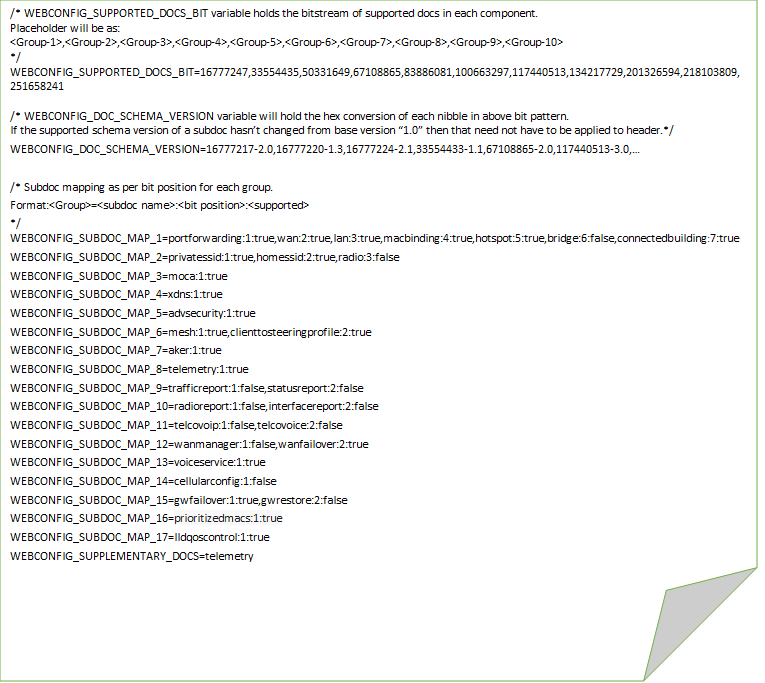
| Code Block | ||||
|---|---|---|---|---|
| ||||
/* WEBCONFIG_SUPPORTED_DOCS_BIT variable holds the bitstream of supported docs in each component.
Placeholder will be as:
<Group-1>,<Group-2>,<Group-3>,<Group-4>,<Group-5>,<Group-6>,<Group-7>,<Group-8>,<Group-9>,<Group-10>
*/
WEBCONFIG_SUPPORTED_DOCS_BIT=16777247,33554435,50331649,67108865,83886081,100663297,117440513,134217729,201326594,218103809,251658241

/* WEBCONFIG_DOC_SCHEMA_VERSION variable will hold the hex conversion of each nibble in above bit pattern.
If the supported schema version of a subdoc hasn’t changed from base version “1.0” then that need not have to be applied to header.*/
WEBCONFIG_DOC_SCHEMA_VERSION=16777217-2.0,16777220-1.3,16777224-2.1,33554433-1.1,67108865-2.0,117440513-3.0,...

/* Subdoc mapping as per bit position for each group.
Format:<Group><subdoc name>:<bit position>:<supported>
*/
WEBCONFIG_SUBDOC_MAP_1=portforwarding:1:true,wan:2:true,lan:3:true,macbinding:4:true,hotspot:5:true,bridge:6:false,connectedbuilding:7:true
WEBCONFIG_SUBDOC_MAP_2=privatessid:1:true,homesid:2:true,radio:3:false
WEBCONFIG_SUBDOC_MAP_3=moca:1:true
WEBCONFIG_SUBDOC_MAP_4=xdns:1:true
WEBCONFIG_SUBDOC_MAP_5=advsecurity:1:true
WEBCONFIG_SUBDOC_MAP_6=mesh:1:true,clienttosteeringprofile:2:true
WEBCONFIG_SUBDOC_MAP_7=aker:1:true
WEBCONFIG_SUBDOC_MAP_8=telemetry:1:true
WEBCONFIG_SUBDOC_MAP_9=trafficreport:1:false,statusreport:2:false
WEBCONFIG_SUBDOC_MAP_10=radioreport:1:false,interfacereport:2:false
WEBCONFIG_SUBDOC_MAP_11=telcovoip:1:false,telcovoice:2:false
WEBCONFIG_SUBDOC_MAP_12=wanmanager:1:false,wanfailover:2:true
WEBCONFIG_SUBDOC_MAP_13=voiceservice:1:true
WEBCONFIG_SUBDOC_MAP_14=cellularconfig:1:false
WEBCONFIG_SUBDOC_MAP_15=gwfailover:1:true,gwrestore:2:false
WEBCONFIG_SUBDOC_MAP_16=prioritizedmacs:1:true
WEBCONFIG_SUBDOC_MAP_17=lldqoscontrol:1:true
WEBCONFIG_SUPPLEMENTARY_DOCS=telemetry |
Overview
Community Forums
Content Tools
Tasks