

Page History
| Table of Contents |
|---|
| Info |
|---|
WIPInformation only,not supported in reference devices |
What does passpoint do
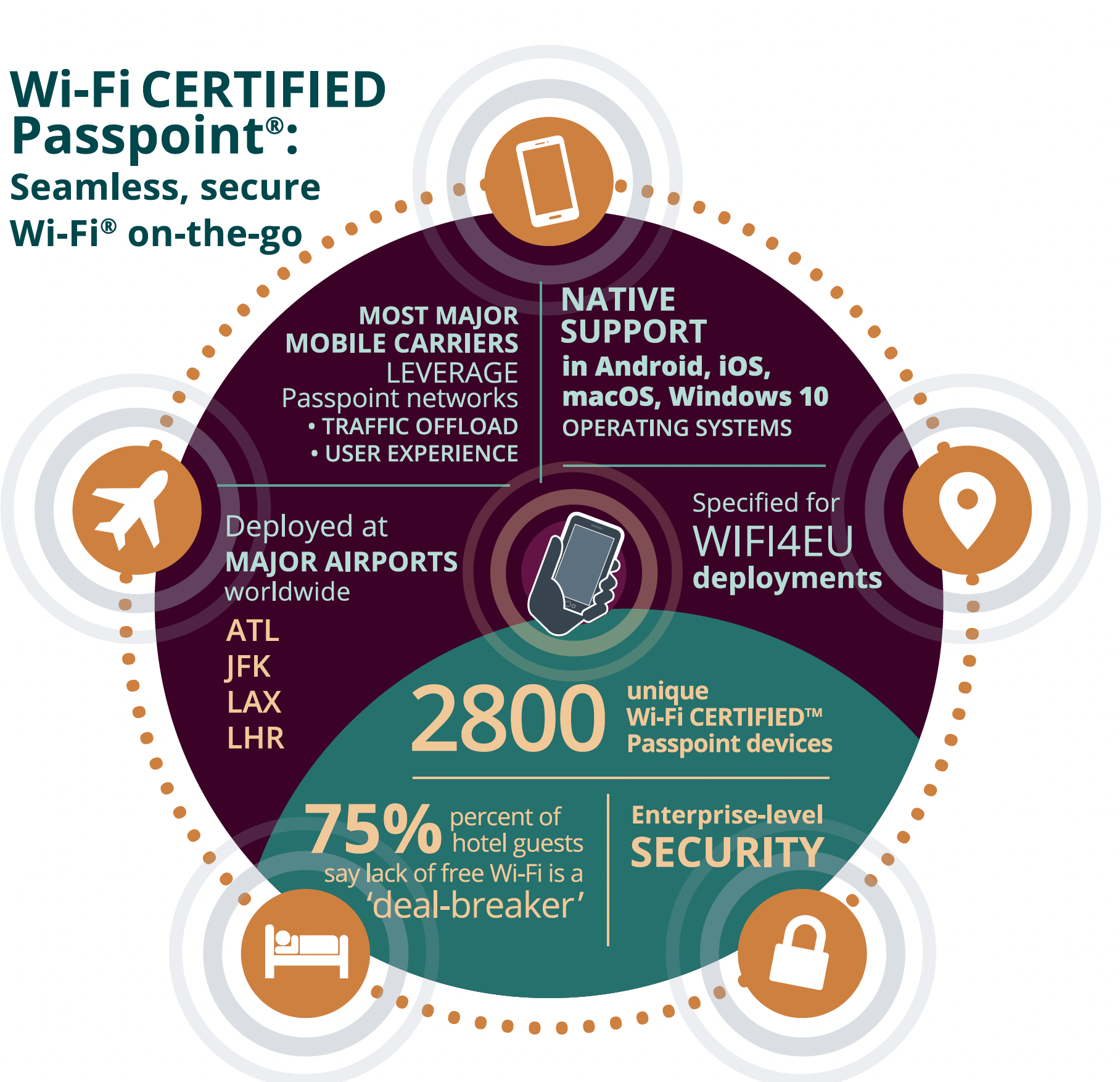
connecting to Wi-Fi networks, particularly public hotspots.It allows users to automatically and securely connect to Wi-Fi networks without needing to manually select SSIDs or enter credentials each time they connect to a new network
...
Advantages
Automatic Network Selection
- Devices equipped with Passpoint can automatically discover and connect to available Wi-Fi networks that meet specific security and performance criteria. This eliminates the need for users to manually search for and join a network.
Seamless Roaming
- Passpoint supports seamless roaming between networks, allowing users to move from one hotspot to another (e.g., from a coffee shop to an airport) without having to log in again.
Enhanced Security
- Passpoint requires the use of WPA2-Enterprise (and more recently WPA3) security, which provides better encryption and authentication compared to open networks. It uses Extensible Authentication Protocol (EAP) for authentication, enhancing security for users.
Authentication via SIM, Certificates, or Username/Password (support all)
- Passpoint supports multiple methods of authentication, including:
SIM-based authentication(for cellular subscribers), - Not tested,But RDK-B can support
Certificate-based authentication - Tested in RDK-B from comcast
Username and password authentication (e.g., credentials provided by an internet service provider). - Tested in RDK-B from comcast
EAP-AKA - Not tested,But RDK-B can support
Efficient Data Management
- By prioritizing Wi-Fi over cellular networks for data traffic, Passpoint can reduce mobile data usage, particularly in areas with strong Wi-Fi coverage.
...
Public Hotspots
- Passpoint is widely used by public Wi-Fi providers, such as airports, hotels, and cafes, to streamline the user experience.
Service Provider Networks
- Internet service providers (ISPs) often deploy Passpoint to allow their subscribers to access their Wi-Fi networks automatically, even when they are away from home.
Enterprise Networks
- Some organizations use Passpoint to provide employees with secure and seamless Wi-Fi access in different office locations.
Appendix
SIM Based Auth(users moving between cellular and Wi-Fi networks)
Steps to Map SIM-Based Authentication with Wi-Fi Passpoint
- SIM-based Authentication Overview (EAP-SIM)
Reference use case state machine
RDK-B supported use cases
Use case # Auth Method 1 SIM-based authentication
2 Certificate-based authentication
3 Username and password authentication
4 EAP-AKA
Hotspot vs wifi passpoint(Hotspot 2.0)
Hotspot Wifi passpoint(hotspot 2.0) - Definition: A Wi-Fi hotspot is a physical location or device that provides wireless internet access to users, typically through a local area network (LAN) connected to a router. It can be created using a mobile device (mobile hotspot) or a dedicated router.
- Authentication: Users typically need to manually connect to a hotspot by selecting the network (SSID) and entering a password.
- User Experience: The connection is often temporary. Users must re-authenticate every time they connect to the hotspot.
- Security: Hotspots generally offer open or password-protected networks. Open networks (like those in public places) can be less secure, exposing users to potential threats unless extra protection (like a VPN) is used.
- Use Cases: Public places like airports, cafes, or personal hotspots created using a smartphone.
- Definition: Wi-Fi Passpoint is a technology that automates the process of connecting to secure Wi-Fi networks. It was developed by the Wi-Fi Alliance under the Hotspot 2.0 standard, making the connection process more seamless, secure, and automated.
- Authentication: Passpoint networks use automatic authentication, often linked to a user’s cellular carrier, credentials stored on a device, or SIM card. Users don’t need to manually select the network or enter credentials each time.
- User Experience: Once a device is configured to use Passpoint, it can automatically connect to available Passpoint-enabled Wi-Fi networks, providing a seamless and roaming-friendly experience similar to how mobile networks operate.
- Security: Passpoint uses advanced encryption standards (WPA3 or WPA2-Enterprise), ensuring a higher level of security than typical public hotspots. It also supports seamless authentication via EAP (Extensible Authentication Protocol).
- Use Cases: Common in places like airports, hotels, or city-wide networks where secure, automatic roaming is desired. Cellular carriers and ISPs also use Passpoint to offload traffic from mobile networks to Wi-Fi.
Prerequisites for Passpoint(Hotspot 2.0)
Configure public VAP's using postman or dmcli
Public hostspot
Wi-Fi Interworking element
GAS(Generic advertisement service)
ANQP (Access Network query protocol)
How to enable
Use case highlevel
| draw.io Diagram | ||||||||||||||||||||||
|---|---|---|---|---|---|---|---|---|---|---|---|---|---|---|---|---|---|---|---|---|---|---|
|
Webconfig enabled builds
For Non Webconfig builds
Use Datamodels to configure and enable - configure public and private VAP's
draw.io Diagram border true diagramName PS2 simpleViewer false width links auto tbstyle top lbox true diagramWidth 881 height 1021 revision 2 draw.io Diagram border true diagramName HS20 simpleViewer false width links auto tbstyle top lbox true diagramWidth 801 height 451 revision 1 Check if the interfaces are up for the vaps and are mapped to GRE TAPS
- brctl show
Testing of passpoint
- Run the sniffer in MAC Book and verify the packets
Where to configure my AUTH methods
- As part of COM_InterworkingService.parameteres
Feature Flags for passpoint and interworking
draw.io Diagram border true diagramName featureflags simpleViewer false width links auto tbstyle top lbox true diagramWidth 781 height 321 revision 1
Complete feature flags
draw.io Diagram border true diagramName all feature flags simpleViewer false width links auto tbstyle top lbox true diagramWidth 941 height 1631 revision 1
Feature enabling in latest builds
- In latest build enabling of feature done inside wifi component
draw.io Diagram border true diagramName Fen simpleViewer false width links auto tbstyle top lbox true diagramWidth 871 height 761 revision 1
Some references
draw.io Diagram border true diagramName iw simpleViewer false width links auto tbstyle top lbox true diagramWidth 690 height 440 revision 1
Ccspwifiagent apply settings(Radio apply will do it for both radio and accesspoint)
Porting Guide - OneWifi#CcspWifiAgent:
- In latest build enabling of feature done inside wifi component
HAL API's
wifi_pushApRoamingConsortiumElement
- https://code.rdkcentral.com/r/plugins/gitiles/rdkb/components/opensource/ccsp/halinterface/+/refs/heads/rdk-next/wifi_hal_ap.h
Porting mechanism
By default this feature is kept under distro and disabled.Operator has to work with OEM/SoC vendor and enable this feature in their platform and get the Platform api's from SoC/OEM to integrate end to end use case
Highlevel Block diagram
Prerequisites
Enable the distro
draw.io Diagram border true diagramName dispi simpleViewer false width links auto tbstyle top lbox true diagramWidth 821 height 301 revision 1 Hal definitions
draw.io Diagram border true diagramName haldef simpleViewer false width links auto tbstyle top lbox true diagramWidth 791 height 241 revision 3 - Definition for enablePassPointSettings and wifi_setGASConfiguration are not available in halinterface(https://code.rdkcentral.com/r/plugins/gitiles/rdkb/components/opensource/ccsp/halinterface/+/refs/heads/rdk-next).its there in rdk-wifi-hal(https://code.rdkcentral.com/r/plugins/gitiles/rdkb/components/opensource/ccsp/hal/rdk-wifi-hal/+/refs/heads/rdk-next/src/).you can port those two api's from rdk-wifi-hal to ccspwifiagent hal
- For enablePassPointSettings it has dependency on
- wifi_setCountryIe(ap_index, passpoint_enable)
- wifi_setProxyArp(ap_index, passpoint_enable)
- wifi_setLayer2TrafficInspectionFiltering(ap_index, layer2TIF)
- wifi_setDownStreamGroupAddress(ap_index, downstream_disable);
- wifi_setBssLoad(ap_index, passpoint_enable);
- wifi_setP2PCrossConnect(ap_index, p2p_disable);
- wifi_pushApHotspotElement(ap_index,passpoint_enable)
wifi_applyGASConfiguration - this is been invoked by wifi_setGASConfiguration
PSM configurations
- As part of device you may need to have passpoint and interworking specific psm entries in the psm config file and by default the code for RFC params for passpoint and interworking are under feature flags.when we enable the distro code is compiled in CcspPandM
draw.io Diagram border true diagramName pppsm simpleViewer false width links auto tbstyle top lbox true diagramWidth 911 height 231 revision 1 draw.io Diagram border true diagramName dmlsrfc simpleViewer false width links auto tbstyle top lbox true diagramWidth 921 height 491 revision 1 Testing of dml's
draw.io Diagram border true diagramName dmlspass simpleViewer false width links auto tbstyle top lbox true diagramWidth 1171 height 1171 revision 1
CcspwifiAgent side - No code changes required
Reference Wi-Fi AccessPoint DML's
Code Block root@RaspberryPi-Gateway:~# dmcli eRT getv Device.WiFi.AccessPoint.7. CR component name is: eRT.com.cisco.spvtg.ccsp.CR subsystem_prefix eRT. getv from/to component(eRT.com.cisco.spvtg.ccsp.wifi): Device.WiFi.AccessPoint.7. Execution succeed. Parameter 1 name: Device.WiFi.AccessPoint.7.Enable type: bool, value: false Parameter 2 name: Device.WiFi.AccessPoint.7.Status type: string, value: Disabled Parameter 3 name: Device.WiFi.AccessPoint.7.Alias type: string, value: AccessPoint7 Parameter 4 name: Device.WiFi.AccessPoint.7.SSIDReference type: string, value: Device.WiFi.SSID.7. Parameter 5 name: Device.WiFi.AccessPoint.7.SSIDAdvertisementEnabled type: bool, value: false Parameter 6 name: Device.WiFi.AccessPoint.7.RetryLimit type: uint, value: 16 Parameter 7 name: Device.WiFi.AccessPoint.7.X_CISCO_COM_LongRetryLimit type: uint, value: 16 Parameter 8 name: Device.WiFi.AccessPoint.7.WMMCapability type: bool, value: true Parameter 9 name: Device.WiFi.AccessPoint.7.UAPSDCapability type: bool, value: true Parameter 10 name: Device.WiFi.AccessPoint.7.WMMEnable type: bool, value: true Parameter 11 name: Device.WiFi.AccessPoint.7.UAPSDEnable type: bool, value: true Parameter 12 name: Device.WiFi.AccessPoint.7.AssociatedDeviceNumberOfEntries type: uint, value: 0 Parameter 13 name: Device.WiFi.AccessPoint.7.X_CISCO_COM_WmmNoAck type: int, value: 0 Parameter 14 name: Device.WiFi.AccessPoint.7.X_CISCO_COM_MulticastRate type: int, value: 123 Parameter 15 name: Device.WiFi.AccessPoint.7.IsolationEnable type: bool, value: false Parameter 16 name: Device.WiFi.AccessPoint.7.X_CISCO_COM_BssMaxNumSta type: int, value: 30 Parameter 17 name: Device.WiFi.AccessPoint.7.X_CISCO_COM_BssCountStaAsCpe type: bool, value: true Parameter 18 name: Device.WiFi.AccessPoint.7.X_CISCO_COM_BssUserStatus type: int, value: 2 Parameter 19 name: Device.WiFi.AccessPoint.7.X_CISCO_COM_BssHotSpot type: bool, value: false Parameter 20 name: Device.WiFi.AccessPoint.7.X_RDKCENTRAL-COM_BeaconRate type: string, value: Parameter 21 name: Device.WiFi.AccessPoint.7.X_CISCO_COM_KickAssocDevices type: bool, value: false Parameter 22 name: Device.WiFi.AccessPoint.7.MaxAssociatedDevices type: uint, value: 64 Parameter 23 name: Device.WiFi.AccessPoint.7.X_COMCAST-COM_AssociatedDevicesHighWatermarkThreshold type: uint, value: 50 Parameter 24 name: Device.WiFi.AccessPoint.7.X_COMCAST-COM_AssociatedDevicesHighWatermarkThresholdReached type: uint, value: 3 Parameter 25 name: Device.WiFi.AccessPoint.7.X_COMCAST-COM_AssociatedDevicesHighWatermark type: uint, value: 3 Parameter 26 name: Device.WiFi.AccessPoint.7.X_COMCAST-COM_AssociatedDevicesHighWatermarkDate type: uint, value: 1727811150 Parameter 27 name: Device.WiFi.AccessPoint.7.X_RDKCENTRAL-COM_InterworkingServiceCapability type: bool, value: false Parameter 28 name: Device.WiFi.AccessPoint.7.X_RDKCENTRAL-COM_InterworkingServiceEnable type: bool, value: false Parameter 29 name: Device.WiFi.AccessPoint.7.X_RDKCENTRAL-COM_InterworkingApplySettings type: bool, value: false Parameter 30 name: Device.WiFi.AccessPoint.7.X_COMCAST-COM_MAC_FilteringMode type: string, value: Allow-ALL Parameter 31 name: Device.WiFi.AccessPoint.7.X_RDKCENTRAL-COM_ManagementFramePowerControl type: int, value: 0 Parameter 32 name: Device.WiFi.AccessPoint.7.X_RDKCENTRAL-COM_rapidReconnectCountEnable type: bool, value: false Parameter 33 name: Device.WiFi.AccessPoint.7.X_RDKCENTRAL-COM_rapidReconnectMaxTime type: int, value: 180 Parameter 34 name: Device.WiFi.AccessPoint.7.X_COMCAST-COM_TXOverflow type: uint, value: 1598768210 Parameter 35 name: Device.WiFi.AccessPoint.7.X_RDKCENTRAL-COM_StatsEnable type: bool, value: false Parameter 36 name: Device.WiFi.AccessPoint.7.X_RDKCENTRAL-COM_WirelessManagementImplemented type: bool, value: false Parameter 37 name: Device.WiFi.AccessPoint.7.X_RDKCENTRAL-COM_BSSTransitionImplemented type: bool, value: false Parameter 38 name: Device.WiFi.AccessPoint.7.X_RDKCENTRAL-COM_BSSTransitionActivated type: bool, value: false Parameter 39 name: Device.WiFi.AccessPoint.7.X_RDKCENTRAL-COM_NeighborReportActivated type: bool, value: false Parameter 40 name: Device.WiFi.AccessPoint.7.X_CISCO_COM_MacFilterTableNumberOfEntries type: uint, value: 0 Parameter 41 name: Device.WiFi.AccessPoint.7.X_RDKCENTRAL-COM_InterworkingElement.AccessNetworkType type: uint, value: 0 Parameter 42 name: Device.WiFi.AccessPoint.7.X_RDKCENTRAL-COM_InterworkingElement.Internet type: bool, value: false Parameter 43 name: Device.WiFi.AccessPoint.7.X_RDKCENTRAL-COM_InterworkingElement.ASRA type: bool, value: false Parameter 44 name: Device.WiFi.AccessPoint.7.X_RDKCENTRAL-COM_InterworkingElement.ESR type: bool, value: false Parameter 45 name: Device.WiFi.AccessPoint.7.X_RDKCENTRAL-COM_InterworkingElement.UESA type: bool, value: false Parameter 46 name: Device.WiFi.AccessPoint.7.X_RDKCENTRAL-COM_InterworkingElement.HESSOptionPresent type: bool, value: false Parameter 47 name: Device.WiFi.AccessPoint.7.X_RDKCENTRAL-COM_InterworkingElement.HESSID type: string, value: Parameter 48 name: Device.WiFi.AccessPoint.7.X_RDKCENTRAL-COM_InterworkingElement.VenueInfo.Group type: uint, value: 0 Parameter 49 name: Device.WiFi.AccessPoint.7.X_RDKCENTRAL-COM_InterworkingElement.VenueInfo.Type type: uint, value: 0 Parameter 50 name: Device.WiFi.AccessPoint.7.X_CISCO_COM_MACFilter.Enable type: bool, value: false Parameter 51 name: Device.WiFi.AccessPoint.7.X_CISCO_COM_MACFilter.FilterAsBlackList type: bool, value: false Parameter 52 name: Device.WiFi.AccessPoint.7.Security.ModesSupported type: string, value: None,WEP-64,WEP-128,WPA2-Personal,WPA-WPA2-Personal,WPA2-Enterprise,WPA-WPA2-Enterprise Parameter 53 name: Device.WiFi.AccessPoint.7.Security.ModeEnabled type: string, value: None Parameter 54 name: Device.WiFi.AccessPoint.7.Security.WEPKey type: string, value: Parameter 55 name: Device.WiFi.AccessPoint.7.Security.X_CISCO_COM_WEPKey type: string, value: Parameter 56 name: Device.WiFi.AccessPoint.7.Security.X_COMCAST-COM_WEPKey type: string, value: Parameter 57 name: Device.WiFi.AccessPoint.7.Security.PreSharedKey type: string, value: Parameter 58 name: Device.WiFi.AccessPoint.7.Security.KeyPassphrase type: string, value: Parameter 59 name: Device.WiFi.AccessPoint.7.Security.X_RDKCENTRAL-COM_TransitionDisable type: bool, value: false Parameter 60 name: Device.WiFi.AccessPoint.7.Security.SAEPassphrase type: string, value: Parameter 61 name: Device.WiFi.AccessPoint.7.Security.X_COMCAST-COM_DefaultKeyPassphrase type: string, value: Parameter 62 name: Device.WiFi.AccessPoint.7.Security.X_COMCAST-COM_KeyPassphrase type: string, value: Parameter 63 name: Device.WiFi.AccessPoint.7.Security.RekeyingInterval type: uint, value: 0 Parameter 64 name: Device.WiFi.AccessPoint.7.Security.X_CISCO_COM_EncryptionMethod type: string, value: Parameter 65 name: Device.WiFi.AccessPoint.7.Security.RadiusServerIPAddr type: string, value: 75.56.77.78 Parameter 66 name: Device.WiFi.AccessPoint.7.Security.RadiusServerPort type: uint, value: 123 Parameter 67 name: Device.WiFi.AccessPoint.7.Security.RadiusSecret type: string, value: Parameter 68 name: Device.WiFi.AccessPoint.7.Security.SecondaryRadiusServerIPAddr type: string, value: 75.56.77.78 Parameter 69 name: Device.WiFi.AccessPoint.7.Security.SecondaryRadiusServerPort type: uint, value: 123 Parameter 70 name: Device.WiFi.AccessPoint.7.Security.SecondaryRadiusSecret type: string, value: Parameter 71 name: Device.WiFi.AccessPoint.7.Security.RadiusDASIPAddr type: string, value: 0.0.0.0 Parameter 72 name: Device.WiFi.AccessPoint.7.Security.RadiusDASPort type: uint, value: 0 Parameter 73 name: Device.WiFi.AccessPoint.7.Security.RadiusDASSecret type: string, value: Parameter 74 name: Device.WiFi.AccessPoint.7.Security.X_CISCO_COM_RadiusReAuthInterval type: int, value: 0 Parameter 75 name: Device.WiFi.AccessPoint.7.Security.X_CISCO_COM_DefaultKey type: int, value: 0 Parameter 76 name: Device.WiFi.AccessPoint.7.Security.MFPConfig type: string, value: Parameter 77 name: Device.WiFi.AccessPoint.7.Security.Reset type: bool, value: false Parameter 78 name: Device.WiFi.AccessPoint.7.Security.X_CISCO_COM_WEPKey64BitNumberOfEntries type: uint, value: 4 Parameter 79 name: Device.WiFi.AccessPoint.7.Security.X_CISCO_COM_WEPKey128BitNumberOfEntries type: uint, value: 4 Parameter 80 name: Device.WiFi.AccessPoint.7.Security.X_CISCO_COM_WEPKey64Bit.1.WEPKey type: string, value: Parameter 81 name: Device.WiFi.AccessPoint.7.Security.X_CISCO_COM_WEPKey64Bit.2.WEPKey type: string, value: Parameter 82 name: Device.WiFi.AccessPoint.7.Security.X_CISCO_COM_WEPKey64Bit.3.WEPKey type: string, value: Parameter 83 name: Device.WiFi.AccessPoint.7.Security.X_CISCO_COM_WEPKey64Bit.4.WEPKey type: string, value: Parameter 84 name: Device.WiFi.AccessPoint.7.Security.X_CISCO_COM_WEPKey128Bit.1.WEPKey type: string, value: Parameter 85 name: Device.WiFi.AccessPoint.7.Security.X_CISCO_COM_WEPKey128Bit.2.WEPKey type: string, value: Parameter 86 name: Device.WiFi.AccessPoint.7.Security.X_CISCO_COM_WEPKey128Bit.3.WEPKey type: string, value: Parameter 87 name: Device.WiFi.AccessPoint.7.Security.X_CISCO_COM_WEPKey128Bit.4.WEPKey type: string, value: Parameter 88 name: Device.WiFi.AccessPoint.7.Security.X_COMCAST-COM_RadiusSettings.RadiusServerRetries type: int, value: 3 Parameter 89 name: Device.WiFi.AccessPoint.7.Security.X_COMCAST-COM_RadiusSettings.RadiusServerRequestTimeout type: int, value: 5 Parameter 90 name: Device.WiFi.AccessPoint.7.Security.X_COMCAST-COM_RadiusSettings.PMKLifetime type: int, value: 28800 Parameter 91 name: Device.WiFi.AccessPoint.7.Security.X_COMCAST-COM_RadiusSettings.PMKCaching type: bool, value: false Parameter 92 name: Device.WiFi.AccessPoint.7.Security.X_COMCAST-COM_RadiusSettings.PMKCacheInterval type: int, value: 300 Parameter 93 name: Device.WiFi.AccessPoint.7.Security.X_COMCAST-COM_RadiusSettings.MaxAuthenticationAttempts type: int, value: 3 Parameter 94 name: Device.WiFi.AccessPoint.7.Security.X_COMCAST-COM_RadiusSettings.BlacklistTableTimeout type: int, value: 600 Parameter 95 name: Device.WiFi.AccessPoint.7.Security.X_COMCAST-COM_RadiusSettings.IdentityRequestRetryInterval type: int, value: 5 Parameter 96 name: Device.WiFi.AccessPoint.7.Security.X_COMCAST-COM_RadiusSettings.QuietPeriodAfterFailedAuthentication type: int, value: 5 Parameter 97 name: Device.WiFi.AccessPoint.7.Security.X_RDKCENTRAL-COM_Authenticator.EAPOLKeyTimeout type: uint, value: 0 Parameter 98 name: Device.WiFi.AccessPoint.7.Security.X_RDKCENTRAL-COM_Authenticator.EAPOLKeyRetries type: uint, value: 0 Parameter 99 name: Device.WiFi.AccessPoint.7.Security.X_RDKCENTRAL-COM_Authenticator.EAPIdentityRequestTimeout type: uint, value: 0 Parameter 100 name: Device.WiFi.AccessPoint.7.Security.X_RDKCENTRAL-COM_Authenticator.EAPIdentityRequestRetries type: uint, value: 0 Parameter 101 name: Device.WiFi.AccessPoint.7.Security.X_RDKCENTRAL-COM_Authenticator.EAPRequestTimeout type: uint, value: 0 Parameter 102 name: Device.WiFi.AccessPoint.7.Security.X_RDKCENTRAL-COM_Authenticator.EAPRequestRetries type: uint, value: 0 Parameter 103 name: Device.WiFi.AccessPoint.7.WPS.Enable type: bool, value: false Parameter 104 name: Device.WiFi.AccessPoint.7.WPS.ConfigMethodsSupported type: string, value: PushButton,PIN Parameter 105 name: Device.WiFi.AccessPoint.7.WPS.ConfigMethodsEnabled type: string, value: Parameter 106 name: Device.WiFi.AccessPoint.7.WPS.X_CISCO_COM_WpsPushButton type: int, value: 0 Parameter 107 name: Device.WiFi.AccessPoint.7.WPS.X_CISCO_COM_Pin type: string, value: 4294967295 Parameter 108 name: Device.WiFi.AccessPoint.7.WPS.X_CISCO_COM_ActivatePushButton type: bool, value: false Parameter 109 name: Device.WiFi.AccessPoint.7.WPS.X_CISCO_COM_ClientPin type: string, value: Parameter 110 name: Device.WiFi.AccessPoint.7.WPS.X_Comcast_com_Configured type: bool, value: false Parameter 111 name: Device.WiFi.AccessPoint.7.WPS.X_CISCO_COM_CancelSession type: bool, value: false Parameter 112 name: Device.WiFi.AccessPoint.7.X_RDKCENTRAL-COM_DPP.Version type: uint, value: 0 Parameter 113 name: Device.WiFi.AccessPoint.7.X_RDKCENTRAL-COM_DPP.PrivateSigningKey type: string, value: Parameter 114 name: Device.WiFi.AccessPoint.7.X_RDKCENTRAL-COM_DPP.PrivateReconfigAccessKey type: string, value: Parameter 115 name: Device.WiFi.AccessPoint.7.X_RDKCENTRAL-COM_DPP.STANumberOfEntries type: uint, value: 16 Parameter 116 name: Device.WiFi.AccessPoint.7.X_RDKCENTRAL-COM_DPP.STA.1.ClientMac type: string, value: Parameter 117 name: Device.WiFi.AccessPoint.7.X_RDKCENTRAL-COM_DPP.STA.1.InitiatorBootstrapSubjectPublicKeyInfo type: string, value: Parameter 118 name: Device.WiFi.AccessPoint.7.X_RDKCENTRAL-COM_DPP.STA.1.ResponderBootstrapSubjectPublicKeyInfo type: string, value: Parameter 119 name: Device.WiFi.AccessPoint.7.X_RDKCENTRAL-COM_DPP.STA.1.Channels type: string, value: Parameter 120 name: Device.WiFi.AccessPoint.7.X_RDKCENTRAL-COM_DPP.STA.1.MaxRetryCount type: uint, value: 0 Parameter 121 name: Device.WiFi.AccessPoint.7.X_RDKCENTRAL-COM_DPP.STA.1.Activate type: bool, value: false Parameter 122 name: Device.WiFi.AccessPoint.7.X_RDKCENTRAL-COM_DPP.STA.1.ActivationStatus type: string, value: Parameter 123 name: Device.WiFi.AccessPoint.7.X_RDKCENTRAL-COM_DPP.STA.1.EnrolleeResponderStatus type: string, value: Parameter 124 name: Device.WiFi.AccessPoint.7.X_RDKCENTRAL-COM_DPP.STA.1.Credential.KeyManagement type: string, value: Parameter 125 name: Device.WiFi.AccessPoint.7.X_RDKCENTRAL-COM_DPP.STA.1.Credential.psk_hex type: string, value: not_allowed_to_show Parameter 126 name: Device.WiFi.AccessPoint.7.X_RDKCENTRAL-COM_DPP.STA.1.Credential.password type: string, value: not_allowed_to_show Parameter 127 name: Device.WiFi.AccessPoint.7.X_RDKCENTRAL-COM_DPP.STA.2.ClientMac type: string, value: Parameter 128 name: Device.WiFi.AccessPoint.7.X_RDKCENTRAL-COM_DPP.STA.2.InitiatorBootstrapSubjectPublicKeyInfo type: string, value: Parameter 129 name: Device.WiFi.AccessPoint.7.X_RDKCENTRAL-COM_DPP.STA.2.ResponderBootstrapSubjectPublicKeyInfo type: string, value: Parameter 130 name: Device.WiFi.AccessPoint.7.X_RDKCENTRAL-COM_DPP.STA.2.Channels type: string, value: Parameter 131 name: Device.WiFi.AccessPoint.7.X_RDKCENTRAL-COM_DPP.STA.2.MaxRetryCount type: uint, value: 0 Parameter 132 name: Device.WiFi.AccessPoint.7.X_RDKCENTRAL-COM_DPP.STA.2.Activate type: bool, value: false Parameter 133 name: Device.WiFi.AccessPoint.7.X_RDKCENTRAL-COM_DPP.STA.2.ActivationStatus type: string, value: Parameter 134 name: Device.WiFi.AccessPoint.7.X_RDKCENTRAL-COM_DPP.STA.2.EnrolleeResponderStatus type: string, value: Parameter 135 name: Device.WiFi.AccessPoint.7.X_RDKCENTRAL-COM_DPP.STA.2.Credential.KeyManagement type: string, value: Parameter 136 name: Device.WiFi.AccessPoint.7.X_RDKCENTRAL-COM_DPP.STA.2.Credential.psk_hex type: string, value: not_allowed_to_show Parameter 137 name: Device.WiFi.AccessPoint.7.X_RDKCENTRAL-COM_DPP.STA.2.Credential.password type: string, value: not_allowed_to_show Parameter 138 name: Device.WiFi.AccessPoint.7.X_RDKCENTRAL-COM_DPP.STA.3.ClientMac type: string, value: Parameter 139 name: Device.WiFi.AccessPoint.7.X_RDKCENTRAL-COM_DPP.STA.3.InitiatorBootstrapSubjectPublicKeyInfo type: string, value: Parameter 140 name: Device.WiFi.AccessPoint.7.X_RDKCENTRAL-COM_DPP.STA.3.ResponderBootstrapSubjectPublicKeyInfo type: string, value: Parameter 141 name: Device.WiFi.AccessPoint.7.X_RDKCENTRAL-COM_DPP.STA.3.Channels type: string, value: Parameter 142 name: Device.WiFi.AccessPoint.7.X_RDKCENTRAL-COM_DPP.STA.3.MaxRetryCount type: uint, value: 0 Parameter 143 name: Device.WiFi.AccessPoint.7.X_RDKCENTRAL-COM_DPP.STA.3.Activate type: bool, value: false Parameter 144 name: Device.WiFi.AccessPoint.7.X_RDKCENTRAL-COM_DPP.STA.3.ActivationStatus type: string, value: Parameter 145 name: Device.WiFi.AccessPoint.7.X_RDKCENTRAL-COM_DPP.STA.3.EnrolleeResponderStatus type: string, value: Parameter 146 name: Device.WiFi.AccessPoint.7.X_RDKCENTRAL-COM_DPP.STA.3.Credential.KeyManagement type: string, value: Parameter 147 name: Device.WiFi.AccessPoint.7.X_RDKCENTRAL-COM_DPP.STA.3.Credential.psk_hex type: string, value: not_allowed_to_show Parameter 148 name: Device.WiFi.AccessPoint.7.X_RDKCENTRAL-COM_DPP.STA.3.Credential.password type: string, value: not_allowed_to_show Parameter 149 name: Device.WiFi.AccessPoint.7.X_RDKCENTRAL-COM_DPP.STA.4.ClientMac type: string, value: Parameter 150 name: Device.WiFi.AccessPoint.7.X_RDKCENTRAL-COM_DPP.STA.4.InitiatorBootstrapSubjectPublicKeyInfo type: string, value: Parameter 151 name: Device.WiFi.AccessPoint.7.X_RDKCENTRAL-COM_DPP.STA.4.ResponderBootstrapSubjectPublicKeyInfo type: string, value: Parameter 152 name: Device.WiFi.AccessPoint.7.X_RDKCENTRAL-COM_DPP.STA.4.Channels type: string, value: Parameter 153 name: Device.WiFi.AccessPoint.7.X_RDKCENTRAL-COM_DPP.STA.4.MaxRetryCount type: uint, value: 0 Parameter 154 name: Device.WiFi.AccessPoint.7.X_RDKCENTRAL-COM_DPP.STA.4.Activate type: bool, value: false Parameter 155 name: Device.WiFi.AccessPoint.7.X_RDKCENTRAL-COM_DPP.STA.4.ActivationStatus type: string, value: Parameter 156 name: Device.WiFi.AccessPoint.7.X_RDKCENTRAL-COM_DPP.STA.4.EnrolleeResponderStatus type: string, value: Parameter 157 name: Device.WiFi.AccessPoint.7.X_RDKCENTRAL-COM_DPP.STA.4.Credential.KeyManagement type: string, value: Parameter 158 name: Device.WiFi.AccessPoint.7.X_RDKCENTRAL-COM_DPP.STA.4.Credential.psk_hex type: string, value: not_allowed_to_show Parameter 159 name: Device.WiFi.AccessPoint.7.X_RDKCENTRAL-COM_DPP.STA.4.Credential.password type: string, value: not_allowed_to_show Parameter 160 name: Device.WiFi.AccessPoint.7.X_RDKCENTRAL-COM_DPP.STA.5.ClientMac type: string, value: Parameter 161 name: Device.WiFi.AccessPoint.7.X_RDKCENTRAL-COM_DPP.STA.5.InitiatorBootstrapSubjectPublicKeyInfo type: string, value: Parameter 162 name: Device.WiFi.AccessPoint.7.X_RDKCENTRAL-COM_DPP.STA.5.ResponderBootstrapSubjectPublicKeyInfo type: string, value: Parameter 163 name: Device.WiFi.AccessPoint.7.X_RDKCENTRAL-COM_DPP.STA.5.Channels type: string, value: Parameter 164 name: Device.WiFi.AccessPoint.7.X_RDKCENTRAL-COM_DPP.STA.5.MaxRetryCount type: uint, value: 0 Parameter 165 name: Device.WiFi.AccessPoint.7.X_RDKCENTRAL-COM_DPP.STA.5.Activate type: bool, value: false Parameter 166 name: Device.WiFi.AccessPoint.7.X_RDKCENTRAL-COM_DPP.STA.5.ActivationStatus type: string, value: Parameter 167 name: Device.WiFi.AccessPoint.7.X_RDKCENTRAL-COM_DPP.STA.5.EnrolleeResponderStatus type: string, value: Parameter 168 name: Device.WiFi.AccessPoint.7.X_RDKCENTRAL-COM_DPP.STA.5.Credential.KeyManagement type: string, value: Parameter 169 name: Device.WiFi.AccessPoint.7.X_RDKCENTRAL-COM_DPP.STA.5.Credential.psk_hex type: string, value: not_allowed_to_show Parameter 170 name: Device.WiFi.AccessPoint.7.X_RDKCENTRAL-COM_DPP.STA.5.Credential.password type: string, value: not_allowed_to_show Parameter 171 name: Device.WiFi.AccessPoint.7.X_RDKCENTRAL-COM_DPP.STA.6.ClientMac type: string, value: Parameter 172 name: Device.WiFi.AccessPoint.7.X_RDKCENTRAL-COM_DPP.STA.6.InitiatorBootstrapSubjectPublicKeyInfo type: string, value: Parameter 173 name: Device.WiFi.AccessPoint.7.X_RDKCENTRAL-COM_DPP.STA.6.ResponderBootstrapSubjectPublicKeyInfo type: string, value: Parameter 174 name: Device.WiFi.AccessPoint.7.X_RDKCENTRAL-COM_DPP.STA.6.Channels type: string, value: Parameter 175 name: Device.WiFi.AccessPoint.7.X_RDKCENTRAL-COM_DPP.STA.6.MaxRetryCount type: uint, value: 0 Parameter 176 name: Device.WiFi.AccessPoint.7.X_RDKCENTRAL-COM_DPP.STA.6.Activate type: bool, value: false Parameter 177 name: Device.WiFi.AccessPoint.7.X_RDKCENTRAL-COM_DPP.STA.6.ActivationStatus type: string, value: Parameter 178 name: Device.WiFi.AccessPoint.7.X_RDKCENTRAL-COM_DPP.STA.6.EnrolleeResponderStatus type: string, value: Parameter 179 name: Device.WiFi.AccessPoint.7.X_RDKCENTRAL-COM_DPP.STA.6.Credential.KeyManagement type: string, value: Parameter 180 name: Device.WiFi.AccessPoint.7.X_RDKCENTRAL-COM_DPP.STA.6.Credential.psk_hex type: string, value: not_allowed_to_show Parameter 181 name: Device.WiFi.AccessPoint.7.X_RDKCENTRAL-COM_DPP.STA.6.Credential.password type: string, value: not_allowed_to_show Parameter 182 name: Device.WiFi.AccessPoint.7.X_RDKCENTRAL-COM_DPP.STA.7.ClientMac type: string, value: Parameter 183 name: Device.WiFi.AccessPoint.7.X_RDKCENTRAL-COM_DPP.STA.7.InitiatorBootstrapSubjectPublicKeyInfo type: string, value: Parameter 184 name: Device.WiFi.AccessPoint.7.X_RDKCENTRAL-COM_DPP.STA.7.ResponderBootstrapSubjectPublicKeyInfo type: string, value: Parameter 185 name: Device.WiFi.AccessPoint.7.X_RDKCENTRAL-COM_DPP.STA.7.Channels type: string, value: Parameter 186 name: Device.WiFi.AccessPoint.7.X_RDKCENTRAL-COM_DPP.STA.7.MaxRetryCount type: uint, value: 0 Parameter 187 name: Device.WiFi.AccessPoint.7.X_RDKCENTRAL-COM_DPP.STA.7.Activate type: bool, value: false Parameter 188 name: Device.WiFi.AccessPoint.7.X_RDKCENTRAL-COM_DPP.STA.7.ActivationStatus type: string, value: Parameter 189 name: Device.WiFi.AccessPoint.7.X_RDKCENTRAL-COM_DPP.STA.7.EnrolleeResponderStatus type: string, value: Parameter 190 name: Device.WiFi.AccessPoint.7.X_RDKCENTRAL-COM_DPP.STA.7.Credential.KeyManagement type: string, value: Parameter 191 name: Device.WiFi.AccessPoint.7.X_RDKCENTRAL-COM_DPP.STA.7.Credential.psk_hex type: string, value: not_allowed_to_show Parameter 192 name: Device.WiFi.AccessPoint.7.X_RDKCENTRAL-COM_DPP.STA.7.Credential.password type: string, value: not_allowed_to_show Parameter 193 name: Device.WiFi.AccessPoint.7.X_RDKCENTRAL-COM_DPP.STA.8.ClientMac type: string, value: Parameter 194 name: Device.WiFi.AccessPoint.7.X_RDKCENTRAL-COM_DPP.STA.8.InitiatorBootstrapSubjectPublicKeyInfo type: string, value: Parameter 195 name: Device.WiFi.AccessPoint.7.X_RDKCENTRAL-COM_DPP.STA.8.ResponderBootstrapSubjectPublicKeyInfo type: string, value: Parameter 196 name: Device.WiFi.AccessPoint.7.X_RDKCENTRAL-COM_DPP.STA.8.Channels type: string, value: Parameter 197 name: Device.WiFi.AccessPoint.7.X_RDKCENTRAL-COM_DPP.STA.8.MaxRetryCount type: uint, value: 0 Parameter 198 name: Device.WiFi.AccessPoint.7.X_RDKCENTRAL-COM_DPP.STA.8.Activate type: bool, value: false Parameter 199 name: Device.WiFi.AccessPoint.7.X_RDKCENTRAL-COM_DPP.STA.8.ActivationStatus type: string, value: Parameter 200 name: Device.WiFi.AccessPoint.7.X_RDKCENTRAL-COM_DPP.STA.8.EnrolleeResponderStatus type: string, value: Parameter 201 name: Device.WiFi.AccessPoint.7.X_RDKCENTRAL-COM_DPP.STA.8.Credential.KeyManagement type: string, value: Parameter 202 name: Device.WiFi.AccessPoint.7.X_RDKCENTRAL-COM_DPP.STA.8.Credential.psk_hex type: string, value: not_allowed_to_show Parameter 203 name: Device.WiFi.AccessPoint.7.X_RDKCENTRAL-COM_DPP.STA.8.Credential.password type: string, value: not_allowed_to_show Parameter 204 name: Device.WiFi.AccessPoint.7.X_RDKCENTRAL-COM_DPP.STA.9.ClientMac type: string, value: Parameter 205 name: Device.WiFi.AccessPoint.7.X_RDKCENTRAL-COM_DPP.STA.9.InitiatorBootstrapSubjectPublicKeyInfo type: string, value: Parameter 206 name: Device.WiFi.AccessPoint.7.X_RDKCENTRAL-COM_DPP.STA.9.ResponderBootstrapSubjectPublicKeyInfo type: string, value: Parameter 207 name: Device.WiFi.AccessPoint.7.X_RDKCENTRAL-COM_DPP.STA.9.Channels type: string, value: Parameter 208 name: Device.WiFi.AccessPoint.7.X_RDKCENTRAL-COM_DPP.STA.9.MaxRetryCount type: uint, value: 0 Parameter 209 name: Device.WiFi.AccessPoint.7.X_RDKCENTRAL-COM_DPP.STA.9.Activate type: bool, value: false Parameter 210 name: Device.WiFi.AccessPoint.7.X_RDKCENTRAL-COM_DPP.STA.9.ActivationStatus type: string, value: Parameter 211 name: Device.WiFi.AccessPoint.7.X_RDKCENTRAL-COM_DPP.STA.9.EnrolleeResponderStatus type: string, value: Parameter 212 name: Device.WiFi.AccessPoint.7.X_RDKCENTRAL-COM_DPP.STA.9.Credential.KeyManagement type: string, value: Parameter 213 name: Device.WiFi.AccessPoint.7.X_RDKCENTRAL-COM_DPP.STA.9.Credential.psk_hex type: string, value: not_allowed_to_show Parameter 214 name: Device.WiFi.AccessPoint.7.X_RDKCENTRAL-COM_DPP.STA.9.Credential.password type: string, value: not_allowed_to_show Parameter 215 name: Device.WiFi.AccessPoint.7.X_RDKCENTRAL-COM_DPP.STA.10.ClientMac type: string, value: Parameter 216 name: Device.WiFi.AccessPoint.7.X_RDKCENTRAL-COM_DPP.STA.10.InitiatorBootstrapSubjectPublicKeyInfo type: string, value: Parameter 217 name: Device.WiFi.AccessPoint.7.X_RDKCENTRAL-COM_DPP.STA.10.ResponderBootstrapSubjectPublicKeyInfo type: string, value: Parameter 218 name: Device.WiFi.AccessPoint.7.X_RDKCENTRAL-COM_DPP.STA.10.Channels type: string, value: Parameter 219 name: Device.WiFi.AccessPoint.7.X_RDKCENTRAL-COM_DPP.STA.10.MaxRetryCount type: uint, value: 0 Parameter 220 name: Device.WiFi.AccessPoint.7.X_RDKCENTRAL-COM_DPP.STA.10.Activate type: bool, value: false Parameter 221 name: Device.WiFi.AccessPoint.7.X_RDKCENTRAL-COM_DPP.STA.10.ActivationStatus type: string, value: Parameter 222 name: Device.WiFi.AccessPoint.7.X_RDKCENTRAL-COM_DPP.STA.10.EnrolleeResponderStatus type: string, value: Parameter 223 name: Device.WiFi.AccessPoint.7.X_RDKCENTRAL-COM_DPP.STA.10.Credential.KeyManagement type: string, value: Parameter 224 name: Device.WiFi.AccessPoint.7.X_RDKCENTRAL-COM_DPP.STA.10.Credential.psk_hex type: string, value: not_allowed_to_show Parameter 225 name: Device.WiFi.AccessPoint.7.X_RDKCENTRAL-COM_DPP.STA.10.Credential.password type: string, value: not_allowed_to_show Parameter 226 name: Device.WiFi.AccessPoint.7.X_RDKCENTRAL-COM_DPP.STA.11.ClientMac type: string, value: Parameter 227 name: Device.WiFi.AccessPoint.7.X_RDKCENTRAL-COM_DPP.STA.11.InitiatorBootstrapSubjectPublicKeyInfo type: string, value: Parameter 228 name: Device.WiFi.AccessPoint.7.X_RDKCENTRAL-COM_DPP.STA.11.ResponderBootstrapSubjectPublicKeyInfo type: string, value: Parameter 229 name: Device.WiFi.AccessPoint.7.X_RDKCENTRAL-COM_DPP.STA.11.Channels type: string, value: Parameter 230 name: Device.WiFi.AccessPoint.7.X_RDKCENTRAL-COM_DPP.STA.11.MaxRetryCount type: uint, value: 0 Parameter 231 name: Device.WiFi.AccessPoint.7.X_RDKCENTRAL-COM_DPP.STA.11.Activate type: bool, value: false Parameter 232 name: Device.WiFi.AccessPoint.7.X_RDKCENTRAL-COM_DPP.STA.11.ActivationStatus type: string, value: Parameter 233 name: Device.WiFi.AccessPoint.7.X_RDKCENTRAL-COM_DPP.STA.11.EnrolleeResponderStatus type: string, value: Parameter 234 name: Device.WiFi.AccessPoint.7.X_RDKCENTRAL-COM_DPP.STA.11.Credential.KeyManagement type: string, value: Parameter 235 name: Device.WiFi.AccessPoint.7.X_RDKCENTRAL-COM_DPP.STA.11.Credential.psk_hex type: string, value: not_allowed_to_show Parameter 236 name: Device.WiFi.AccessPoint.7.X_RDKCENTRAL-COM_DPP.STA.11.Credential.password type: string, value: not_allowed_to_show Parameter 237 name: Device.WiFi.AccessPoint.7.X_RDKCENTRAL-COM_DPP.STA.12.ClientMac type: string, value: Parameter 238 name: Device.WiFi.AccessPoint.7.X_RDKCENTRAL-COM_DPP.STA.12.InitiatorBootstrapSubjectPublicKeyInfo type: string, value: Parameter 239 name: Device.WiFi.AccessPoint.7.X_RDKCENTRAL-COM_DPP.STA.12.ResponderBootstrapSubjectPublicKeyInfo type: string, value: Parameter 240 name: Device.WiFi.AccessPoint.7.X_RDKCENTRAL-COM_DPP.STA.12.Channels type: string, value: Parameter 241 name: Device.WiFi.AccessPoint.7.X_RDKCENTRAL-COM_DPP.STA.12.MaxRetryCount type: uint, value: 0 Parameter 242 name: Device.WiFi.AccessPoint.7.X_RDKCENTRAL-COM_DPP.STA.12.Activate type: bool, value: false Parameter 243 name: Device.WiFi.AccessPoint.7.X_RDKCENTRAL-COM_DPP.STA.12.ActivationStatus type: string, value: Parameter 244 name: Device.WiFi.AccessPoint.7.X_RDKCENTRAL-COM_DPP.STA.12.EnrolleeResponderStatus type: string, value: Parameter 245 name: Device.WiFi.AccessPoint.7.X_RDKCENTRAL-COM_DPP.STA.12.Credential.KeyManagement type: string, value: Parameter 246 name: Device.WiFi.AccessPoint.7.X_RDKCENTRAL-COM_DPP.STA.12.Credential.psk_hex type: string, value: not_allowed_to_show Parameter 247 name: Device.WiFi.AccessPoint.7.X_RDKCENTRAL-COM_DPP.STA.12.Credential.password type: string, value: not_allowed_to_show Parameter 248 name: Device.WiFi.AccessPoint.7.X_RDKCENTRAL-COM_DPP.STA.13.ClientMac type: string, value: Parameter 249 name: Device.WiFi.AccessPoint.7.X_RDKCENTRAL-COM_DPP.STA.13.InitiatorBootstrapSubjectPublicKeyInfo type: string, value: Parameter 250 name: Device.WiFi.AccessPoint.7.X_RDKCENTRAL-COM_DPP.STA.13.ResponderBootstrapSubjectPublicKeyInfo type: string, value: Parameter 251 name: Device.WiFi.AccessPoint.7.X_RDKCENTRAL-COM_DPP.STA.13.Channels type: string, value: Parameter 252 name: Device.WiFi.AccessPoint.7.X_RDKCENTRAL-COM_DPP.STA.13.MaxRetryCount type: uint, value: 0 Parameter 253 name: Device.WiFi.AccessPoint.7.X_RDKCENTRAL-COM_DPP.STA.13.Activate type: bool, value: false Parameter 254 name: Device.WiFi.AccessPoint.7.X_RDKCENTRAL-COM_DPP.STA.13.ActivationStatus type: string, value: Parameter 255 name: Device.WiFi.AccessPoint.7.X_RDKCENTRAL-COM_DPP.STA.13.EnrolleeResponderStatus type: string, value: Parameter 256 name: Device.WiFi.AccessPoint.7.X_RDKCENTRAL-COM_DPP.STA.13.Credential.KeyManagement type: string, value: Parameter 257 name: Device.WiFi.AccessPoint.7.X_RDKCENTRAL-COM_DPP.STA.13.Credential.psk_hex type: string, value: not_allowed_to_show Parameter 258 name: Device.WiFi.AccessPoint.7.X_RDKCENTRAL-COM_DPP.STA.13.Credential.password type: string, value: not_allowed_to_show Parameter 259 name: Device.WiFi.AccessPoint.7.X_RDKCENTRAL-COM_DPP.STA.14.ClientMac type: string, value: Parameter 260 name: Device.WiFi.AccessPoint.7.X_RDKCENTRAL-COM_DPP.STA.14.InitiatorBootstrapSubjectPublicKeyInfo type: string, value: Parameter 261 name: Device.WiFi.AccessPoint.7.X_RDKCENTRAL-COM_DPP.STA.14.ResponderBootstrapSubjectPublicKeyInfo type: string, value: Parameter 262 name: Device.WiFi.AccessPoint.7.X_RDKCENTRAL-COM_DPP.STA.14.Channels type: string, value: Parameter 263 name: Device.WiFi.AccessPoint.7.X_RDKCENTRAL-COM_DPP.STA.14.MaxRetryCount type: uint, value: 0 Parameter 264 name: Device.WiFi.AccessPoint.7.X_RDKCENTRAL-COM_DPP.STA.14.Activate type: bool, value: false Parameter 265 name: Device.WiFi.AccessPoint.7.X_RDKCENTRAL-COM_DPP.STA.14.ActivationStatus type: string, value: Parameter 266 name: Device.WiFi.AccessPoint.7.X_RDKCENTRAL-COM_DPP.STA.14.EnrolleeResponderStatus type: string, value: Parameter 267 name: Device.WiFi.AccessPoint.7.X_RDKCENTRAL-COM_DPP.STA.14.Credential.KeyManagement type: string, value: Parameter 268 name: Device.WiFi.AccessPoint.7.X_RDKCENTRAL-COM_DPP.STA.14.Credential.psk_hex type: string, value: not_allowed_to_show Parameter 269 name: Device.WiFi.AccessPoint.7.X_RDKCENTRAL-COM_DPP.STA.14.Credential.password type: string, value: not_allowed_to_show Parameter 270 name: Device.WiFi.AccessPoint.7.X_RDKCENTRAL-COM_DPP.STA.15.ClientMac type: string, value: Parameter 271 name: Device.WiFi.AccessPoint.7.X_RDKCENTRAL-COM_DPP.STA.15.InitiatorBootstrapSubjectPublicKeyInfo type: string, value: Parameter 272 name: Device.WiFi.AccessPoint.7.X_RDKCENTRAL-COM_DPP.STA.15.ResponderBootstrapSubjectPublicKeyInfo type: string, value: Parameter 273 name: Device.WiFi.AccessPoint.7.X_RDKCENTRAL-COM_DPP.STA.15.Channels type: string, value: Parameter 274 name: Device.WiFi.AccessPoint.7.X_RDKCENTRAL-COM_DPP.STA.15.MaxRetryCount type: uint, value: 0 Parameter 275 name: Device.WiFi.AccessPoint.7.X_RDKCENTRAL-COM_DPP.STA.15.Activate type: bool, value: false Parameter 276 name: Device.WiFi.AccessPoint.7.X_RDKCENTRAL-COM_DPP.STA.15.ActivationStatus type: string, value: Parameter 277 name: Device.WiFi.AccessPoint.7.X_RDKCENTRAL-COM_DPP.STA.15.EnrolleeResponderStatus type: string, value: Parameter 278 name: Device.WiFi.AccessPoint.7.X_RDKCENTRAL-COM_DPP.STA.15.Credential.KeyManagement type: string, value: Parameter 279 name: Device.WiFi.AccessPoint.7.X_RDKCENTRAL-COM_DPP.STA.15.Credential.psk_hex type: string, value: not_allowed_to_show Parameter 280 name: Device.WiFi.AccessPoint.7.X_RDKCENTRAL-COM_DPP.STA.15.Credential.password type: string, value: not_allowed_to_show Parameter 281 name: Device.WiFi.AccessPoint.7.X_RDKCENTRAL-COM_DPP.STA.16.ClientMac type: string, value: Parameter 282 name: Device.WiFi.AccessPoint.7.X_RDKCENTRAL-COM_DPP.STA.16.InitiatorBootstrapSubjectPublicKeyInfo type: string, value: Parameter 283 name: Device.WiFi.AccessPoint.7.X_RDKCENTRAL-COM_DPP.STA.16.ResponderBootstrapSubjectPublicKeyInfo type: string, value: Parameter 284 name: Device.WiFi.AccessPoint.7.X_RDKCENTRAL-COM_DPP.STA.16.Channels type: string, value: Parameter 285 name: Device.WiFi.AccessPoint.7.X_RDKCENTRAL-COM_DPP.STA.16.MaxRetryCount type: uint, value: 0 Parameter 286 name: Device.WiFi.AccessPoint.7.X_RDKCENTRAL-COM_DPP.STA.16.Activate type: bool, value: false Parameter 287 name: Device.WiFi.AccessPoint.7.X_RDKCENTRAL-COM_DPP.STA.16.ActivationStatus type: string, value: Parameter 288 name: Device.WiFi.AccessPoint.7.X_RDKCENTRAL-COM_DPP.STA.16.EnrolleeResponderStatus type: string, value: Parameter 289 name: Device.WiFi.AccessPoint.7.X_RDKCENTRAL-COM_DPP.STA.16.Credential.KeyManagement type: string, value: Parameter 290 name: Device.WiFi.AccessPoint.7.X_RDKCENTRAL-COM_DPP.STA.16.Credential.psk_hex type: string, value: not_allowed_to_show Parameter 291 name: Device.WiFi.AccessPoint.7.X_RDKCENTRAL-COM_DPP.STA.16.Credential.password type: string, value: not_allowed_to_show Parameter 292 name: Device.WiFi.AccessPoint.7.X_RDKCENTRAL-COM_InterworkingService.Parameters type: string, value: Parameter 293 name: Device.WiFi.AccessPoint.7.X_RDKCENTRAL-COM_Passpoint.Capability type: bool, value: false Parameter 294 name: Device.WiFi.AccessPoint.7.X_RDKCENTRAL-COM_Passpoint.Enable type: bool, value: false Parameter 295 name: Device.WiFi.AccessPoint.7.X_RDKCENTRAL-COM_Passpoint.Parameters type: string, value: Parameter 296 name: Device.WiFi.AccessPoint.7.X_RDKCENTRAL-COM_Passpoint.WANMetrics type: string, value: {"WANMetrics":{"WANInfo":0,"DownlinkSpeed":0,"UplinkSpeed":0,"DownlinkLoad":0,"UplinkLoad":0,"LMD":0}} Parameter 297 name: Device.WiFi.AccessPoint.7.X_RDKCENTRAL-COM_Passpoint.Stats type: string, value:
Reference for operators(Just for understanding)
draw.io Diagram border true diagramName prototype simpleViewer false width links auto tbstyle top lbox true diagramWidth 981 height 351 revision 2 Code Block /* GAS Configuration */ #define GAS_CFG_TYPE_SUPPORTED 1 /* GAS Configuration */ typedef struct _wifi_GASConfiguration_t{ // Values correspond to the dot11GASAdvertisementEntry field definitions; see 802.11-2016 Annex C.3. unsigned int AdvertisementID; bool PauseForServerResponse; unsigned int ResponseTimeout; unsigned int ComeBackDelay; unsigned int ResponseBufferingTime; unsigned int QueryResponseLengthLimit; }__attribute__((packed))wifi_GASConfiguration_t; typedef enum { wifi_anqp_element_name_reserved_0, wifi_anqp_element_name_query_list = 256, wifi_anqp_element_name_capability_list, wifi_anqp_element_name_venue_name, wifi_anqp_element_name_emergency_call_number, wifi_anqp_element_name_network_auth_type, wifi_anqp_element_name_roaming_consortium, wifi_anqp_element_name_ip_address_availabality, wifi_anqp_element_name_nai_realm, wifi_anqp_element_name_3gpp_cellular_network, wifi_anqp_element_name_geo_location, wifi_anqp_element_name_civic_location, wifi_anqp_element_name_loc_public_id, wifi_anqp_element_name_domain_name, wifi_anqp_element_name_emergency_alert_id, wifi_anqp_element_name_tdls_capability, wifi_anqp_element_name_emergency_nai, wifi_anqp_element_name_neighbor_report, wifi_anqp_element_name_venue_url, wifi_anqp_element_name_advice_of_charge, wifi_anqp_element_name_local_content, wifi_anqp_element_name_network_auth_type_with_timestamp, wifi_anqp_element_name_reserved_1 = 273, wifi_anqp_element_name_vendor_specific = 56797, wifi_anqp_element_name_reserved_2 } wifi_anqp_element_name_t; typedef enum { wifi_anqp_element_hs_subtype_reserved_0, wifi_anqp_element_hs_subtype_hs_query_list, wifi_anqp_element_hs_subtype_hs_capability_list, wifi_anqp_element_hs_subtype_operator_friendly_name, wifi_anqp_element_hs_subtype_wan_metrics, wifi_anqp_element_hs_subtype_conn_capability, wifi_anqp_element_hs_subtype_nai_home_realm_query, wifi_anqp_element_hs_subtype_op_class_ind, wifi_anqp_element_hs_subtype_osu_providers_list, wifi_anqp_element_hs_subtype_reserved_1, wifi_anqp_element_hs_subtype_icon_request, wifi_anqp_element_hs_subtype_icon_bin_file, wifi_anqp_element_hs_subtype_op_icon_metadata, wifi_anqp_element_hs_subtype_op_providers_nai_list, wifi_anqp_element_hs_subtype_reserved_2 } wifi_anqp_element_hs_subtype_t; typedef enum { wifi_anqp_id_type_anqp, wifi_anqp_id_type_hs } wifi_anqp_id_type_t; typedef struct { wifi_anqp_id_type_t type; union { wifi_anqp_element_name_t anqp_elem_id; wifi_anqp_element_hs_subtype_t anqp_hs_id; } u; UINT len; UCHAR *data; } wifi_anqp_elem_t; typedef struct wifi_anqp_node { struct wifi_anqp_node *next; wifi_anqp_elem_t *value; } wifi_anqp_node_t; typedef struct { UCHAR wifiRoamingConsortiumCount; UCHAR wifiRoamingConsortiumOui[3][15+1];//only 3 OIS is allowed in beacon and probe responses OIS length is variable between 3-15 UCHAR wifiRoamingConsortiumLen[3]; }__attribute__((packed)) wifi_roamingConsortiumElement_t; typedef struct { // wifi_InterworkingElement_t interworking; wifi_roamingConsortiumElement_t roamingConsortium; //wifi_anqp_settings_t anqp; //should not be implemented in the hal //wifi_passpoint_settings_t passpoint; }__attribute__((packed)) wifi_interworking_t; //---------------------------------------------------------- int enablePassPointSettings(int ap_index, bool passpoint_enable, bool downstream_disable, bool p2p_disable, bool layer2TIF) { printf("enablePassPointSettings.\n"); #ifdef CKP if (ap_index < 0 || ap_index > MAX_AP_INDEX) { wifi_anqp_dbg_print(1, "%s:%d:Invalid ap index: %d\n", __func__, __LINE__, ap_index); return RETURN_ERR; } if(!hs2SettingsStored) { hs2SettingsStored = TRUE; wifi_storeInitialPassPointSettings(); } if (passpoint_enable) { wifi_anqp_dbg_print(1, "%s:%d:Enabling HS2 Settings for ap index: %d\n", __func__, __LINE__, ap_index); wifi_setCountryIe(ap_index, passpoint_enable); wifi_setProxyArp(ap_index, passpoint_enable); wifi_setLayer2TrafficInspectionFiltering(ap_index, layer2TIF); wifi_setDownStreamGroupAddress(ap_index, downstream_disable); wifi_setBssLoad(ap_index, passpoint_enable); wifi_setP2PCrossConnect(ap_index, p2p_disable); } else { //set the values initially stored in hs2settings for ap index. wifi_anqp_dbg_print(1, "%s:%d:Disabling HS2 Settings for ap index: %d\n", __func__, __LINE__, ap_index); wifi_setCountryIe(ap_index, hs2Settings[ap_index].countryIe); wifi_setProxyArp(ap_index, hs2Settings[ap_index].proxyArp); wifi_setLayer2TrafficInspectionFiltering(ap_index, hs2Settings[ap_index].layer2TIF); wifi_setDownStreamGroupAddress(ap_index, hs2Settings[ap_index].downStreamGroupAddress); wifi_setBssLoad(ap_index, hs2Settings[ap_index].bssLoad); } if(wifi_pushApHotspotElement(ap_index,passpoint_enable)!= RETURN_OK) { return RETURN_ERR; } #endif return 1; } int wifi_setGASConfiguration(unsigned int advertisementID, wifi_GASConfiguration_t *input_struct) { printf("wifi_setGASConfiguration.\n"); return 1; } // Dummy function to simulate callback registration int wifi_anqp_request_callback_register(wifi_anqp_request_callback_t callback) { // Dummy implementation: just print a message and return success printf("ANQP request callback registered.\n"); return 1; } // Example of a dummy callback function void anqpRequest_callback(int apIndex, mac_address_t sta, unsigned char token, wifi_anqp_node_t *list) { // Dummy callback implementation printf("ANQP request received for AP index: %d, token: %u\n", apIndex, token); } int wifi_anqpSendResponse(unsigned int apIndex, mac_address_t sta, unsigned char token, wifi_anqp_node_t *list) { printf("Called with apIndex: %d\n", apIndex); // Dummy implementation, just returning 1 return 1; } int wifi_pushApInterworkingElement(int apIndex, wifi_InterworkingElement_t *infoElement) { printf("Called wifi_pushApInterworkingElement with apIndex: %d\n", apIndex); // Dummy implementation, just returning 1 return 1; } // Dummy function implementation int wifi_pushApRoamingConsortiumElement(int apIndex, wifi_roamingConsortiumElement_t *infoElement) { // Log the input values (optional, for debugging) printf("Called wifi_pushApRoamingConsortiumElement with apIndex: %d\n", apIndex); // Optionally print contents of infoElement for debugging (if fields exist) if (infoElement != NULL) { //printf("Info Element some_field: %d\n", infoElement->some_field); } // Dummy function, always returns true return 1; } Note: Add all necessary structures
Release details:
2020q4 dunfel
commit
Appendix
SIM Based Auth(users moving between cellular and Wi-Fi networks)
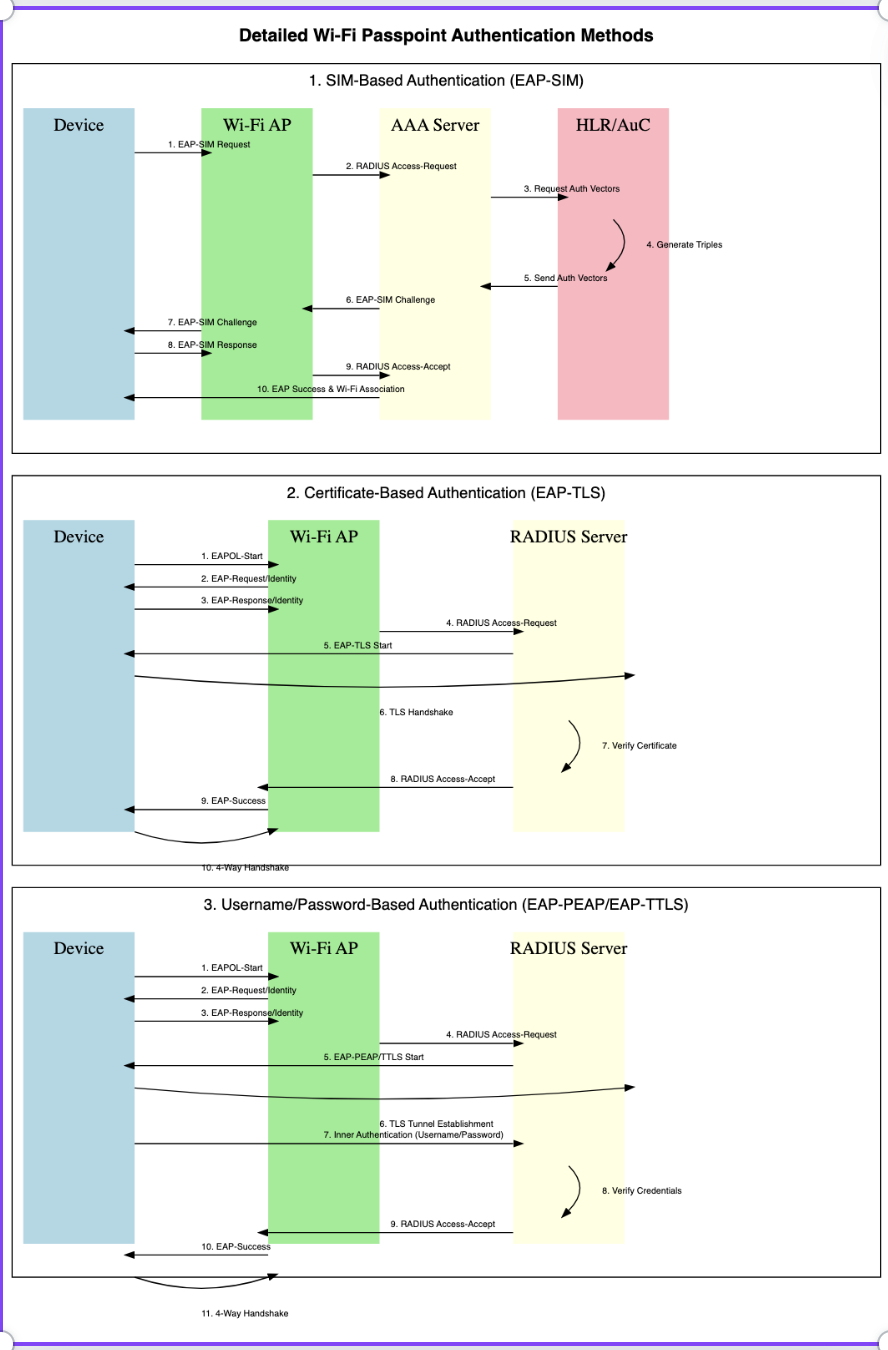
SIM-based authentication in Wi-Fi Passpoint, also known as EAP-SIM (Extensible Authentication Protocol - Subscriber Identity Module), allows users with mobile SIM cards to automatically authenticate and connect to Wi-Fi networks without manually entering credentials like usernames or passwords. This method is widely used in cellular offloading scenarios, where mobile devices automatically switch from cellular data to Wi-Fi networks provided by their carrier or trusted roaming partners
Steps to Map SIM-Based Authentication with Wi-Fi Passpoint
- SIM-based Authentication Overview (EAP-SIM)
- EAP-SIM is a type of EAP (Extensible Authentication Protocol) used for authenticating devices based on their SIM cards. It enables automatic connection to Wi-Fi networks using information from the SIM card (such as IMSI and authentication keys) instead of traditional username/password methods.
- Mobile Network Operators (MNOs) or Wi-Fi providers that have partnerships with MNOs can use EAP-SIM to let subscribers connect to Wi-Fi networks seamlessly.
Steps to Implement SIM-
- EAP-SIM is a type of EAP (Extensible Authentication Protocol) used for authenticating devices based on their SIM cards. It enables automatic connection to Wi-Fi networks using information from the SIM card (such as IMSI and authentication keys) instead of traditional username/password methods.
- Mobile Network Operators (MNOs) or Wi-Fi providers that have partnerships with MNOs can use EAP-SIM to let subscribers connect to Wi-Fi networks seamlessly.
Steps to Implement SIM-Based Authentication with Wi-Fi Passpoint
Configure Wi-Fi Network to Support EAP-SIM:
- The Wi-Fi network, specifically the RADIUS server (Authentication server), must be configured to support EAP-SIM for authentication.
- The network provider’s infrastructure should support 3GPP AAA servers or similar infrastructure that allows the Wi-Fi network to communicate with the Home Location Register (HLR) or Home Subscriber Server (HSS) to authenticate the SIM credentials.
Steps:
- The Wi-Fi access point (AP) is configured to use WPA2-Enterprise (or WPA3-Enterprise for enhanced security).
- In the AP's configuration, select EAP-SIM as one of the supported authentication methods.
- The AP communicates with a RADIUS server, which verifies the subscriber's identity through the Mobile Core Network using the SIM card information.
Wi-Fi Passpoint Network Configuration:
- Passpoint profiles are used to configure client devices to automatically connect to Passpoint-enabled networks.
- The Passpoint profile for a network that supports SIM-based authentication will specify EAP-SIM as the authentication method.
- The network's Online Sign-Up (OSU) Server can also deliver the profile to compatible devices, so they can connect automatically.
Steps:
- In the Access Network Query Protocol (ANQP) settings, configure EAP-SIM as a supported authentication method.
- The ANQP responses from the AP will indicate to the device that the network supports EAP-SIM, allowing devices with SIM cards to select this network for automatic connection.
Device-Side Configuration:
- On the client side (e.g., smartphones or tablets), Passpoint profiles are created by the mobile operator or network provider.
- Devices with Passpoint support will automatically select networks that match their Passpoint profile and initiate EAP-SIM authentication.
Steps:
- The device detects the Passpoint-enabled network and checks the profile for available authentication methods (such as EAP-SIM).
- The device automatically chooses EAP-SIM and sends the SIM card information (IMSI) to the network.
- The RADIUS server communicates with the mobile operator’s backend to verify the SIM card’s information.
Authentication Process (EAP-SIM):
- When a device with a SIM card attempts to connect to a Passpoint-enabled network that supports EAP-SIM, the following occurs:
Steps:
- The device sends a request to authenticate using EAP-SIM.
- The access point forwards this request to the RADIUS server.
- The RADIUS server then communicates with the Mobile Core Network, querying the HLR or HSS to authenticate the device using the IMSI and other SIM data.
- The mobile network sends a challenge-response mechanism back to the device, which uses the SIM card to respond and complete authentication.
- Once authentication is successful, the device is granted access to the network.
SIM-Based Roaming:
- When the network is set up for roaming, SIM-based authentication works across different networks with roaming agreements.
- A device using SIM-based authentication can automatically connect to Wi-Fi networks provided by a partner operator in a different country or region.
Advantages of SIM-Based Authentication in Passpoint:
- Seamless Authentication: Users do not need to manually select a Wi-Fi network or enter credentials. The SIM card handles all authentication automatically.
- Roaming Support: EAP-SIM enables users to roam between Wi-Fi networks that have roaming agreements with the user’s mobile operator, providing a seamless transition between Wi-Fi and cellular networks.
- Security: The authentication process is secure, leveraging SIM credentials that are difficult to compromise. EAP-SIM operates over WPA2/WPA3-Enterprise networks, ensuring encryption during data transmission.
...
- User Device with SIM detects a Passpoint-enabled Wi-Fi network.
- The device checks its Passpoint profile and determines that EAP-SIM is supported by the network.
- The device sends an authentication request using EAP-SIM, including the IMSI (International Mobile Subscriber Identity) from the SIM card.
- The Wi-Fi network’s AP forwards the request to the RADIUS server, which queries the user’s mobile network for authentication.
- The mobile network verifies the SIM credentials using the HLR/HSS and sends back an authentication challenge.
- The device responds to the challenge using the SIM card.
- Upon successful verification, the RADIUS server grants access to the Wi-Fi network, and the user is automatically connected.
Certificate-based authentication
This method allows with Wi-Fi Passpoint involves using EAP-TLS (Extensible Authentication Protocol - Transport Layer Security), where client devices authenticate to the Wi-Fi network using digital certificates rather than usernames, passwords, or SIM credentials. This ensures a high level of security, especially in environments such as enterprises, or public Wi-Fi hotspots
Steps to Map Certificate Authentication with Wi-Fi Passpoint:
Understanding EAP-TLS (Certificate-Based Authentication):
- EAP-TLS is an authentication method within the EAP framework that uses digital certificates for mutual authentication between the client and the server.
- In this method, both the client and the network's RADIUS server exchange certificates to authenticate each other securely.
- Certificates are issued and managed by a Certificate Authority (CA).
Components Involved in EAP-TLS Authentication with Passpoint:
- Passpoint Profile: Configured on the client device to connect to Passpoint-enabled Wi-Fi networks that support certificate-based authentication (EAP-TLS).
- Access Point (AP): Configured to use WPA2-Enterprise or WPA3-Enterprise security, with EAP-TLS as the authentication method.
- RADIUS Server: Handles the authentication process and validates the client certificates using the CA's public key.
- Client Device: Must have a digital certificate installed, along with a private key that corresponds to the certificate. This certificate is typically issued by the network provider or organization.
- Certificate Authority (CA): Issues the certificates for the client and RADIUS server, allowing mutual authentication.
...
To map Wi-Fi Passpoint with Username and Password Authentication, you would typically use EAP-TTLS (Tunneled Transport Layer Security) or EAP-PEAP (Protected Extensible Authentication Protocol). These authentication methods allow the use of usernames and passwords securely over Wi-Fi networks. In these protocols, an outer TLS tunnel is established to protect the inner authentication, where the ) or EAP-PEAP (Protected Extensible Authentication Protocol). These authentication methods allow the use of usernames and passwords securely over Wi-Fi networks. In these protocols, an outer TLS tunnel is established to protect the inner authentication, where the user credentials (username and password) are verified
Steps to Map Username and Password Authentication with Wi-Fi Passpoint
1. Understanding EAP-TTLS and EAP-PEAP:
- EAP-TTLS and EAP-PEAP are both Extensible Authentication Protocol (EAP) types used for WPA2-Enterprise or WPA3-Enterprise networks. They both work by establishing a secure TLS tunnel between the client and the authentication server (usually a RADIUS server).
- Inside this tunnel, user credentials (username and password) are
...
- sent securely for authentication.
- EAP-TTLS supports multiple inner authentication mechanisms (such as PAP, CHAP, MS-CHAPv2, etc.).
- EAP-PEAP typically uses MS-CHAPv2 (Microsoft Challenge Handshake Authentication Protocol version 2) to authenticate with a username and password.
2. Components Involved:
- Passpoint Profile: Configured on the client device to define how the device should connect to a Passpoint-enabled network that supports username and password-based authentication.
- Access Point (AP): Configured to support WPA2/WPA3-Enterprise with EAP-TTLS or EAP-PEAP as the authentication method.
- RADIUS Server: Performs authentication by validating the username and password. It also validates the server’s certificate.
- Client Device: Configured with a Passpoint profile that includes the username and password for authentication.
3. Configure the RADIUS Server for EAP-TTLS or EAP-PEAP:
The RADIUS server must be configured to support EAP-TTLS or EAP-PEAP. The RADIUS server will authenticate the username and password against a backend database, such as LDAP, Active Directory, or a local user database.
Steps:
- Install the server certificate on the RADIUS server, which is used to establish the TLS tunnel for secure communication.
- Configure the RADIUS server to support EAP-TTLS or EAP-PEAP and to verify the username and password credentials.
draw.io Diagram border true diagramName freeradiconfig-unpd simpleViewer false width links auto tbstyle top lbox true diagramWidth 521 revision 1 - Ensure that the CA certificate (used to sign the server certificate) is trusted by client devices.
4.Configure the Wi-Fi Access Point:
The Wi-Fi AP must be configured to use WPA2-Enterprise (or WPA3-Enterprise) and must use EAP-TTLS or EAP-PEAP as the authentication methods.
Steps:
- Set the Security Mode on the AP to WPA2-Enterprise or WPA3-Enterprise.
- Specify the RADIUS server IP address and shared secret on the AP to allow it to forward authentication requests to the RADIUS server.
- Enable
Steps to Map Username and Password Authentication with Wi-Fi Passpoint
1. Understanding EAP-TTLS and EAP-PEAP:
- EAP-TTLS and EAP-PEAP are both Extensible Authentication Protocol (EAP) types used for WPA2-Enterprise or WPA3-Enterprise networks. They both work by establishing a secure TLS tunnel between the client and the authentication server (usually a RADIUS server).
- Inside this tunnel, user credentials (username and password) are sent securely for authentication.
- EAP-TTLS supports multiple inner authentication mechanisms (such as PAP, CHAP, MS-CHAPv2, etc.).
- EAP-PEAP typically uses MS-CHAPv2 (Microsoft Challenge Handshake Authentication Protocol version 2) to authenticate with a username and password.
2. Components Involved:
- Passpoint Profile: Configured on the client device to define how the device should connect to a Passpoint-enabled network that supports username and password-based authentication.
- Access Point (AP): Configured to support WPA2/WPA3-Enterprise with EAP-TTLS or EAP-PEAP as the authentication method on the AP.
- RADIUS Server: Performs authentication by validating the username and password. It also validates the server’s certificate.
- Client Device: Configured with a Passpoint profile that includes the username and password for authentication.
3. Configure the RADIUS Server for EAP-TTLS or EAP-PEAP:
5. Configure the Passpoint Profile for Username and Password Authentication:
- The Passpoint profile on the client device needs to specify the EAP method (either EAP-TTLS or EAP-PEAP) and the credentials (username and password) that the client will use to authenticate.
- The profile also contains the identity provider (IDP) information that allows the device to automatically connect to Passpoint-enabled networks.
Steps:
...
- Configure the ANQP (Access Network Query Protocol) settings on the Wi-Fi AP to advertise support for
- EAP-TTLS or EAP-PEAP.
...
- On the client device, create a Passpoint configuration profile that specifies the username and password
...
Steps:
- Install the server certificate on the RADIUS server, which is used to establish the TLS tunnel for secure communication. Configure the RADIUS server to support
- for authentication, as well as the EAP type (EAP-TTLS or EAP-PEAP
and to verify the username and password credentials.- )
draw.io Diagram border true diagramName
freeradiconfig-unpdexpp simpleViewer false width links auto tbstyle top lbox true diagramWidth
521421 revision 1
6.Install the Passpoint Profile on Client Devices:
- The Passpoint profile containing the username, password, and EAP method needs to be installed on the client device.
- The client device must also have Ensure that the CA certificate (used installed to sign trust the server certificate) is trusted by client devices.
4.Configure the Wi-Fi Access Point:
The Wi-Fi AP must be configured to use WPA2-Enterprise (or WPA3-Enterprise) and must use EAP-TTLS or EAP-PEAP as the authentication methods.
Steps:
- Set the Security Mode on the AP to WPA2-Enterprise or WPA3-Enterprise.
- Specify the RADIUS server IP address and shared secret on the AP to allow it to forward authentication requests to the RADIUS server.
- Enable EAP-TTLS or EAP-PEAP as the authentication method on the AP.
5. Configure the Passpoint Profile for Username and Password Authentication:
- The Passpoint profile on the client device needs to specify the EAP method (either EAP-TTLS or EAP-PEAP) and the credentials (username and password) that the client will use to authenticate.
- The profile also contains the identity provider (IDP) information that allows the device to automatically connect to Passpoint-enabled networks.
Steps:
Configure the ANQP (Access Network Query Protocol) settings on the Wi-Fi AP to advertise support for EAP-TTLS or EAP-PEAP.
- RADIUS server’s certificate.
Steps:
- For Windows/macOS/Linux: Use the system’s network manager or profile manager to install the profile.
- For Android and iOS devices: The Passpoint profile can be pushed via Mobile Device Management (MDM), or users can install it manually.
7. EAP-TTLS or EAP-PEAP Authentication Workflow:
When the client with a Passpoint profile containing the username and password tries to connect to a Passpoint-enabled Wi-Fi network, the following occurs:
Steps:
- The client sends an authentication request to the AP.
- The AP forwards this request to the RADIUS server.
- The RADIUS server responds with its certificate to establish a secure TLS tunnel.
- The client validates the server certificate (using the CA certificate installed on the client device).
- The client sends the username and password (inside the secure TLS tunnel) to the RADIUS server.
- The RADIUS server verifies the username and password by checking the credentials against its backend database (such as LDAP, AD, etc.).
- Upon successful authentication, the client is granted access to the Wi-Fi network.
- A secure TLS session is established for the client’s data to be transmitted securely.
8. User Experience:
Once the Passpoint profile with the username and password is configured, the client device can automatically connect to Passpoint-enabled networks that support EAP-TTLS or EAP-PEAP without needing to re-enter the credentials.
The client device will also automatically authenticate securely, ensuring a seamless and secure experience.
References
...
Overview
Community Forums
Content Tools
Tasks