The initial purpose of the USP Controller is to allow USP agent validation and can be expanded to further use cases as required
USP Agent Configuration with respect to local Oktopus Controller
Supported MTPs:
...
The above can be saved to a text file and run as follows:
To build into an image, modify meta-rdk-broadband/recipes-rdkb/usp-pa/usp-pa/conf/usp_factory_reset.conf
USP Agent Onboarding
- After configuring the UspPa agent and connecting to the oktopus controller in the GUI the new device should appear under Devices with a status of ONLINE
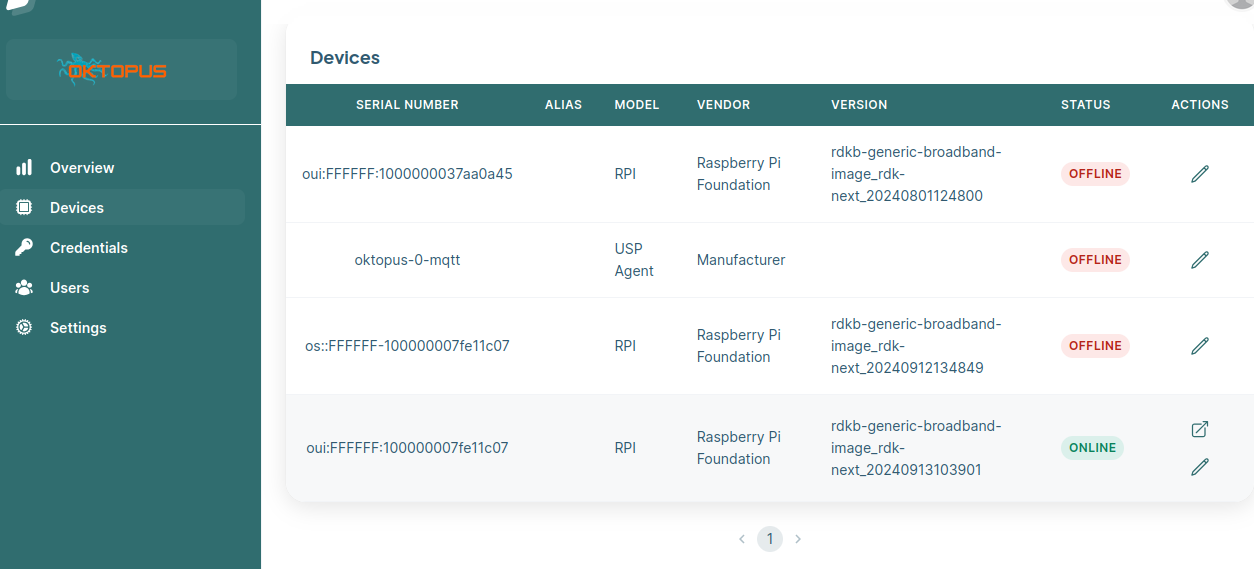
- Click on the Access the device and then go to Remote Messages page to perform get /set CRUD operations
- get Read Operation
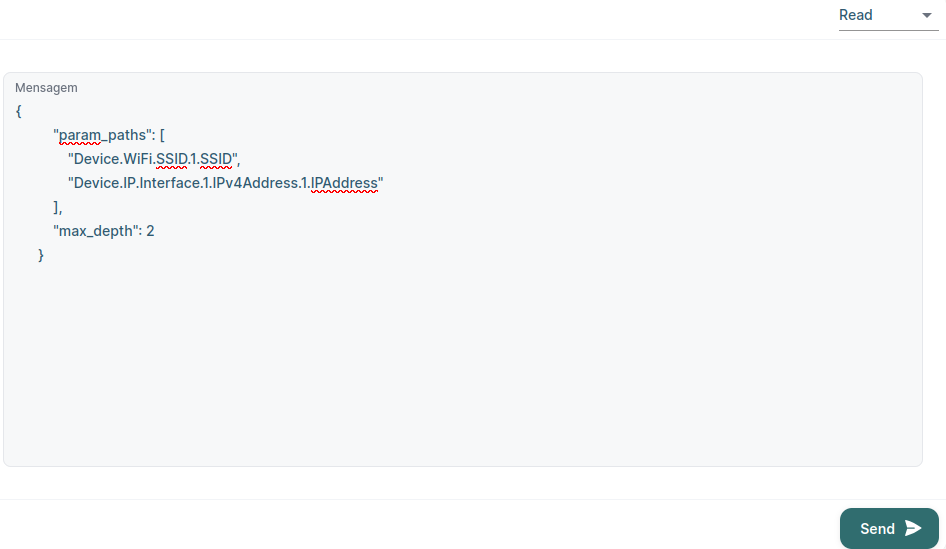
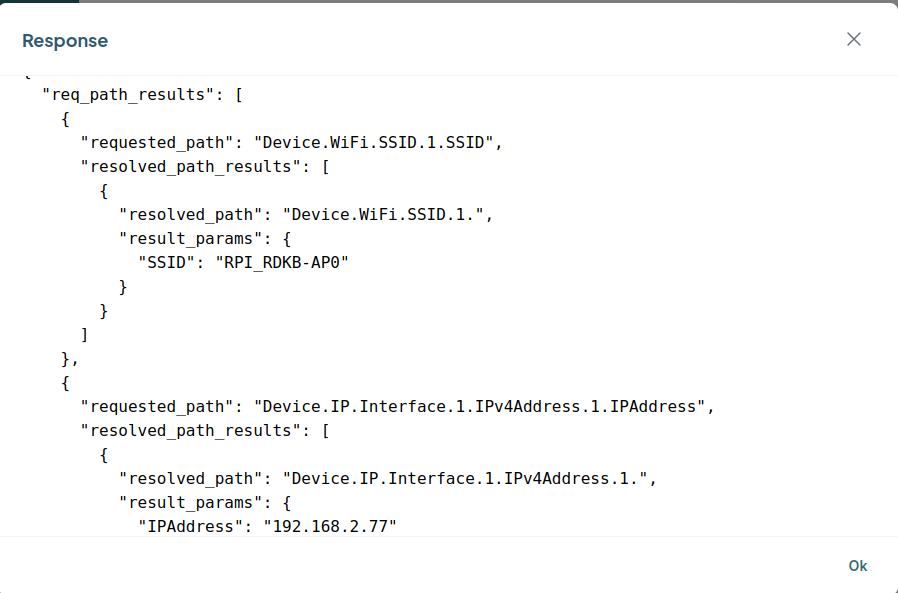 set Operation
- Search for your parameter(s) to change e.g. Device.WiFi.SSID.1.SSIDs then select Provision then select Set Value to the new setting e.g. Demo then Confirm then Save then OK
- Check the device and it should be updated
# /usr/bin/UspPa -c get "Device.WiFi.SSID.1.SSID"
Device.WiFi.SSID.1.SSID => Demo
| No Format |
|---|
##########################################################################################################
#
# This file contains a factory reset database in text format
#
# If no USP database exists when OB-USP-AGENT starts, then OB-USP-AGENT will create a database containing
# the parameters specified in a text file located by the '-r' option.
# Example:
#    obuspa -p -v 4 -r factory_reset_example.txt
#
|
...
| icon | success |
|---|
| title | Sample Response |
|---|
| type | success |
|---|
root@RaspberryPi-Gateway:~# systemctl stop usp-pa
root@RaspberryPi-Gateway:~# UspPa -p -v 4 -r /etc/usp-pa/usp_factory_reset.conf
DATABASE_Init: Opening database /nvram/usp-pa.db
LoadClientCert: Not using a device certificate for connections
DM_PRIV_GetNodeFromPath: Path is invalid: Device.DHCPv4.Server.Pool.1.Client.1.IPv4Address.1.
DM_INST_VECTOR_RefreshInstance: Path (Device.DHCPv4.Server.Pool.1.Client.1.IPv4Address.1.) does not exist in the schema
DM_PRIV_GetNodeFromPath: Path is invalid: Device.Hosts.Host.1.IPv4Address.1.
DM_INST_VECTOR_RefreshInstance: Path (Device.Hosts.Host.1.IPv4Address.1.) does not exist in the schema
Attempting to connect to host=192.168.2.11 (ipaddr=192.168.2.11, port=61613, unencrypted) from interface=any
CLI_SERVER_Init: Starting CLI server on /tmp/usp_cli
Connected to 192.168.2.11 (host=192.168.2.11, port=61613) from interface=erouter0
LogNoPasswordWarning: WARNING: No username/password set for connection to (host=192.168.2.11, port=61613)
LogNoPasswordWarning: WARNING: No TLS set for connection to (host=192.168.2.11, port=61613)
Sending STOMP frame to (host=192.168.2.11, port=61613)
STOMP
accept-version:1.2
host:/
heart-beat:30000,300000
endpoint-id:os\c\cFFFFFF-100000007fe11c07
...
- Upate Operation
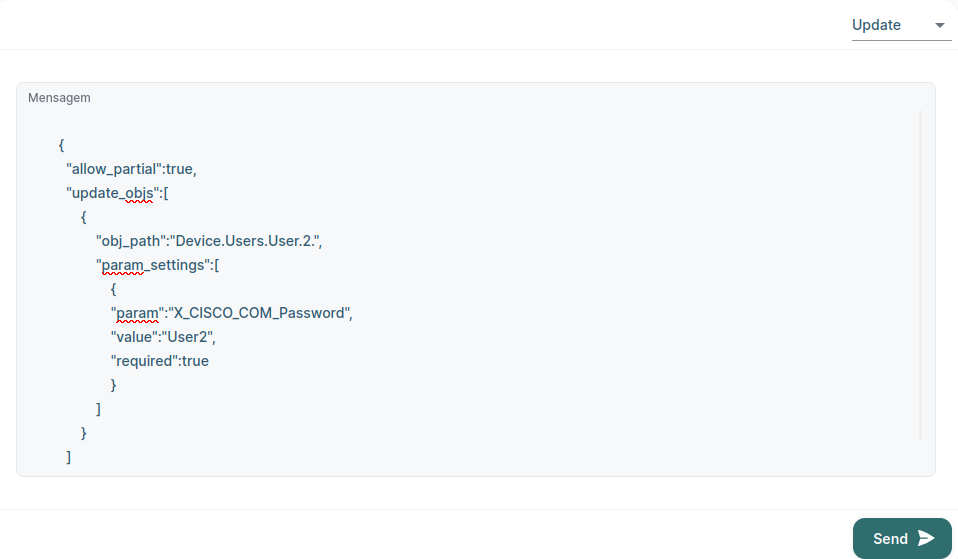 Image Added
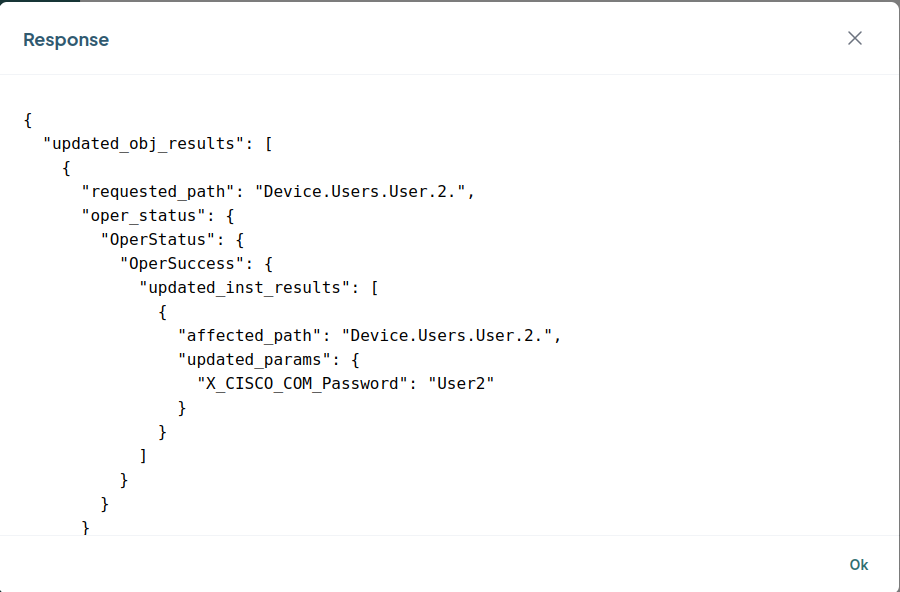 Image Added
 - Create Operation
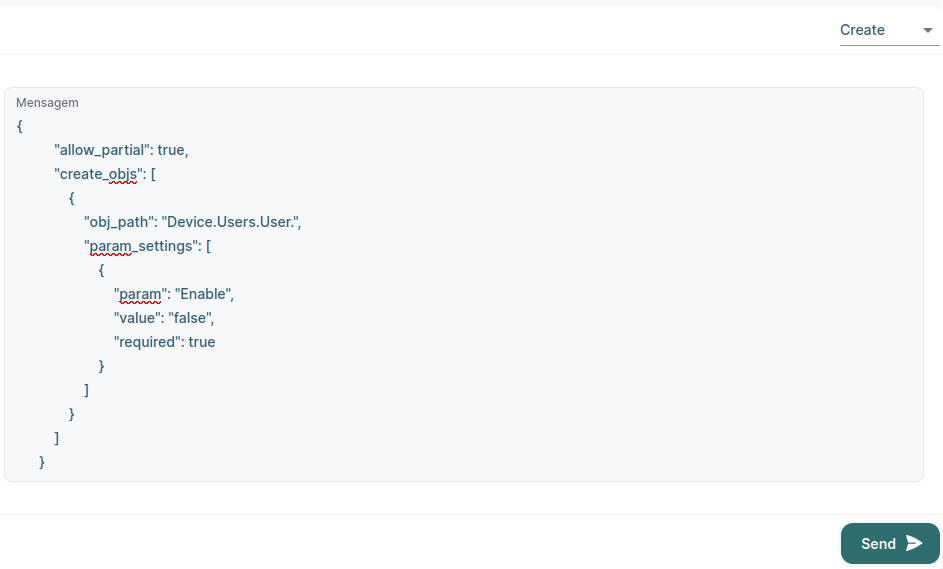 Image Added
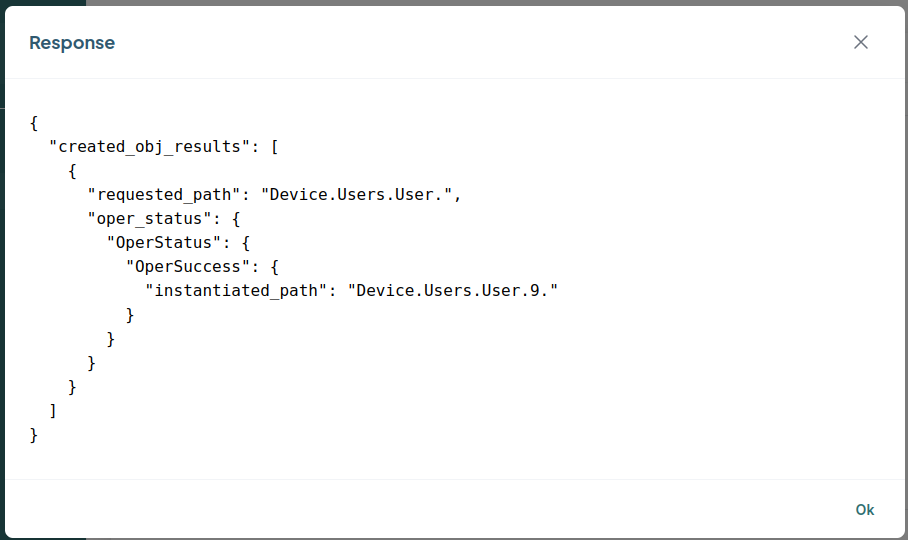 Image Added
 - del Operation
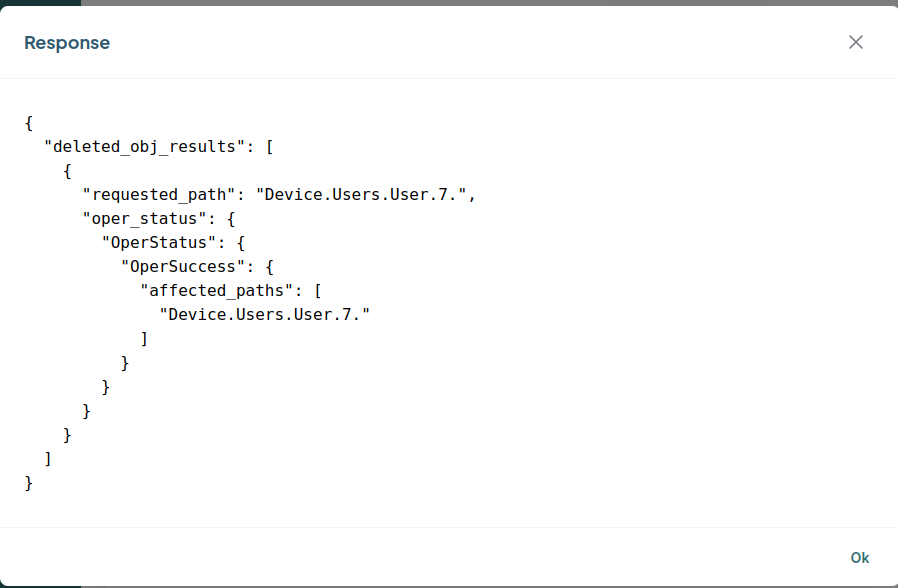 Image Added
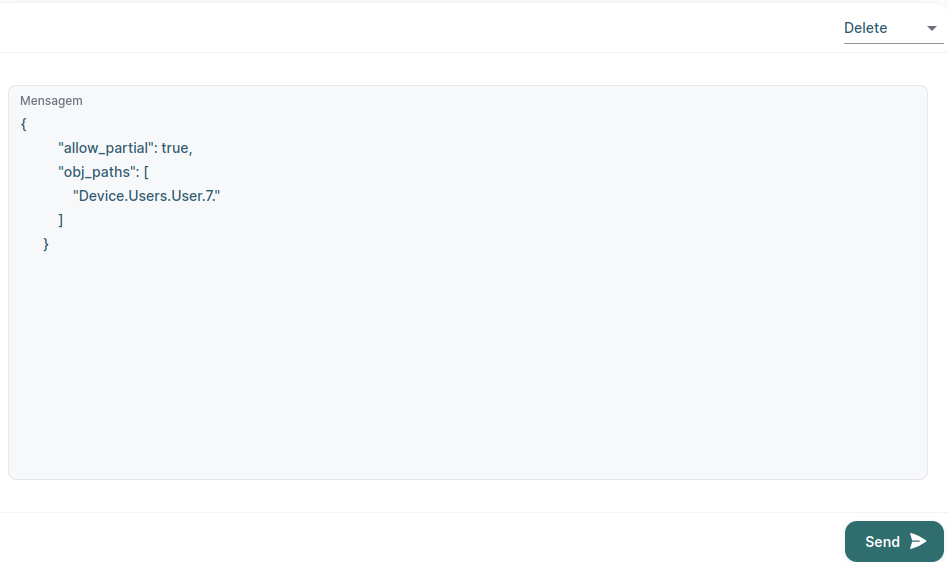 Image Added
UspPa commands from CLI
| Message Box |
|---|
| icon | success |
|---|
| title | Sample Response |
|---|
| type | success |
|---|
|
# Version
root@RaspberryPi-Gateway:~# UspPa -c version
Running command on database /nvram/usp-pa.db
USP_SIGNAL_ObjectAdded is being called before data model has been initialised
USP_SIGNAL_ObjectAdded is being called before data model has been initialised
USP_SIGNAL_ObjectAdded is being called before data model has been initialised
Agent Version=8.0.3
OpenSSL Version=OpenSSL 3.0.5 5 Jul 2022
Sqlite Version=3.31.1
Curl Version=libcurl/7.82.0 OpenSSL/3.0.5 zlib/1.2.11 libidn2/2.3.2
zlib Version=1.2.11
libmosquitto Version=2.0.14
root@RaspberryPi-Gateway:~# # get
root@RaspberryPi-Gateway:~# UspPa -c get Device.X_RDK_Ethernet.Link.1.
Device.X_RDK_Ethernet.Link.1.Enable => false
Device.X_RDK_Ethernet.Link.1.Status => Up
Device.X_RDK_Ethernet.Link.1.Alias => WANOE
Device.X_RDK_Ethernet.Link.1.Name => erouter0
Device.X_RDK_Ethernet.Link.1.LowerLayers =>
Device.X_RDK_Ethernet.Link.1.X_RDK_BaseInterface => eth0
Device.X_RDK_Ethernet.Link.1.MACAddress => e4:5f:01:d5:3c:13
Device.X_RDK_Ethernet.Link.1.MACAddrOffSet => 3
Device.X_RDK_Ethernet.Link.1.PriorityTagging => false
Device.X_RDK_Ethernet.Link.1.X_RDK_Refresh => false
Device.X_RDK_Ethernet.Link.1.X_RDK_MarkingNumberOfEntries => 0
root@RaspberryPi-Gateway:~# # set
root@RaspberryPi-Gateway:~# UspPa -c set Device.WiFi.SSID.1.SSID 2GHz
Device.WiFi.SSID.1.SSID => 2GHz
root@RaspberryPi-Gateway:~# UspPa -c set Device.WiFi.ApplyAccessPointSettings true
Device.WiFi.ApplyAccessPointSettings => true
root@RaspberryPi-Gateway:~# dmcli eRT getv Device.WiFi.SSID.1.SSID
CR component name is: eRT.com.cisco.spvtg.ccsp.CR
subsystem_prefix eRT.
Execution succeed.
Parameter 1 name: Device.WiFi.SSID.1.SSID
type: string, value: 2GHz # instances
root@RaspberryPi-Gateway:~# UspPa -c instances Device.Users.User.
Device.Users.User.1
Device.Users.User.2
Device.Users.User.3 # add
root@RaspberryPi-Gateway:~# UspPa -c add Device.Users.User.
Added Device.Users.User.4
root@RaspberryPi-Gateway:~# UspPa -c instances Device.Users.User.
Device.Users.User.1
Device.Users.User.2
Device.Users.User.3
Device.Users.User.4
# del
root@RaspberryPi-Gateway:~# UspPa -c del Device.Users.User.4.
Deleted Device.Users.User.4
root@RaspberryPi-Gateway:~# UspPa -c instances Device.Users.User.
Device.Users.User.1
Device.Users.User.2
Device.Users.User.3
# dump
root@RaspberryPi-Gateway:~# UspPa -c dump datamodel | head -n 30 Dumping DataModel Schema...
Device.
Device.Boot!
Device.Boot! event_arg:Cause
Device.Boot! event_arg:CommandKey
Device.Boot! event_arg:FirmwareUpdated
Device.Boot! event_arg:ParameterMap
Device.Bridging.
Device.Bridging.Bridge.{i}.
Device.Bridging.Bridge.{i}.Alias
Device.Bridging.Bridge.{i}.Enable
Device.Bridging.Bridge.{i}.Port.{i}.
Device.Bridging.Bridge.{i}.Port.{i}.AcceptableFrameTypes
Device.Bridging.Bridge.{i}.Port.{i}.Alias
Device.Bridging.Bridge.{i}.Port.{i}.DefaultUserPriority
Device.Bridging.Bridge.{i}.Port.{i}.Enable
Device.Bridging.Bridge.{i}.Port.{i}.IngressFiltering
Device.Bridging.Bridge.{i}.Port.{i}.LastChange
Device.Bridging.Bridge.{i}.Port.{i}.LowerLayers
Device.Bridging.Bridge.{i}.Port.{i}.ManagementPort
Device.Bridging.Bridge.{i}.Port.{i}.Name
Device.Bridging.Bridge.{i}.Port.{i}.PVID
Device.Bridging.Bridge.{i}.Port.{i}.PortState
Device.Bridging.Bridge.{i}.Port.{i}.PriorityRegeneration
Device.Bridging.Bridge.{i}.Port.{i}.PriorityTagging
Device.Bridging.Bridge.{i}.Port.{i}.Stats.
Device.Bridging.Bridge.{i}.Port.{i}.Stats.BroadcastPacketsReceived
Device.Bridging.Bridge.{i}.Port.{i}.Stats.BroadcastPacketsSent
Device.Bridging.Bridge.{i}.Port.{i}.Stats.BytesReceived
root@RaspberryPi-Gateway:~# # database
root@RaspberryPi-Gateway:~# UspPa -c show database
Running command on database /nvram/usp-pa.db
USP_SIGNAL_ObjectAdded is being called before data model has been initialised
USP_SIGNAL_ObjectAdded is being called before data model has been initialised
USP_SIGNAL_ObjectAdded is being called before data model has been initialised
Device.LocalAgent.Controller.1.EndpointID => oktopusController
Device.STOMP.Connection.1.Host => 192.168.2.11
Device.STOMP.Connection.1.Username =>
Device.STOMP.Connection.1.Password =>
Device.LocalAgent.MTP.1.Alias => cpe-1
Device.LocalAgent.MTP.1.Enable => true
Device.LocalAgent.MTP.1.Protocol => STOMP
Device.LocalAgent.MTP.1.STOMP.Reference => Device.STOMP.Connection.1
Device.LocalAgent.MTP.1.STOMP.Destination =>
Device.LocalAgent.Controller.1.Alias => cpe-1
Device.LocalAgent.Controller.1.Enable => true
Device.LocalAgent.Controller.1.AssignedRole => Device.LocalAgent.ControllerTrust.Role.1
# dac use case using UspPa by operate command
root@RaspberryPi-Gateway:~# UspPa -c operate "Device.SoftwareModules.InstallDU(URL=http://192.168.2.165/busybox.tar.gz)"
Asynchronous Operation (Device.SoftwareModules.InstallDU()) Started successfully.
Device.LocalAgent.Request.1 created.
See log for output arguments of operation root@RaspberryPi-Gateway:~/destination# UspPa -c operate "Device.SoftwareModules.ExecutionUnit.1.SetRequestedState(RequestedState=Active)"
Synchronous Operation (Device.SoftwareModules.ExecutionUnit.1.SetRequestedState()) completed successfully.
Output Arguments:-
Ret => "Starting EU"
root@RaspberryPi-Gateway:~/destination# DobbyTool list
descriptor | id | state
------------|----------------------------------|-------------
734 | Kn | running root@RaspberryPi-Gateway:/var/log# UspPa -c operate "Device.SoftwareModules.ExecutionUnit.1.SetRequestedState(RequestedState=Idle)"
Synchronous Operation (Device.SoftwareModules.ExecutionUnit.1.SetRequestedState()) completed successfully.
Output Arguments:-
Ret => "Stopping EU" |
Logs to see the response from Controller
# /usr/bin/UspPa -p -v 4 -r usp_factory_reset.conf
| Message Box |
|---|
| icon | success |
|---|
| title | Sample Response |
|---|
| type | success |
|---|
|
root@RaspberryPi-Gateway:~# systemctl stop usp-pa
root@RaspberryPi-Gateway:~# UspPa -p -v 4 -r /etc/usp-pa/usp_factory_reset.conf
DATABASE_Init: Opening database /nvram/usp-pa.db
LoadClientCert: Not using a device certificate for connections
DM_PRIV_GetNodeFromPath: Path is invalid: Device.DHCPv4.Server.Pool.1.Client.1.IPv4Address.1.
DM_INST_VECTOR_RefreshInstance: Path (Device.DHCPv4.Server.Pool.1.Client.1.IPv4Address.1.) does not exist in the schema
DM_PRIV_GetNodeFromPath: Path is invalid: Device.Hosts.Host.1.IPv4Address.1.
DM_INST_VECTOR_RefreshInstance: Path (Device.Hosts.Host.1.IPv4Address.1.) does not exist in the schema
Attempting to connect to host=192.168.2.11 (ipaddr=192.168.2.11, port=61613, unencrypted) from interface=any
CLI_SERVER_Init: Starting CLI server on /tmp/usp_cli
Connected to 192.168.2.11 (host=192.168.2.11, port=61613) from interface=erouter0
LogNoPasswordWarning: WARNING: No username/password set for connection to (host=192.168.2.11, port=61613)
LogNoPasswordWarning: WARNING: No TLS set for connection to (host=192.168.2.11, port=61613)
Sending STOMP frame to (host=192.168.2.11, port=61613)
STOMP
accept-version:1.2
host:/
heart-beat:30000,300000
endpoint-id:os\c\cFFFFFF-100000007fe11c07
Received CONNECTED frame from (host=192.168.2.11, port=61613)
CONNECTED
version:1.2
server:stompd/1.2
heart-beat:300000,60000
subscribe-dest:oktopus/usp/v1/agent/os\c\cFFFFFF-100000007fe11c07
Sending SUBSCRIBE frame to (host=192.168.2.11, port=61613)
SUBSCRIBE
id:0
destination:oktopus/usp/v1/agent/os\c\cFFFFFF-100000007fe11c07
ack:auto
USP_CONNECT_RECORD sending at time 2024-10-07T05:56:09Z, to host 192.168.2.11 over STOMP
SEND
content-length:107
content-type:application/vnd.bbf.usp.msg
reply-to-dest:oktopus/usp/v1/agent/os\c\cFFFFFF-100000007fe11c07
destination:controller-notify-dest
version: "1.3"
to_id: "oktopusController"
from_id: "os::FFFFFF-100000007fe11c07"
payload_security: PLAINTEXT
mac_signature[0]
sender_cert[0]
stomp_connect {
version: V1_2
subscribed_destination: "oktopus/usp/v1/agent/os\c\cFFFFFF-100000007fe11c07"
Sending NotifyRequest (Event for path=Device.LocalAgent.Subscription.1)
}
NOTIFY sending at time 2024-10-07T05:56:09Z, to host 192.168.2.11 over STOMP
SEND
content-length:227
content-type:application/vnd.bbf.usp.msg
reply-to-dest:oktopus/usp/v1/agent/os\c\cFFFFFF-100000007fe11c07
destination:controller-notify-dest
version: "1.3"
to_id: "oktopusController"
from_id: "os::FFFFFF-100000007fe11c07"
payload_security: PLAINTEXT
mac_signature[0]
sender_cert[0]
no_session_context {
payload[168]
}
header {
msg_id: "Event-2024-10-07T05:56:09Z-1"
msg_type: NOTIFY
}
body {
request {
notify {
subscription_id: "default-boot-event-ACS"
Retrying sending notification (retry_count=1) in 8 seconds.
send_resp: true
event {
obj_path: "Device."
event_name: "Boot!"
params {
key: "CommandKey"
value: ""
}
params {
key: "Cause"
value: "LocalReboot"
}
params {
key: "FirmwareUpdated"
value: "false"
}
params {
key: "ParameterMap"
value: "{}"
}
}
}
}
}
|
Known Issue
# If we remove and regenerate the usp_dm_comps.conf, usp_dm_objs.conf and usp_dm_params.conf files, observed below issue
| Message Box |
|---|
| icon | success |
|---|
| title | Sample Response |
|---|
| type | success |
|---|
|
root@RaspberryPi-Gateway:~# rm /nvram/usp-pa.db root@RaspberryPi-Gateway:~# rm /etc/usp-pa/usp_dm_* root@RaspberryPi-Gateway:~# systemctl restart usp-pa root@RaspberryPi-Gateway:~# UspPa -p -v 4 -r /etc/usp-pa/usp_factory_reset.conf DATABASE_Init: Opening database /nvram/usp-pa.db DM_PRIV_AddSchemaPath: Path Device.SoftwareModules.ExecEnv.{i} already exists in schema USP Agent aborted unexpectedly root@RaspberryPi-Gateway:~# |
→ To resolve this issue , remove all Device.SoftwareModules.ExecEnv. lines from
usp_dm_objs.conf and usp_dm_params.conf
→ Remove /nvram/usp-pa.db and restart the service to communicate with controller
...
USP Agent Onboarding
- After configuring the UspPa agent and connecting to the USP controller in the GUI the new device should appear under Devices with a status of synchronized
- A Device Model needs to be created. Double click on your device and in the main dashboard under Device Model click on Generate
- Once the Device Model is created you can test setting a parameter e.g. We can review the current Device.WiFi.SSID.1.SSID set on the device:
# /usr/bin/UspPa -c get "Device.WiFi.SSID.1.SSID"
Device.WiFi.SSID.1.SSID => RDK
- To change this in the GUI under Devices → double click on your device then select Manage Object Structure and Parameters
- Search for your parameter(s) to change e.g. Device.WiFi.SSID.1.SSIDs then select Provision then select Set Value to the new setting e.g. Demo then Confirm then Save then OK
- Check the device and it should be updated
...

