

Page History
...
Follow below steps to setup maven on Centos/linux.
- Download latest Apache maven archive from Apache Maven 3 Download webpage.
Extract distribution archive in any directory.
...
- Add maven bin folder path using cmd "export PATH=<MAVEN_FOLDER_PATH>:$PATH.
Example:

- Verfiy Maven is installed by giving "mvn -v" cmd.

- SMTP server (optional, if email feature in Automatics to be enabled)
...
- Log4j Configuration
- Orchestration <= v3.0
- Log4j configuration is mandatory
- Copy “log4j.properties” (inside Automatics/src/main/resources) to any specific location,
Add the following param to JAVA_OPTS inside apache-tomcat/bin/catalina.sh file
-DloggerUI.properties.file = {path to log properties file}
- Orchestration >= v3.1
- Log4j configuration is optional.
- log4j.properties has been replaced with log4j2-test.xml and is available at Automatics/src/main/resources/. By default, log4j2-test.xml logging configuration will be taken and no explicit configuration is required. However, if custom logging is preferred then it can be configured with JVM property
- Add the following param to JAVA_OPTS inside apache-tomcat/bin/catalina.sh file
- Orchestration <= v3.0
-Dlog4j.configurationFile={path_to_custom_log4j2-test.xml}
- Create empty files childUI.jmd and mainUI.jmd in apache-tomcat/bin/. This is required by orchestration for job scheduling.
- Navigate to apache-tomcat/bin directory and start the server by executing command.
...
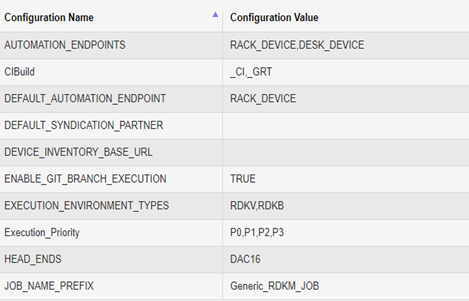
System Config Param | Description |
DEFAULT_SYNDICATION_PARTNER | Default syndication partner. Eg: Company name |
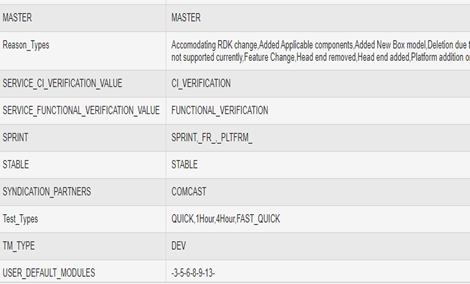
SYNDICATION_PARTNERS | Syndication partner names in comma separated format. Eg: Company name1, Company name2 |
DEVICE_INVENTORY_BASE_URL | Base URL which is having the rest implementation of device management |
EXECUTION_ENVIRONMENT_TYPES | Execution environment types in comma separated format. Supported values are RDKV, RDKB |
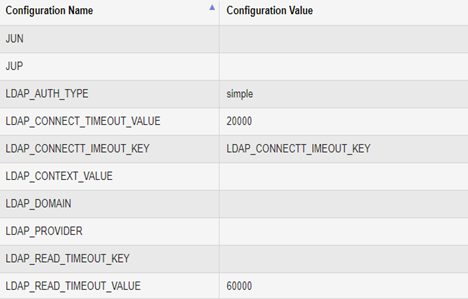
JUN | Jenkins Username |
JUP | Jenkins Password |
LDAP | LDAP Configuration values |
Test_Types | Test Types supported by Automatics, QUICK, QUICK_CI, 1HOUR, 4HOUR, 2DAYS, FAST_QUICK, FAST_QUICK_CI. New test types can also be created here using comma separated format. |
EXECUTION_PRIORITY | Test cases will be executed based on the priority. Default provided values in comma separated format for execution priority are P0,P1,P2,P3 |
JOB_NAME_PREFIX | Prefix of the Jenkins job name. Depending on the test environment partner can configure multiple jenkins jobs for test execution and they all should have name that is configured here with an index. Default provided value is “GENERIC_RDKM_JOB”. eg: GENERIC_RDKM_JOB1, GENERIC_RDKM_JOB2 ...GENERIC_RDKM_JOBN |
MINIMUM_FAIL_PERCENTAGE_TO_RETRY_TEST | After test execution, orchestration will calculate the percentage of failed test steps in a test script. If the failure percentage is beyond the limit configured here, then test will be automatically selected for re-trigger. Default value is 20 |
USER_DEFAULT_MODULES | Values of the default modules that can be accessed by the guest user. Default provided values separated by hyphen -3-5-6-8-9-13- |
MASTER | Comma separated string keywords to identify a build name as master |
SPRINT | Comma separated string keywords to identify a build name as sprint |
STABLE | Comma separated string keywords to identify a build name as stable |
CI_BUILD | Comma separated string keywords to identify a build name as CI build |
TM_TYPE | Automatics deployment environment. Valid values DEV or PROD |
HEAD_ENDS | Head ends to which devices are connected. Values added in comma separated format |
SERVICE_CI_VERIFICATION_VALUE | Value for service CI_VERFICATION. Supported value CI_VERIFICATION. |
SERVICE_FUNCTIONAL_VERIFICATION_VALUE | Value for service FUNCTIONAL_VERIFICATION. Supported value FUNCTIONAL _VERIFICATION. |
REASON_TYPES | Reasons for adding/updating/deleting scripts via 'Manage Script' page. Values added in comma separated format |
| MAX_DAILY_ACCEPTABLE_GRT_BUILD_FROM_PORTAL | Ideally automatics process one time only the same CI build for a device. If process/execution to be done multiple time on same CI build for same device this property can be configured. |
| RDK_PORTAL_BASE_URL | RDK Portal base url; Required only for integration with Partner's CI Portal |
| RDK_PORTAL_AUTH | Authentication token to access the RDK portal. Currently, this is not used by Orchestration for communication |
| ISSUE_MANAGEMENT_URL | Issue/Defect Management service base url; Required only for automated defect creation |
| AUTOMATICS_BASE_URL | Base URL of Automatics Orchestration Application |
| MICROSERVICE_URL | Provide the DNS (Domain Name System) base URL of Scriptless Service |
| SCRIPTLESS_SERVICE_BASE_URL | Base URL of Scriptless Service |
| TEST_TYPE_MAP | Test types enums are removed from orchestration and added here as key value pairs. Use the insert script from Automatics_DB.sql mentioned with a comment as 'Changes for Test type configuration' to insert this record. |

Device Models
- From Automatics UI, navigate to Settings -> Manage Scripts -> Run on Models
User needs to configure all device models that is going to execute from Automatics.
Automatics identifies a device model from its build name. For this, admin user has to configure device model and its corresponding build name. It requires only to map the device model and initial starting sub string of build name. The starting few letters(image prefix) in build name should be unique to a device model and this should be added in 'Image Name Prefix' text.
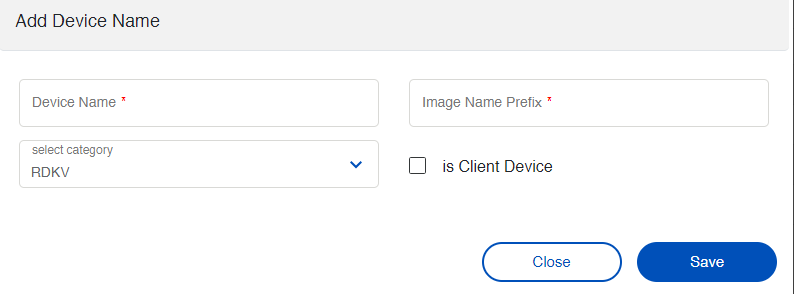
- Click on Add Device Name
- Enter the Device Name.
- Enter the Image Prefix Name. The build name prefix which will be unique to identify a device model. Automatics identify a device model from the build name.
- Select the device category.
- Check-in isClientDevice, if the device is a RDKV client device.
Device Group
- From Automatics UI, navigate to Settings -> Device Groups
For Automatics to use devices from partner's inventory, device groups have to be configured. The device group name in inventory should be added here so that user can execute tests on devices within these groups only. Admin user can map device groups to users so that only those users mapped to device group can execute tests on device.
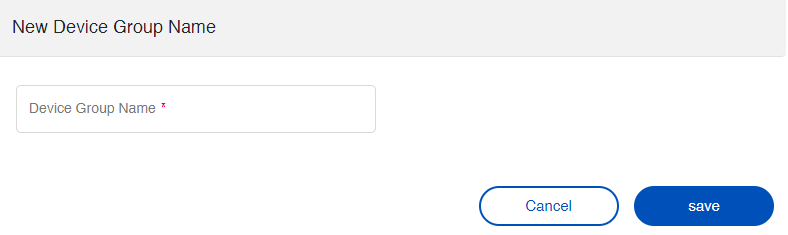
- Go to Settings -> Device Groups
- Click on Add New Device Group Name
- Enter the Device Group Name. Devices should be present in this Group Name.
...
Please follow Automatics 3.0 - Scriptless Automation#SystemConfigurationinAutomaticsOrchestration for configurations related to scriptless automation in System Configuration Page.
Please follow Smart Review Management#AddConfigsinSystemConfigurationPage for configurations related to Review Management feature in System Configuration Page.
Please follow Smart Debugger#AddConfigsinSystemConfigurationPage for configurations related to Smart Debugger feature in System Configuration Page.
Please follow CDRouter Configurations in Automatics#AddConfigsinSystemConfigurationPage for configurations related to CDRouter integration in System Configuration Page.
Device Models
- From Automatics UI, navigate to Settings -> Manage Scripts -> Run on Models
User needs to configure all device models that is going to execute from Automatics.
Automatics identifies a device model from its build name. For this, admin user has to configure device model and its corresponding build name. It requires only to map the device model and initial starting sub string of build name. The starting few letters(image prefix) in build name should be unique to a device model and this should be added in 'Image Name Prefix' text.
- Click on Add Device Name
- Enter the Device Name.
- Enter the Image Prefix Name. The build name prefix which will be unique to identify a device model. Automatics identify a device model from the build name.
- Select the device category.
- Check-in isClientDevice, if the device is a RDKV client device.
Device Group
- From Automatics UI, navigate to Settings -> Resource Details
User can configure Jenkins details in resource details. The test execution happens at jenkins. The jenkins job name should be configured in 'System Configuration' page for param 'JOB_NAME_PREFIX'.
...
- > Device Groups
For Automatics to use devices from partner's inventory, device groups have to be configured. The device group name in inventory should be added here so that user can execute tests on devices within these groups only. Admin user can map device groups to users so that only those users mapped to device group can execute tests on device.
- Go to Settings -> Device Groups
- Click on Add New Device Group Name
- Enter the Device Group Name. Devices should be present in this Group Name.
Resource Details
- From Automatics UI, navigate to Settings -> Resource Details
User can configure Jenkins details in resource details. The test execution happens at jenkins. The jenkins job name should be configured in 'System Configuration' page for param 'JOB_NAME_PREFIX'.
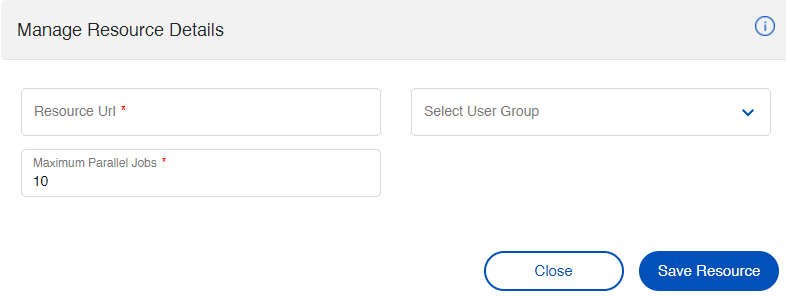
- Click on Add Resource Details.
- Enter the Jenkins resource base URL
- Select the Category type from the dropdown (Select if jenkins is configured for RDKV or RDKB execution).
- Maximum Parallel Jobs :- It represents the number of jobs configured in Jenkins for Automatics. It also requires, the configured jenkins jobs should have pre-defined name which is configurable from system property 'JOB_NAME_PREFIX'. For, eg: If "JOB_NAME_PREFIX" is set to AUTO_JOB, then in jenkins, jobs dedicated for Automatics execution should have names AUTO_JOB1, AUTO_JOB2, AUTO_JOB3 etc. Here, the Maximum Parallel Jobs configured is 10. So at a time Automatics can perform 10 job executions and remaining jobs will be in Queued state in Automatics waiting for free jenkins job. For, eg: If "JOB_NAME_PREFIX" is set to AUTO_JOB, then in jenkins, jobs dedicated for Automatics execution should have names AUTO_JOB1, AUTO_JOB2, AUTO_JOB3 etc. Here, the Maximum Parallel Jobs configured is 10. So at a time Automatics can perform 10 job executions and remaining jobs will be in Queued state in Automatics waiting for free jenkins job.
Source Code Repository
Admin user has to configure source repositories of test projects in Automatics Orchestration.
...
Source Repo Configuration for RDKB
Following are the source repository details to be configured for RDKB. Please execute following SQL Queries.repository details to be configured for RDKB. Please execute following SQL Queries.
Configure generic core tests
insert into source_code_details (NAME, CATEGORY_TYPE, SOURCE_REPO, SOURCE_BRANCH, DELETED_DATE, UPDATED_BY, UPDATED_DATE) values ('RDKB_CORE_TESTS', 'RDKB', 'generic-automation-tests', 'rdk-next', NULL, 'admin', now());
Configure RDKB Configure generic core tests
insert into source_code_details (NAME, CATEGORY_TYPE, SOURCE_REPO, SOURCE_BRANCH, DELETED_DATE, UPDATED_BY, UPDATED_DATE) values ('RDKB_CORE_TESTS', 'RDKB', 'generic-automationrdkb-tests', 'rdk-next', NULL, 'admin', now());'admin', now());
Source Repo Configuration for RDKV
Following are the source repository details to be configured for RDKV. Please execute following SQL Queries.
Configure generic core Configure RDKB tests
insert into source_code_details (NAME, CATEGORY_TYPE, SOURCE_REPO, SOURCE_BRANCH, DELETED_DATE, UPDATED_BY, UPDATED_DATE) values ('RDKBRDKV_CORE_TESTS', 'RDKBRDKV', 'rdkbgeneric-automation-tests', 'rdk-next', NULL, 'admin', now());
Source Repo Configuration for RDKV
Following are the source repository details to be configured for RDKV. Please execute following SQL Queries.
Configure generic core Configure RDKV tests
insert into source_code_details (NAME, CATEGORY_TYPE, SOURCE_REPO, SOURCE_BRANCH, DELETED_DATE, UPDATED_BY, UPDATED_DATE) values ('RDKV_CORE_TESTS', 'RDKV', 'generic-automationrdkv-tests', 'rdk-next', NULL, 'admin', now());
...
Job templates are created . If it is not not created you can follow Automatics Orchestration User Manual - Preferred Program - RDK Central Wiki
User can create a new test type, map the test cases to the newly created test type and execute the test cases. To create a new test type add the test type using system configuration tab
under 'Test_Types' configuration name. If a new test type is created, then a new job as to be created based on test type name. The job name should be in the format of 'AUTO_'+'Test type name'+'_TEST_JOB'.
For example If a test type is created as 'REGRESSION', then the job name should be 'AUTO_REGRESSION_TEST_JOB'. Do not create new test types by using the use the test type name that are already present
in 'Test_Types' and 'TEST_TYPE_MAP' config values from the system_config table.
| Test Type | Template Job Name |
|---|---|
| QUICK, FAST_QUICK | AUTO_QUICK_TEST_JOB |
| QUICK_CI, FAST_QUICK_CI | AUTO_QUICK_TEST_JOB_CI |
| 1HOUR | AUTO_1HOUR_TEST_JOB |
| 4HOUR | AUTO_4HOUR_TEST_JOB |
| 2DAYS | AUTO_2DAYS_TEST_JOB |
| Tests not mapped to any group | AUTO_COMPONENT_TEST_JOB |
...
Overview
Community Forums
Content Tools
Tasks