

Page History
...
| # | Description |
|---|---|
| 0 | GIVEN a Firebolt app is being loaded WHEN the container is created THEN
|
| 1 | GIVEN the platform launched the app with a non- OR the app does not have permission to be loaded directly to WHEN the app calls THEN
|
| 2 | GIVEN an app is in the THEN
|
| 2, 4, 7 | GIVEN an app is in the WHEN a THEN
See Intents, below |
| 3a | GIVEN an app is in the THEN
|
| 3b | GIVEN an app is in the WHEN the THEN
|
| 5a | GIVEN an app is WHEN it is moved to THEN
|
| 5b | GIVEN an App moves from Active to WHEN the THEN
|
| 6a | GIVEN an app is WHEN it moves to THEN
|
| 6b | GIVEN an app is WHEN the onSuspended notification occurs THEN
|
| 8a | GIVEN an app is WHEN the app is being moved to THEN
|
| 8b | GIVEN an app is WHEN the app is done executing THEN
|
| 8c | GIVEN an app is WHEN the app is being moved to THEN
|
| 9a | GIVEN an app is WHEN the app is being moved to THEN
|
| 9b | GIVEN an app is WHEN the THEN
|
| 10 | GIVEN an app has permission to be loaded directly to AND the platform launched the app with a PreloadIntent WHEN the app calls THEN
|
| 11 | GIVEN an app is in WHEN the app is being terminated AND a graceful shutdown is possible* THEN
Determination out of scope for this document, but effort should be made to have this requirement fulfilled as often as possible |
| 12 | GIVEN an app is built for W3C / HTML WHEN the app access the Firebolt 2.x SDK THEN the SDK client library MUST NOT have the AND the WPE browser MUST map the Firebolt Lifecycle to the W3C Page Lifecycle* AND the WPE browser MUST handle Firebolt requirements for video, textures, graphics, etc.* Details of the mapping requires review with architecture & engineering, see W3C Page Lifecycle below for draft requirements. |
...
method = App → Platform
notification = platform → app
| Firebolt / Wayland API | API Type | W3C | Firebolt 1.x |
|---|
Lifecycle.ready() | method | NA |
Lifecycle.ready() |
Lifecycle.ready()
Lifecycle.ready()
Discovery.getNavigationIntent() | method | Discovery.getNavigationIntent() | Discovery.getNavigationIntent() |
Discovery.getNavigationIntent()
Discovery.getNavigationIntent()
Discovery.getNavigationIntent()
Lifecycle.close(reason) | method | Window.close | |
Lifecycle.onStart() | notification | Window.load | Lifecycle.onInactive (previous: initializing) |
boot to Background w/ graphics=true
SbSystemRequestConceal
Lifecycle.onStartSuspend | notification | NA | NA |
Lifecycle.onPause()Lifecycle.onActivate() | notification | Document.visibilityChanged = 'visible' Document.visibilityState = 'visible' All video tags unpaused (if paused by WPE via onPause) | Lifecycle.onForeground (previous: Inactive) |
warm launch to Foreground w/ focus = true
SbSystemRequestFocus
AV_DISPLAY_REQUEST_ENTER_FOREGROUND
Lifecycle.onPause() |
| notification | Document.visibilityChanged = 'hidden' Document.visibilityState = 'hidden' All video tags paused by WPE | Lifecycle.onInactive (previous: Foreground) |
focus lost to Foreground w/ focus = false
Can we pause video in Netflix here?
SbSystemRequestBlur
| notification | Discovery.onNavigateTo(intent) | NA |
move to/stay in Background w/ graphics = true
Cancel any content loaded
| notification | Discovery.onNavigateTo(intent) | Discovery.onNavigateTo(intent |
Load new content, stay in Background w/ graphics = true
Can Netflix load new content w/out being warmed launched?
Lifecycle.onSuspend()) | |
Lifecycle.onSuspend() | notification |
Document.freeze() All canvas tags have their context deallocated by WPE | Lifecycle.onSuspended (previous: Inactive) |
SbSystemRequestFreeze
Lifecycle.onResume() | notification | Document.resume() All canvas tags have their context recreated All canvas tags have the W3C onContextLost event is fired | Lifecycle.onInactive (previous: Suspended) |
Lifecycle.onHibernate() | notification | NA | NA |
Lifecycle.onRestore() | notification | NA | NA |
wl_keyboard::enter | notification | Window.focus() | Lifecycle.onForeground (previous: Background) |
wl_keyboard::leave | notification | Window.blur() | Lifecycle.onBackground (previous: Foreground) |
W3C Page Lifecycle
This is tentative, requires review with engineering, but having it creates a level of confidence in our model.
...
Next step: NFR PoC & documentation w/ engineering
States and explanation
13 November 02 December 2025 : changes done on 25Q2 model by implementers . and review of Firebolt RDK-8 api, see RDK8 Firebolt® API Specification Sathishkumar Deena Kirupakararn Andrew Bennett Yuri Pasquali
| draw.io Diagram | ||||||||||||||||||||||
|---|---|---|---|---|---|---|---|---|---|---|---|---|---|---|---|---|---|---|---|---|---|---|
|
From Bart C after finalized agreement in March 5
...
- A)regular App startup flow that leads to PAUSED and possibly other state afterwards
- B)or in flow that leads to SUSPENDED state directly. Latter is more unusual and not supported by all Apps (eg Netflix requires it) but Apps but platform and lifecycle model must support it
The ALM decides the flow the App must follow based on use case & app capabilities and communicates that to the App explicitly with with different Lifecycle Notification, onStart for flow A and onStartSuspend for flow B. ALM may also communicate that already earlier via other means (ENV variable or part of NavigationIntent structure) but these are not necessary guaranteed
Example use case of flow B)
At box boot the ALM may decide to preload specific applications so these would launch quick (quicker compared to boot from cold start) when user requests them. But to not consume too much resources ALM decides to preload them in Suspended mode directly, provided that the application that supports that. Netflix supports it but Some native apps might require this, for example, but WebApps won't support preloading them via this flow B) from initializing to suspended directly, these require to be preloaded via passing paused state and then suspend/hibernate them.
...
3b)is for preload directly in suspend use case, for example required for netflix, where netflix will boot directly in suspended mode. The App must not setup Wayland-EGL surface, no rialto AV client and should not load textures,vertices, shaders in GPU.
Note that only few apps can support this direct to suspeded mode preload. For example WebApps through browser cannot be preloaded this way. These need to first enter paused state and then moved to suspended state.
REMAINING open QUESTION here : On what basis will ALM know and decide that App can be considered to have landed in Suspended mode instead of still being in transiting state?
...
P0 | Group: I want to support launching & deep-linking with a good user experience | ||
|---|---|---|---|
| 1 | Given an app is loaded, I want to tell the app what level of loading is expected ...so that the app can load the correct level of resources for the intended use case, no more, no less. | WHEN an app is loaded THEN the platform MUST be able to return the desired deep-link to the app as soon as the app calls AND there MUST be a valid, non null value for the intent WHEN an app is loaded AND the platform is doing a standard pre-load to P THEN the intent MUST be a AND the AND the platform MUST fire a more specific intent some time before dispatching an WHEN an app is loaded AND the platform is doing a pre-load to THEN the intent MUST be a AND the AND the platform MAY fire a more specific intent some time before dispatching an WHEN an app is loaded AND the platform is doing a cold launch to P AND the platform doesn't have a specific deep-link for the launch THEN the intent MUST be a AND the platform MAY activate the app or not WHEN an app is loaded AND the platform is doing a cold launch to P AND the platform has a specific deep-link for the launch THEN the intent MUST represent the the deep-link that is desired* AND the platform MAY activate the app or not *Complete list of NavigationIntents is out of scope for this document. | |
| 2 | Given an app has initialized Firebolt, I want to immediately send the next state change ...so that the app can continue to load. | WHEN an app is loading / initializing THEN the app MUST call Lifecycle.ready() as soon as it has set up it's Firebolt event listeners AND the app MUST NOT wait for any asynchronous or CPU intensive process to complete before doing so WHEN an app calls AND it has already called THEN the platform MUST send an error response WHEN an app calls AND it has already registered for the AND the platform is doing a cold launch or pre-load to P THEN the platform MUST send a WHEN an app calls AND it has already registered for the AND the platform is doing a pre-load to THEN the platform MUST send a | |
| 3 | Given an app is loaded, but not yet active, I want it to render a good user experience as quickly as possible ...so that the platform can make it visible any time and the user will have a visual cue that the app is starting up | WHEN an app is P THEN the platform MAY make the app visible at any point (3a) AND the platform MUST notify the app of this (1, 8b, 4b) AND the app MUST present graphics which provide a good* user experience as quickly as possible (2) AND any animations for said experience MUST be ready, but not actively drawing frames (2) | |
| 4 | Given an app moves into the foreground, it should have loaded and rendered any deep-links as quickly as possible ... so that the user can get to their intended use case quickly. | WHEN an app receives an AND the app SHOULD immediately begin to fetch and compose the appropriate UX (3b) | |
| 5 | Given an app moves into the foreground, it should be made visible quickly and with a good user experience ...so that the user can be presented with the app's experience. | WHEN an app is launched with a deep-link AND the app is already in the P THEN the platform MUST dispatch a AND the platform MUST wait to make the app visible until after the AND the platform MUST wait to make the app visible until after the has drawn something* (3a) AND the shared requirements below... WHEN an app is launched without a deep-link AND the app is already in the P AND the most recent intent was a THEN the platform MUST dispatch a AND the platform MUST wait to make the app visible until after the AND the platform MUST wait to make the app visible until after the has drawn something* (3a) AND the shared requirements below... WHEN an app is launched without a deep-link AND the app is already in the P AND the most recent intent was not a THEN the platform MUST wait to make the app visible until after the has drawn something* (3a) AND the shared requirements below... Shared requirements: AND the app MUST now be in the AND the platform MUST notify the app of this transition (3b) AND the app MAY call getNavigationIntent() to check if there is an intent that it missed the event for (3b) AND the app SHOULD immediately begin to fetch and compose the appropriate UX if it has not already (3b) AND the app SHOULD render a UX indicated by the most recent *detection of when the app has "drawn something" is an engineering effort, not in scope for this document. | |
| 6 |
| Given an app moves out of the foreground, it should remain in it's current UX state for a short amount of time ...so that the user can navigate back quickly to the same experience | WHEN an app is explicitly exited, e.g. by an exit option in the app's navigation THEN the platform MUST make the app invisible (4a) AND the app MUST be moved to the P AND the app MUST be informed of the exit (4b) AND the app MUST keep it's most recent UX displayed on the screen (4b) AND the platform MUST stop and destroy any audio / video sessions belong to the app (2) AND the platform MAY decide to exit to app for any reason* AND the rest of the acceptance criteria from requirement #3 *Details out of scope for this doc |
| 7 |
| Given an app has been paused for a while, I want to tell the app to clear out it's last UX and prepare for a new intent ...so that the app can take less memory and be ready with a good user experience. | WHEN an app has been paused for a set amount of time* THEN the platform MAY send a "Preload" intent via the onNavigateTo notification AND the rest of the acceptance criteria from requirement #3 *Details out of scope for this doc |
P1 | Group: I want the active app to get the most resources without giving up fast (hot) launches of other apps (aka Suspended) | ||
| 8 |
| Given an app is loaded but not active, I want to ensure it does not negatively impact performance of active apps ...so that the user has a fast, responsive experience | WHEN an app is P AND the app is no longer needed* THEN the app MUST be moved to the AND the app MUST be informed of the transition (5) AND the app MUST deallocate it's EGL surface (5) AND the app MUST deallocate GPU textures and other GPU memory (5) AND the app MUST deallocate any other memory not necessary for a hot launch (5) AND the platform SHOULD reduce CPU cycles given to the app (5) AND the platform SHOULD reduce platform resources given to the app's graphics surface, e.g. destroy or set it 1x1 (5) AND the platform MAY reduce Network bandwidth available to the app (5) AND the platform MAY decide to suspend the app for any reason* |
| 9 |
| Given the user launches a suspended app, I want to bring it back to the running state and activate it ...so that the user has a faster launch time | WHEN an app is launched AND the app is in the THEN the platform MUST resize the app's graphics plane to full screen (8a) AND the app MUST be moved to the P AND the app MUST be informed that is is resuming (8b) AND the rest of the acceptance criteria from requirement #3 AND the rest of the acceptance criteria from requirement #4 |
| 10 |
| Given the user launches many apps, I want to keep the platform running smoothly and manage resources ...so that the user has a fast, responsive experience | WHEN an app is AND the platform needs more resources* THEN the platform MAY hibernate if appropriate* (7a) OR the platform MAY destroy the app if appropriate* (10) OR the platform MAY leave the app Suspended if appropriate*
|
| 11 |
| Given a platform pre-loads an app due to contractual obligations, I want to load it directly to suspended ...so that we don't waste platform resources on apps that might never be launched | WHEN an app is loaded AND the platform wants to save additional resources AND the app supports these criteria AND the platform decides to do so* THEN the platform MUST load the app directly into the AND the app MUST be informed (5) AND the app SHOULD NOT allocate it's EGL surface (5) AND the app SHOULD NOT allocate GPU textures and other GPU memory (5) AND the app SHOULD NOT allocate any other memory not necessary for a hot launch (5) AND the platform SHOULD reduce CPU cycles given to the app (5) AND the platform SHOULD reduce platform resources given to the app's graphics surface, e.g. destroy or set it 1x1 (5) AND the platform MAY reduce Network bandwidth available to the app (5) AND the platform MAY decide to suspend the app for any reason* |
P1 | Group: I want to have more apps preloaded than available RAM allows (aka Hibernated) | ||
| 12 |
| Given the user launches many apps, I want to keep as many of them pre-loaded as possible ...so that the user has a faster launch time
| WHEN a AND the platform has determined that the app has released sufficient resources* THEN the app MUST be moved to the AND the app MUST be informed of the transition (7b) TODO is this a SHOULD? AND the platform MUST execute the MemCR routine to store the app's state (7c) AND the platform MUST terminate the original app process and free up its resources TODO is this right? |
| 13 |
| Given a user launches a hibernated app, I want to restore it to memory and activate it ...so that the user has a faster launch time | WHEN an app is launched AND the app is in the THEN the platform MUST execute the reverse MemCR routine to restore the app's state (7d) AND the app MUST be moved to the AND the rest of the acceptance criteria from requirement #11 |
P0 | As a W3C App Developer I want to get all of the benefits of the Firebolt Lifecycle through my existing integration with the W3C Page Lifecycle | ||
| 14 |
| Given my app is loading, I want access to the Firebolt ENV variables | WHEN JS execution begins (0) THEN
MUST already have the ENV values set. |
| 15 |
| Given | WHEN THEN |
| 16 | P0 | Given | WHEN THEN AND
AND WHEN the Intent is not null THEN my app MUST do all of the responsibilities denoted in Lifecycle.activate() (requirement #4) WHEN the Intent is a Launch Intent AND the platform had previously dispatched an THEN any |
| 17 | P2 | Given | WHEN THEN Document.visibilityState MUST be fired AND
AND any |
| 18 | P1 | Given Lifecycle.onSuspend happens, I want to be notified via standard HTML events | WHENLifecycle.onSuspend is invoked on WPETHEN AND |
| 19 | P1 | Given | WHEN THEN |
| 20 | P1 | Given | WHEN THEN the WPE browser MUST handle all necessary work |
| 21 | P1 | Given | WHENLifecycle.onRestore is invoked on WPETHEN the WPE browser MUST handle all necessary work |
Container Notes
Netflix
Can't share the Neflix info on public site, requires appropriate access control
Referring to restricted pages behind access control
Simplified Lifecycle 2.0#ApplicationStates
https://docs.netflixpartners.com/docs/nrdp/nrdp2024/application-states-and-management/
Youtube Cobalt
4.2.2.1. Application States
https://developers.google.com/youtube/cobalt/docs/reference/starboard/modules/16/event
https://developers.google.com/youtube/cobalt/docs/reference/starboard/modules/16/system
https://developers.google.com/youtube/cobalt/docs/gen/cobalt/doc/lifecycle
...
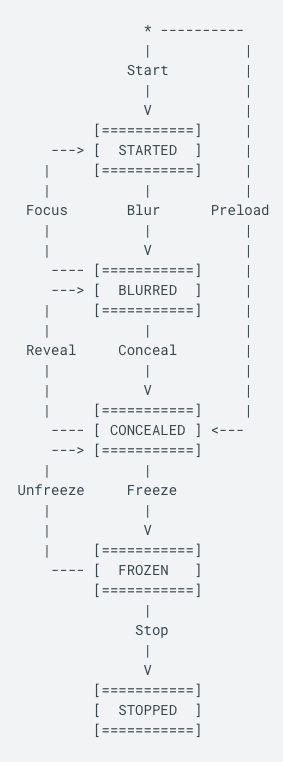
Visible; focused; foregrounded
The Started state; this should roughly correspond to a "focused application" in a traditional window manager, where the application is fully visible and the primary receiver of input events.
...
...
Previously called paused
Visible, unfocused; foregrounded
This should roughly correspond to "unfocused application" in a traditional window manager, where the application may be partially visible.
...
Previously called suspended (and preloading)
Hidden, unfocused; backgrounded
This is a intermediate state between blurred and frozen.
This should roughly correspond to "minimization" in a traditional window manager, where the application is no longer visible. However, the background tasks can still be running.
...
Previously called suspended
Hidden, unfocused; backgrounded
In the Frozen state, the application will be resident, but probably not running and has no network access. The expectation is that an external system event will bring the application out of the Frozen state.
Shutdown Reasons
Cobalt does not support any particular shutdown reasons–the app can be killed or transitioned between states without specifying a reason.
Prime
Can't share the Amazon info on public site, requires appropriate access control
Referring to restricted pages behind access control
Simplified Lifecycle 2.0#Prime
...
Overview
Community Forums
Content Tools
Tasks