


The initial purpose of the USP Controller is to allow USP agent validation and can be expanded to further use cases as required
USP Agent Configuration with respect to local Oktopus Controller
Supported MTPs:
- STOMP: Full Support
Using the OB-USP-AGENT which has been ported to RDK the agent can be configured using the following sample:
Note: Changed the Device.STOMP.Connection.1.EnableEncryption as "false" and Device.LocalAgent.MTP.2.Alias as "cpe-2"
##########################################################################################################
#
# This file contains a factory reset database in text format
#
# If no USP database exists when OB-USP-AGENT starts, then OB-USP-AGENT will create a database containing
# the parameters specified in a text file located by the '-r' option.
# Example:
#    obuspa -p -v 4 -r factory_reset_example.txt
#
# Each line of this file contains either a comment (denoted by '#' at the start of the line)
# or a USP data model parameter and its factory reset value.
# The parameter and value are separated by whitespace.
# The value may optionally be enclosed in speech marks "" (this is the only way to specify an empty string)
#
##########################################################################################################

#
# The following parameters will definitely need modifying to configure which USP controller to connect to
#
Device.LocalAgent.Controller.1.EndpointID "oktopusController"
Device.STOMP.Connection.1.Host "192.168.2.11"
Device.STOMP.Connection.1.Username ""
Device.STOMP.Connection.1.Password ""

#
# The following parameters may be modified
#
Device.LocalAgent.MTP.1.Alias "cpe-1"
Device.LocalAgent.MTP.1.Enable "true"
Device.LocalAgent.MTP.1.Protocol "STOMP"
Device.LocalAgent.MTP.1.STOMP.Reference "Device.STOMP.Connection.1"
Device.LocalAgent.MTP.1.STOMP.Destination ""
Device.LocalAgent.Controller.1.Alias "cpe-1"
Device.LocalAgent.Controller.1.Enable "true"
Device.LocalAgent.Controller.1.AssignedRole "Device.LocalAgent.ControllerTrust.Role.1"
Device.LocalAgent.Controller.1.PeriodicNotifInterval "600"
Device.LocalAgent.Controller.1.PeriodicNotifTime "0001-01-01T00:00:00Z"
Device.LocalAgent.Controller.1.USPNotifRetryMinimumWaitInterval "5"
Device.LocalAgent.Controller.1.USPNotifRetryIntervalMultiplier "2000"
Device.LocalAgent.Controller.1.ControllerCode ""
Device.LocalAgent.Controller.1.MTP.1.Alias "cpe-1"
Device.LocalAgent.Controller.1.MTP.1.Enable "true"
Device.LocalAgent.Controller.1.MTP.1.Protocol "STOMP"
Device.LocalAgent.Controller.1.MTP.1.STOMP.Reference "Device.STOMP.Connection.1"
Device.LocalAgent.Controller.1.MTP.1.STOMP.Destination "controller-notify-dest"
Device.STOMP.Connection.1.Alias "cpe-1"
Device.STOMP.Connection.1.Enable "true"
Device.STOMP.Connection.1.Port "61613"
Device.STOMP.Connection.1.EnableEncryption "false"
Device.STOMP.Connection.1.VirtualHost "/"
Device.STOMP.Connection.1.EnableHeartbeats "true"
Device.STOMP.Connection.1.OutgoingHeartbeat "30000"
Device.STOMP.Connection.1.IncomingHeartbeat "300000"
Device.STOMP.Connection.1.ServerRetryInitialInterval "60"
Device.STOMP.Connection.1.ServerRetryIntervalMultiplier "2000"
Device.STOMP.Connection.1.ServerRetryMaxInterval "30720"
Internal.Reboot.Cause "LocalFactoryReset"
Device.LocalAgent.Subscription.1.Alias "cpe-1"
Device.LocalAgent.Subscription.1.Enable "true"
Device.LocalAgent.Subscription.1.Recipient "Device.LocalAgent.Controller.1"
Device.LocalAgent.Subscription.1.ID "default-boot-event-ACS"
Device.LocalAgent.Subscription.1.CreationDate "0001-01-01T00:00:00Z"
Device.LocalAgent.Subscription.1.NotifType "Event"
Device.LocalAgent.Subscription.1.ReferenceList "Device.Boot!"
Device.LocalAgent.Subscription.1.Persistent "true"
Device.LocalAgent.Subscription.1.TimeToLive "0"
Device.LocalAgent.Subscription.1.NotifRetry "true"
Device.LocalAgent.Subscription.1.NotifExpiration 10000
Device.UnixDomainSockets.UnixDomainSocket.1.Alias "cpe-2"
Device.UnixDomainSockets.UnixDomainSocket.1.Mode "Listen"
Device.UnixDomainSockets.UnixDomainSocket.1.Path "/var/run/usp/broker_controller_path"
Device.UnixDomainSockets.UnixDomainSocket.2.Alias "cpe-2"
Device.UnixDomainSockets.UnixDomainSocket.2.Mode "Listen"
Device.UnixDomainSockets.UnixDomainSocket.2.Path "/var/run/usp/broker_agent_path"
Device.LocalAgent.MTP.2.Alias  "cpe-2"
Device.LocalAgent.MTP.2.Protocol  "UDS"
Device.LocalAgent.MTP.2.UDS.UnixDomainSocketRef  "Device.UnixDomainSockets.UnixDomainSocket.2"
Device.LocalAgent.MTP.2.Enable  "true"
The above can be saved to a text file and run as follows:
To build into an image, modify meta-rdk-broadband/recipes-rdkb/usp-pa/usp-pa/conf/usp_factory_reset.conf
USP Agent Onboarding
- After configuring the UspPa agent and connecting to the oktopus controller in the GUI the new device should appear under Devices with a status of ONLINE
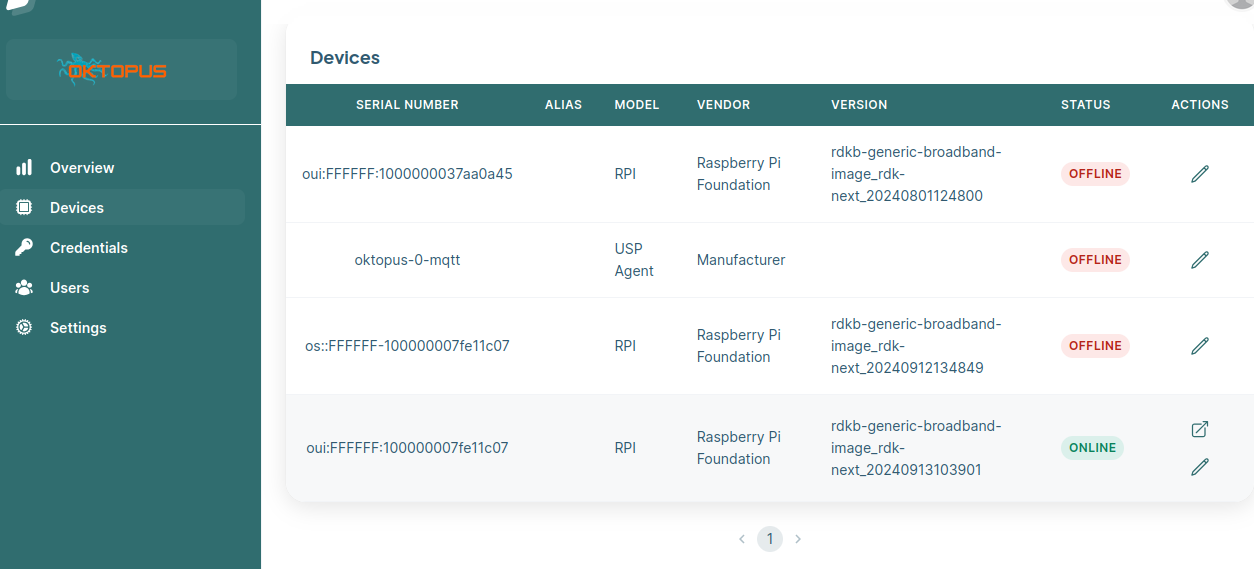
- A Device Model needs to be created. Double click on your device and in the main dashboard under Device Model click on Generate
- Once the Device Model is created you can test setting a parameter e.g. We can review the current Device.WiFi.SSID.1.SSID set on the device:
# /usr/bin/UspPa -c get "Device.WiFi.SSID.1.SSID"
Device.WiFi.SSID.1.SSID => RDK
- To change this in the GUI under Devices → double click on your device then select Manage Object Structure and Parameters
- Search for your parameter(s) to change e.g. Device.WiFi.SSID.1.SSIDs then select Provision then select Set Value to the new setting e.g. Demo then Confirm then Save then OK
- Check the device and it should be updated
# /usr/bin/UspPa -c get "Device.WiFi.SSID.1.SSID"
Device.WiFi.SSID.1.SSID => Demo
Logs to see the response from Controller
# /usr/bin/UspPa -p -v 4 -r usp_factory_reset.conf
Command to retrieve the parameters of the database. The usp_factory_reset.conf file should be configured with the valid entries for the database file.
/usr/bin/UspPa -c show database
USP Agent Onboarding
- After configuring the UspPa agent and connecting to the USP controller in the GUI the new device should appear under Devices with a status of synchronized
- A Device Model needs to be created. Double click on your device and in the main dashboard under Device Model click on Generate
- Once the Device Model is created you can test setting a parameter e.g. We can review the current Device.WiFi.SSID.1.SSID set on the device:
# /usr/bin/UspPa -c get "Device.WiFi.SSID.1.SSID"
Device.WiFi.SSID.1.SSID => RDK
- To change this in the GUI under Devices → double click on your device then select Manage Object Structure and Parameters
- Search for your parameter(s) to change e.g. Device.WiFi.SSID.1.SSIDs then select Provision then select Set Value to the new setting e.g. Demo then Confirm then Save then OK
- Check the device and it should be updated
# /usr/bin/UspPa -c get "Device.WiFi.SSID.1.SSID"
Device.WiFi.SSID.1.SSID => Demo
Overview
Community Forums
Content Tools
Tasks