


- Created by Ashraf Bhanu Kothapeta, last updated by Raheen Aslam on Feb 03, 2025 20 minute read
You are viewing an old version of this page. View the current version.
Compare with Current View Page History
« Previous Version 14 Next »
Linux Platform (RaspberryPi4)
Build steps for compilation on Raspberry Pi with Raspbian OS:
Prerequisites
- Install the Raspian Pi OS from the “Raspberry Pi Imager” software. Select the Raspberry Pi Os (64-bit) image.
After installation below are additional packages to be installed for build, db and execution.
sudo apt-get update;
sudo apt-get upgrade;
sudo apt-get install vim;
sudo apt-get install libev-dev;
sudo apt-get install libjansson-dev;
sudo apt-get install zlib1g-dev;
sudo apt-get install libnl-3-dev;
sudo apt-get install libnl-genl-3-dev;
sudo apt-get install libnl-route-3-dev;
sudo apt-get install libavro-dev;
sudo apt-get install libcjson1 libcjson-dev;
sudo apt-get install libssl-dev;
sudo apt-get install uuid-dev;
sudo apt-get install libmysqlcppconn-dev;
sudo apt-get install libreadline-dev;
sudo apt-get install iptables;
sudo apt install mariadb-server;
Build Instructions
- In a working directory git clone the OneWifi in generic folder and unified-wifi-mesh repository
ashraf@raspberrypi:~ $ ls
Bookshelf  Desktop  Documents  Downloads  Music  Pictures  Public  Templates  Videos
ashraf@raspberrypi:~ $ mkdir easymesh_project
ashraf@raspberrypi:~ $ cd easymesh_project/
ashraf@raspberrypi:~/easymesh_project $ git clone https://github.com/rdkcentral/OneWifi.git
ashraf@raspberrypi:~/easymesh_project $ ls
OneWifi  unified-wifi-mesh
- Run the makefile of OneWifi with setup option to pull in other dependent repository. This is a one time operation.
ashraf@raspberrypi:~/easymesh_project $ cd OneWifi/
ashraf@raspberrypi:~/easymesh_project/OneWifi $ ls
AUTHORS     build      cmpnt_build_custom_pre_arm.mk   CODE_STYLE.md  configure.ac     COPYING  genautotools.ini  lib      Makefile.am  NOTICE  README.md  source
autogen.sh  ChangeLog  cmpnt_build_custom_pre_atom.mk  config         CONTRIBUTING.md  custom   include           LICENSE  NEWS         README  scripts
ashraf@raspberrypi:~/easymesh_project/OneWifi $ make -f build/linux/makefile setup
- Build the Onewifi with make command
ashraf@raspberrypi:~/easymesh_project/OneWifi $ make -f build/linux/makefile all
- Build easymesh components in the
unified-wifi-mesh folder
- Controller
ashraf@raspberrypi:~/easymesh_project $ cd unified-easy-mesh/build/ctrl
-bash: cd: unified-easy-mesh/build/ctrl: No such file or directory
ashraf@raspberrypi:~/easymesh_project $ ls
halinterface  OneWifi  rdk-wifi-hal  rdk-wifi-libhostap  unified-wifi-mesh
ashraf@raspberrypi:~/easymesh_project/unified-wifi-mesh/build/ctrl $ ls
makefile
ashraf@raspberrypi:~/easymesh_project/unified-wifi-mesh/build/ctrl $ make all
- Cli
ashraf@raspberrypi:~/easymesh_project/unified-wifi-mesh/build/ctrl $ cd ../../../
ashraf@raspberrypi:~/easymesh_project $ cd unified-wifi-mesh/build/cli/
ashraf@raspberrypi:~/easymesh_project/unified-wifi-mesh/build/cli $ ls
makefile
ashraf@raspberrypi:~/easymesh_project/unified-wifi-mesh/build/cli $ make all#If any issues in building cli, please follow below steps:
1.cd /etc/ld.so.conf.d
2.sudo vi libemcli.conf
3.In this file specify the path where libemcli.so is built. (install/lib - do pwd). If no libemcli.so present, install golang and build cli again with "sudo apt install golang" and "/unified-wifi-mesh/build/cli $ make all" . With this "libemcli.so" listed under "unified-wifi-mesh/install/lib". Now in "libemcli.conf" specify the path where libemcli.so is built. (install/lib - do pwd).
4.install/bin/sudo ldconfig
#Now "onewifi_em_cli" is listed under "/unified-wifi-mesh/install/bin"
ashraf@raspberrypi:~/easymesh_project/unified-wifi-mesh/install/bin $ ls
agent.json cli ctrl.json DevTest.json LinkMetric.json onewifi_em_agent Radiocap.json Sample.json Template.json
CfgRenew.json Clientcap.json DeviceList.json DPPURI.json Network.json onewifi_em_cli RadioConfig.json STAList.json Template.sav
Channel.json ClientSteer.json DevInit.json interface NetworkSSID.json onewifi_em_ctrl Reset.json STASteer.json
- Agent
ashraf@raspberrypi:~/easymesh_project/unified-wifi-mesh/build/agent $ ls
makefile
ashraf@raspberrypi:~/easymesh_project/unified-wifi-mesh/build/agent $ make all
- Controller
OpenWrt Platform
[ToDo]
RDK Platform
mkdir <workspace dir>
cd <workspace dir>
repo init -u https://code.rdkcentral.com/r/manifests -b kirkstone -m rdkb-extsrc.xml
repo sync -j`nproc` --no-clone-bundle
MACHINE=raspberrypi4-64-rdk-broadband source meta-cmf-raspberrypi/setup-environment
bitbake rdk-generic-broadband-image
Linux Platform (RaspberryPi4)
Execution Steps
Prerequisites
OneWifi related
- Install bridge utils
- sudo apt-get install bridge-utils
- Mask running of wpa_supplicant with below commands and ensure that wpa_supplicant is not running after these steps using ps command.
- sudo systemctl stop wpa_supplicant
- sudo systemctl disable wpa_supplicant
- sudo systemctl mask wpa_supplicant
- sudo systemctl status wpa_supplicant
- Configure brlan0 interface, IP Tables, DHCP
Enable brlan0 interface and configure ip address
ashraf@raspberrypi:~/easymesh_project $ sudo brctl addbr brlan0
ashraf@raspberrypi:~/easymesh_project $ sudo ip link set dev brlan0 up
ashraf@raspberrypi:~/easymesh_project $ sudo ip addr add 192.168.100.1/24 broadcast 192.168.100.255 dev brlan0
- #IP tables command
ashraf@raspberrypi:~/easymesh_project $ sudo sh -c "echo 1 > /proc/sys/net/ipv4/ip_forward"
ashraf@raspberrypi:~/easymesh_project $ sudo iptables -t nat -A POSTROUTING -o eth0 -j MASQUERADE
ashraf@raspberrypi:~/easymesh_project $ sudo iptables -A FORWARD -i eth0 -o brlan0 -m state --state RELATED,ESTABLISHED -j ACCEPT
ashraf@raspberrypi:~/easymesh_project $ sudo iptables -A FORWARD -i eth0 -o brlan0 -j ACCEPT
- #dnsmasq for DHCP in background or in a different terminal
ashraf@raspberrypi:~/easymesh_project $ sudo dnsmasq -i brlan0 -d --dhcp-range=192.168.100.2,192.168.100.200 &
[1] 25764
ashraf@raspberrypi:~/easymesh_project $ dnsmasq: started, version 2.89 cachesize 150
dnsmasq: compile time options: IPv6 GNU-getopt DBus no-UBus i18n IDN2 DHCP DHCPv6 no-Lua TFTP conntrack ipset nftset auth cryptohash DNSSEC loop-detect inotify dumpfile
dnsmasq-dhcp: DHCP, IP range 192.168.100.2 -- 192.168.100.200, lease time 1h
dnsmasq: reading /etc/resolv.conf
dnsmasq: using nameserver 218.248.90.37#53
dnsmasq: using nameserver 218.248.112.1#53
dnsmasq: using nameserver fe80::1%eth0#53
dnsmasq: using nameserver fe80::1%wlan0#53
dnsmasq: read /etc/hosts - 7 names
DB Setup commands (On controller)
- Setup mysql database one time running below command. Choose "n" for Remove anonymous users and Remove test database.
- sudo mysql_secure_installation
ashraf@raspberrypi:~/easymesh_project $ sudo mysql_secure_installation

NOTE: RUNNING ALL PARTS OF THIS SCRIPT IS RECOMMENDED FOR ALL MariaDB
SERVERS IN PRODUCTION USE! PLEASE READ EACH STEP CAREFULLY!

In order to log into MariaDB to secure it, we'll need the current
password for the root user. If you've just installed MariaDB, and
haven't set the root password yet, you should just press enter here.

Enter current password for root (enter for none):
OK, successfully used password, moving on...

Setting the root password or using the unix_socket ensures that nobody
can log into the MariaDB root user without the proper authorisation.

You already have your root account protected, so you can safely answer 'n'.

Switch to unix_socket authentication [Y/n] Y
Enabled successfully!
Reloading privilege tables..
... Success!


You already have your root account protected, so you can safely answer 'n'.

Change the root password? [Y/n] n
... skipping.

By default, a MariaDB installation has an anonymous user, allowing anyone
to log into MariaDB without having to have a user account created for
them. This is intended only for testing, and to make the installation
go a bit smoother. You should remove them before moving into a
production environment.

Remove anonymous users? [Y/n] n
... skipping.

Normally, root should only be allowed to connect from 'localhost'. This
ensures that someone cannot guess at the root password from the network.

Disallow root login remotely? [Y/n] n
... skipping.

By default, MariaDB comes with a database named 'test' that anyone can
access. This is also intended only for testing, and should be removed
before moving into a production environment.

Remove test database and access to it? [Y/n] n
... skipping.

Reloading the privilege tables will ensure that all changes made so far
will take effect immediately.

Reload privilege tables now? [Y/n] Y
... Success!

Cleaning up...

All done! If you've completed all of the above steps, your MariaDB
installation should now be secure.

Thanks for using MariaDB!
ashraf@raspberrypi:~/easymesh_project $
- Setup "OneWifiMesh" database with the below commands
- #Login to MariaDB monitor
- sudo mysql -u root -p
- #In MariaDB console
- create database OneWifiMesh;
- use OneWifiMesh;
- show tables; ==> should show no tables
ashraf@raspberrypi:~/easymesh_project $ sudo mysql -u root -p
Enter password:
Welcome to the MariaDB monitor. Commands end with ; or \g.
Your MariaDB connection id is 55
Server version: 10.11.6-MariaDB-0+deb12u1 Debian 12

Copyright (c) 2000, 2018, Oracle, MariaDB Corporation Ab and others.

Type 'help;' or '\h' for help. Type '\c' to clear the current input statement.

MariaDB [(none)]> create database OneWifiMesh;
Query OK, 1 row affected (0.001 sec)

MariaDB [(none)]> use OneWifiMesh;
Database changed
MariaDB [OneWifiMesh]> show tables;
Empty set (0.001 sec)

MariaDB [OneWifiMesh]>
- #Login to MariaDB monitor
- Reset database and check tables are created
- #In a separate window run easy mesh ctrl with <username of db>@<password> to connect to DB.
sudo ./onewifi_em_ctrl root@root
#In a separate window run easy mesh cli and run reset command "reset eth0 pi4" as specified below to reset the database
sudo ./onewifi_em_cli
<<OneWifiMeshCli>>: reset eth0 pi4 - #After this in MariaDB Console you if you run "show tables;" you will see 7 tables created with NetworkSSIDList and NetworkList tables Initialized.
- # All other tables will be empty
MariaDB [OneWifiMesh]> show tables;
+-------------------------+
| Tables_in_OneWifiMesh |
+-------------------------+
| BSSList |
| DeviceList |
| NetworkList |
| NetworkSSIDList |
| OperatingClassList |
| RadioList |
| STAList |
+------------------------+
- # All other tables will be empty
- #In a separate window run easy mesh ctrl with <username of db>@<password> to connect to DB.
#In Window 1(W1),MariaDB [OneWifiMesh] runningMariaDB [OneWifiMesh]> show tables;
+-----------------------+
| Tables_in_OneWifiMesh |
+-----------------------+
| BSSList |
| DeviceList |
| NetworkList |
| NetworkSSIDList |
| OperatingClassList |
| PolicyList |
| RadioList |
| STAList |
+-----------------------+
8 rows in set (0.001 sec)

MariaDB [OneWifiMesh]>
Now, kill the cli and ctrl windows.
Running instructions
- Run Easy mesh Controller and cli in separate windows.
- sudo ./one_wifi_em_ctrl root@root
- sudo ./one_wifi_em_cli
- Run OneWifi first in a separate window and then run easy mesh agent
- sudo ./OneWifi -c
- sudo ./one_wifi_em_agent
- Check Below commands on cli window to see Agent configured
- <<OneWifiMeshCli>>:get_device OneWifiMesh
- <<OneWifiMeshCli>>:get_radio OneWifiMesh
- <<OneWifiMeshCli>>:get_bss OneWifiMesh
- <<OneWifiMeshCli>>:get_ssid OneWifiMesh
- Check on the Agent that it is beaconing with the configured SSID
#In a separate window(W2), run easy mesh controller
ashraf@raspberrypi:~/easymesh_project/unified-wifi-mesh/install/bin $ sudo ./onewifi_em_ctrl root@root
connect:135: user:root pass:root
create_data_model:1282: Number of policies: 6
create_data_model:1299: Putting data model at key: OneWifiMesh@d8:3a:dd:27:41:ed
create_node:134: created entry for key:d8:3a:dd:27:41:ed
execute:55: Controller communication path: /tmp/onewifi_mesh_ctrl
find_em_for_msg_type:558: Received autoconfig search from agenti al mac: d8:3a:dd:27:41:ed
find_em_for_msg_type:567: Found existing data model for mac: d8:3a:dd:27:41:ed net: OneWifiMesh
handle_autoconfig_search:2742: autoconfig rsp send success
find_em_for_msg_type:591: Found data model for mac: d8:3a:dd:27:41:ed, creating node for ruid: d8:3a:dd:27:41:ee
create_node:134: created entry for key:d8:3a:dd:27:41:ee
handle_autoconfig_wsc_m1:2608: Device AL MAC: d8:3a:dd:27:41:ed
Failed TLV [1]: 17.2.48 of Wi-Fi Easy Mesh 5.0
Failed TLV [2]: 17.2.52 of Wi-Fi Easy Mesh 5.0
handle_autoconfig_wsc_m1:2611: received autoconfig wsc m1 msg failed validation
handle_ap_radio_basic_cap:2538: Radio does not exist, getting radio at index: 0
create_encrypted_settings:2373: ssid: private_ssid, passphrase: test-fronthaul
find_em_for_msg_type:581: Found existing radio:d8:3a:dd:27:41:ee
analyze_m2_tx:200: Radio: d8:3a:dd:27:41:ee AL MAC: d8:3a:dd:27:41:ed
set_config:82: Enter: Radio id: d8:3a:dd:27:41:ee Device: d8:3a:dd:27:41:ed
dm_radio_list_t:update_db:187: Operation: dm_orch_type_db_insert
create_node:120: node with key:d8:3a:dd:27:41:ee already exists
put_radio:349 Node created successfully
update_tables:1499: Op Class[0] ruid: d8:3a:dd:27:41:ed Type: 7 Class: 81 Class: 81
update_tables:1499: Op Class[1] ruid: d8:3a:dd:27:41:ed Type: 7 Class: 115 Class: 115
update_tables:1499: Op Class[2] ruid: d8:3a:dd:27:41:ed Type: 7 Class: 135 Class: 135
update_tables:1499: Op Class[3] ruid: d8:3a:dd:27:41:ed Type: 8 Class: 81 Class: 81
update_tables:1499: Op Class[4] ruid: d8:3a:dd:27:41:ed Type: 8 Class: 115 Class: 115
update_tables:1499: Op Class[5] ruid: d8:3a:dd:27:41:ed Type: 8 Class: 135 Class: 135
update_tables:1499: Op Class[6] ruid: d8:3a:dd:27:41:ee Type: 2 Class: 81 Class: 81
update_tables:1499: Op Class[7] ruid: d8:3a:dd:27:41:ee Type: 2 Class: 83 Class: 83
update_tables:1499: Op Class[8] ruid: d8:3a:dd:27:41:ee Type: 2 Class: 84 Class: 84
orch_execute:98: dm_orch_type_topo_sync(em_cmd_type_em_config) state: em_state_ctrl_wsc_m2_sent
send_topology_query_msg:349: Topology Query (1) Send Successful
is_em_ready_for_orch_fini:107: em not ready orchestration:dm_orch_type_topo_sync(em_cmd_type_em_config) because of incorrect state, state:em_state_ctrl_topo_sync_pending
send_topology_query_msg:349: Topology Query (2) Send Successful
is_em_ready_for_orch_fini:107: em not ready orchestration:dm_orch_type_topo_sync(em_cmd_type_em_config) because of incorrect state, state:em_state_ctrl_topo_sync_pending
is_em_ready_for_orch_fini:107: em not ready orchestration:dm_orch_type_topo_sync(em_cmd_type_em_config) because of incorrect state, state:em_state_ctrl_topo_sync_pending
send_topology_query_msg:349: Topology Query (3) Send Successful
orch_execute:98: dm_orch_type_channel_pref(em_cmd_type_em_config) state: em_state_ctrl_topo_synchronized
send_channel_pref_query_msg:684: Channel Pref Query (1) Send Successful
is_em_ready_for_orch_fini:107: em not ready orchestration:dm_orch_type_channel_pref(em_cmd_type_em_config) because of incorrect state, state:em_state_ctrl_channel_pref_report_pending
is_em_ready_for_orch_fini:107: em not ready orchestration:dm_orch_type_channel_pref(em_cmd_type_em_config) because of incorrect state, state:em_state_ctrl_channel_pref_report_pending
set_config:82: Enter: Radio id: d8:3a:dd:27:41:ee Device: d8:3a:dd:27:41:ed
get_dm_orch_type:122: Device: d8:3a:dd:27:41:ee already in list
dm_radio_list_t:update_db:187: Operation: dm_orch_type_none
update_tables:1499: Op Class[0] ruid: d8:3a:dd:27:41:ed Type: 7 Class: 81 Class: 81
update_tables:1499: Op Class[1] ruid: d8:3a:dd:27:41:ed Type: 7 Class: 115 Class: 115
update_tables:1499: Op Class[2] ruid: d8:3a:dd:27:41:ed Type: 7 Class: 135 Class: 135
update_tables:1499: Op Class[3] ruid: d8:3a:dd:27:41:ed Type: 8 Class: 81 Class: 81
update_tables:1499: Op Class[4] ruid: d8:3a:dd:27:41:ed Type: 8 Class: 115 Class: 115
update_tables:1499: Op Class[5] ruid: d8:3a:dd:27:41:ed Type: 8 Class: 135 Class: 135
update_tables:1499: Op Class[6] ruid: d8:3a:dd:27:41:ee Type: 2 Class: 81 Class: 81
update_tables:1499: Op Class[7] ruid: d8:3a:dd:27:41:ee Type: 2 Class: 83 Class: 83
update_tables:1499: Op Class[8] ruid: d8:3a:dd:27:41:ee Type: 2 Class: 84 Class: 84
update_tables:1499: Op Class[9] ruid: d8:3a:dd:27:41:ed Type: 6 Class: 81 Class: 81
update_tables:1499: Op Class[10] ruid: d8:3a:dd:27:41:ed Type: 6 Class: 83 Class: 83
update_tables:1499: Op Class[11] ruid: d8:3a:dd:27:41:ed Type: 6 Class: 84 Class: 84
orch_execute:98: dm_orch_type_channel_sel(em_cmd_type_em_config) state: em_state_ctrl_channel_queried
orch_execute:98: dm_orch_type_channel_cnf(em_cmd_type_em_config) state: em_state_ctrl_channel_selected
set_config:82: Enter: Radio id: d8:3a:dd:27:41:ee Device: d8:3a:dd:27:41:ed
get_dm_orch_type:122: Device: d8:3a:dd:27:41:ee already in list
dm_radio_list_t:update_db:187: Operation: dm_orch_type_none
update_tables:1499: Op Class[0] ruid: d8:3a:dd:27:41:ed Type: 7 Class: 81 Class: 81
update_tables:1499: Op Class[1] ruid: d8:3a:dd:27:41:ed Type: 7 Class: 115 Class: 115
update_tables:1499: Op Class[2] ruid: d8:3a:dd:27:41:ed Type: 7 Class: 135 Class: 135
update_tables:1499: Op Class[3] ruid: d8:3a:dd:27:41:ed Type: 8 Class: 81 Class: 81
update_tables:1499: Op Class[4] ruid: d8:3a:dd:27:41:ed Type: 8 Class: 115 Class: 115
update_tables:1499: Op Class[5] ruid: d8:3a:dd:27:41:ed Type: 8 Class: 135 Class: 135
update_tables:1499: Op Class[6] ruid: d8:3a:dd:27:41:ee Type: 2 Class: 81 Class: 81
update_tables:1499: Op Class[7] ruid: d8:3a:dd:27:41:ee Type: 2 Class: 83 Class: 83
update_tables:1499: Op Class[8] ruid: d8:3a:dd:27:41:ee Type: 2 Class: 84 Class: 84
update_tables:1499: Op Class[9] ruid: d8:3a:dd:27:41:ed Type: 6 Class: 81 Class: 81
update_tables:1499: Op Class[10] ruid: d8:3a:dd:27:41:ed Type: 6 Class: 83 Class: 83
update_tables:1499: Op Class[11] ruid: d8:3a:dd:27:41:ed Type: 6 Class: 84 Class: 84
update_tables:1499: Op Class[12] ruid: d8:3a:dd:27:41:ee Type: 1 Class: 81 Class: 81
#In a separate window(W3), run cli controller
ashraf@raspberrypi:~/easymesh_project/unified-wifi-mesh/install/bin $ sudo ./onewifi_em_cli
<<OneWifiMeshCli>>: get_device OneWifiMesh
{
"Status": "Success",
"Result": {
"Network": {
"ID": "OneWifiMesh",
"DeviceList": [{
"▒\u000f▒▒U": "d8:3a:dd:27:41:ed",
"MultiAPCapabilities": "",
"CollectionInterval": 0,
"ReportUnsuccessfulAssociations": false,
"MaxReportingRate": 0,
"APMetricsReportingInterval": 0,
"Manufacturer": " Raspberry Pi 4 Model B Rev 1.5",
"SerialNumber": " 100000004f5f3d57",
"ManufacturerModel": " Raspberry Pi 4 Model B Rev 1.5",
"SoftwareVersion": "",
"ExecutionEnv": "",
"DSCPMap": "",
"MaxPrioritizationRules": 0,
"MaxVIDs": 0,
"CountryCode": "",
"PrioritizationSupport": false,
"ReportIndependentScans": false,
"TrafficSeparationAllowed": false,
"ServicePrioritizationAllowed": false,
"DFSEnable": false,
"MaxUnsuccessfulAssociationReportingRate": 0,
"STASteeringState": false,
"CoordinatedCACAllowed": false,
"ControllerOperationMode": "",
"BackhaulMACAddress": "00:00:00:00:00:00",
"BackhaulDownMACAddress": [],
"BackhaulPHYRate": 0,
"BackhaulALID": "00:00:00:00:00:00",
"TrafficSeparationCapability": false,
"EasyConnectCapability": false,
"TestCapabilities": 0,
"APMLDMaxLinks": 0,
"TIDLinkMapping": "",
"AssociatedSTAReportingInterval": 0,
"MaxNumMLDs": 0,
"bSTAMLDMaxLinks": 0
}]
}
}
}
double free or corruption (out)
Aborted
ashraf@raspberrypi:~/easymesh_project/unified-wifi-mesh/install/bin $ sudo ./onewifi_em_cli
<<OneWifiMeshCli>>: get_radio OneWifiMesh
{
"Status": "Success",
"Result": {
"Network": {
"ID": "OneWifiMesh",
"NumberOfDevices": 24624,
"TimeStamp": "▒▒",
"ControllerID": "02:01:02:01:00:01",
"MSCSDisallowedStaList": [],
"SCSDisallowedStaList": [],
"CollocatedAgentID": "d8:3a:dd:27:41:ed",
"DeviceList": [{
"ID": "d8:3a:dd:27:41:ed",
"RadioList": [{
"ID": "d8:3a:dd:27:41:ee",
"Enabled": true,
"NumberOfBSS": 1,
"NumberOfUnassocSta": 0,
"Noise": 0,
"Utilization": 0,
"TrafficSeparationCombinedFronthaul": false,
"TrafficSeparationCombinedBackhaul": false,
"SteeringPolicy": 0,
"ChannelUtilizationThreshold": 0,
"RCPISteeringThreshold": 0,
"STAReportingRCPIThreshold": 0,
"STAReportingRCPIHysteresisMarginOverride": 0,
"ChannelUtilizationReportingThreshold": 0,
"AssociatedSTATrafficStatsInclusionPolicy": false,
"AssociatedSTALinkMetricsInclusionPolicy": false,
"ChipsetVendor": "",
"APMetricsWiFi6": false,
"TransmitPowerLimit": 0
}]
}]
}
}
}
<<OneWifiMeshCli>>: get_bss OneWifiMesh
{
"Status": "Success",
"Result": {
"Network": {
"ID": "OneWifiMesh",
"DeviceList": [{
"ID": "d8:3a:dd:27:41:ed",
"RadioList": [{
"ID": "d8:3a:dd:27:41:ee",
"Enabled": true,
"BSSList": [{
"BSSID": "d8:3a:dd:27:41:ee",
"SSID": "private_ssid",
"Enabled": false,
"LastChange": 0,
"TimeStamp": "",
"UnicastBytesSent": 0,
"UnicastBytesReceived": 0,
"NumberOfSTA": 0,
"EstServiceParametersBE": "",
"EstServiceParametersBK": "",
"EstServiceParametersVI": "",
"EstServiceParametersVO": "",
"ByteCounterUnits": 0,
"Profile1bSTAsDisallowed": false,
"Profile2bSTAsDisallowed": false,
"AssociationAllowanceStatus": 0,
"FronthaulUse": false,
"BackhaulUse": false,
"R1disallowed": false,
"R2disallowed": false,
"MultiBSSID": false,
"TransmittedBSSID": false,
"FronthaulAKMsAllowed": [],
"BackhaulAKMsAllowed": []
}]
}]
}]
}
}
}
<<OneWifiMeshCli>>: get_ssid OneWifiMesh
{
"Status": "Success",
"Result": {
"NetworkSSIDList": [{
"SSID": "private_ssid",
"PassPhrase": "test-fronthaul",
"Band": ["2.4", "5", "6"],
"Enable": true,
"AKMsAllowed": ["dpp"],
"SuiteSelector": "",
"AdvertisementEnabled": true,
"MFPConfig": "Optional",
"MobilityDomain": "00:01:02:03:04:05",
"HaulType": ["Fronthaul"]
}, {
"SSID": "iot_ssid",
"PassPhrase": "test-backhaul",
"Band": ["2.4", "5", "6"],
"Enable": true,
"AKMsAllowed": ["dpp", "sae", "SuiteSe"],
"SuiteSelector": "00010203",
"AdvertisementEnabled": true,
"MFPConfig": "Required",
"MobilityDomain": "00:01:02:03:04:05",
"HaulType": ["IoT"]
}, {
"SSID": "lnf_radius",
"PassPhrase": "test-backhaul",
"Band": ["2.4", "5", "6"],
"Enable": true,
"AKMsAllowed": ["dpp", "sae", "SuiteSe"],
"SuiteSelector": "00010203",
"AdvertisementEnabled": true,
"MFPConfig": "Required",
"MobilityDomain": "00:01:02:03:04:05",
"HaulType": ["Configurator"]
}, {
"SSID": "mesh_backhaul",
"PassPhrase": "test-backhaul",
"Band": ["2.4", "5", "6"],
"Enable": true,
"AKMsAllowed": ["dpp", "sae", "SuiteSe"],
"SuiteSelector": "00010203",
"AdvertisementEnabled": true,
"MFPConfig": "Required",
"MobilityDomain": "00:01:02:03:04:05",
"HaulType": ["Backhaul"]
}]
}
}
<<OneWifiMeshCli>>:
#In a separate window(W4), run onewifi
ashraf@raspberrypi:~/easymesh_project/OneWifi/install/bin $ sudo ./OneWifi -c
grep: /nvram/wifi_defaults.txt: No such file or directory
grep: /nvram/wifi_defaults.txt: No such file or directory
bridge brlan0 does not exist!
interface wlan1 does not exist!
grep: /nvram/wifi_defaults.txt: No such file or directory
grep: /nvram/wifi_defaults.txt: No such file or directory
grep: /nvram/wifi_defaults.txt: No such file or directory
#In a separate window(W5), run onewifi Agent
ashraf@raspberrypi:~/easymesh_project/unified-wifi-mesh/install/bin $ sudo ./onewifi_em_agent
input_listener:382 he_bus open success
input_listener:390 recv data:
{
"Version": "1.0",
"SubDocName": "dml",
"WifiConfig": {
"GASConfig": {
"AdvertisementId": 0,
"PauseForServerResp": true,
"RespTimeout": 5000,
"ComebackDelay": 1000,
"RespBufferTime": 1000,
"QueryRespLengthLimit": 127
},
"NotifyWifiChanges": false,
"PreferPrivate": false,
"PreferPrivateConfigure": false,
"FactoryReset": false,
"TxOverflowSelfheal": false,
"InstWifiClientEnabled": false,
"InstWifiClientReportingPeriod": 0,
"InstWifiClientMac": "00:00:00:00:00:00",
"InstWifiClientDefReportingPeriod": 0,
"WifiActiveMsmtEnabled": false,
"WifiActiveMsmtPktsize": 0,
"WifiActiveMsmtNumSamples": 0,
"WifiActiveMsmtSampleDuration": 0,
"VlanCfgVersion": 0,
"WpsPin": "",
"BandsteeringEnable": false,
"GoodRssiThreshold": 0,
"AssocCountThreshold": 0,
"AssocGateTime": 0,
"WhixLoginterval": 0,
"whix_chutility_loginterval": 0,
"AssocMonitorDuration": 0,
"RapidReconnectEnable": false,
"VapStatsFeature": false,
"MfpConfigFeature": false,
"ForceDisableRadioFeature": false,
"ForceDisableRadioStatus": false,
"FixedWmmParams": 0,
"WifiRegionCode": "",
"DiagnosticEnable": false,
"ValidateSsid": false,
"DeviceNetworkMode": 0,
"NormalizedRssiList": "",
"SNRList": "",
"CliStatList": "",
"TxRxRateList": ""
},
"WifiRadioConfig": [{
"WifiRadioSetup": {
"RadioIndex": 0,
"VapMap": [{
"VapName": "private_ssid_2g",
"VapIndex": 0
}]
},
"RadioName": "radio1",
"Enabled": true,
"FreqBand": 1,
"AutoChannelEnabled": true,
"Channel": 1,
"NumSecondaryChannels": 0,
"SecondaryChannelsList": " ",
"ChannelWidth": 1,
"HwMode": 12,
"CsaBeaconCount": 100,
"Country": "US",
"RegDomain": 0,
"OperatingEnvironment": "I",
"DFSEnable": false,
"DfsEnabledBootup": false,
"ChannelAvailability": "1:1,2:1,3:1,4:1,5:1,6:1,7:1,8:1,9:1,10:1,11:1",
"radarInfo": "last_channel:0,num_detected:0,time:0",
"DcsEnabled": false,
"DtimPeriod": 1,
"OperatingClass": 81,
"BasicDataTransmitRates": 656,
"OperationalDataTransmitRates": 8112,
"FragmentationThreshold": 2346,
"GuardInterval": 16,
"TransmitPower": 100,
"BeaconInterval": 100,
"RtsThreshold": 2347,
"FactoryResetSsid": false,
"RadioStatsMeasuringRate": 0,
"RadioStatsMeasuringInterval": 0,
"CtsProtection": false,
"ObssCoex": true,
"StbcEnable": true,
"GreenFieldEnable": false,
"UserControl": 0,
"AdminControl": 0,
"ChanUtilThreshold": 90,
"ChanUtilSelfHealEnable": false,
"EcoPowerDown": false,
"Tscan": 0,
"Nscan": 0,
"Tidle": 0,
"DfsTimer": 30,
"RadarDetected": " ",
"NumberOfOpClass": 3,
"OperatingClasses": [{
"NumberOfNonOperChan": 2,
"Class": 81,
"MaxTxPower": -30,
"NonOperable": [12, 13]
}, {
"NumberOfNonOperChan": 0,
"Class": 83,
"MaxTxPower": -30,
"NonOperable": "[]"
}, {
"NumberOfNonOperChan": 2,
"Class": 84,
"MaxTxPower": -30,
"NonOperable": [12, 13]
}],
"CurrentOperatingClasses": [{
"Class": 81,
"Channel": 1
}]
}],
"DeviceInfo": {
"Manufacturer": " Raspberry Pi 4 Model B Rev 1.5",
"Model": " Raspberry Pi 4 Model B Rev 1.5",
"SerialNo": " 100000004f5f3d57",
"Software_version": "2ae30f53898ae2f1ba77ff570a92991bedfb0398",
"CMMAC": "d8:3a:dd:27:41:ed",
"AL1905-MAC": "d8:3a:dd:27:41:ed"
},
"WiFiCap": {
"WiFiRadioCap": [{
"RadioIndex": 0,
"PossibleChannels": [1, 2, 3, 4, 5, 6, 7, 8, 9, 10, 11],
"PossibleChannelWidths": [1, 2],
"RadioPresence": 1
}],
"WiFiVapCap": [{
"VapName": "private_ssid_2g",
"PhyIndex": 0,
"RadioIndex": 0,
"InterfaceName": "wlan0",
"BridgeName": "brlan0",
"VLANID": 0,
"Index": 0
}],
"WiFiRadioInterfaceCap": [{
"PhyIndex": 0,
"RadioIndex": 0,
"InterfaceName": "wlan0"
}]
},
"WifiVapConfig": [{
"VapName": "private_ssid_2g",
"BridgeName": "brlan0",
"RepurposedVapName": "",
"RadioIndex": 0,
"VapMode": 0,
"Exists": true,
"SSID": "RPI_RDKB-AP0",
"BSSID": "d8:3a:dd:27:41:ee",
"Enabled": true,
"SSIDAdvertisementEnabled": true,
"IsolationEnable": false,
"ManagementFramePowerControl": 0,
"BssMaxNumSta": 75,
"BSSTransitionActivated": true,
"NeighborReportActivated": true,
"NetworkGreyList": false,
"RapidReconnCountEnable": true,
"RapidReconnThreshold": 180,
"VapStatsEnable": true,
"MacFilterEnable": false,
"MacFilterMode": 0,
"WmmEnabled": true,
"UapsdEnabled": true,
"BeaconRate": 16,
"WmmNoAck": 0,
"WepKeyLength": 128,
"BssHotspot": false,
"WpsPushButton": 0,
"WpsEnable": true,
"WpsConfigMethodsEnabled": 128,
"WpsConfigPin": "12345678",
"BeaconRateCtl": "6Mbps",
"Connected_building_enabled": false,
"HostapMgtFrameCtrl": false,
"MboEnabled": true,
"Security": {
"Mode": "WPA2-Personal",
"MFPConfig": "Disabled",
"EncryptionMethod": "AES",
"Wpa3_transition_disable": false,
"Passphrase": "12345678",
"KeyId": "",
"RekeyInterval": 0
},
"Interworking": {
"InterworkingEnable": false,
"AccessNetworkType": 0,
"Internet": false,
"ASRA": false,
"ESR": false,
"UESA": false,
"HESSOptionPresent": true,
"HESSID": "11:22:33:44:55:66",
"Venue": {
"VenueType": 0,
"VenueGroup": 0
}
}
}],
"WifiMacFilter": [{
"VapName": "private_ssid_2g",
"MACFilterList": []
}]
}
translate_onewifi_dml_data:199 Dev-Init decode success
print_config:1753:Network:d8:3a:dd:27:41:ed
print_config:1754:Controller MAC:d8:3a:dd:27:41:ed Controller AL MAC:d8:3a:dd:27:41:ed Agent AL MAC:d8:3a:dd:27:41:ed
print_config:1756:Manufacturer: Raspberry Pi 4 Model B Rev 1.5 Manufacturere Model: Raspberry Pi 4 Model B Rev 1.5 SoftwareVersion:2ae30f53898ae2f1testEnv70a92991bedfb0398
print_config:1766: OpClass[0] id.ruid: d8:3a:dd:27:41:ee id.type: 2 id.index: 81 Channel : 0 Op_class : 81 num_channel : 2
print_config:1766: OpClass[1] id.ruid: d8:3a:dd:27:41:ee id.type: 2 id.index: 83 Channel : 0 Op_class : 83 num_channel : 0
print_config:1766: OpClass[2] id.ruid: d8:3a:dd:27:41:ee id.type: 2 id.index: 84 Channel : 0 Op_class : 84 num_channel : 2
print_config:1766: OpClass[3] id.ruid: d8:3a:dd:27:41:ee id.type: 1 id.index: 81 Channel : 1 Op_class : 81 num_channel : 0
print_config:1771:No of BSS=1 No of Radios=1
print_config:1774:Radio Mac : d8:3a:dd:27:41:ee BSSID : d8:3a:dd:27:41:ee
print_config:1782:Radio Mac: d8:3a:dd:27:41:ee
print_config:1783:Radio Band: 1
print_config:1784:TransmitPowerLimit: 0
execute:87: Waiting for client connection
pre_process_orch_op:155: calling create node
create_node:134: created entry for key:d8:3a:dd:27:41:ed
pre_process_orch_op:166: AL node created
commit_config:124 New Radio d8:3a:dd:27:41:ee configuration created no of radios=1
commit_config:149 New op class=81 commiting it
commit_config:149 New op class=83 commiting it
commit_config:149 New op class=84 commiting it
commit_config:149 New op class=81 commiting it
commit_config:157 Commit radio=d8:3a:dd:27:41:ee
commit_config:174 New BSS d8:3a:dd:27:41:ee configuration updated no of bss=1
pre_process_orch_op:184: calling create_node freq_band=0
create_node:134: created entry for key:d8:3a:dd:27:41:ee
send_result:138: write error on socket, err:88
handle_state_config_none:2872: autoconfig_search send successful
Received resp and validated...creating M1 msg
Op Class 0: 81, max_tx_eirp: -30, channels.num: 2
cap->op_classes[0].op_class: 81, cap->op_classes[0].max_tx_eirp 226, cap->op_classes[0].channels.num 2
Op Class 1: 83, max_tx_eirp: -30, channels.num: 0
cap->op_classes[1].op_class: 12, cap->op_classes[1].max_tx_eirp 13, cap->op_classes[1].channels.num 83
Op Class 2: 84, max_tx_eirp: -30, channels.num: 2
cap->op_classes[2].op_class: 226, cap->op_classes[2].max_tx_eirp 0, cap->op_classes[2].channels.num 84
find_em_for_msg_type:589: Found existing radio:d8:3a:dd:27:41:ee
find_em_for_msg_type:589: Found existing radio:d8:3a:dd:27:41:ee
handle_autoconfig_resp:2692: autoconfig wsc m1 send success
handle_wsc_m2:2091: Parsing m1 message, len: 647
handle_autoconfig_wsc_m2:2262: Authenticator verification succeeded
handle_encrypted_settings:2327: ssid attrib: private_ssid
handle_encrypted_settings:2329: auth type attrib
handle_encrypted_settings:2337: network key attrib: test-fronthaul
handle_encrypted_settings:2340: mac address attrib: d8:3a:dd:27:41:ee
handle_encrypted_settings:2343: key wrap auth attrib
handle_encrypted_settings:2351 Recived new config ssid=private_ssid mode=16 pass=test-fronthaul
execute:96: Connection accepted from client
execute:87: Waiting for client connection
analyze_m2ctrl_configuration:237 New configuration SSID=private_ssid Security mode=16 passphrase=test-fronthaul radiomac=
analyze_m2ctrl_configuration:253 Private subdoc encode success {
"Version": "1.0",
"SubDocName": "Vap_2.4G",
"Primary MacAddress": "d8:3a:dd:27:41:ee",
"WifiVapConfig": [{
"VapName": "private_ssid_2g",
"BridgeName": "brlan0",
"RepurposedVapName": "",
"RadioIndex": 0,
"VapMode": 0,
"Exists": true,
"SSID": "private_ssid",
"BSSID": "d8:3a:dd:27:41:ee",
"Enabled": true,
"SSIDAdvertisementEnabled": true,
"IsolationEnable": false,
"ManagementFramePowerControl": 0,
"BssMaxNumSta": 75,
"BSSTransitionActivated": true,
"NeighborReportActivated": true,
"NetworkGreyList": false,
"RapidReconnCountEnable": true,
"RapidReconnThreshold": 180,
"VapStatsEnable": true,
"MacFilterEnable": false,
"MacFilterMode": 0,
"WmmEnabled": true,
"UapsdEnabled": true,
"BeaconRate": 16,
"WmmNoAck": 0,
"WepKeyLength": 128,
"BssHotspot": false,
"WpsPushButton": 0,
"WpsEnable": true,
"WpsConfigMethodsEnabled": 128,
"WpsConfigPin": "12345678",
"BeaconRateCtl": "6Mbps",
"Connected_building_enabled": false,
"HostapMgtFrameCtrl": false,
"MboEnabled": true,
"Security": {
"Mode": "WPA2-Personal",
"MFPConfig": "Disabled",
"EncryptionMethod": "AES",
"Wpa3_transition_disable": false,
"Passphrase": "test-fronthaul",
"KeyId": "",
"RekeyInterval": 0
},
"Interworking": {
"InterworkingEnable": false,
"AccessNetworkType": 0,
"Internet": false,
"ASRA": false,
"ESR": false,
"UESA": false,
"HESSOptionPresent": true,
"HESSID": "11:22:33:44:55:66",
"Venue": {
"VenueType": 0,
"VenueGroup": 0
}
}
}]
}
analyze_m2ctrl_configuration:265 private subdoc send successfull
onewifi_cb:466Recv data from onewifi:
{
"Version": "1.0",
"SubDocName": "Vap_2.4G",
"Primary MacAddress": "d8:3a:dd:27:41:ee",
"WifiVapConfig": [{
"VapName": "private_ssid_2g",
"BridgeName": "brlan0",
"RepurposedVapName": "",
"RadioIndex": 0,
"VapMode": 0,
"Exists": true,
"SSID": "private_ssid",
"BSSID": "d8:3a:dd:27:41:ee",
"Enabled": true,
"SSIDAdvertisementEnabled": true,
"IsolationEnable": false,
"ManagementFramePowerControl": 0,
"BssMaxNumSta": 75,
"BSSTransitionActivated": true,
"NeighborReportActivated": true,
"NetworkGreyList": false,
"RapidReconnCountEnable": true,
"RapidReconnThreshold": 180,
"VapStatsEnable": true,
"MacFilterEnable": false,
"MacFilterMode": 0,
"WmmEnabled": true,
"UapsdEnabled": true,
"BeaconRate": 16,
"WmmNoAck": 0,
"WepKeyLength": 128,
"BssHotspot": false,
"WpsPushButton": 0,
"WpsEnable": true,
"WpsConfigMethodsEnabled": 128,
"WpsConfigPin": "12345678",
"BeaconRateCtl": "6Mbps",
"Connected_building_enabled": false,
"HostapMgtFrameCtrl": false,
"MboEnabled": true,
"Security": {
"Mode": "WPA2-Personal",
"MFPConfig": "Disabled",
"EncryptionMethod": "AES",
"Wpa3_transition_disable": false,
"Passphrase": "test-fronthaul",
"KeyId": "",
"RekeyInterval": 0
},
"Interworking": {
"InterworkingEnable": false,
"AccessNetworkType": 0,
"Internet": false,
"ASRA": false,
"ESR": false,
"UESA": false,
"HESSOptionPresent": true,
"HESSID": "11:22:33:44:55:66",
"Venue": {
"VenueType": 0,
"VenueGroup": 0
}
}
}]
}
onewifi_cb:475 Found SubDocName: private
analyze_onewifi_private_cb:295 Private subdoc decode success
em candidates created for em_cmd_type_onewifi_cb
submitted command for orchestration
send_topology_response_msg:681: Testing topo, number of radios: 1, bss: 1
first tlv_len in em_configuration_t::create_operational_bss_tlv = 1
bss->ssid=private_ssid
print_ap_operational_bss_tlv:837 Number of radios: 1
print_ap_operational_bss_tlv:840: Radio: d8:3a:dd:27:41:ee
print_ap_operational_bss_tlv:843 Number of bss: 1
print_ap_operational_bss_tlv:846: BSS:d8:3a:dd:27:41:ee SSID:private_ssid, SSID Length: 13
send_topology_response_msg:786: Testing topo, frame length: 209
setting state to em_state_agent_topo_synchronized
find_em_for_msg_type:619: Received channel preference query recv, found existing radio:d8:3a:dd:27:41:ee
execute:96: Connection accepted from client
execute:87: Waiting for client connection
build_candidates:343 em_cmd_type_channel_pref_query build candidate MAC=d8:3a:dd:27:41:ee
handle_channel_pref_query:149 send success
find_em_for_msg_type:630:Received channel preference report
find_em_for_msg_type:630:Received channel preference report
send_channel_pref_report_msg:962: Channel Preference Report send success
process_state:1290 channel_pref_report_msg send
find_em_for_msg_type:642: Received em_msg_type_channel_sel_req, found existing radio:d8:3a:dd:27:41:ee
handle_channel_pref_tlv:1135 Received channel selection request op_class=81
handle_channel_sel_req:1207 Received channel selection request
execute:96: Connection accepted from client
execute:87: Waiting for client connection
find_em_for_msg_type:651: Received em_msg_type_channel_sel_resp
analyze_channel_sel_req:448 No of opclass=1
analyze_channel_sel_req:514 Radio subdoc encode success {
"Version": "1.0",
"SubDocName": "radio_2.4G",
"WifiRadioConfig": [{
"WifiRadioSetup": {
"RadioIndex": 0,
"VapMap": [{
"VapName": "private_ssid_2g",
"VapIndex": 0
}]
},
"RadioName": "radio1",
"Enabled": true,
"FreqBand": 1,
"AutoChannelEnabled": true,
"Channel": 6,
"NumSecondaryChannels": 0,
"SecondaryChannelsList": " ",
"ChannelWidth": 1,
"HwMode": 12,
"CsaBeaconCount": 100,
"Country": "US",
"RegDomain": 0,
"OperatingEnvironment": "I",
"DFSEnable": false,
"DfsEnabledBootup": false,
"ChannelAvailability": "1:1,2:1,3:1,4:1,5:1,6:1,7:1,8:1,9:1,10:1,11:1",
"radarInfo": "last_channel:0,num_detected:0,time:0",
"DcsEnabled": false,
"DtimPeriod": 1,
"OperatingClass": 81,
"BasicDataTransmitRates": 656,
"OperationalDataTransmitRates": 8112,
"FragmentationThreshold": 2346,
"GuardInterval": 16,
"TransmitPower": 100,
"BeaconInterval": 100,
"RtsThreshold": 2347,
"FactoryResetSsid": false,
"RadioStatsMeasuringRate": 0,
"RadioStatsMeasuringInterval": 0,
"CtsProtection": false,
"ObssCoex": true,
"StbcEnable": true,
"GreenFieldEnable": false,
"UserControl": 0,
"AdminControl": 0,
"ChanUtilThreshold": 90,
"ChanUtilSelfHealEnable": false,
"EcoPowerDown": false,
"Tscan": 0,
"Nscan": 0,
"Tidle": 0,
"DfsTimer": 30,
"RadarDetected": " ",
"NumberOfOpClass": 3,
"OperatingClasses": [{
"NumberOfNonOperChan": 2,
"Class": 81,
"MaxTxPower": -30,
"NonOperable": [12, 13]
}, {
"NumberOfNonOperChan": 0,
"Class": 83,
"MaxTxPower": -30,
"NonOperable": "[]"
}, {
"NumberOfNonOperChan": 2,
"Class": 84,
"MaxTxPower": -30,
"NonOperable": [12, 13]
}],
"CurrentOperatingClasses": [{
"Class": 81,
"Channel": 6
}]
}]
}
analyze_channel_sel_req:526 Radio subdoc send successfull
onewifi_cb:466Recv data from onewifi:
{
"Version": "1.0",
"SubDocName": "radio_2.4G",
"WifiRadioConfig": [{
"WifiRadioSetup": {
"RadioIndex": 0,
"VapMap": [{
"VapName": "private_ssid_2g",
"VapIndex": 0
}]
},
"RadioName": "radio1",
"Enabled": true,
"FreqBand": 1,
"AutoChannelEnabled": true,
"Channel": 1,
"NumSecondaryChannels": 0,
"SecondaryChannelsList": " ",
"ChannelWidth": 1,
"HwMode": 12,
"CsaBeaconCount": 100,
"Country": "US",
"RegDomain": 0,
"OperatingEnvironment": "I",
"DFSEnable": false,
"DfsEnabledBootup": false,
"ChannelAvailability": "1:1,2:1,3:1,4:1,5:1,6:1,7:1,8:1,9:1,10:1,11:1",
"radarInfo": "last_channel:0,num_detected:0,time:0",
"DcsEnabled": false,
"DtimPeriod": 1,
"OperatingClass": 81,
"BasicDataTransmitRates": 656,
"OperationalDataTransmitRates": 8112,
"FragmentationThreshold": 2346,
"GuardInterval": 16,
"TransmitPower": 100,
"BeaconInterval": 100,
"RtsThreshold": 2347,
"FactoryResetSsid": false,
"RadioStatsMeasuringRate": 0,
"RadioStatsMeasuringInterval": 0,
"CtsProtection": false,
"ObssCoex": true,
"StbcEnable": true,
"GreenFieldEnable": false,
"UserControl": 0,
"AdminControl": 0,
"ChanUtilThreshold": 90,
"ChanUtilSelfHealEnable": false,
"EcoPowerDown": false,
"Tscan": 0,
"Nscan": 0,
"Tidle": 0,
"DfsTimer": 30,
"RadarDetected": " ",
"NumberOfOpClass": 3,
"OperatingClasses": [{
"NumberOfNonOperChan": 2,
"Class": 81,
"MaxTxPower": -30,
"NonOperable": [12, 13]
}, {
"NumberOfNonOperChan": 0,
"Class": 83,
"MaxTxPower": -30,
"NonOperable": "[]"
}, {
"NumberOfNonOperChan": 2,
"Class": 84,
"MaxTxPower": -30,
"NonOperable": [12, 13]
}],
"CurrentOperatingClasses": [{
"Class": 81,
"Channel": 1
}]
}]
}
onewifi_cb:482 Found SubDocName: radio
analyze_onewifi_radio_cb:347 Radio subdoc decode success
commit_config:117 Radio d8:3a:dd:27:41:ee configuration updated
commit_config:134 op class=81 already exist so updated
commit_config:134 op class=83 already exist so updated
commit_config:134 op class=84 already exist so updated
commit_config:134 op class=81 already exist so updated
build_candidates:358 Operating Channel Report build candidate MAC=d8:3a:dd:27:41:ee
submitted command for orchestration
find_em_for_msg_type:677: Sending Operating Channel report
process_state:1298 operating_channel_report_msg send
OpenWrt Platform
[ToDo]
RDK Platform
Flashing
This section outlines two methods for flashing: Flashing using bmaptool (flashing steps in a Linux environment) and using balenaEtcher App (flashing in Windows).
Flashing using bmaptool
bzip2 -d <path to ImageName.wic.bz2>sudo -E bmaptool copy --nobmap <path to ImageName.wic> <path to SD card space>Example:$ bzip2 -d rdk-generic-broadband-image-raspberrypi-rdk-broadband.wic.bz2$ sudo -E bmaptool copy --nobmap rdk-generic-broadband-image-raspberrypi-rdk-broadband.wic /dev/sdb
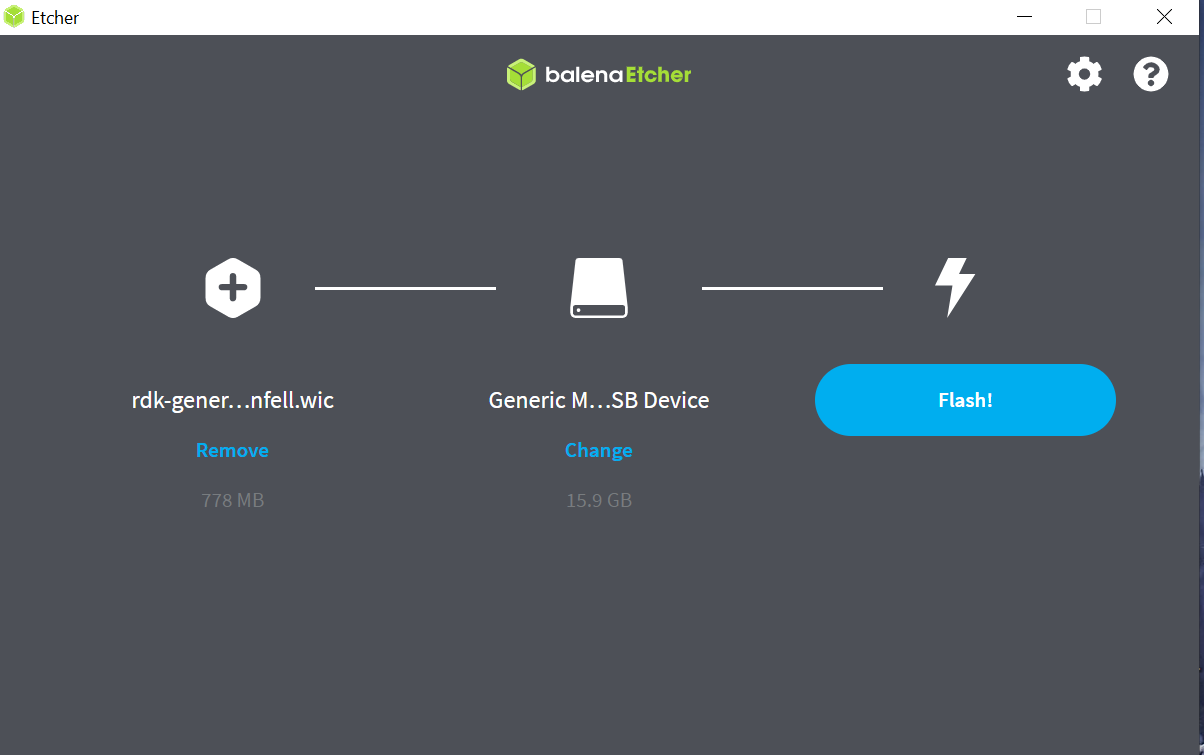
Flashing using BalenaEtcher
To flash the image on an SD card in Windows, you will need to download the BalenaEtcher application: https://www.balena.io/etcher/.
*Note: Prefer to use a 32GB SD card, and there should be a minimum of 12GB of free space available in the device. Be sure to remove all other portable flash drives/hard drives/SD cards from your computer before flashing the RDK image.
- Open the application.
- Select the image.
- Select the drive containing your SD card.
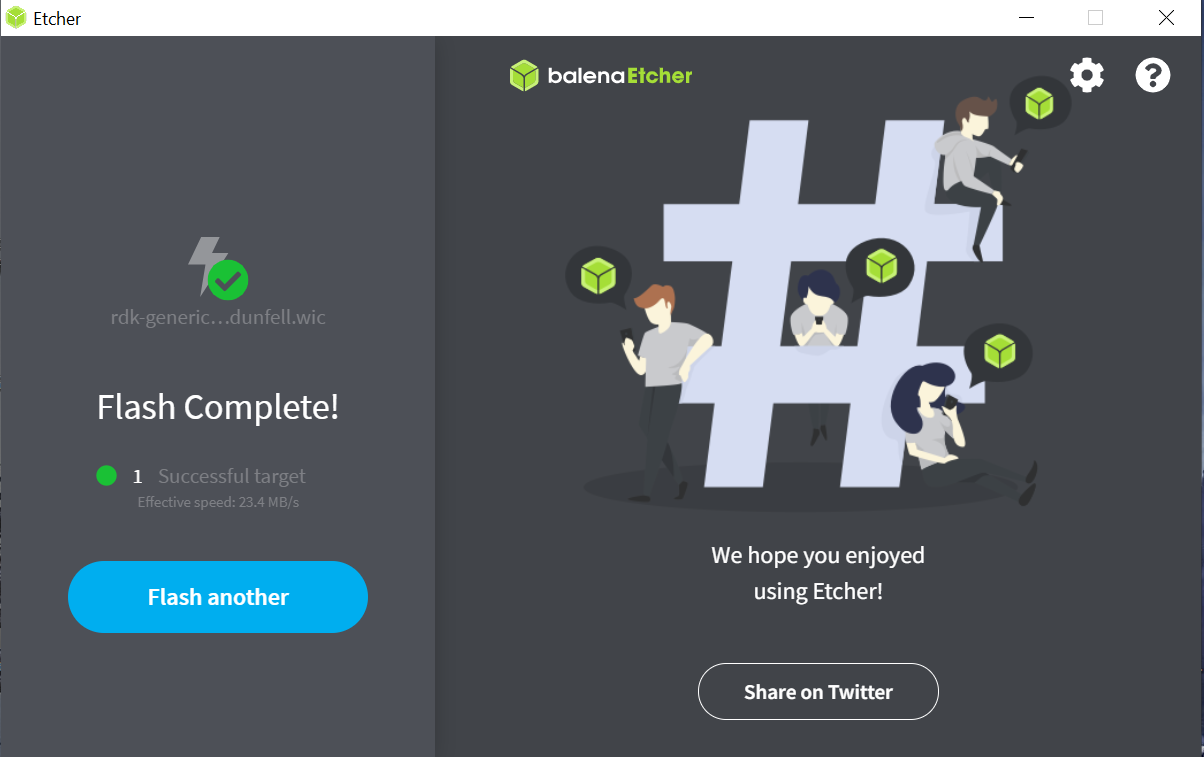
- Click “Flash” to copy the image onto the SD card.
Install SD Card and Connect Your Device
- Insert the SD card into the microSD card slot on the underside of Raspberry Pi and connect all the devices.
- Plug the USB power supply into a socket and connect it to your Raspberry Pi’s power port. A red LED light indicates that the Raspberry Pi is connected to power and is booting.
- Type “root” when the login prompt is displayed
- Run following in the terminal to know IP address
- $ ifconfig
- ssh to the rpi using ip address: ssh root@<Raspberry Pi's ip address>
Validate Onewifi
root@RaspberryPi-Gateway:~# uname -a
Linux RaspberryPi-Gateway 5.15.92-v8 #1 SMP PREEMPT Wed Feb 8 16:47:50 UTC 2023 aarch64 GNU/Linux
root@RaspberryPi-Gateway:~#
ifconfig
root@RaspberryPi-Gateway:~#ifconfig
br0       Link encap:Ethernet  HWaddr 1A:17:C0:C5:42:A7
          inet addr:<IP>  Bcast:192.168.101.255  Mask:255.255.255.0
          inet6 addr: fe80::1817:c0ff:fec5:42a7/64 Scope:Link
          UP BROADCAST RUNNING MULTICAST  MTU:1500  Metric:1
          RX packets:0 errors:0 dropped:0 overruns:0 frame:0
          TX packets:11 errors:0 dropped:0 overruns:0 carrier:0
          collisions:0 txqueuelen:1000
          RX bytes:0 (0.0 B)  TX bytes:1034 (1.0 KiB)

wlan0     Link encap:Ethernet  HWaddr <MAC>
          inet6 addr: fe80::da3a:ddff:fee4:3657/64 Scope:Link
          UP BROADCAST RUNNING MULTICAST  MTU:1500  Metric:1
          RX packets:0 errors:0 dropped:0 overruns:0 frame:0
          TX packets:11 errors:0 dropped:0 overruns:0 carrier:0
          collisions:0 txqueuelen:1000
          RX bytes:0 (0.0 B)  TX bytes:1186 (1.1 KiB)

root@RaspberryPi-Gateway:~#
Version.txt
root@RaspberryPi-Gateway:~# cat /version.txt
imagename:rdkb-generic-broadband-image_rdk-next_20241125100805
BRANCH=rdk-next
YOCTO_VERSION=kirkstone
VERSION=6.1.11.25.24
SPIN=0
BUILD_TIME="2024-11-25 10:08:05"
Generated on Mon Nov 25  10:08:05 UTC 2024
Check for WiFi database
root@RaspberryPi-Gateway:/# find -iname rdkb-wifi.db
./opt/secure/wifi/rdkb-wifi.db
root@RaspberryPi-Gateway:/#
OneWiFi status
root@RaspberryPi-Gateway:~# systemctl status onewifi
● onewifi.service - Cosa service
     Loaded: loaded (/lib/systemd/system/onewifi.service; static)
     Active: active (running) since Sun 2024-12-15 18:09:07 UTC; 14h ago
TriggeredBy: ● rpiwifiinitialized.path
    Process: 2763 ExecStartPre=/bin/sh /usr/ccsp/wifi/onewifi_pre_start.sh (code=exited, status=0/SUCCESS)
    Process: 2859 ExecStart=/usr/bin/OneWifi -subsys $Subsys (code=exited, status=0/SUCCESS)
    Process: 3353 ExecStartPost=/bin/sh /usr/ccsp/wifi/onewifi_post_start.sh (code=exited, status=0/SUCCESS)
   Main PID: 2905 (OneWifi)
      Tasks: 14 (limit: 8679)
     CGroup: /system.slice/onewifi.service
             ├─ 2905 /usr/bin/OneWifi -subsys eRT.
             └─ 2979 /var/tmp/wifidb-server /opt/secure/wifi/rdkb-wifi.db --remote=punix:/var/tmp/wifidb.sock --unixctl=/var/tmp/wifi.ctl --log-file=/dev/null --detach

2022 Apr 28 17:43:10 RaspberryPi-Gateway systemd[1]: Starting Cosa service...
2022 Apr 28 17:43:10 RaspberryPi-Gateway sh[2763]: reloading wifi drivers
2022 Apr 28 17:43:10 RaspberryPi-Gateway sh[2763]: loaded wifi drivers are brcmfmac
2022 Apr 28 17:43:10 RaspberryPi-Gateway sh[2763]: Nothing to do ..
2024 Dec 15 18:09:07 RaspberryPi-Gateway systemd[1]: Started Cosa service.
All process status
root@RaspberryPi-Gateway:~# ps - aux|grep eRT
 2905 root      0:03 /usr/bin/OneWifi -subsys eRT.
 3357 root      0:00 /usr/bin/meshAgent -subsys eRT.
 5000 root      0:00 /usr/bin/CcspAdvSecuritySsp -subsys eRT.
15211 root      0:00 /usr/bin/CcspTandDSsp -subsys eRT.
16090 root      0:00 grep eRT
OneWifi related DataModel
$dmcli eRT getv Device.WiFi.
CR component name is: eRT.com.cisco.spvtg.ccsp.CR
subsystem_prefix eRT.
Execution succeed.
.
.
.
Parameter 3180 name: Device.WiFi.AccessPoint.16.X_RDKCENTRAL-COM_Passpoint.Capability
               type:       bool,    value: false
Parameter 3181 name: Device.WiFi.AccessPoint.16.X_RDKCENTRAL-COM_Passpoint.Enable
               type:       bool,    value: false
Parameter 3182 name: Device.WiFi.AccessPoint.16.X_RDKCENTRAL-COM_Passpoint.Parameters
               type:     string,    value:
Parameter 3183 name: Device.WiFi.AccessPoint.16.X_RDKCENTRAL-COM_Passpoint.WANMetrics
               type:     string,    value:
Parameter 3184 name: Device.WiFi.AccessPoint.16.X_RDKCENTRAL-COM_Passpoint.Stats
               type:     string,    value:
Parameter 3185 name: Device.WiFi.NeighboringWiFiDiagnostic.Enable
               type:       bool,    value: false
Parameter 3186 name: Device.WiFi.NeighboringWiFiDiagnostic.DiagnosticsState
               type:     string,    value:
Parameter 3187 name: Device.WiFi.NeighboringWiFiDiagnostic.ResultNumberOfEntries
               type:       uint,    value: 0
Parameter 3188 name: Device.WiFi.X_RDKCENTRAL-COM_ATM.Capable
               type:       bool,    value: false
Parameter 3189 name: Device.WiFi.X_RDKCENTRAL-COM_ATM.Enable
               type:       bool,    value: false
Parameter 3190 name: Device.WiFi.X_RDKCENTRAL-COM_ATM.APGroupNumberOfEntries
               type:       uint,    value: 0


Note : All dmcli related to one wifi captured in “rpi4-64-onewifi-dmcli.txt”
cat /rdklogs/logs
root@RaspberryPi-Gateway:~# cd /rdklogs/logs
root@RaspberryPi-Gateway:/rdklogs/logs# ls
ADVSEClog.txt.0           DNSInternetCheck.txt.1     MeshAgentLog.txt.1   RXTX100Log.txt          WANMANAGERLog.txt.0  core_log.txt       telemetry.log       wifiMon.txt
ADVSEClog.txt.1           ETHAGENTLog.txt.0          MnetDebug.txt        SNMP.txt.0              WANMANAGERLog.txt.1  dcmProcessing.log  telemetry2_0.txt.0  wifiPsm.txt
ArmConsolelog.txt.0       ETHAGENTLog.txt.1          NOTIFYLog.txt.0      SNMP.txt.1              WEBCONFIGlog.txt.0   dcmrfc.log         telemetry2_0.txt.1  wifiWebConfig.txt
BootTime.log              FirewallDebug.txt          NOTIFYLog.txt.1      SelfHeal.txt.0          WEBCONFIGlog.txt.1   dcmscript.log      webui.log           wifihealth.txt
CRlog.txt.0               FwUpgradeManagerLog.txt.0  OnBoardingLog.txt.0  SelfHealAggressive.txt  WEBPAlog.txt.0       eth_telemetry.txt  wifiAnalytics.txt   xconf_curl_httpcode
CRlog.txt.1               FwUpgradeManagerLog.txt.1  PAMlog.txt.0         TDMlog.txt.0            WEBPAlog.txt.1       lighttpderror.log  wifiApps.txt
CapDebug.txt              GWPROVLog.txt.0            PAMlog.txt.1         TDMlog.txt.1            WiFilog.txt.0        ocsp-support.log   wifiCtrl.txt
CellularManagerLog.txt.0  GWPROVLog.txt.1            PARODUSlog.txt.0     TR69log.txt.0           WiFilog.txt.1        response.txt       wifiDMCLI.txt
CellularManagerLog.txt.1  LM.txt.0                   PARODUSlog.txt.1     TR69log.txt.1           XDNSlog.txt.0        rfcscript.log      wifiDb.txt
Consolelog.txt.0          LM.txt.1                   PSMlog.txt.0         VLANManagerLog.txt.0    XDNSlog.txt.1        rtrouted.log       wifiHal.txt
DNSInternetCheck.txt.0    MeshAgentLog.txt.0         PSMlog.txt.1         VLANManagerLog.txt.1    agent.txt            swupdate.log       wifiMgr.txt
Core file:-
Should not observe onewifi core files in tmp folder.
root@RaspberryPi-Gateway:/rdklogs/logs# ls /tmp/*core*
ls: cannot access /tmp/*core*: No such file or directory
WiFi tick mark , SSID, password, channel, ssid advertisement, bandwidth, security mode in RDKB webui
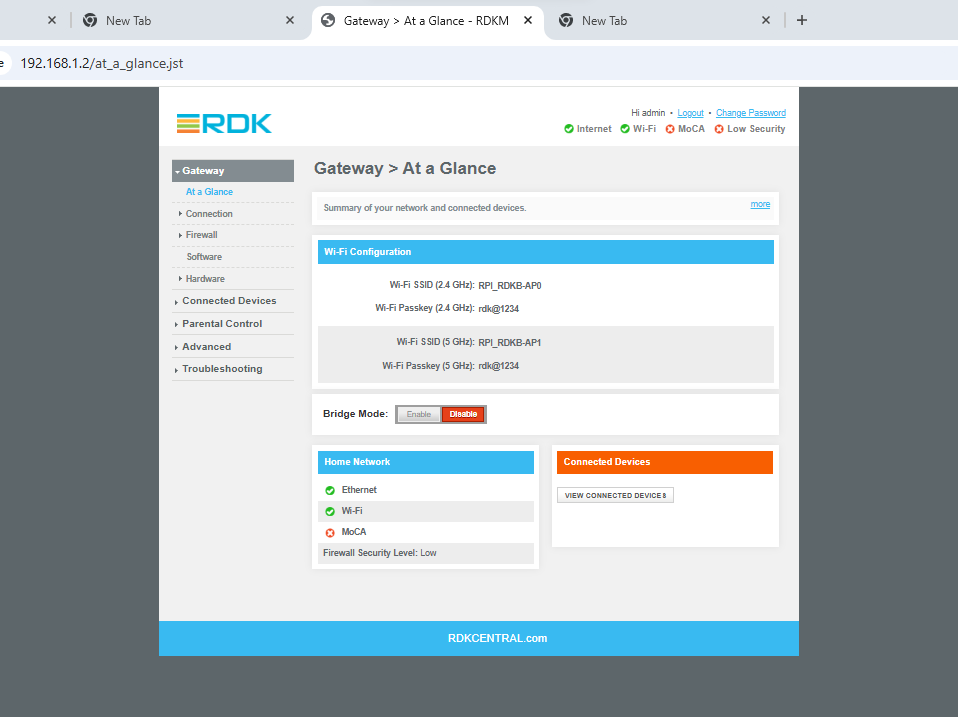
Edit Wifi configuration like SSID, password, channel, ssid advertisement, bandwidth and security mode in webui
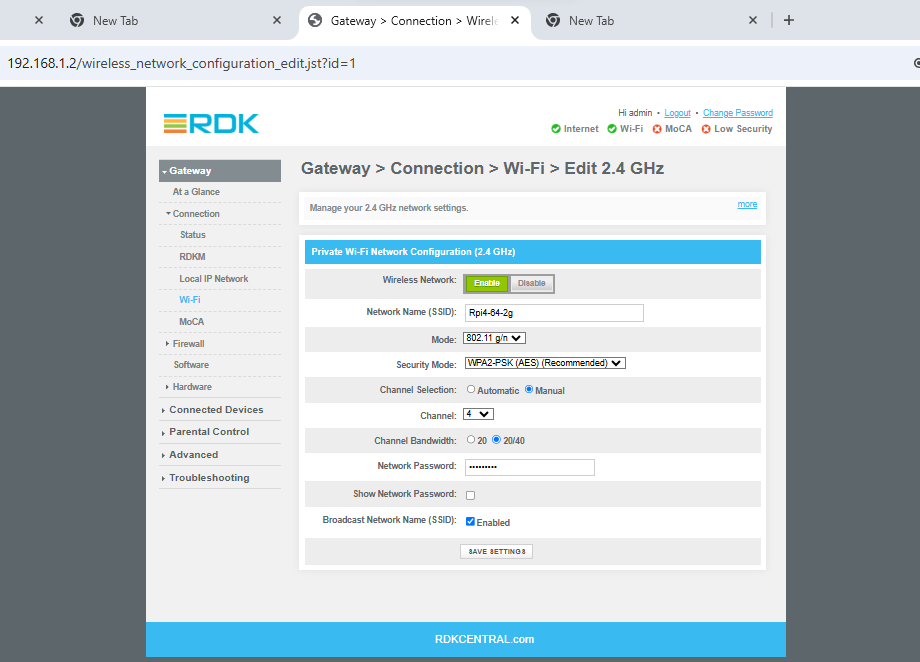
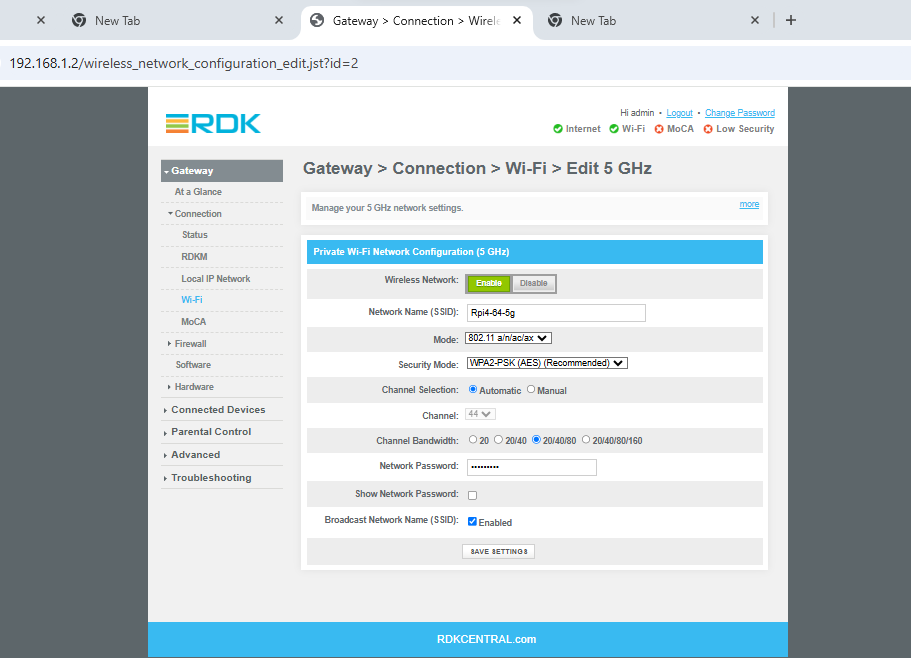
On reboot, changed data should be persisted
root@RaspberryPi-Gateway:~# iw dev
phy#0
        Interface wlan0
                ifindex 8
                wdev 0x1
                addr d8:3a:dd:27:41:ee
                type AP
                channel 34 (5170 MHz), width: 20 MHz, center1: 5170 MHz
On Factory reset of wifi, all default values to be restored
root@RaspberryPi-Gateway:~# dmcli eRT setv Device.X_CISCO_COM_DeviceControl.FactoryReset string Wifi
CR component name is: eRT.com.cisco.spvtg.ccsp.CR
subsystem_prefix eRT.
Execution succeed.
root@RaspberryPi-Gateway:~# iw dev
root@RaspberryPi-Gateway:~# systemctl status onewifi
● onewifi.service - Cosa service
     Loaded: loaded (/lib/systemd/system/onewifi.service; static)
     Active: active (running) since Mon 2024-12-16 09:39:37 UTC; 11min ago
TriggeredBy: ● rpiwifiinitialized.path
    Process: 2784 ExecStartPre=/bin/sh /usr/ccsp/wifi/onewifi_pre_start.sh (code=exited, status=0/SUCCESS)
    Process: 2866 ExecStart=/usr/bin/OneWifi -subsys $Subsys (code=exited, status=0/SUCCESS)
    Process: 3355 ExecStartPost=/bin/sh /usr/ccsp/wifi/onewifi_post_start.sh (code=exited, status=0/SUCCESS)
   Main PID: 2913 (OneWifi)
      Tasks: 14 (limit: 8679)
     CGroup: /system.slice/onewifi.service
             ├─ 2913 /usr/bin/OneWifi -subsys eRT.
             └─ 2990 /var/tmp/wifidb-server /opt/secure/wifi/rdkb-wifi.db --remote=punix:/var/tmp/wifidb.sock --unixctl=/var/tmp/wifi.ctl --log-file=/dev/null --detach

2022 Apr 28 17:43:10 RaspberryPi-Gateway systemd[1]: Starting Cosa service...
2022 Apr 28 17:43:10 RaspberryPi-Gateway sh[2784]: reloading wifi drivers
2022 Apr 28 17:43:10 RaspberryPi-Gateway sh[2784]: loaded wifi drivers are brcmfmac
2022 Apr 28 17:43:10 RaspberryPi-Gateway sh[2784]: Nothing to do ..
2024 Dec 16 09:39:37 RaspberryPi-Gateway systemd[1]: Started Cosa service.
root@RaspberryPi-Gateway:~# ls /tmp/*core*
ls: cannot access /tmp/*core*: No such file or directory
Uptime:
root@RaspberryPi-Gateway:~# uptime
 09:54:34 up 9 min,  load average: 0.01, 0.12, 0.08
root@RaspberryPi-Gateway:~# systemctl --state failed
  UNIT              LOAD   ACTIVE SUB    DESCRIPTION
● hciuart.service   loaded failed failed Configure Bluetooth Modems connected by UART
● miniupnpd.service loaded failed failed Lightweight UPnP IGD daemon

LOAD   = Reflects whether the unit definition was properly loaded.
ACTIVE = The high-level unit activation state, i.e. generalization of SUB.
SUB    = The low-level unit activation state, values depend on unit type.
2 loaded units listed.
- No labels
Overview
Community Forums
Content Tools
Tasks
DISCLAIMER: Please note that the use of the RDK Wiki is subject to its Privacy Policy & Terms of Use. In addition, this Wiki may be accessed by all RDK licensees and their contractors.
Powered by a free Atlassian Confluence Open Source Project License granted to RDKCentral. Evaluate Confluence today.
- Powered by Atlassian Confluence 9.2.9
- Printed by Atlassian Confluence 9.2.9
- Report a bug
- Atlassian News