


What are Factory Apps:
In the context of this document, factory applications refer to the core set of applications that are pre-integrated into an RDK 8 image and work together to deliver the Reference User Interface (UI) shown on device boot.
The factory apps include:
- Reference UI
- WebKit browser runtime
- Base bolt package
Together, these components form the default user experience that is displayed immediately after an RDK 8 image boots.
How to get Factory Applications
At the time of writing this document, work is still in progress to open up and make the pre-built BOLT applications available to the wider RDK community. Due to legal constraints, RDK-M is currently unable to share or distribute pre-built signed bolt binaries to the community.
Implication for the RDK Community
Until the legal considerations are resolved:
- Members of the RDK community are required to generate the factory applications (signed bolt packages) themselves using their own signing certificate
- Pre-built factory app binaries will not be provided by RDK-M
**This limitation is temporary and will be revisited once the legal situation around sharing signed BOLT applications is clarified.**
How are Factory Apps handled in RDK8
In RDK 8, factory applications are treated as external, deploy‑time components rather than being tightly coupled to the core RDK stack.
- What Changed?:
- RDK7 Architecture
- The application layer built the Reference UI packages during image build time.
- The middleware layer built components such as the WPE WebKit browser and the Cobalt runtime (YouTube).
- All these components (RefUI, WPE WebKit) were open-source and compiled from source during the build.
- As a result, community-built images contained all the necessary components for the Factory Reference UI to boot and run at runtime.
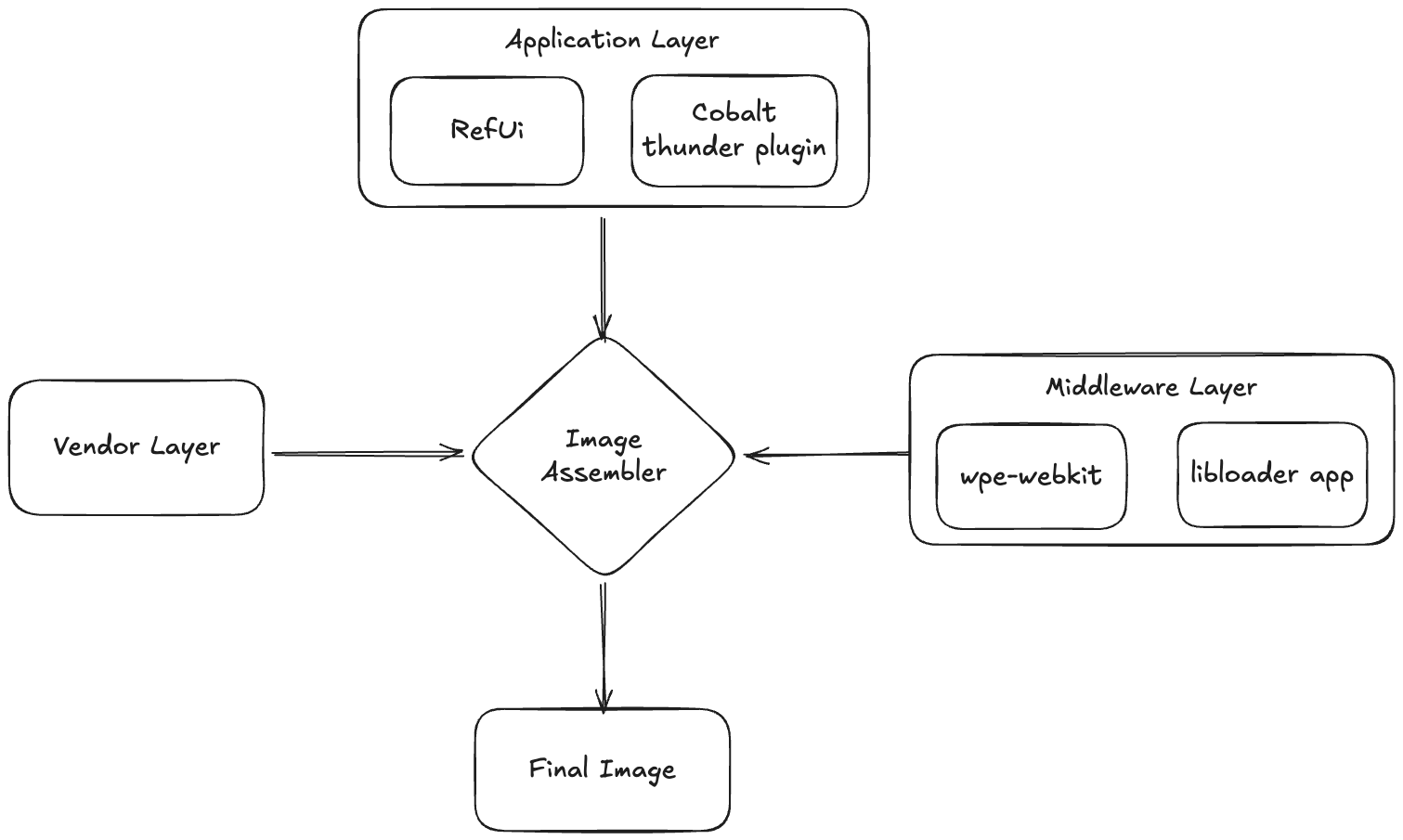
- RDK8 Architecture
RDK8 introduced major architectural changes:
- The application layer has been removed.
- The WPE WebKit browser, Cobalt, and other native applications previously built in the middleware are no longer built as part of the image.
- These components are now delivered as BOLT packages.
- BOLT packages are built separately and downloaded at runtime rather than being included in the image itself.
This means that native browser, runtimes, and applications are no longer embedded during the image build.
However, when the device boots for the first time, the Factory App / Reference UI must already be present on the platform so the user has a default, pre‑installed application available at startup.
Factory App Deployment Options
Factory applications can be deployed to the device using one of the following approaches:
Pre-installed during image build
Factory apps can be integrated directly into the final RDK 8 image during the Image Assembler stage.Sideloaded on first boot
Factory apps can be sideloaded onto the device during the initial boot-up process, after which the device is restarted to apply the changes.
Both approaches result in the factory applications being available for delivering the Reference UI experience.
Option 1: Pre-installed during image build
To pre-install factory applications and make them part of the final RDK 8 image, the BOLT-based factory apps must be built, signed, and integrated during the image build process.
To simplify the process of generating factory applications, a script has been created to assist developers with the complete workflow.
The script automates the following tasks:
- Building the required BOLT applications [Step 1]
- Signing the generated BOLT applications using a certificate provided by the developer [Step 2]
- Automatically generating the factory apps JSON file [Step 3]
By using this script, developers can avoid following the detailed and manual steps described in the below sections.
Script Location and Usage
The script, along with instructions on how to run it, can be found at https://github.com/rdkcentral/bolt-pkg-build-scripts
This approach is recommended for faster setup and to reduce manual errors during factory app generation.
The overall flow is outlined below.
Step 1: Build Factory App BOLT Applications Locally
All factory applications must be built locally by the integrator.
BOLT Application Build Steps
Build the following components:
Base application
→ Build instructions: Build Base Bolt PackageWPE (WebKit runtime)
→ Build instructions:Build Wpe Bolt PackageReference UI (RefUI)
→ Build instructions: Build Refui Bolt Package
Each of these components is packaged as a BOLT application.
Step 2: Sign the BOLT Applications
- All generated BOLT application packages must be signed
- Signing is mandatory for the applications to be accepted and installed as factory apps
- Refer: Bolt package - signing and verification
Step 3: Create the Factory Apps JSON File
Create a factory apps JSON file that describes the applications to be pre-installed.
The JSON file must include:
File system location of each BOLT package
Corresponding SHA-256 checksum for integrity verification
JSON template:
example-manifest
Step 4: Update local.conf
Update the path to the factory apps JSON file in your local build configuration:
- Set the
FACTORY_APPS_JSON_FILEvariable inlocal.confto point to the locally created JSON file
- Set the
Step 5: Run the Image Assembler Build
- Start the Image Assembler build process
- The factory applications will be packaged into the final RDK 8 image as part of the build
- On boot, the device will launch the pre-installed factory apps and display the Reference UI
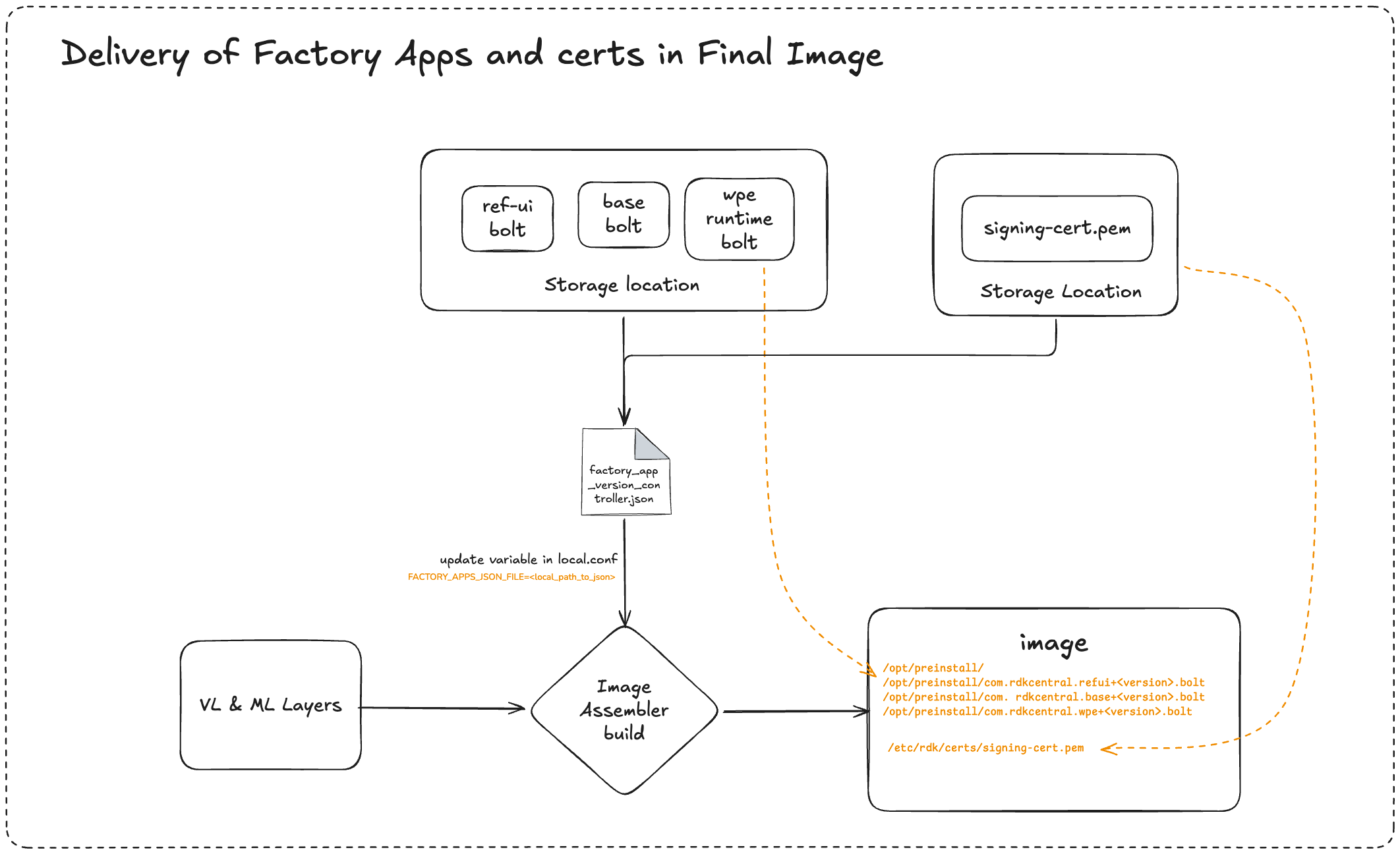
For a deeper understanding of how the Factory Apps Installer works internally, please refer to the documentation linked below:
Design for Factory Apps Installer in RDK-8
This resource provides an in‑depth explanation of the installer workflow and architecture.
Option 2: Sideloaded on first boot
Factory applications can also be sideloaded onto the device after the initial boot instead of being pre-installed as part of the image build.
In this approach, once the device completes its first boot and console access is available, the required BOLT applications can be copied to the device and installed manually.
- For this method to work, the public signing certificate used to sign the BOLT applications must be present on the device. The certificate must be located at:
/etc/rdk/certs/ - As mentioned in the above option, you should have bolt packages built and signed: Build Factory BOLT Applications Locally
Supported Sideloading Methods
There are two supported ways to install factory apps after the initial boot:
- Preinstall Manager–based installation
- Package Manager installation using
curl
High-Level Steps
- Boot the device with the RDK 8 image
- Gain console access after the initial boot completes
- Copy the required BOLT application packages onto the device
- Install the applications using one of the methods described below
- Reboot the device to activate the factory apps (if applicable)
Method 1: Installation Using Preinstall Manager
This method leverages the preinstall manager, which installs applications automatically during the next boot.
Steps:
- Copy the BOLT application packages to the following directory on the device in the PREINSTALL PATH
Preinstall Path in the platform changes from platform to platform. It's based on the variable value set in rdke-common-config Refer: rdke-rdkm-config.inc#L46
- Reboot the device
- Copy the BOLT application packages to the following directory on the device in the PREINSTALL PATH
On the next boot:
- The preinstall manager detects the packages
- Factory applications are installed automatically
- The Reference UI becomes available after installation
Method 2: Installation Using Package Manager (curl)
This method installs factory apps directly using the package manager APIs.
Steps
- Run the appropriate package manager
curlcommand to install the BOLT application.
[Please note, you need to install all 3 bolt packages (base, wpe, refui) using the following CURL command.]curl -X POST http://127.0.0.1:9998/jsonrpc -d '{"jsonrpc":2.0,"id":1,"method":"org.rdk.PackageManagerRDKEMS.install","params":{"packageId":"<package_name_or_id>","version":"<package_version>","fileLocator":"<file_path_in_file>"}}' -H "Content-Type: application/json" - Reboot the device to ensure the applications are launched correctly
- Run the appropriate package manager
Regardless of the installation method used (pre-install during image build or sideloading on first boot), the public certificate required to verify the signed BOLT applications must be present on the device.
- The public certificate must be placed at:
/etc/rdk/certs - This certificate is used to verify the signature of the BOLT packages
- Without the correct certificate in place, installation of the factory apps will fail
Building Bolt Application
This section describes the steps required to build BOLT applications used as factory apps in RDK 8.
Note:
The steps outlined below are accurate as of the time of writing this document.
Since build procedures may evolve over time, it is strongly recommended to refer to the README file of each individual package for the most up-to-date and authoritative instructions when generating BOLT applications.
Building Base Bolt Package:
Repo: https://github.com/rdkcentral/meta-bolt-distro
git clone https://github.com/rdkcentral/meta-bolt-distro.git
cd meta-bolt-distro
git checkout <branch/revision/tag>
source setup-environment

# Create bolt-tools and hash it
bitbake bolt-env && hash bolt

# build base bolt package
bolt make base
Building Wpe Bolt Package:
Repo: https://github.com/rdkcentral/meta-bolt-wpe
Dependent Bolt Packages:
To build an application that depends on base/runtime Bolt packages (for example, com.rdkcentral.base+<version>.bolt), ensure those dependent packages are available first. Either build them separately or place the corresponding .bolt artifacts in the following
location before running the build. So in this case, please make sure the base bolt package is present in the following location:
build/bolts/
git clone https://github.com/rdkcentral/meta-bolt-wpe.git
cd meta-bolt-wpe
git checkout <branch/revision/tag>
source setup-environment

# Create bolt-tools and hash it
bitbake bolt-env && hash bolt

#build wpe bolt package
bolt make wpe
Building Refui Bolt Package:
Repo: https://github.com/rdkcentral/rdke-refui
You need to bolt-tools configured for packing bolt package for refui
Steps: https://github.com/rdkcentral/rdke-refui/tree/develop/bolt
git clone https://github.com/rdkcentral/rdke-refui.git
cd rdke-refui
git checkout <branch/revision/tag>

cd develop/bolt/
./pack.sh
cd packages
bolt pack ../package-configs/com.rdkcentral.refui.json refui.tgz
# You should have com.rdkcentral.refui+0.0.1.bolt created in the packages directory.
Overview
Community Forums
Content Tools
Tasks