


RDK8 App Integration Use-case
Complete flow

Development Stage: Sign the package using self-signed certificate
This section provides details about the process of signing a Bolt package on the HOST machine using bolt-tools by generating a self-signed certificate.
 draw.io
CPE App Execution Flow: How an App gets launched on device
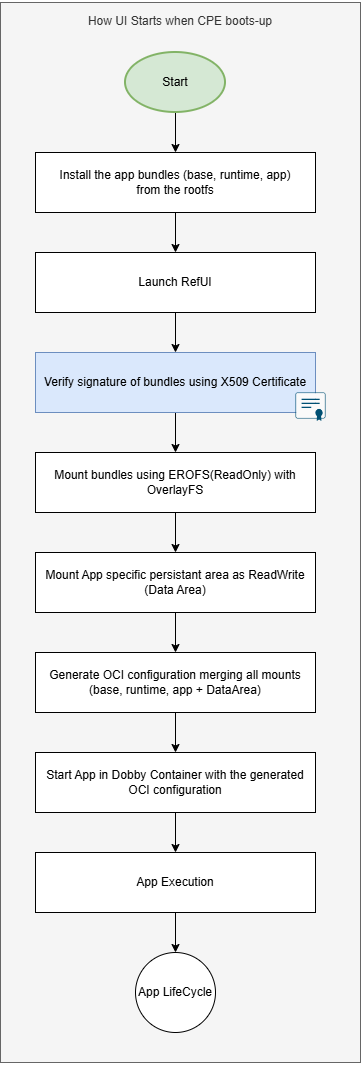
The libPackage library at runtime uses all the compatible certificates present in DAC_APP_CERT_PATH for verifying the signature of the bolt package. DAC_APP_CERT_PATH is unique to device build configuration (Reference: here).
Reference Commands and Tools
Signing-key Generation
Generate private key
Generates a 2048-bit RSA private key and saves it to private_key.pem. When prompted, input the Secret Passphrase.
openssl genrsa -out private_key.pem 2048
Extract the public key
This step extracts the public key from the private key and saves it to public.pem
openssl rsa -in private_key.pem -pubout -out public.pem
Generate a self-signed certificate with 10yr validity
Creates a self-signed X.509 certificate using the private key (private_key.pem) and saves it to certificate.pem
openssl req -new -x509 -key private_key.pem -out certificate.pem -days 3650 -subj "/C=US/ST=Pennsylvania/L=Philadelphia/O=RDKM/OU=RDKE MW/CN=RDKM"
Create a PKCS#12 File
This P12 file (signing.p12) contains the private key and the certificate. Used for securely storing and transporting private keys and certificates. When prompted, input the same Secret Passphrase.
openssl pkcs12 -export -out signing.p12 -inkey private_key.pem -in certificate.pem
Check the private key
This verifies the integrity of the private key (private_key.pem)
openssl rsa -in private_key.pem -check
Inspect the Certificate
Displays the details of the certificate (certificate.pem) in a human-readable format without outputting the raw certificate.
openssl x509 -in certificate.pem -text -noout
$ openssl x509 -in certificate.pem -text -noout
Certificate:
    Data:
        Version: 3 (0x2)
        Serial Number:
            15:e2:80:96:13:7d:25:28:9e:a2:b6:3a:42:97:a6:67:de:bc:ab:3e
        Signature Algorithm: sha256WithRSAEncryption
        Issuer: C = US, ST = Pennsylvania, L = Philadelphia, O = RDKM, OU = RDKE MW, CN = RDKM
        Validity
            Not Before: Dec 10 15:31:52 2025 GMT
            Not After : Dec  8 15:31:52 2035 GMT
        Subject: C = US, ST = Pennsylvania, L = Philadelphia, O = RDKM, OU = RDKE MW, CN = RDKM
        Subject Public Key Info:
            Public Key Algorithm: rsaEncryption
                Public-Key: (2048 bit)
                Modulus:
                    00:a2:6a:45:97:40:12:24:51:ae:ed:8f:d7:2a:29:
                    c7:97:d1:1b:89:0c:e3:cd:8b:cd:08:d0:5f:a3:9c:
                    0f:65:17:0f:1f:60:5b:ec:7f:16:f0:10:95:c4:40:
                    f3:82:c4:00:57:0c:f9:26:88:cf:8d:69:d2:a1:cd:
                    ae:c1:a6:ea:e4:8c:87:b7:78:dc:5e:82:04:23:2b:
                    2f:fd:4e:7b:32:05:1f:8d:49:b6:97:9c:9a:95:4e:
                    61:d5:24:d6:56:2f:04:8e:87:b9:c8:4c:f1:31:2a:
                    3d:b0:60:0a:72:30:0d:d9:12:71:b8:f1:ec:6b:09:
                    e3:bb:51:02:46:d6:06:e6:69:54:41:41:07:a3:45:
                    28:b8:c2:b5:32:85:da:0b:03:20:b4:2e:d2:ec:47:
                    71:2f:60:8b:07:dd:e3:ad:35:27:d5:df:da:39:87:
                    a6:59:c8:6f:2b:96:25:71:80:3b:eb:01:76:2c:90:
                    4d:f0:ed:7c:7c:49:f2:81:d9:ee:d7:57:bf:c4:b4:
                    20:1b:0a:08:97:54:8e:4e:b1:6c:91:76:9c:70:b3:
                    7f:9d:8c:f4:d5:8b:7b:c1:c0:22:a8:17:8b:14:d4:
                    be:63:db:fc:4b:37:74:fb:28:91:d4:d0:84:54:30:
                    dd:5f:79:04:32:43:26:37:42:10:de:48:98:a6:f7:
                    37:89
                Exponent: 65537 (0x10001)
        X509v3 extensions:
            X509v3 Subject Key Identifier:
                51:B7:65:8D:43:C9:01:37:47:99:B0:6B:2B:2C:67:06:CD:DA:FD:35
            X509v3 Authority Key Identifier:
                51:B7:65:8D:43:C9:01:37:47:99:B0:6B:2B:2C:67:06:CD:DA:FD:35
            X509v3 Basic Constraints: critical
                CA:TRUE
    Signature Algorithm: sha256WithRSAEncryption
    Signature Value:
        60:da:37:fe:30:ef:3a:8c:3d:c3:31:f0:a6:d2:07:82:c2:f1:
        9b:07:d8:0f:89:54:50:e9:e0:c4:04:b1:d4:a5:7c:e8:4d:10:
        39:49:2e:3c:ca:7e:dc:71:3d:c2:46:2f:d0:be:36:39:32:9a:
        fd:8b:e8:ab:68:53:e3:4e:e1:ec:62:3d:6e:d1:6b:6a:05:bd:
        1d:a8:81:c5:4e:cb:83:e0:b5:ac:e2:cc:42:30:f5:be:ef:9c:
        0c:33:b3:95:1b:1d:42:de:13:8b:13:e7:86:47:fb:ff:06:90:
        cd:46:c8:77:6a:20:d8:86:fe:27:0f:55:c4:f9:4a:9e:98:c8:
        e7:c5:3c:90:ac:fd:fd:42:2d:6c:da:75:59:03:e8:88:52:9f:
        4e:27:fc:a6:46:ed:48:89:2e:ac:ea:de:67:4f:b6:98:36:34:
        3b:e6:8e:02:d6:86:a4:61:63:c3:fd:19:b2:7b:2f:60:db:60:
        43:5d:c6:8a:55:21:35:70:69:36:25:e1:69:be:a2:7d:4d:be:
        a3:e2:72:84:8b:45:23:41:05:76:08:b6:c9:a5:68:c0:8e:65:
        5b:cb:f3:54:c6:86:a1:1c:10:25:37:6a:7a:37:10:1e:4a:40:
        1c:08:5c:35:a7:29:1b:48:5b:71:01:c0:99:a3:50:76:4b:b9:
        bd:4d:62:da
Bundle Signing Process - Generate the signed bolt bundle
Using ralfpack utility we shall sign the bolt bundles from the HOST using the generated certificates.
Prerequisite: HOST machine with ralfpack support. Refer https://github.com/rdkcentral/ralfpack for details.
Sign a single bundle using ralfpack
ralfpack sign --pkcs12=signing.p12 --passphrase=<Secret Passphrase> <bolt package>
ralfpack sign --pkcs12=signing.p12 --passphrase="<Secret Passphrase>" com.rdkcentral.base+0.0.2.bolt
Successfully signed com.rdkcentral.base+0.0.2.bolt
Verify the signed bundle using ralfpack
Two ways - using public key as well as with the root CA
ralfpack verify --key=public.pem <signed bolt package>
ralfpack verify --key=public.pem com.rdkcentral.base+0.0.2.bolt
Package signature verification succeeded
ralfpack verify --ca-roots=certificate.pem <signed bolt package>
ralfpack verify --ca-roots=certificate.pem com.rdkcentral.base+0.0.2.bolt
Package signature verification succeeded
Batch-sign bundles using ralfpack (optional)
Using bolt-pkg-sign.sh script, we can generate multiple signed bundles in batch mode. Use this self-signed certificate for development activities.
d35@d35:/mnt/vmShared/joseSignPkg/source$ ./bolt-pkg-sign.sh certs/com.rdkcentral.ralf.p12 <Secret Passphrase> $PWD signed/
Found 6 package(s) to sign
Output directory: signed/

Signing com.rdkcentral.AmazonPrime+0.1.0.bolt...
Successfully signed com.rdkcentral.AmazonPrime+0.1.0.bolt
Success...
Signing com.rdkcentral.base+0.1.0.bolt...
Successfully signed com.rdkcentral.base+0.1.0.bolt
Success...
Signing com.rdkcentral.cobalt+0.1.0.bolt...
Successfully signed com.rdkcentral.cobalt+0.1.0.bolt
Success...
Signing com.rdkcentral.refui+0.0.2.bolt...
Successfully signed com.rdkcentral.refui+0.0.2.bolt
Success...
Signing com.rdkcentral.wpe-develop+0.1.0.bolt...
Successfully signed com.rdkcentral.wpe-develop+0.1.0.bolt
Success...
Signing com.rdkcentral.youtube+0.1.0.bolt...
Successfully signed com.rdkcentral.youtube+0.1.0.bolt
Success...

All packages signed successfully!
Signed packages are in: signed/
d35@d35:/mnt/vmShared/joseSignPkg/source$
Verifying the signature of bolt bundle at DUT
This section explains how to verify the signature information of a Bolt bundle on the device side. The flow is explained with respect to the FactoryApp launch flow diagram. A sample test application named ralfinfo can be used to inspect the bundle details on the DUT which closely mimics the behavior of the plugin based runtime logic.
root@ipstb-mediabox-rtd1325:/mnt/signed-bundles# ralfinfo -p com.rdkcentral.wpe+0.0.2.bolt -v -c certificate.pem
Successfully opened package: com.rdkcentral.wpe+0.0.2.bolt
Package information:
********************************************************
Package format: Package::Format::Ralf
Package ID: com.rdkcentral.wpe
Package version: 0.0.2
Certificate Subject: CN=RDKM,OU=RDKE MW,O=RDKM,L=Philadelphia,ST=Pennsylvania,C=US
Certificate Issuer: CN=RDKM,OU=RDKE MW,O=RDKM,L=Philadelphia,ST=Pennsylvania,C=US
Certificate Is Valid: 1
Metadata information:
********************************************************
ID com.rdkcentral.wpe
Version 0.0.2
Type Runtime
Platform Architecture unknown
Platform variant unknown
Platform OS unknown
 Is Mountable ? Yes
 Mime Type runtime/unknown
 Title WPE WebKit
 Entry Point Path /usr/bin/cog-launcher
 Dependencies:
  com.rdkcentral.base : 0.0.2 - 0.0.3
 Icons:
  None
 No Application Info present.
 Service Info Present: No
 Runtime Info: Present Yes
  Vendor Config Keys:
Auxiliary metadata keys:
********************************************************
root@ipstb-mediabox-rtd1325:/mnt/signed-bundles#
Overview
Community Forums
Content Tools
Tasks