


Jenkins Jobs
2 Jobs are required in Automatics Jenkins for Python Test Execution. These jobs are created as part of automated deployment.
- SETUP_AUTOMATICS_PYTHON_ENV
- Install python packages within Jenkins docker environment required for Python test execution.
- User has to trigger this job one time as part of the initial setup
- PY_JOB1
- Job that executes python test scripts
Job Configuration Details during Automated Setup
In Automated setup, jobs are created automatically during setup. Below additional manual configuration required in PY_JOB1 jenkins job.
In Build Steps, in execute shell section, please provide your python test repository url in variable 'repo_url' and branch name in variable branch_name and Save Configuration. Then job is ready for execution.
Job Configuration Details during Manual Setup
Please follow below steps only if you are bringing up Automatics manually, instead of Automated Deployment approach Automatics+Jenkins+Setup+and+Automated+Deployment+Guide. In automated deployment, these jobs are created as part of Jenkins setup.
SETUP_AUTOMATICS_PYTHON_ENV Job Configuration
Please follow the below steps to create Automatics Python Library and distribute across jenkins VM from Jenkins job
Creating Jenkins job
- From Jenkins, select “New Item”,

- Specify name of the new job to be created.
- Select ‘OK’ button.
Configuration of Jenkins Job
Configure General Settings
- In ‘General’ settings, add proper description in the ‘Description’ section
- Check ‘Discard old builds’ checkbox
Configure Source Code Management
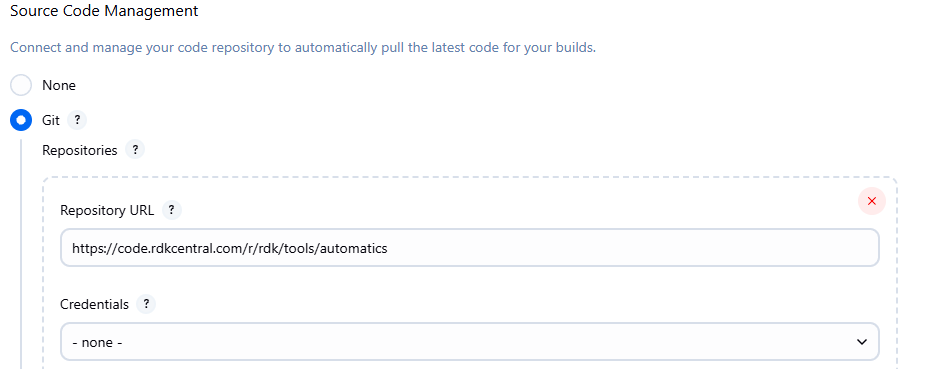
- In ‘Source Code Management’, select git and under ‘Repository’ add the repo detail of Automatics Python wrapper Library project
eg : ‘https://code.rdkcentral.com/r/rdk/tools/automatics’ and also add the repo credentials
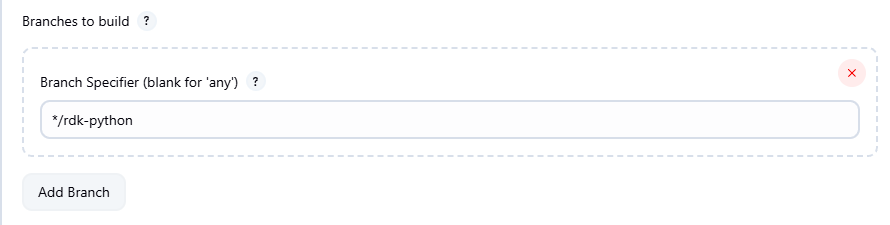
- Also add the branch of the repository in ‘Branches to build’
eg : */rdk-python
- Also add the branch of the repository in ‘Branches to build’
Configure Build Triggers
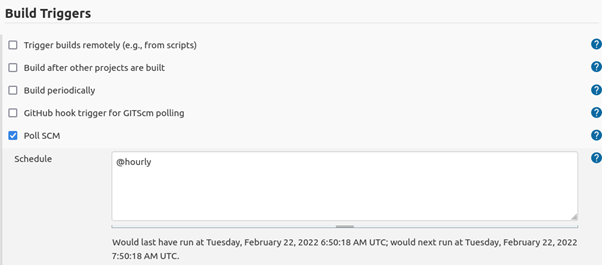
- In build triggers section select ‘Poll SCM’ and enter the schedule. By this configuration, there will be a polling to the repo for any changes periodically and if there are any changes then the Jenkins build will be executed
Eg : @hourly means the job will check for any changes in the remote repo for every 1 hour and if there are any changes, then the build will run
Configure Build Environment
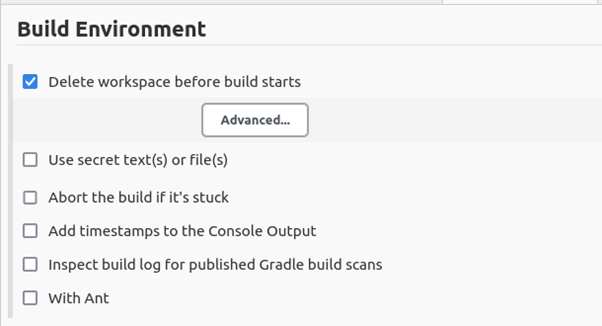
- In ‘Build Environment’, select ‘Delete workspace before build starts’
Configure Build Settings
- In the ‘Build’ settings, Click on ‘Add build step’ and Select 'Execute Shell'
- Add the following commands in the text box
- Configure Build Setting
#/bin/sh

python3 setup.py bdist_wheel

python3 setup.py sdist

pip3 install --upgrade -e .
Save the Configuration
- Click on ‘Apply’ and ‘Save’
PY_JOB1 Job Configuration
The job creation for test execution can be done using the steps available in the page Jenkins Job for Test Execution . Only change is in the Jenkins Job for Test Execution#ConfigureBuild section. The final changes are as follows. In below script, please provide your python test repository url in variable 'repo_url' and branch name in variable branch_name
Execute shell in Configure Build
#!/bin/bash
		chmod 777 src/main/resources/pre-test-config_py.sh
        echo "Mode: $executionMode"

       if [[ "$executionMode" =~ .*"RDKV".* ]]; then
          src/main/resources/pre-test-config_py.sh -g 'com.automatics.providers' -a 'rpi-provider-impl' -v '0.0.1-SNAPSHOT'
          src/main/resources/pre-test-config_py.sh -g 'com.automatics.apps' -a 'rdkv-utils' -v '1.0.0-SNAPSHOT'
        else
           src/main/resources/pre-test-config_py.sh -g 'com.automatics.providers' -a 'rpi-provider-impl' -v '0.0.1-SNAPSHOT'
           src/main/resources/pre-test-config_py.sh -g 'RDKMAutomationRDKBUtils' -a 'rdkb-utils' -v '0.0.1-SNAPSHOT'
        fi

        # Target directory where python test repository will be cloned
        target_dir="/var/jenkins_home/jobs/PY_JOB1/workspace/automaticsPythonTest"
        mkdir $target_dir
        cd $target_dir

        #Specify the repository URL of python test scripts
        #Please replace this with repo url of your python test script
        repo_url="https://code.rdkcentral.com/r/rdk/tools/automatics"

        #Specify the test repository branch name
        branch_name="python-test"

        # clone the python test repository
        git clone --branch $branch_name $repo_url $target_dir

	 	# change to the target directory
		cd $target_dir
Overview
Community Forums
Content Tools
Tasks