


Applications in RDK8 represent a major architectural shift compared to RDK7.
The way native applications and web applications are built, packaged, and delivered has been completely redesigned to improve flexibility, upgradeability, and build efficiency.
This document explains:
- How applications were handled in RDK7
- What changed in RDK8
- How applications (UI, WebKit, YouTube, etc.) are delivered in RDK8
- How UI is preloaded on RDK8 devices
Application Model in RDK7
In RDK7, applications were tightly coupled to the firmware image.
RDK7 Architecture Overview
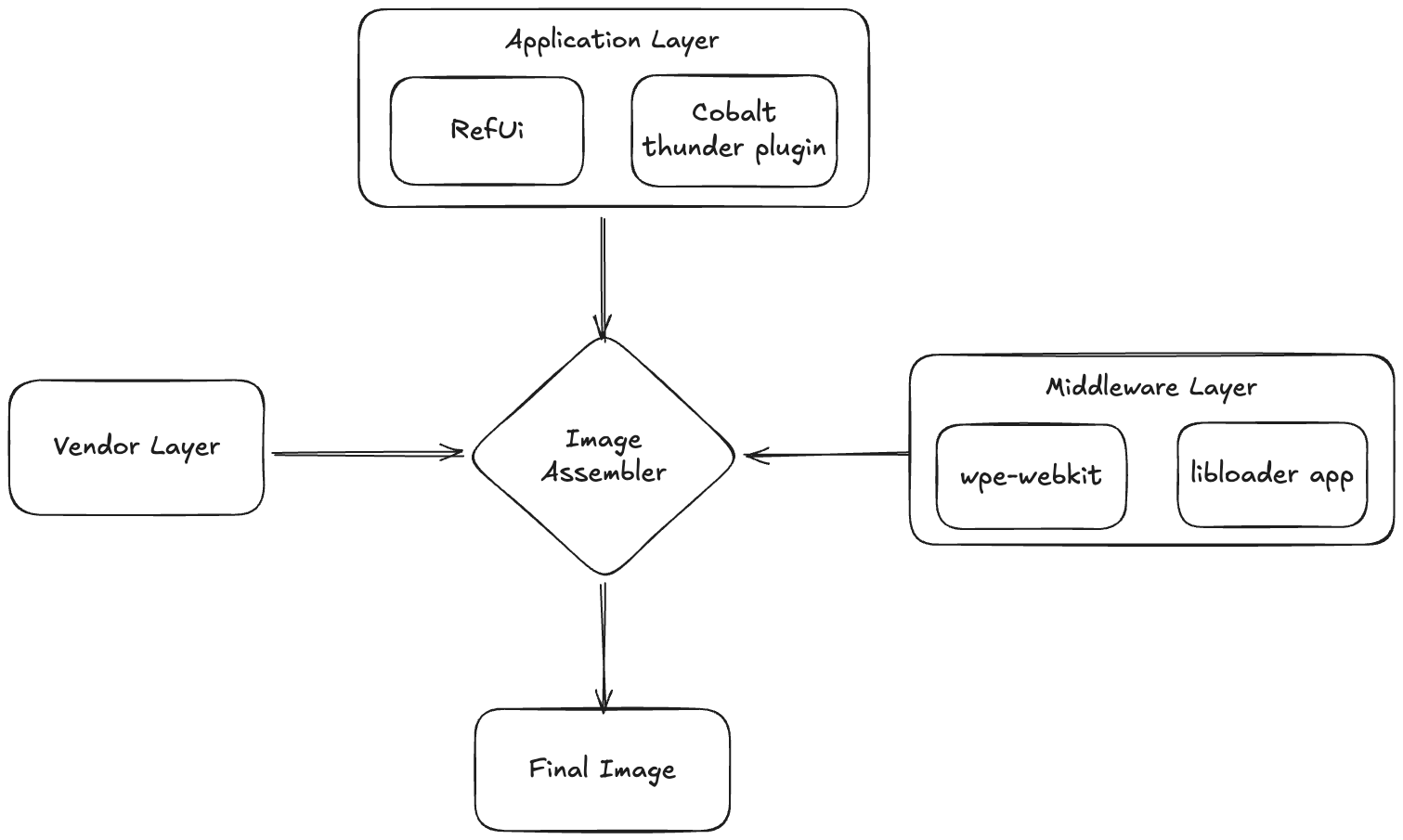
- RDK7 has a dedicated Application Layer, added during image assembly.
- The Application Layer is platform-specific and built for the target hardware.
Responsibilities of the Application Layer
The Application Layer contained:
- Thunder plugins
- Native App SDK
- App Porting layer assets
- Platform-specific native application components
Middleware and Application Split in RDK7
- Middleware Layer
- WPE WebKit
- WPE Thunder plugin
libcobalt(YouTube runtime)
- Application Layer
- Reference UI Thunder plugin
- YouTube Thunder plugin
- Premium native apps such as:
- Amazon Prime Video (Along with it respective Thunder plugins)
👉 Key Limitation:
All applications were bound to the firmware, requiring a full image rebuild and flash to upgrade or modify applications.
Application Model in RDK8
In RDK8, the traditional Application Layer has been removed entirely.
Key Conceptual Changes
- There is no separate Application Layer in RDK8.
- The distinction between native apps and web apps has changed.
- Applications are no longer tied to the firmware image.
Bolt-Based Application Model
All applications in RDK8 are delivered as BOLT packages, which are:
- Platform-agnostic
- Decoupled from firmware
- Upgradable independently of the image
Applications are split into three logical BOLT package types:
| Package Type | Description |
|---|---|
| Base | Core dependencies required for application execution |
| Runtime | Shared runtimes used by applications |
| App | The actual application packages (UI, YouTube, etc.) |
Info
The following diagram provides a deliberately high‑level and simplified representation of a more complex packaging architecture. Its purpose is to offer an accessible, quick visual reference—suitable for a two‑minute overview—illustrating how the Bolt packages are organized within the broader system.
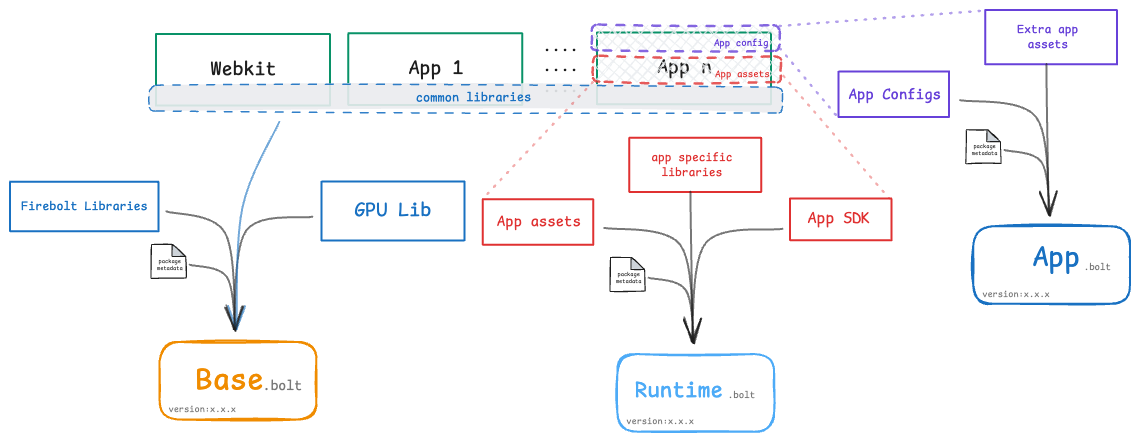
Each component can be upgraded independently without rebuilding or upgrading the firmware.
What Changed from RDK7 → RDK8
Major Differences
1. Removal of Application Layer
- RDK8 eliminates the Application Layer entirely.
- Applications are no longer part of the image assembler.
2. Middleware Build Optimization
- WPE WebKit and its Thunder plugin are no longer part of the middleware layer.
- This significantly reduces middleware build time.
3. Libcobalt Decoupling
libcobaltis no longer part of the middleware layer.
4. Application as BOLT packages
- WPE WebKit, reference UI, and YouTube are delivered as BOLT packages.
- Applications can be:
- Downloaded at runtime
- Sideloaded
- Preloaded at Image Assembler stage and Installed at run time
Runtime and Application Dependencies in RDK8
Runtime Packages
- WPE WebKit → Runtime BOLT package
- Libcobalt → Runtime BOLT package
App Packages
These runtime components are consumed by application BOLT packages such as:
- Reference UI
- YouTube
- YouTube Kids
- Other HTML5 / Lightning / web-based applications
How Is the UI Preloaded on RDK8?
To support out-of-box user experience, RDK8 introduces the concept of Factory Apps.
Factory Apps
Factory Apps include:
- Reference UI → App package
- WPE WebKit → Runtime Package
- Base packages
These applications are:
- Preloaded on the device
- Installed automatically during initial boot
- Available immediately after first boot
Info
For a detailed explanation on preloading of Factory Apps refer to: Factory Apps on RDK8
Summary
| Aspect | RDK7 | RDK8 |
|---|---|---|
| Application Layer | Present | Removed |
| Platform Dependency | Platform-specific | Platform-agnostic |
| App Upgrade Model | Firmware rebuild required | Independent BOLT upgrades |
| WebKit / Libcobalt | Middleware | Runtime BOLT packages |
| UI Delivery | Application layer | Preloaded as part of Factory Apps |
Overview
Community Forums
Content Tools
Tasks