


- Device Details
- Prerequisite
- Playing Test streams with Rialto
- Running YouTube with Rialto
- Pipeline Diagram
- Known Issues / limitations
Device Details
| Params | Value |
|---|---|
| Chip | Rpi4/Rpi3B+ |
| Cobalt | RDK Common Port - Cobalt 22.lts |
| CPU | ARMv7 Processor rev 0 |
| Gstreamer | 1.16.0 |
| Kernel | 5.10.52 |
| Memory | 16 GB flash and 2 GB RAM |
| RDK Build | rdk-next |
| RDKServices | Main |
| UI | RDK Resident UI |
| Widevine | Not Available |
| Yocto | 3.1 - Dunfell |
Prerequisite
- Build the latest Raspberry Pi4/Pi3 Image using below links
RPI 4B model reference platform for RDKV - RDK - RDK Central Wiki
RDK-V rdk-next Yocto 3.1 dunfell build for Raspberrypi - RDK - RDK Central Wiki
Playing Test streams with Rialto
Stop wpeframework
systemctl stop wpeframework For Rpi4 platform - Run the below command in all terminals where you need to run the rialto commands.
export WESTEROS_DRM_CARD=/dev/dri/card0 Note: In case of Rpi3 platform, no need to run the above command. Since, Rpi3 uses only one master card.
- For below steps, Refer Running YouTube with Rialto - Preferred Program - RDK Central Wiki page.
- Run westeros
- Start server manager simulator
- Run Rialto Server for YouTube Command used to run test streams:
GST_REGISTRY=/tmp/rialto-registry.bin RIALTO_DEBUG=5 RIALTO_CONSOLE_LOG=1 RIALTO_SOCKET_PATH=/tmp/rialto-0 XDG_RUNTIME_DIR=/tmp WAYLAND_DISPLAY=westeros-cobalt LD_LIBRARY_PATH="$PWD/usr/lib" COBALT_CONTENT_DIR="$PWD/usr/share/content/data" RIALTO_CLIENT_BACKEND_LIB="/usr/lib/libRialtoClient.so" gst-launch-1.0 playbin uri=file:///tmp/sample-video-file-for-testing.mp4
Note:
- Make sure rialto-registry.bin is cleared
rm /tmp/rialto-registry.bin - PFA sample-video-file-for-testing_mp4.zip for reference.
- Make sure rialto-registry.bin is cleared
Playing HLS with Rialto
Stop wpeframework
systemctl stop wpeframework For Rpi4 platform - Run the below command in all terminals where you need to run the rialto commands.
export WESTEROS_DRM_CARD=/dev/dri/card0 Note: In case of Rpi3 platform, no need to run the above command. Since, Rpi3 uses only one master card.
Run westeros
XDG_RUNTIME_DIR=/tmp LD_PRELOAD=/usr/lib/libwesteros_gl.so.0 westeros --renderer /usr/lib/libwesteros_render_embedded.so.0.0.0 --embedded --display "westeros-cobalt" --window-size 1920x1080 Start server manager simulator:
RIALTO_DEBUG=5 RIALTO_SESSION_SERVER_STARTUP_TIMEOUT_MS=15000 SESSION_SERVER_ENV_VARS='XDG_RUNTIME_DIR=/tmp;RIALTO_SINKS_RANK=0;GST_REGISTRY=/tmp/rialto-server-gstreamer-cache.bin;WAYLAND_DISPLAY=westeros-cobalt;FORCE_SAP=TRUE;FORCE_SVP=TRUE' /usr/bin/RialtoServerManagerSim Note:
If you are not able to play HLS using rialto-mse sinks, then try to increase value of RIALTO_SESSION_SERVER_STARTUP_TIMEOUT_MS (>2000) or remove the TIMEOUT. So, there will be no startup limit.Run Rialto Server for YouTube:
curl -X POST -d "" localhost:9008/SetState/YouTube/Active Command used to run test streams:
GST_REGISTRY=/tmp/rialto-registry.bin RIALTO_DEBUG=5 RIALTO_CONSOLE_LOG=1 RIALTO_SOCKET_PATH=/tmp/rialto-0 XDG_RUNTIME_DIR=/tmp WAYLAND_DISPLAY=westeros-cobalt LD_LIBRARY_PATH="$PWD/usr/lib" COBALT_CONTENT_DIR="$PWD/usr/share/content/data" RIALTO_CLIENT_BACKEND_LIB="/usr/lib/libRialtoClient.so" gst-launch-1.0 playbin uri=https://bitmovin-a.akamaihd.net/content/MI201109210084_1/mpds/f08e80da-bf1d-4e3d-8899-f0f6155f6efa.mpd
Note:
- Make sure rialto-registry.bin is cleared
rm /tmp/rialto-registry.bin
- Make sure rialto-registry.bin is cleared
Running YouTube with Rialto
Stop wpeframework
systemctl stop wpeframework For Rpi4 platform - Run the below command in all terminals where you need to run the rialto commands.
export WESTEROS_DRM_CARD=/dev/dri/card0 Note: In case of Rpi3 platform, no need to run the above command. Since, Rpi3 uses only one master card.
- For below steps, Refer Running YouTube with Rialto - Preferred Program - RDK Central Wiki page.
- Run westeros
- Start server manager simulator
- Run Rialto Server for YouTube Command used to launch YouTube Homepage.
GST_REGISTRY=/tmp/rialto-registry.bin RIALTO_DEBUG=5 RIALTO_SOCKET_PATH=/tmp/rialto-0 XDG_RUNTIME_DIR=/tmp WAYLAND_DISPLAY=westeros-cobalt LD_LIBRARY_PATH="$PWD/usr/lib" COBALT_CONTENT_DIR="/usr/share/content/data" RIALTO_CLIENT_BACKEND_LIB="/usr/lib/libRialtoClient.so" /usr/bin/cobalt_bin
Note:
There is a small correction in the below "Run YouTube" Command mentioned in rdk wiki page
remove "$PWD" in
COBALT_CONTENT_DIR- Make sure rialto-registry.bin is cleared
rm /tmp/rialto-registry.bin
Pipeline Diagram

Application Session Management - Overview
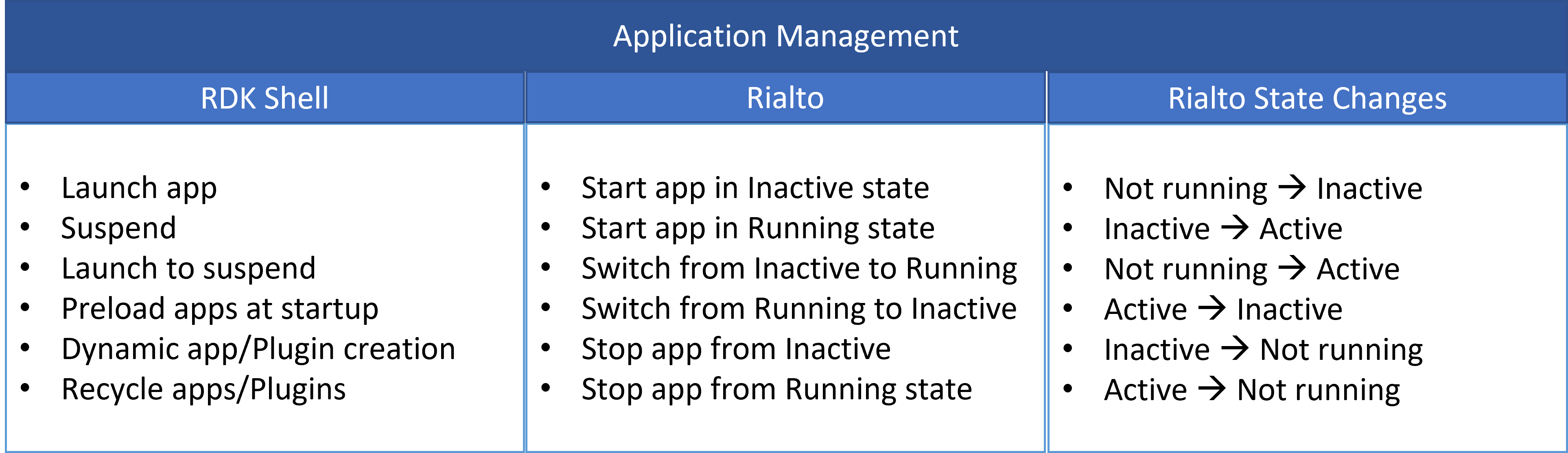
App Lifecycle
Known issues / Limitations
Encrypted playback is not verified as a part of POC.
Overview
Community Forums
Content Tools
Tasks