


Software Requirement
Following softwares should be installed inside Jenkins docker or in machine if Jenkins is directly running in it.
- Python 3.6 or above
- Jpype should be added as the dependency in Python
Command to add Jpype dependency
Install JpyPepip install jpype1
Guidelines to develop Python Scripts for Automatics Test Execution
For creating a Test case in python the below criteria should be followed
- When creating the python test case, multiple test cases can be written in a single python script under different functions with parameter as DUT.
- All these function should be annotated with "@TestCaseId('AUTOMATION_ID')" with automation id as the parameter.
- Python Wrapper scripts and other Automatics Python dependency scripts like Annotation Python scripts should be available.
- Automatics Utils and Core API's can be invoked from the Python test scripts as mentioned in the below section link.
Adding Test Case to Automatics Orchestration
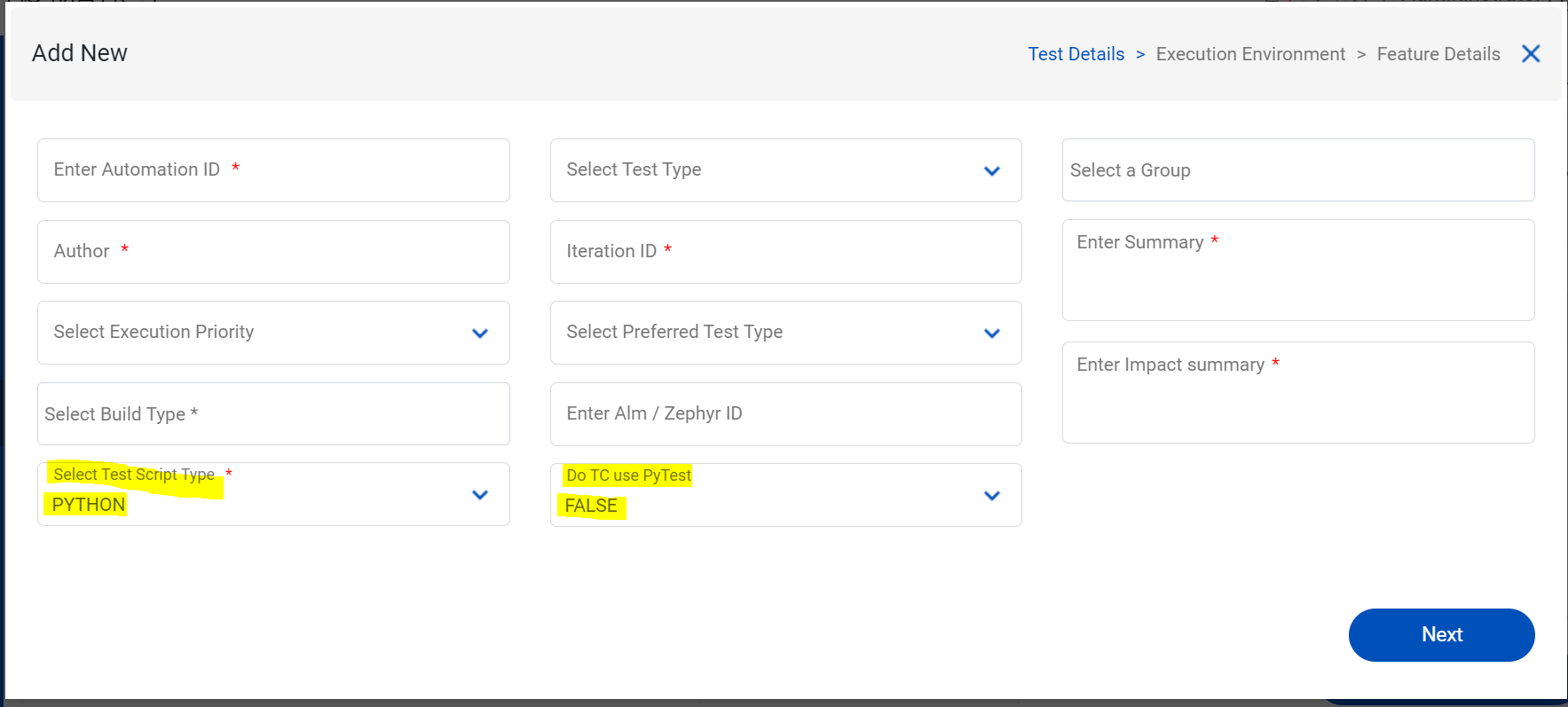
- At first Python test case should be added in Automatics. Test Script Type field should be PYTHON and 2nd field 'Do TC use PyTest' should be set to TRUE if test is using Pytest framework or else FALSE. Please refer Automatics Orchestration User Manual#ManageScripts to get detailed steps on adding scripts to Automatics
- Once the test is triggered, Jenkins job for Python script execution will pull the latest Python code from the configured repo along with the RDK B or V tests and it will invoke the corresponding Python script using Java Process builder based on the Automation ID of the test case.
Enable Python scripts to use Automatics Core, Test Utils & Props
For unlocking/enabling the access of Automatics Java API's to python scripts, JPype framework is used. For accessing the Java API's from python test scripts, a new set of Python scripts which contains all the basic API's should be developed which will make use of the JPype framework to instantiate and invoke the Java classes and method in Automatics Core and Test Utils.
For example, a python script similar to AutomaticsTapApi class can be created to get the Automatics properties configuration and other API's of Automatics core. This python script will in-turn call the AutomaticsTapApi Java class present in the Automatics core project using JPype to enable all the required functions.
- The below python script will invoke AutomaticsTapApi java class in Automatics Core to get the current execution mode if available AutomaticsTapAPI.pyAutomaticsTapApi.py
# Boiler plate stuff to start the module
import json
import os
import jpype
import jpype.imports
from jpype.types import *

import logging

logger = logging.getLogger()


# Launch the JVM
def launchJVM(automaticsPropsUrl,pathToExecJar):
    if jpype.isJVMStarted():
        logger.info('JVM is already running. Do not init twice!')
    else:
        logger.info('Inside else')
        logger.info(jpype.getDefaultJVMPath())
        javaClassPath = "-Djava.class.path="+pathToExecJar
        propsJavaOpts = "-Dautomatics.properties.file="+automaticsPropsUrl
        jpype.startJVM(jpype.getDefaultJVMPath(), "-ea", javaClassPath, propsJavaOpts)


# tapApi = AutomaticsTapApi.getInstance()

        # import the Java modules
from com.automatics.tap import AutomaticsTapApi
from com.automatics.executor import PythonScriptExecutor
from com.automatics.utils import BeanUtils


def createDeviceObj(deviceJson):
    pyexecutor = PythonScriptExecutor()
    deviceObj = pyexecutor.convertJsonToDevice(deviceJson)
    return deviceObj


def executeCommandUsingSsh(dut, command):
    pyexecutor = PythonScriptExecutor()
    return pyexecutor.executeCommandUsingSsh(dut, command)


def getInstance():
    jpype.JClass("com.automatics.core.SupportedModelHandler").main([])
    BeanUtils.startContext()
    return AutomaticsTapApi.getInstance()
Sample Python Scripts in Automatics
We have few python test cases available in repository. The branch name is python-test. The test cases are present inside the python-testcases folder in the repo. It also includes a connected client test case (TC-RDKB-PYTHON-WIFI-SEC-MODE-1001.py)
Sample code for an Automatics Test Case Written in Python and which use Utils and Core APIs for different operations
Sample Automatics Python Scriptimport logging from jpype.types import * from com.automatics.rdkb.utils import BroadBandCommonUtils from automaticsPythonLib.annotation.PythonScriptAnnotation import TestCaseId from automaticsPythonLib.automatics import AutomaticsTapApi logger = logging.getLogger() @TestCaseId('TC-RDKB-PYTHON-TEST-001') def checkImageVersionInDevice(dut): testCaseId = "TC-RDKB-PYTHON-TEST-001"; tapEnv = AutomaticsTapApi.getInstance() stepNum = "S1"; errorMessage = "command execution in device failed"; status = JBoolean(False); logger.info("#######################################################################################"); logger.info("STARTING TEST CASE: TC-RDKB-PYTHON-TEST-001"); logger.info("TEST DESCRIPTION: Validation of device version"); logger.info("TEST STEPS : "); logger.info("1. Run a Command in the device VIA SSH to parse the version.txt file"); logger.info("#######################################################################################"); try: logger.info("**********************************************************************************"); logger.info("**********************************************************************************"); logger.info( "STEP 1: DESCRIPTION : Check and Validate the version of the device "); logger.info( "STEP 1: ACTION : \"Run a command in the device to view the current RDK version in device\""); logger.info( "STEP 1: EXPECTED : The current version in the device should be received as response"); logger.info("**********************************************************************************"); response = tapEnv.executeCommandUsingSsh(dut, JString("cat /version.txt")); logger.info(response) except Exception as e: logger.info(str(e)) finally: logger.info("################### STARTING POST-CONFIGURATIONS ###################"); logger.info("POST-CONDITION STEPS"); logger.info("POST-CONDITION : DESCRIPTION : Remove dummy file"); logger.info("POST-CONDITION : ACTION : Remove the dummy file permanently (rm -rf /nvram/dummytest.sh)"); logger.info("POST-CONDITION : EXPECTED : Created dummy file should be removed"); status = BroadBandCommonUtils.removeFileAndVerifyStatus(tapEnv, dut, JString("/nvram/dummytest.sh")); if status: logger.info("POST-CONDITION : ACTUAL : Post condition executed successfully"); else: logger.info("POST-CONDITION : ACTUAL : Post condition failed"); logger.info("POST-CONFIGURATIONS : FINAL STATUS - " + str(status)); tapEnv.updateExecutionStatus(dut, testCaseId, stepNum, JBoolean(status), errorMessage, JBoolean(False)); logger.info("################### COMPLETED POST-CONFIGURATIONS ###################");
Sample PYTEST Test case
from unittest import result

import pytest
import logging
from jpype.types import *

from automaticsPythonLib.annotation.PythonScriptAnnotation import TestCaseId
from automaticsPythonLib.automatics import AutomaticsTapApi

logger = logging.getLogger()

@TestCaseId('TC-RDKB-PYTHON-PY-TEST-001')
def test_command_execution_in_device():
    dut = pytest.Config.dut
    tapEnv = pytest.Config.tapEnv
    testCaseId = "TC-RDKB-PYTHON-PY-TEST-001";
    stepNum = "S1";
    errorMessage = "command execution in device failed";
    status = JBoolean(False);
    expected_result = False
    print(dut)
    response = tapEnv.executeCommandUsingSsh(dut, JString("pwd"));
    if not response:
        status = JBoolean(False);
    else:
        expected_result=True
        status = JBoolean(True);
    tapEnv.updateExecutionStatus(dut, testCaseId, stepNum, JBoolean(status), errorMessage, JBoolean(False));
    assert expected_result == True, f"Expected {expected_result}, but got {response}"
Overview
Community Forums
Content Tools
Tasks