


Overview
WebAudio provides a mechanism for playing PCM audio clips alongside, and mixed with, any ongoing A/V playback sessions by the client.
Changes required:
- Introduce new IWebAudioPlayer interface to allow the client to control PCM injection. This will be implemented in both Rialto ClieGstreamer app source uses 2 signals,nt & Server.
- Data will be passed in existing shm buffer used for MSE
- The resources parameter provided to Rialto Application Session Server when it is spawned will be extended to include a max_web_audio_playbacks parameter to determine how many Web Audio playbacks can be performed by this application
- The shared memory buffer will have a suitably sized Web Audio region allocated if max_web_audio_playbacks > 0
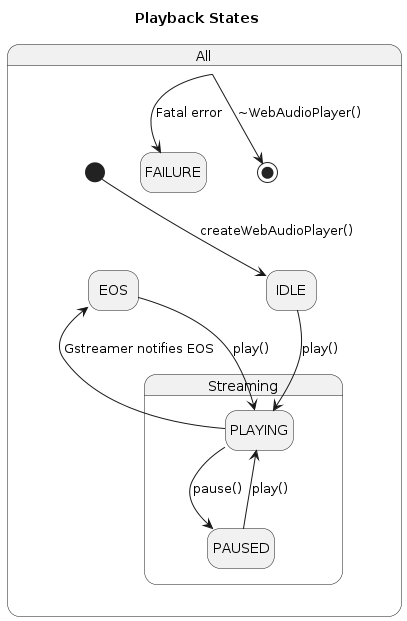
Web Audio Playback States
This diagram shows the states of the Web Audio object and how they are changed. These changes are all notified via the Web Audio Client interface.
The above state machine UML is not rendering correctly so this is a snapshot from Sky Confluence:
Shared Memory Region
If max_web_audio_playbacks>0 then max_web_audio_playbacks regions will be allocated in the shared memory buffer for web audio data. The module managing Web Audio should fetch that region data during initialisation and then manage the memory as a circular buffer into which audio frames can be written and from which they are read. The following diagrams show typical snapshots of how the buffer might look during Web Audio streaming and how the next WebAudioShmInfo parameter returned by getBufferAvailable() would look in such a case.
Sequence Diagrams
Initialisation & Termination
Client Sends Audio Frames
Rialto Internal Push Data Algorithm
Play & Pause
Get Buffer Delay
Set Volume
Get Volume
Overview
Community Forums
Content Tools
Tasks