


1. Architecture
MAP-T (Mapping of Address and Port using Translation) is designed to enable IPv4 connectivity over IPv6-only networks using stateless translation and algorithmic mapping. The architecture consists of two main functional elements and a set of mapping rules:
1.1. Core Components
- Customer Edge (CE):
- Located at the subscriber premises.
- Translates IPv4 packets to IPv6 using MAP rules.
- Border Relay (BR):
- Located in the ISP network.
- Translates IPv6 packets back to IPv4 for external connectivity.
1.2. Mapping Rules
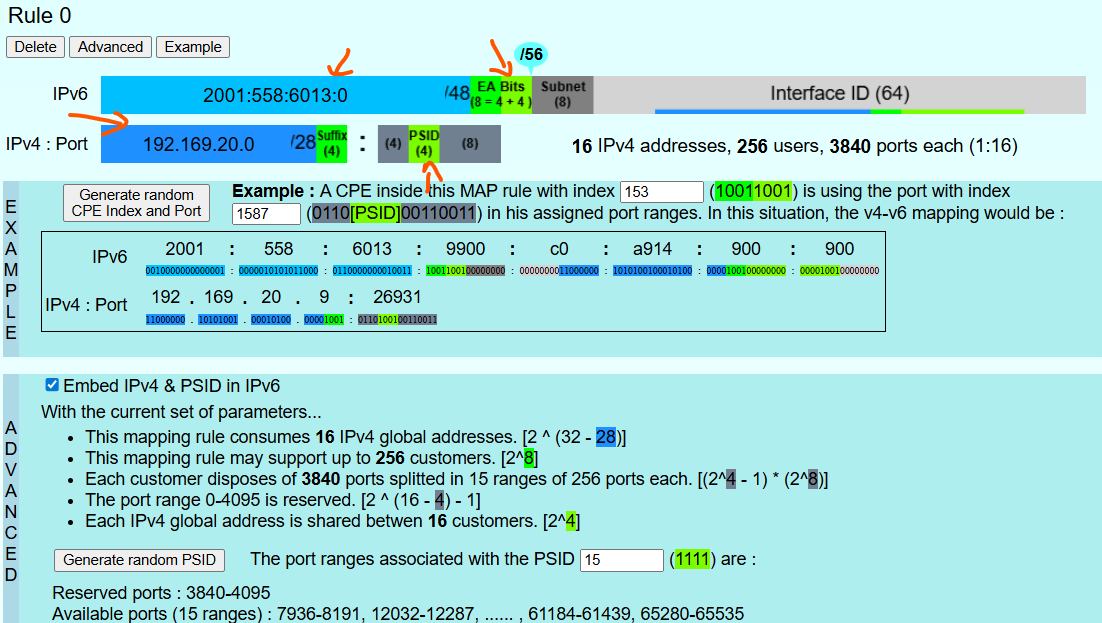
- Basic Mapping Rule (BMR):
Defines how CE derives its IPv6 address from its IPv4 address and PSID. - Forwarding Mapping Rule (FMR):
Used for IPv4 destinations within the MAP domain. - Default Mapping Rule (DMR):
Used for IPv4 destinations outside the MAP domain, embedding IPv4 addresses in IPv6 per RFC 6052.
2. MAP-T Configurations
2.1. CE Configurations
2.1.1. Build Setup
- add mapt distro flag in local.conf
| DISTRO_FEATURES_append = " feature_mapt"
DISTRO_FEATURES_append = " nat46" |
|---|
2. Add these two changes in meta-cmf-raspberrypi
|
vnarwa156@dvm-yocto4-docker-vnarwa156:~/mapt_build/meta-cmf-raspberrypi ((32ae19c...))$git diff meta-rdk-broadband/recipes-ccsp/ccsp/ccsp-p-and-m.bbappend
+do_compile_prepend () {
+RDEPENDS_packagegroup-rdk-ccsp-broadband += " ${@bb.utils.contains('DISTRO_FEATURES', 'nat46', 'nat46', '', d)}"
|
|---|
3. You need to create a nat46.bb file on meta-cmf-res layerand put this info
|
SUMMARY = "MAP-T NAT46" LICENSE = "CLOSED" inherit module SRCREV="80dda1d08efe361b4f236eeae56015065cba1b1d"
PV = "1.0+git${SRCPV}" S = "${WORKDIR}/git/nat46/modules/" |
|---|
Yocto compilation you need to apply this patch on the makefile,
|
Index: modules/Makefile
all:
|
|---|
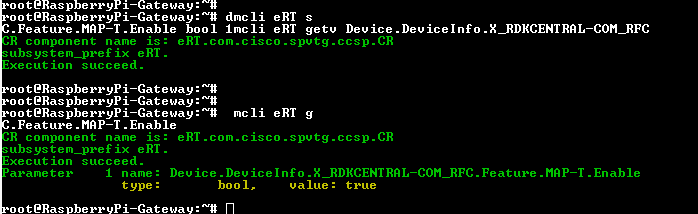
4. Flash the image in rpi and set below parameter to true
| dmcli eRT setv Device.DeviceInfo.X_RDKCENTRAL-COM_RFC.Feature.MAP-T.Enable bool 1 |
|---|
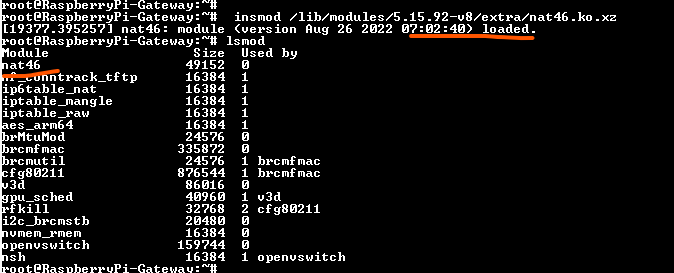
5. insert the nat46 kernel module
| insmod /lib/modules/5.15.92-v8/extra/nat46.ko.xz |
|---|
Setting the data model
Inserting nat46 kernel module
Sample logs from WAN Manager
| 251022-18:46:11.696795 [mod=WANMANAGER, lvl=INFO] [tid=3311] start_dhcpv6_client 175: Collecting DHCP GET/SEND Request
add_dhcp_opt_to_list 630: Added 5 to list 5 add_dhcp_opt_to_list 630: Added 23 to list 23 5 add_dhcp_opt_to_list 630: Added 24 to list 24 23 5 add_dhcp_opt_to_list 630: Added 25 to list 25 add_dhcp_opt_to_list 630: Added 16 to list 16 25 add_dhcp_opt_to_list 630: Added 17 to list 17 16 25 add_dhcp_opt_to_list 630: Added 95 to list 95 24 23 5 251022-18:46:11.699797 [mod=WANMANAGER, lvl=INFO] [tid=3311] start_dhcpv6_client 184: Starting Dibbler Clients 251022-18:46:11.700568 [mod=WANMANAGER, lvl=INFO] [tid=3311] dibbler_client_prepare_config 279: Directory already exists / no 251022-18:46:11.723270 [mod=WANMANAGER, lvl=INFO] [tid=3311] copy_file 79: successfully copied content from /tmp/dibbler/clie 251022-18:46:11.723418 [mod=WANMANAGER, lvl=INFO] [tid=3311] dibbler_client_prepare_config 301: link already exists, continui 251022-18:46:11.723483 [mod=WANMANAGER, lvl=INFO] [tid=3311] start_dibbler 349: Starting dibbler with config /etc/dibbler/ero |
|---|
Sample dibbler configuration after enabling MAP-T
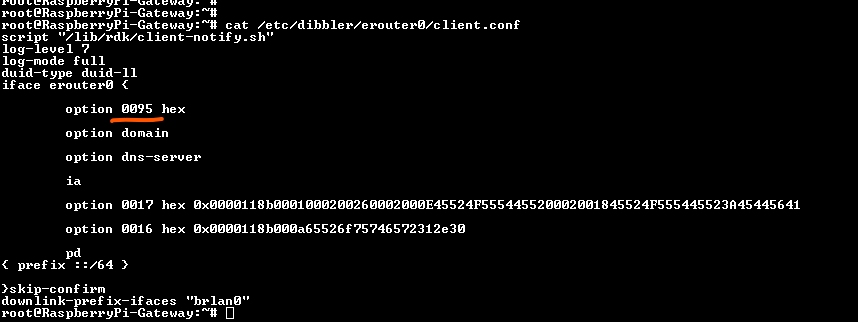
Log files to check
|
cat /rdklogs/logs/WANMANAGERLog.txt.0 cat /rdklogs/logs/MAPTLOG.txt.0 cat /tmp/ipt cat /tmp/ipt_v6 dmesg |
|---|
2.2. BR Configurations
2.2.1. Installations
isc-dhcp-server
| sudo apt-get install isc-dhcp-server |
|---|
|
cat /etc/dhcp/dhcpd.conf ddns-update-style none;
|
|---|
|
cat /etc/dhcp/dhcpd6.conf ## Server configuration file example for DHCPv6
|
|---|
|
DHCP interface setting Edit /etc/default/isc-dhcp-server and set the NIC that you want to run DHCP from. pi@raspberrypi:~ $ cat /etc/default/isc-dhcp-server
INTERFACESv4="eth1"
Creating lease file: sudo touch /var/lib/dhcp/dhcpd6.leases sudo touch /var/lib/dhcp/dhcpd.leases |
|---|
Installing IPv6 Router Advertisement Daemon
sudo apt-get install radvd
|
pi@raspberrypi:~ $ cat /etc/radvd.conf
}; |
|---|
Jool installation
|
sudo apt update sudo apt upgrade sudo apt install build-essential pkg-config sudo apt install linux-headers-$(uname -r) sudo apt install libnl-genl-3-dev sudo apt install libxtables-dev sudo apt install dkms sudo apt install git autoconf libtool sudo apt install tar sudo wget https://github.com/NICMx/Jool/releases/download/v4.2.0-rc2/jool-4.2.0.rc2.tar.gz
sudo /sbin/dkms install jool-4.2.0.rc2/ cd jool-4.2.0.rc2/ sudo ./configure sudo make sudo make install |
|---|
Check for the binaries
| -rw-r--r-- 1 root root 296016 Jan 19 03:38 jool_common.ko
-rw-r--r-- 1 root root 7584 Jan 19 03:38 jool.ko -rw-r--r-- 1 root root 7580 Jan 19 03:38 jool_mapt.ko -rw-r--r-- 1 root root 7216 Jan 19 03:38 jool_siit.ko pi@raspberrypi:~/jool/jool-4.2.0~rc2 $ |
|---|
jool documentaion
Jol configurations
| insmod /usr/lib/modules/5.15.0-1090-raspi/updat es/dkms/jool_common.ko
insmod /usr/lib/modules/5.15.0-1090-raspi/kernel/net/ipv4/netfilter/nf_defrag_ipv4.ko insmod /usr/lib/modules/5.15.0-1090-raspi/kernel/net/ipv6/netfilter/nf_defrag_ipv6.ko insmod /usr/lib/modules/5.15.0-1090-raspi/updates/dkms/jool_mapt.ko sudo /sbin/modprobe jool_mapt jool_mapt instance remove BR jool_mapt instance add "BR" --netfilter --dmr 64:ff9b::/64 jool_mapt -i "BR" fmrt add 2001:558:6013::/48 192.168.0.0 8 6 jool_mapt -i "BR" global update map-t-type BR jool_mapt -i BR fmrt display jool_mapt -i BR global update logging-debug true |
|---|
3. Test setup
3.1. BR setup
|
systemctl start isc-dhcp-server systemctl start isc-dhcp-server6 systemctl start radvd insmod /usr/lib/modules/5.15.0-1090-raspi/updat es/dkms/jool_common.ko
|
|---|
Status check
|
systemctl status isc-dhcp-server systemctl status isc-dhcp-server6 systemctl status radvd |
|---|
Packet checks
|
tcpdump -i eth1 icmp6 - check ping packets are received from CE tcpdump -i eth0 icmp - check the Ipv4 to Ipv6 translation takes place |
|---|
jool logs
| tail -f /var/log/syslog |
|---|
All v6 packets matching the CE’s MAP‑T rule prefix
| sudo ip -6 ro rep 2001:558:6013::14d2/64 via fe80::da3a:ddff:fe0a:431d dev enx0050b602e29d
sudo ip -6 ro rep 2001:558:6013::/48 via fe80::da3a:ddff:fe0a:431d dev enx0050b602e29d |
|---|
erouter link local address : fe80::da3a:ddff:fe0a:431d
3.2. CE setup
Enable MAPT
| dmcli eRT setv Device.DeviceInfo.X_RDKCENTRAL-COM_RFC.Feature.MAP-T.Enable bool 1 |
|---|
insert the nat46 kernel module
| insmod /lib/modules/5.15.92-v8/extra/nat46.ko.xz |
|---|
3.2.1. CE checks
ifconfig map0

MAPT configurations received
| root@RaspberryPi-Gateway:~# dmcli eRT getv Device.DHCPv6.Client.1.X_RDKCENTRAL-COM_RcvOption.
CR component name is: eRT.com.cisco.spvtg.ccsp.CR subsystem_prefix eRT. Execution succeed. Parameter 1 name: Device.DHCPv6.Client.1.X_RDKCENTRAL-COM_RcvOption.MapTransportMode type: string, value: MAPT Parameter 2 name: Device.DHCPv6.Client.1.X_RDKCENTRAL-COM_RcvOption.MapBRPrefix type: string, value: 64:ff9b::/64 Parameter 3 name: Device.DHCPv6.Client.1.X_RDKCENTRAL-COM_RcvOption.MapRuleIPv4Prefix type: string, value: 192.169.20.0 Parameter 4 name: Device.DHCPv6.Client.1.X_RDKCENTRAL-COM_RcvOption.MapRuleIPv6Prefix type: string, value: 2001:558:6013::/48 Parameter 5 name: Device.DHCPv6.Client.1.X_RDKCENTRAL-COM_RcvOption.MapEALen type: uint, value: 8 Parameter 6 name: Device.DHCPv6.Client.1.X_RDKCENTRAL-COM_RcvOption.MapPSIDOffset type: uint, value: 4 Parameter 7 name: Device.DHCPv6.Client.1.X_RDKCENTRAL-COM_RcvOption.MapPSIDLen type: uint, value: 12 Parameter 8 name: Device.DHCPv6.Client.1.X_RDKCENTRAL-COM_RcvOption.MapPSID type: uint, value: 3840 Parameter 9 name: Device.DHCPv6.Client.1.X_RDKCENTRAL-COM_RcvOption.MapIsFMR type: bool, value: false Parameter 10 name: Device.DHCPv6.Client.1.X_RDKCENTRAL-COM_RcvOption.MapIpv4Address type: string, value: 192.169.20.0 Parameter 11 name: Device.DHCPv6.Client.1.X_RDKCENTRAL-COM_RcvOption.MapRatio type: uint, value: 16 |
|---|
Packet checks
|
tcpdump -i brlan0 icmp - check ping packets are received from the client tcpdump -i map0 icmp - check ping packets are received to MAP interface tcpdump -i map0 icmp6 - check ping packets are converted to IPv6 tcpdump -i erouter0 icmp6 - check ping packets are forwarded via WAN interface |
|---|
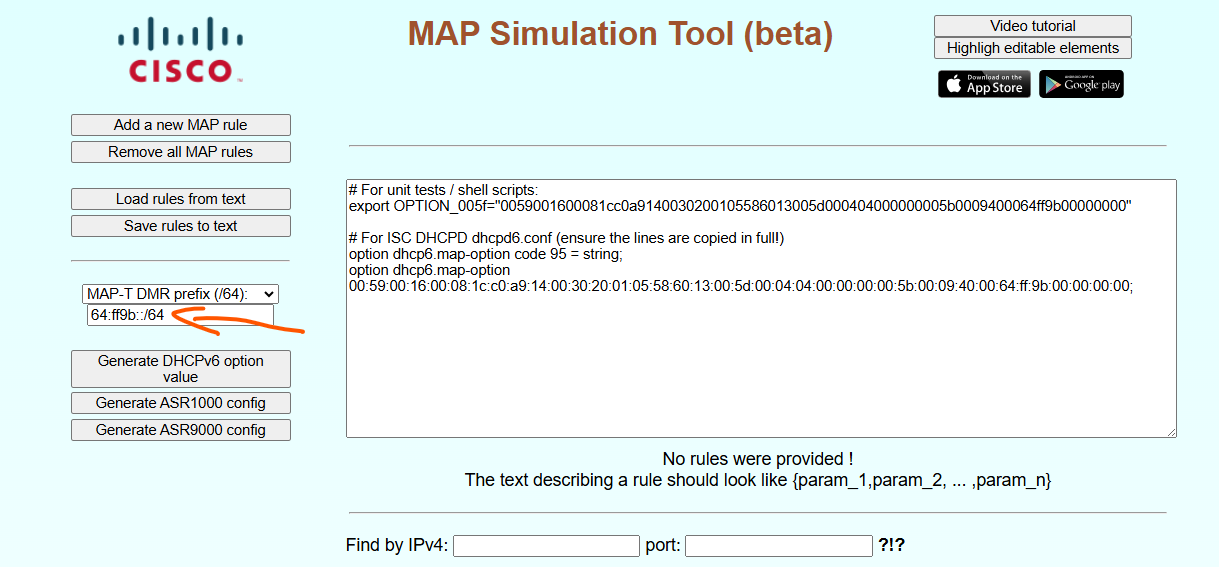
5. Test Results
Overview
Community Forums
Content Tools
Tasks