


Scope
Scope of this release is for RDK-B community. This is our 2026 Annual RDK8 release of Banana Pi R4
Frequently Asked Questions
- Can i use this release for production - Yes.
- Does it cover all features - Yes
- Can i share this release with my OEM's/Operators/SI's/SoC's - You are free to share
- Can i contact RDKM team if i have any queries/to give any feedback - Yes
- Is this release fully tested - Yes we have done End to End testing
- Can i use release for my development/New enhancements - Yes
- Does release support EasyMesh/Wi-Fi 7 - Yes
- Can i expand RAM in BPI R4 - You have to do it on Hand,Please refer here https://forum.banana-pi.org/t/bpi-r4-successfully-upgraded-8gb-ram-on-bpi-r4/17882/5
Host Setup
TBD
Build instructions
SD Build for Gateway
repo init -u https://code.rdkcentral.com/r/rdkcmf/manifests -b rdk8-1.0.0 -m rdkb-bpi-extsrc.xml
repo sync -j`nproc` --no-clone-bundle
MACHINE=bananapi4-rdk-broadband source meta-cmf-bananapi/setup-environment-refboard-rdkb
bitbake rdk-generic-broadband-image
SD Build for Gateway with EasyMesh
repo init -u https://code.rdkcentral.com/r/rdkcmf/manifests -b rdk8-1.0.0 -m rdkb-bpi-extsrc.xml
repo sync -j`nproc` --no-clone-bundle
MACHINE=bananapi4-rdk-broadband FEATURE_TYPE=EasyMesh source meta-cmf-bananapi/setup-environment-refboard-rdkb
bitbake rdk-generic-broadband-image
SD Build for Extender with EasyMesh
repo init -u https://code.rdkcentral.com/r/rdkcmf/manifests -b rdk8-1.0.0 -m rdkb-bpi-ap-extsrc.xml
repo sync -j`nproc` --no-clone-bundle
MACHINE=bananapi4-rdk-broadband-ap-extender source meta-cmf-bananapi/setup-environment-refboard-rdkb
bitbake rdk-generic-ap-extender-image
SD Build for Gateway with USB RNDIS enabled
repo init -u https://code.rdkcentral.com/r/rdkcmf/manifests -b rdk8-1.0.0 -m rdkb-bpi-extsrc.xml
repo sync -j`nproc` --no-clone-bundle

Enable the distro for RNDIS in below path
/meta-cmf-bananapi/conf/distro/include/rdk-bpi.inc
#Enable the below DISTRO to enable Hybrid Hal(rndis/modem) for cellular devices
DISTRO_FEATURES_append_broadband = " cellular_hybrid_support"

MACHINE=bananapi4-rdk-broadband source meta-cmf-bananapi/setup-environment-refboard-rdkb
bitbake rdk-generic-broadband-image
SD Build for WiFiagent build
repo init -u https://code.rdkcentral.com/r/rdkcmf/manifests -b rdk8-1.0.0 -m rdkb-bpi-extsrc.xml
repo sync -j`nproc` --no-clone-bundle

Disable onewifi distro in below path for wifiagent build
/meta-cmf-bananapi/conf/distro/include/rdk-bpi.inc
# OneWifi feature
#DISTRO_FEATURES_append = " OneWifi onewifi_integration"

MACHINE=bananapi4-rdk-broadband source meta-cmf-bananapi/setup-environment-refboard-rdkb
bitbake rdk-generic-broadband-image
SD Build for Non-MLO build
repo init -u https://code.rdkcentral.com/r/rdkcmf/manifests -b rdk8-1.0.0 -m rdkb-bpi-extsrc.xml
repo sync -j`nproc` --no-clone-bundle

Disable generic_mlo distro in below path to trigger the non-mlo build
~/meta-cmf-bananapi/conf/distro/include/rdk-bpi.inc
#DISTRO_FEATURES_append = " generic_mlo"

MACHINE=bananapi4-rdk-broadband source meta-cmf-bananapi/setup-environment-refboard-rdkb
bitbake rdk-generic-broadband-image
NOTE: Prerequisite for SDCard build
- Please download the binaries from below links
wget https://artifactory.rdkcentral.com/artifactory/RDKB-Platform/BPI-R4/uboot-2025.01/bpi-r4_sdmmc_fip_6-6.bin
wget https://artifactory.rdkcentral.com/artifactory/RDKB-Platform/BPI-R4/uboot-2025.01/bpi-r4_sdmmc_bl2_6-6.img
wget https://artifactory.rdkcentral.com/artifactory/RDKB-Platform/BPI-R4/uboot-2025.01/bpi-r4_sdmmc_fip_B_6-6.bin
wget https://artifactory.rdkcentral.com/artifactory/RDKB-Platform/BPI-R4/uboot-2025.01/bpi-r4_sdmmc_bl2_B_6-6.img
- If you don't have access to above resources, please follow instruction in https://wiki.rdkcentral.com/pages/viewpage.action?pageId=354648448#SDMonoliticimagebuildandflashingstepsforBPIR4.-Buildingbl2.imgandfip.binincaseofnothavingaccesstoartifactoryrepository to build bl2 and fip binaries yourselves.
- Place those binaries under ${_TOPDIR}/downloads/
Flashing instructions(SD card)
Tested machines - Linux,MacOs
Copy wic.bz2 from build machine MacOs
Linux
|
|---|
Boot mode
SD
switch configuration
Yocto
Version
- Kirkstone(Yocto 4.0)
SoC meta layers
- meta-filogic
- meta-cmf-filogic
RDK meta layers
- meta-cmf-bananapi
Kernel & user space
- Kernel 6.6
- Full 64bit (User space and kernel space)
Currently supported & working WAN technologies
Wi-Fi highlights
- 2.4 Ghz (wifi0)
- 5 Ghz (wifi1)
- 6 Ghz(wifi2)
- Does it support multiple creations - As of now we have not created any VAP's.Technically that is possible based on requirement.
- EasyMesh R6
- WiFi 7 with MLO
Cellular Network highlights
- Tested in North America & APAC regions for WWAN0,USB RNDIS
Flashing mechanism
Primary
- Prerequisites:You may need to compile your own uboot and copy files to build system before build.The reason is uboot code is not fully open.as of now we are not authorized to host binaries in RDKM(SD Monolitic image build and flashing steps for BPI R4.)
Hardware & Peripherals
- Banana Pi R4 Router Board
- BE14 Wi-Fi 7 card & Antennas
- Quectel EM05-G Cellular Modem
- Power supply & Heat sinks
- Android Phone
- Silabs IOT radio,TP Link smart plug,onvis smart plug (Reference IoT usermanual for more details)
- Case (Optional)
- serial cable
How to get bananapi R4
- https://www.amazon.com/Development-MediaTek-MT7988A-onboard-Network/dp/B0DFBLL1CX/ref=sr_1_3?crid=F4K6S2C1WSLY&dib=eyJ2IjoiMSJ9.VcoMSeqhcGQZZ_Izyt-ezSl4nissusDy-9DX3HtClc5bM0CS1tY8XJu61qTPGaRRTQcyNK6BYUXP_vPjx0FIXXkdDGjpgGdSIzz0IQ0Xy2Qrw5_58JPNNl5PQUT6Arvw64sR8D7uwWeqZY0WAlGFZfff303GAp8FdafZ9UWHJ6TFcUIZh_jtU4Wrr9u131p7plmRCHSqIU-dAFGS4Z_plaknOogJtU7PtddRVlPLHd8.SU2S2lZCwzak9CRvg1LH_uRzc_0UKs1UeQqvk5xvIO0&dib_tag=se&keywords=banana+pi+r4&qid=1729895436&sprefix=bananapi+r4%2Caps%2C141&sr=8-3
- Cellular Modem - Quectel EM05-G LTE M.2 Module/Simcom Module 8200EAM2
- Note: For testing with other CellularModules,There might need some changes in ModemManager (You can plan it on your own)
Features supported in RDK8 Broadband release
Validation Status
Sanity Status of GW build
| S.No | Use case | Status |
|---|---|---|
| 1 | erouter0 interface got Wan IPv4 and IPv6 | PASS |
| 2 | brlan0 interface got default LAN IP & Ipv6 | PASS |
| 3 | Able to take SSH Connection | PASS |
| 4 | All CCSP process are running | PASS |
| 5 | Able to Ping www.google.com & ping -6 www.google.com in Gateway (i,e erouter0) | PASS |
| 6 | All systemd services are running | PASS |
| 7 | Able to connect LAN client | PASS |
| 8 | LAN client got IP from default pool range for Ipv6 and Ipv4 | PASS |
| 9 | LAN client should open with CaptivePortal Page | PASS |
| 10 | Able to connect wireless client | PASS |
| 11 | Wireless client got IP from default pool range(i,e 2G,5G,6G) for Ipv4 and Ipv6 | PASS |
| 12 | Wireless client can access the CaptivePortal Page(i,e 2G,5G,6G) | PASS |
| 13 | Internet should work on Connected clients after changing the default credentials | PASS |
| 14 | Using dmcli to check the CCSP TR-181 DataModels | PASS |
| 15 | WebUI page should be loaded on Connected clients after changing the default credentials | PASS |
| 16 | WebUI page should be loaded through erouter0IP via RM | PASS |
| 17 | wifi0, wifi1, wifi2 interfaces should be UP and RUNNING | PASS |
| 18 | All ccsp logs files should be generated in /rdklogs/logs folder | PASS |
| 19 | Factory Reset | PASS |
| 20 | Device stable | PASS |
Features Status of GW build
| S.No | Features tested | Status |
|---|---|---|
| 1 | WebPa get and set should work, query device. | PASS |
| 2 | LogUpload/Logrotation | PASS |
| 3 | RFC | PASS |
| 4 | Webconfig | PASS |
| 5 | Telemetry 2 | PASS |
| 6 | Usppa get and set are working through DM’s | PASS |
| 7 | Cellular Mode | PASS |
| 8 | Local WebUI | PASS |
| 9 | Firewall | PASS |
| 10 | WPA | PASS |
| 11 | CPU Proc Analyser | PASS |
| 12 | WAN Connectivity (i,e Ipv4) | PASS |
| 13 | WAN Connectivity (i,e Ipv6) | PASS |
| 14 | WiFi Connectivity | PASS |
| 15 | LAN Connectivity | PASS |
| 16 | SNMP | FAIL (RDKBACCL-1468) |
| 17 | Bridge Mode | PASS |
| 18 | DAC | PASS |
| 19 | Firmware Upgrade | PASS |
| 20 | TR069 | PASS |
| 21 | eSDK | FAIL (RDKBACCL-1102) |
| 22 | PopulateSDK | PASS |
| 23 | SelfHeal | PASS |
| 24 | Test and Diagnostic | PASS |
| 25 | Crash Upload | PASS |
| 26 | SD card support | PASS |
| 27 | Factory reset | PASS |
| 28 | ACL (MAC Filtering) | PASS |
| 29 | Remote Debugger | PASS |
| 30 | MAP-T | PASS |
Sanity Status of EM build
| S.No | EM Use case | Status |
| 1 | onewifi systemd service should be RUNNING in ctrl and Extender | Pass |
| 2 | No core files won't be observed in /tmp folder in ctrl and Extender | Pass |
| 3 | systemctl status ieee1905_em_ctrl should be RUNNING state in ctrl | Pass |
| 4 | systemctl status em_ctrl should be RUNNING state in ctrl | Pass |
| 5 | systemctl status ieee1905_em_agent should be RUNNING state in ctrl and Extender | Pass |
| 6 | systemctl status em_agent should be RUNNING state in ctrl and Extender | Pass |
| 7 | check default db values are updated in mariadb | Pass |
| 8 | EasyMesh and ieee1905 logs files should be generated in /tmp folder for Controller and Extender | Pass |
| 9 | All configured VAPs(fronthaul,backhaul,iot) should be UP and Running - to be confirm by iw dev command for both controller and Extender | Pass |
| 10 | VAPs should be broadcasting EasyMesh default SSIDs(eg, private_ssid, mesh_backhaul) for both controller and Extender | Pass |
| 11 | Able to connect clients via fronthaul vaps for both controller and extender | Pass |
| 12 | Able to get IP for fronthaul connected clients | Pass |
| 13 | Able to get Internet for fronthaul connected clients | Pass |
| 14 | mld0 interface should be created - to confirm by iw dev for both controller and Extender | Pass |
| 15 | Mld0 interface should have linked with all private vaps for both controller and Extender | Pass |
| 16 | In Extender ,Ensure mesh backhaul connectivity is established over 5G through wifi1.1 interface . iw dev wifi1.3 info – use this command to confirm in Extender | Pass |
| 17 | Verify mesh backhaul connection in EM-Contrller side as well. iw dev wifi1.1.sta<i> info iw dev wifi1.1.sta<i> station dump ## This command gives information on connected client ie Extender1. | Pass |
| 18 | In Extender , ping 10.0.0.1 -c 5 | Pass |
| 19 | Able to launch RDKB CLI in browser by using ctrl wan ip (i.e erouter0_IP:8888) | Pass |
| 20 | Able to Navigate all the tab in RDKB CLI | Pass |
| 21 | In iw dev , Able to see the updated ssid in ctrl and Extender when we changing the ssid names from RDKB CLI | Pass |
| 22 | Able to change password from RDKB CLI | Pass |
| 23 | Able to change the channel from RDKB CLI for all available radio bands | Fail |
| 24 | Able to do wifi reset from RDKB CLI | Fail |
| 25 | Able to see the N/W topology in CLI | Fail |
| 26 | Able to connect clients with updated ssid for both controller and Extender | Pass |
| 27 | Able to take ssh for both controller and Extender | Pass |
| 28 | Able to make daisy chain and STAR Topology | Pass |
| 29 | Able to get IP for lan clients for both controller and Extender | Pass |
| 30 | Able to get internet for connected lan clients | Pass |
List of Supported Features - User Manual's
- Webpa - WebPA Feature Support on BPI R4 - User Manual
- RFC -RFC Feature Support in RDKB BPI - User manual
- WebConfig -WebConfig Feature Support in RDKB - User Manual
- Telemetry 2 - Telemetry 2.0 Feature support for RDKB BPI -User Manual
- Log Rotate -Log Rotation Feature Support in RDKB BPI - User manual
- Cellular - Cellular Feature support in RDKB BPI - User Manual
- UspPa
- CpuProcAnalyser - Cpuprocanalyzer Feature support in RDKB BPI - User Manual
- OneWifi - OneWifi Integration in RDKB BPI - User Manual
- Selfheal - Self Heal Feature in BPI - User manual
- TR-69 - TR069 Support for Bananapi R4
- SNMP - SNMP Support for BPIR4 - Preferred Program - RDK Central Wiki
- OneWifi with Single WiPhy support
- Crashupload - Crash Upload Feature RDK-B - RDK - RDK Central Wiki
- Test and Diagnostics similar to RPI- Test and Diagnostic on R-Pi
- Bridge Mode similar to RPI- BridgeMode Feature support in RPI
- DAC similar to RPI
- eSDK - RDKB: Extensible SDK support on (BananaPi R4) Yocto 4.0 Kirkstone build
- PopulateSDK : Creating Yocto SDK
- SD card support - SD Monolitic image build and flashing steps for BPI R4.
- SpeedTest Support : IMP/gateway speedtest integration in Banana Pi R4 - Preferred Program - RDK Central Wiki
- WPS support https://wiki.rdkcentral.com/display/ASP/WPS+PBC+integration+in+RDK-B+BPI+R4
- Port Triggering (same as RPI) https://wiki.rdkcentral.com/display/RDK/Port+Triggering+in+RPI
- TelcoVoice - Telco Voice Manager
- Firmware upgrade - Firmware Upgradation for BPI using Xconf Server
- USB Dongle(RNDIS/MODEM type) support to CellularManager - Cellular RNDIS Feature User Manual
- ACL (MAC Filering) support - MAC Filtering in BPI
- RDK Remote Debugger - RDK Remote debugger - Diagnostic Debug Data Collection Tool
- DHCP Manager - DHCP Manager Support for BPIR4
- MAP-T Support - MAPT in RDK-B BPI R4
- Barton Support - RDK-B IoT Barton
Roadmap of new Features
| Q4' 2024(Previous prebeta release,Oct 2024) | Q1' 2025 (current beta release,Feb 05 2025 ) | Q12025 official Release | Q2' 2025 | Q3' 2025 | Q4'2025 | Q1'2026 | Annual RDK8 Release | Future |
|---|---|---|---|---|---|---|---|---|
|
| Same features of Beta Release |
|
|
|
| Same Features of Q1'2026 |
|
References
- About Bananapi R4 - https://www.banana-pi.org/en/bananapi-router/155.html
- Cellular Modem - https://en.simcom.com/product/SIM8200EA_M2.html
- https://wiki.banana-pi.org/Getting_Started_with_BPI-R4#2.EF.BC.89_4G.2F5G_Module
- EM05-G
- Silabs radio - https://www.silabs.com/development-tools/wireless/efr32xg24-explorer-kit?tab=overview
- Pls reach out to support@rdkcentral.com for getting the latest firmware for the above silabs radio
- Use simplicity studio software from silicon labs to upgrade firmware
- Matter over wifi smart plug - amazon.com/TP-Link-Tapo-Supported-P125M-3-Pack/dp/B0BXMNJDW3/ref=sr_1_1?crid=22JN3ZB4RMXH3&dib=eyJ2IjoiMSJ9.0IIMtQoBM17C4dXY9nxVKrk7tgi18x67ACF-0SyYFCIMexngu0iSnPs6QgwEJ1YGb7xGpDFaXNRvQxuqchwWAsqVjLJ4Jo5dMQiZOtZObfth4mpqxX1_yVGUoCxxJfORgmLClt0aWB9XohRvkMlERKOZ8UjpT15uawnV88iZ_pnDvxWl8Gz4fuXcjry7ZUzhuPkK0dvB_10rBTtFu7Mox1SL0ROfnebituTVevvpR3DGtV9u1ZcOER78F9Yl7hHWtfQlnje_MGfJUB3KdY25in4__-udTPAMIGp6Lyykeug.tiEXHp4cCdz3jA5N5i3dw50z5vlJf8sw-fdKdDAOXNo&dib_tag=se&keywords=tapo+p125m&qid=1777564328&sbo=RZvfv%2F%2FHxDF%2BO5021pAnSA%3D%3D&sprefix=p125m%2Caps%2C150&sr=8-1
- Matter over thread smart plug - https://www.amazon.com/dp/B0CWTKW9BB?ref=nb_sb_ss_w_as-reorder_k1_1_5&=&crid=24VZCECYSZJPR&sprefix=onvis&th=1
Reference image
- Can be provided to RDK-B Licenses on demand
Test results reference
Testing of Easy Mesh build on BPI R4
EM Controller Side
Please ensure below processes are running in ctrl.
Observation in EM-Controller device side:
- All configured VAPs should be UP and Running
- VAPs should be broadcasting EasyMesh default SSIDs(eg, private_ssid, mesh_backhaul)
- Logs files are generated under /tmp folder
Extender 1 + STAR Topology
1.Please ensure below processes are running in Ext1
2.Ensure mesh backhaul connectivity is established over 5G through wifi1.1 interface.
| iw dev wifi1.3 info |
3.Verify mesh backhaul connection in EM-Contrller side as well.
iw dev wifi1.1.sta<i> infoiw dev wifi1.1.sta<i> station dump ## This command gives information on connected client ie Extender1. |
4. Wait for few minutes( for Agent to propagate SSID information from Controller to OneWifi in Extender1) and then check
- Check all configured VAPs should be up and running with "iw dev" command
- VAPs should be broadcasting default EasyMesh SSIDS (ie private_ssid, mesh_backhaul)
- logs files are generated under /tmp folder
5. Test the connectivity to EM-Controller through backhaul
|
Test the connectivity with wireless clients.
Extender2 (For Daisy-Chain )
1. Ensure Extender 1 is running properly with configured vap's of FH and BH.
2. Make atleast 7 feet distance from Ext1 to Ext2
3. Ensure ieee1905_em_agent,onewifi_em_agent processes are running in Ext2
4. Ensure mesh backhaul connectivity is established over 5G through wifi1.1 interface.
|
5. Verify mesh backhaul connection in Extender1 side as well.
|
6. Wait for few minutes( for Agent to propagate SSID information from Controller to OneWifi in Extender2) and then check
- Check all configured VAPs should be up and running with "iw dev" command
- VAPs should be broadcasting default EasyMesh SSIDS (ie private_ssid, mesh_backhaul)
7. Test the connectivity to EM-Controller through backhaul
| ping 10.0.0.1 -c 5 |
Test the connectivity with wireless clients.
RDKB-CLI Testing
- Ensure below service is running in your controller image
2. Launch the browser and enter the URL as http://<IP>:<Port> .IP should be the erouter0 IP of device on which rdkb-cli is running, for example:http://192.168.2.221:8888/
3.Please refer the rdkb cli page below.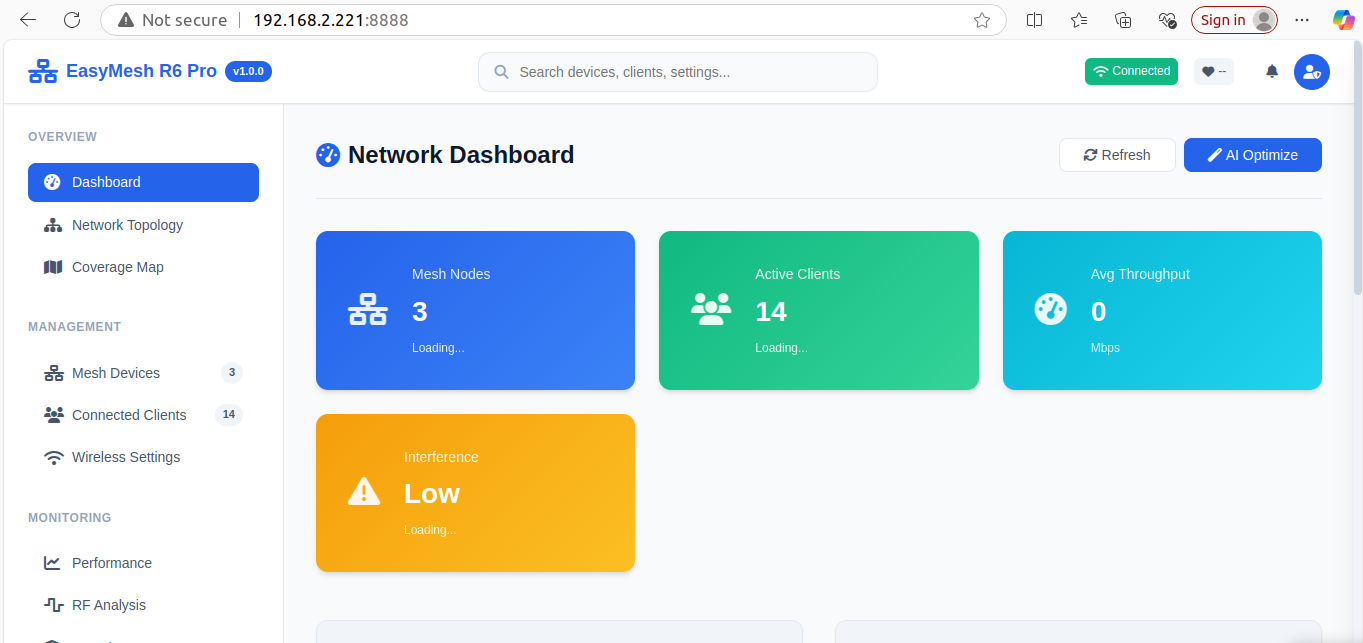
4.User can configure the controller Ip(i,e erouter0) and port by clicking user-avatar icon as highlighted in below image.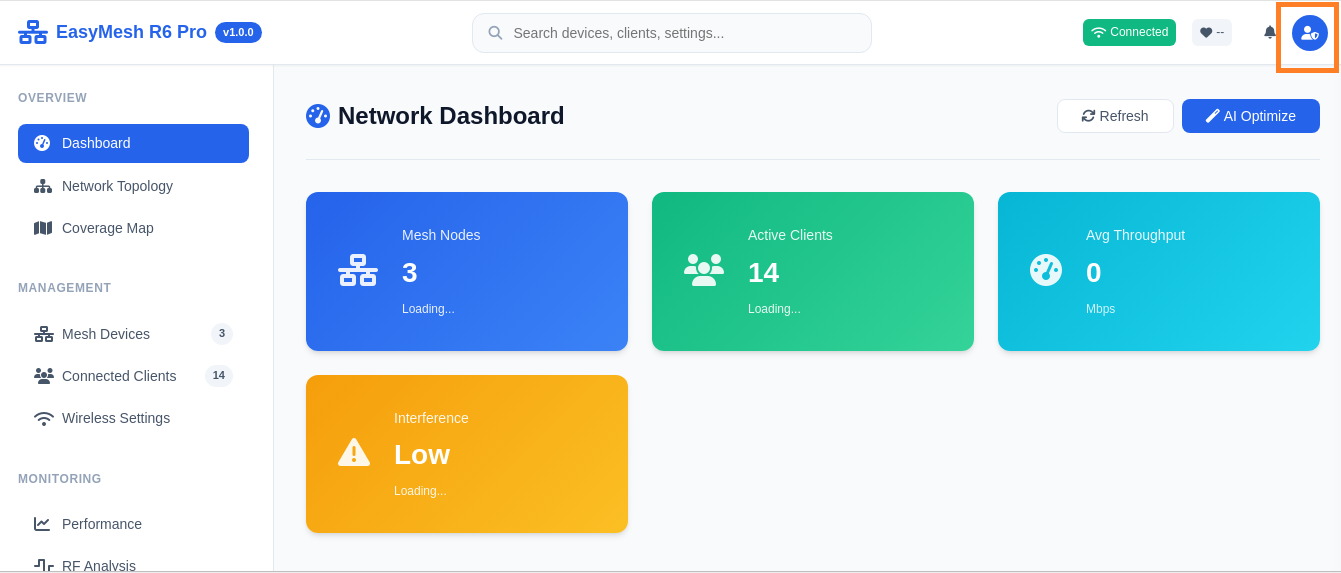
5.On clicking on user avatar icon, popup will come to configure IP and port for controller to connect. Please enter the controller IP(i,erouter0) and port no and click on save.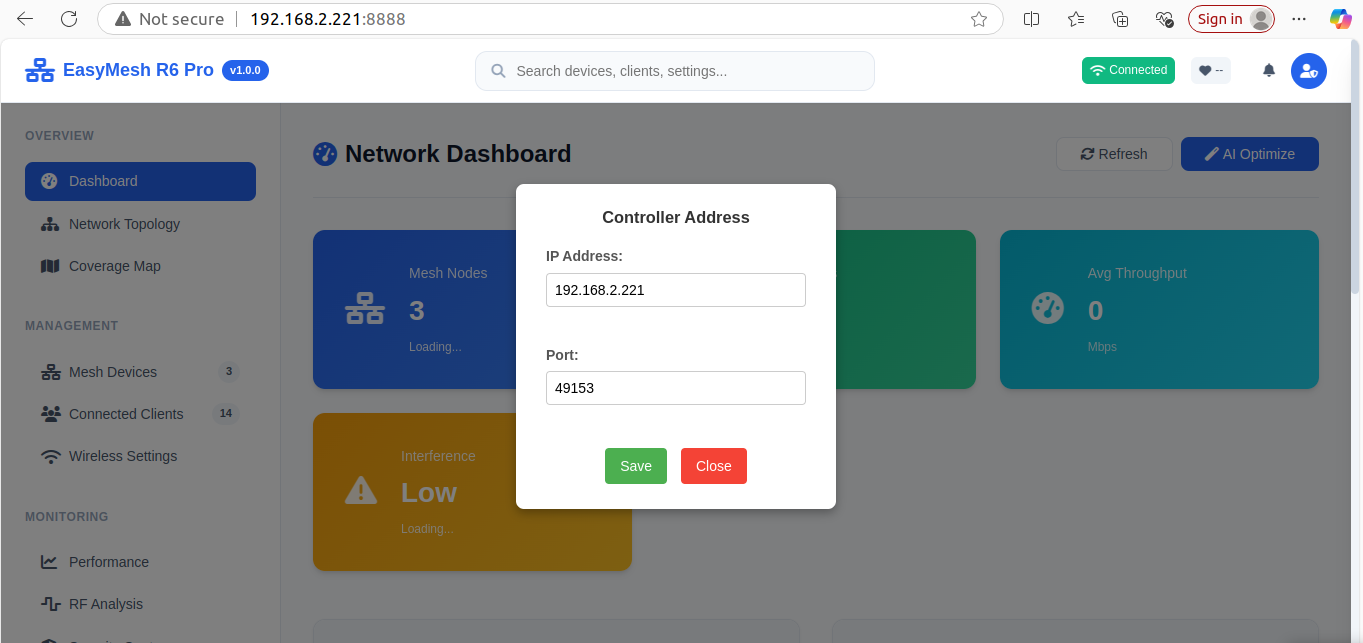
6.Network Topology
To get the current network topology, click on Network Topology tab as shown below.
Note: The topology is being fetch from controller and redraw on every 60 sec if user stay on topology page or page reload.
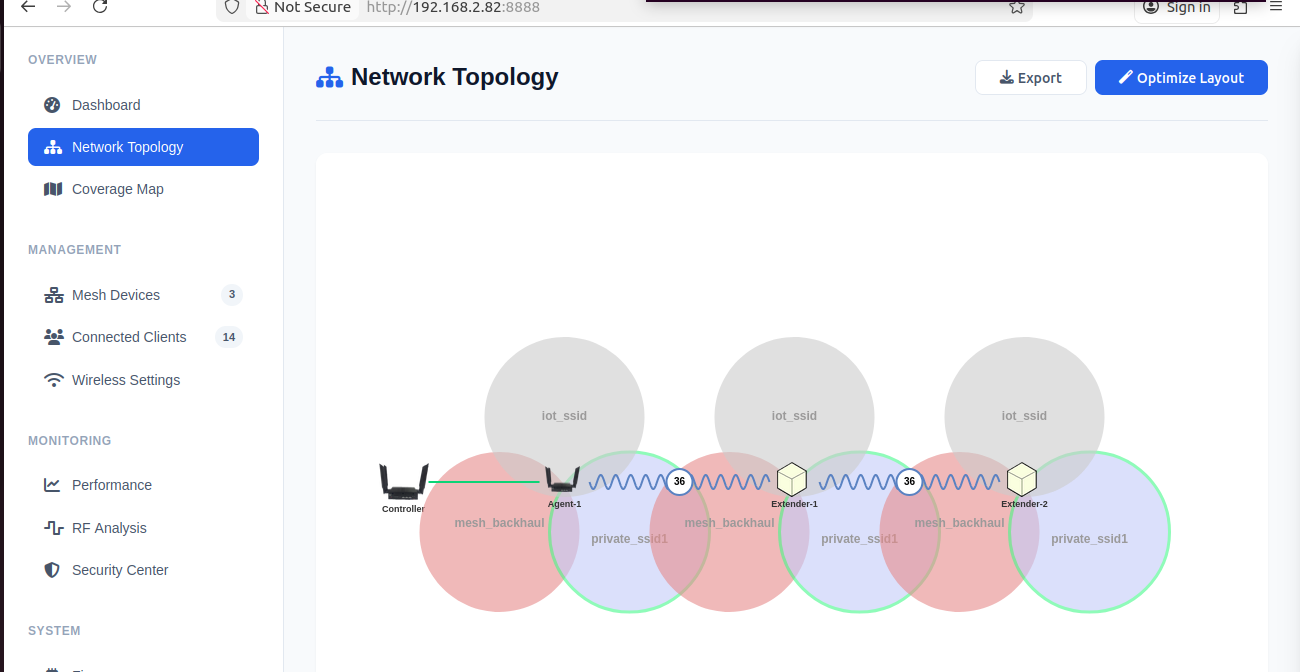
7. Update SSID and Password
User can update SSID and Password as steps shown below.
Click on tab Wireless Settings, The wireless network profile will be fetch as shown on the GUI as shown in picture below.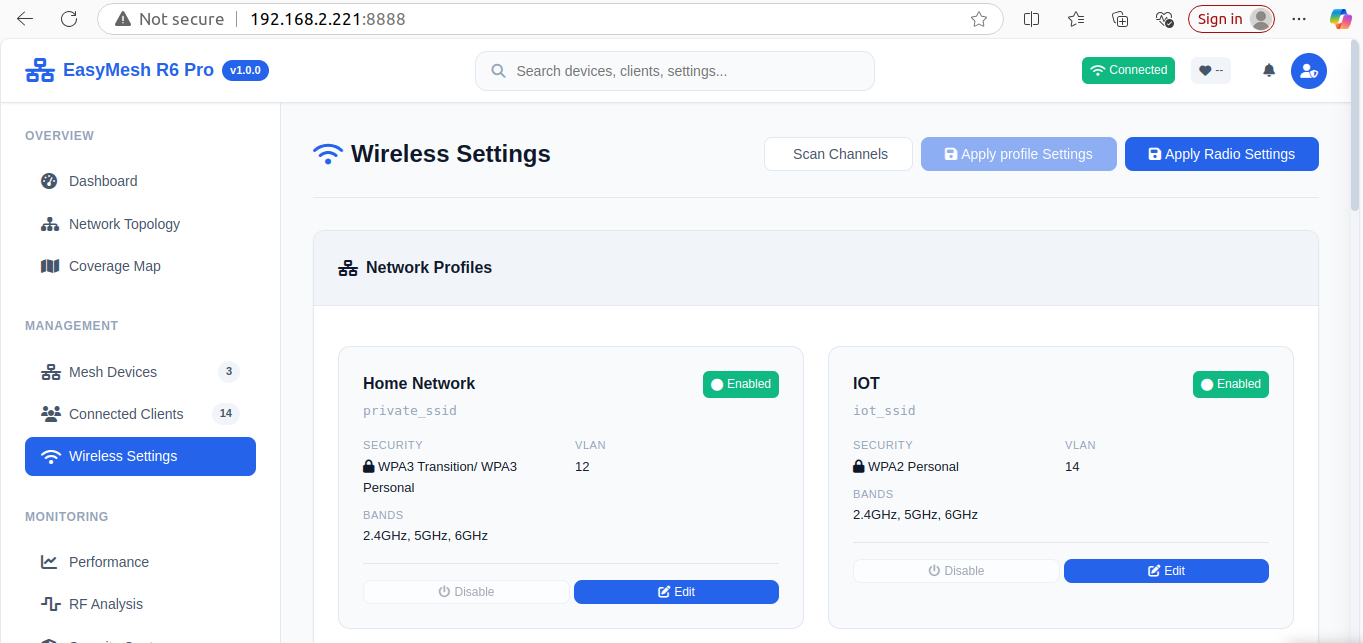
8. User can click on the Edit button on the profile which ssid and passphase needed to be updated. On click on Edit button the pop up will come with existing ssid and passphase, which can be edited and save.
user can edit multiple network profile and apply the updated setting by clicking “Apply Profile Setting” on top of the same page. Please refer the images below.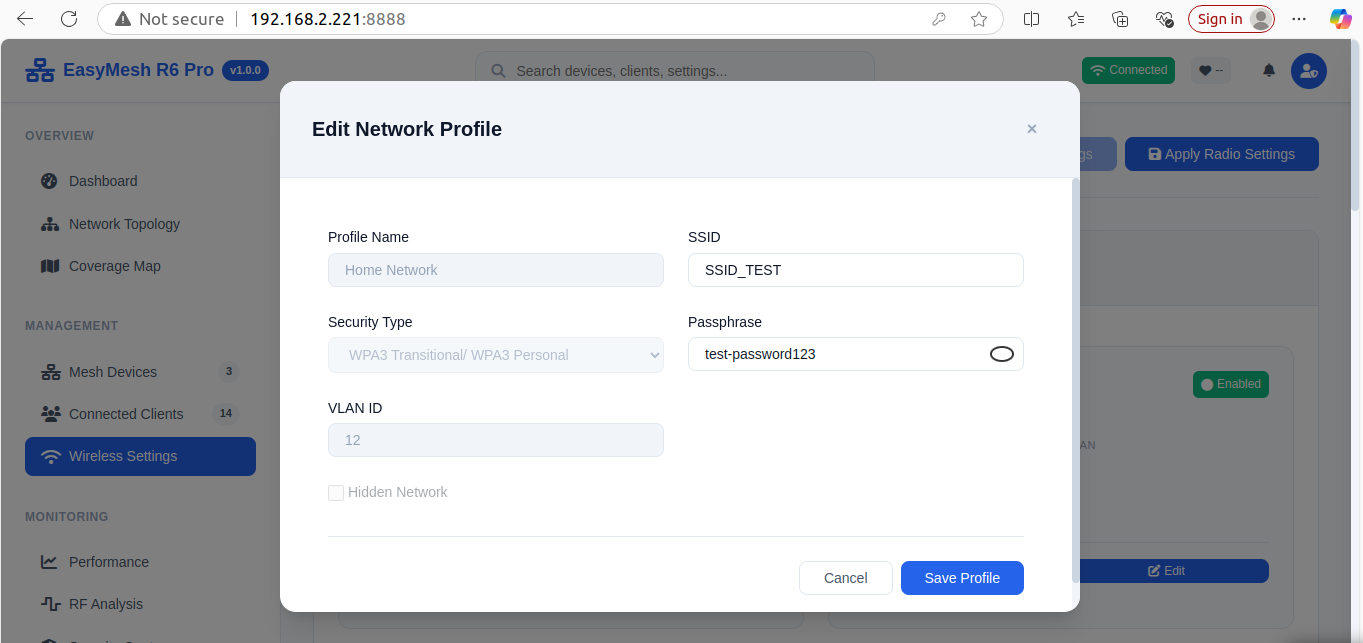
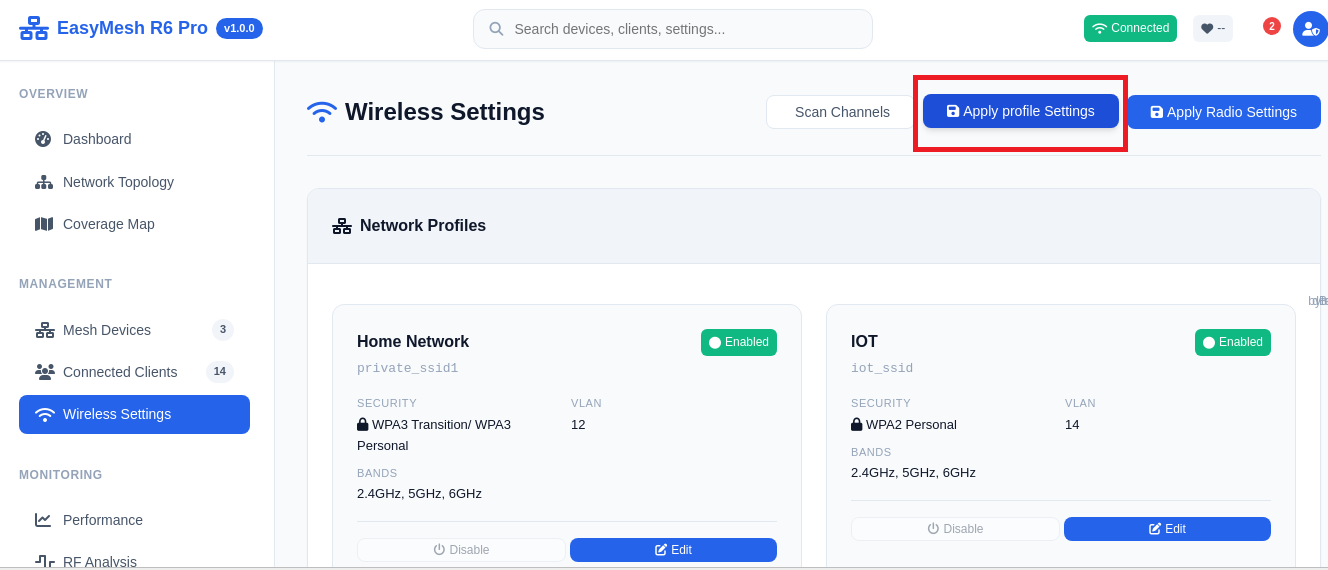
9. Channel Update
User can update Radio channel as steps shown below:
Click on tab Wireless Settings, Radio Configuration will be fetch as shown on below picture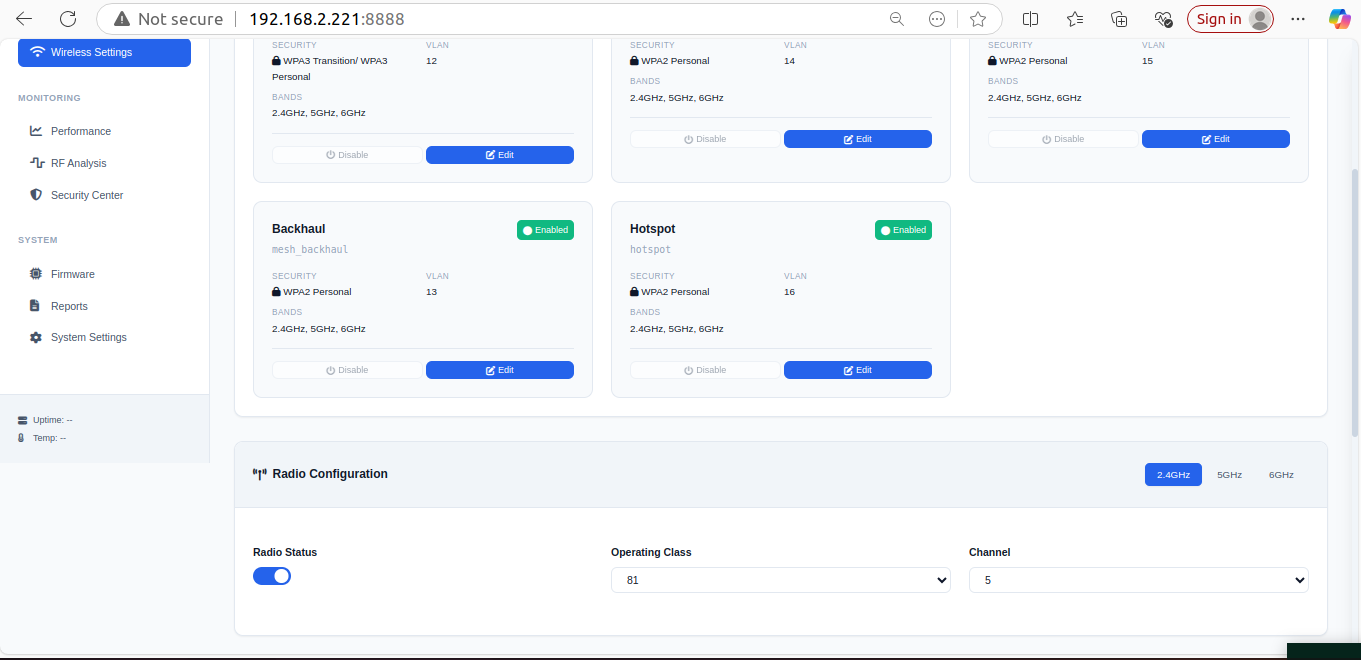
Toggle the bands and user can select the channel from dropdown list and click on Apply Radio Settings button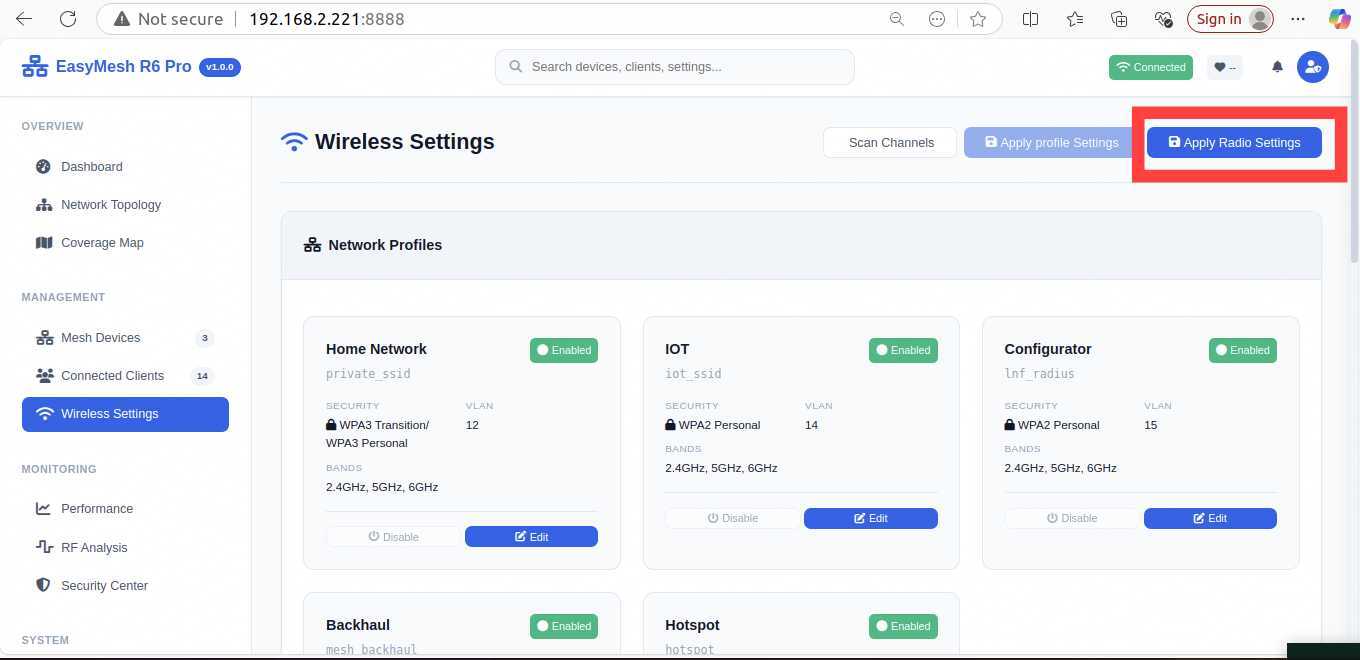
10. Wifi Reset
User can reset the controller as steps show below.
Click on tab “System Setting” for wifi reset page and select the AL MAC from the drop down list.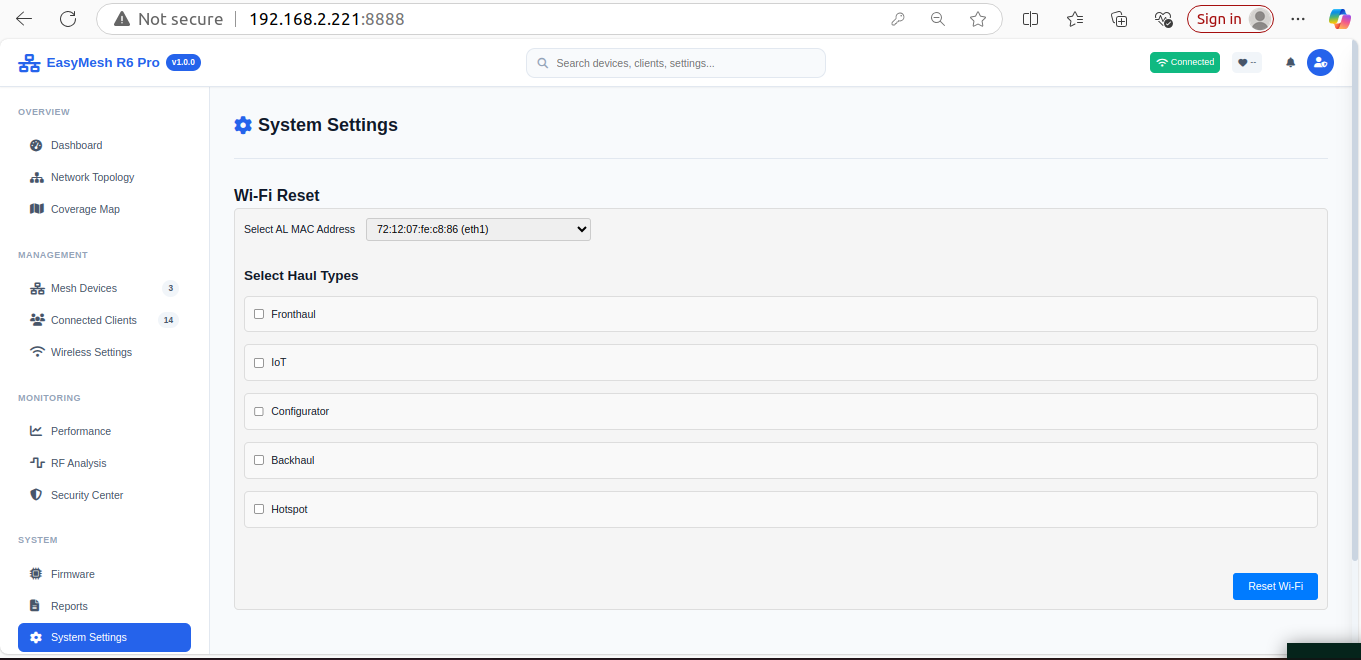
user can also select haultypes if any ssid and password has to be updated with reset.
On click Reset wifi, it will ask for the user configuration to apply reset.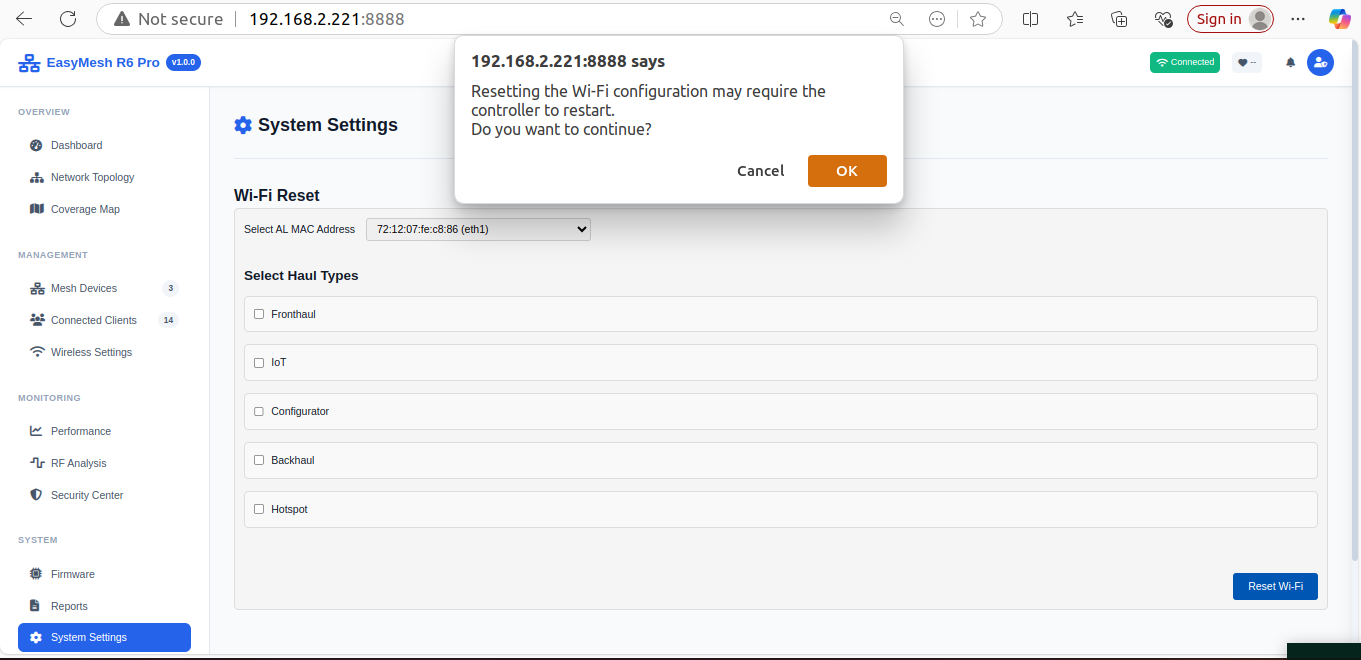
On click on “OK”, the reset will apply.
Please do manual reboot of all connected devices once we performed the Reset operation in RDKB CLI to configure the default configurations .
Known Issue on Easy Mesh builds:
- Randomly, observing cli crash when user try to change the channel value in GUI. To recover need to do WiFi Reset. (refer step 10)
- Channel number change, WiFi reset and network topology not working from CLI.
For support
- Please reach out to support@rdkcentral.com
References
Known issues
# | Component | JIRA / Reference | Details |
1 | eSDK is not working | eSDK FAIL in 2026 Q1 release. PopulateSDK is PASS. Under investigation. | |
2 | WebUi page is not loaded in bridge mode | Issue is there from Q4 2024 | |
3 | SNMP get/set is not working | Issue observed with MLO enabled builds |
Known issues in Non MLO build
| # | Summary | JIRA/Reference | Details |
|---|---|---|---|
| 1 | Observing build issues when we disable generic_mlo distro in BPI RDKB builds | RDKBACCL-1651 - Getting issue details... STATUS | Observing build issues when we disable generic_mlo distro in BPI RDKB builds Fix : https://github.com/rdkcentral/meta-cmf-bananapi/pull/460 |
Overview
Community Forums
Content Tools
Tasks
1 Comment
Yaniv Yizhak
Jun 09, 2026Hi,
How RDK8 annual release is different than the old quarterly RDKB releases?
What's the purpose of RDK8? Is it the same architecture as RDK-B?
Going forward, both releases will be available? yearly and quarterly?
Is there any diff in the feature list or content?
Thanks,
Yaniv