


Scope
Target is to provide a IMP/Gateway speedtest reference implementation to RDK-B community as part of banana Pi R4
Types of speedtests
IMP/Gateway speed test
- Between CPE and ISP's Edge Router/Gateway to test upstream and downstream
Client speed test
- Between connected client and gateway
Block diagram
Components involved
- Test and diagnostic
- iperf3
- USP agent (or) WebPA (parodus,parodus2ccsp)
- T2
Backend ecosystems involved
Xconf
Kibana/Elastic or simple json upload with Markers
USP controller or webpa server
Speedtest analytics engine (An application running on top of Rest API's)
iperf3 server (Linux machine running with iperf3 server)
RDK-B Customer perspective
As an RDK-B operator/OEM/SoC how can use my vendor speedtest implementation
- [Response - Just replace iperf3 client in RDK-B BPI R4 with your custom vendor implementation - refer orange colored
How about server
- Replace iperf3 server with your actual server - refer orange colored
Does this cover client speed test
- No
Technical requirements of gateway speed test
State machine design for Bananapi R4
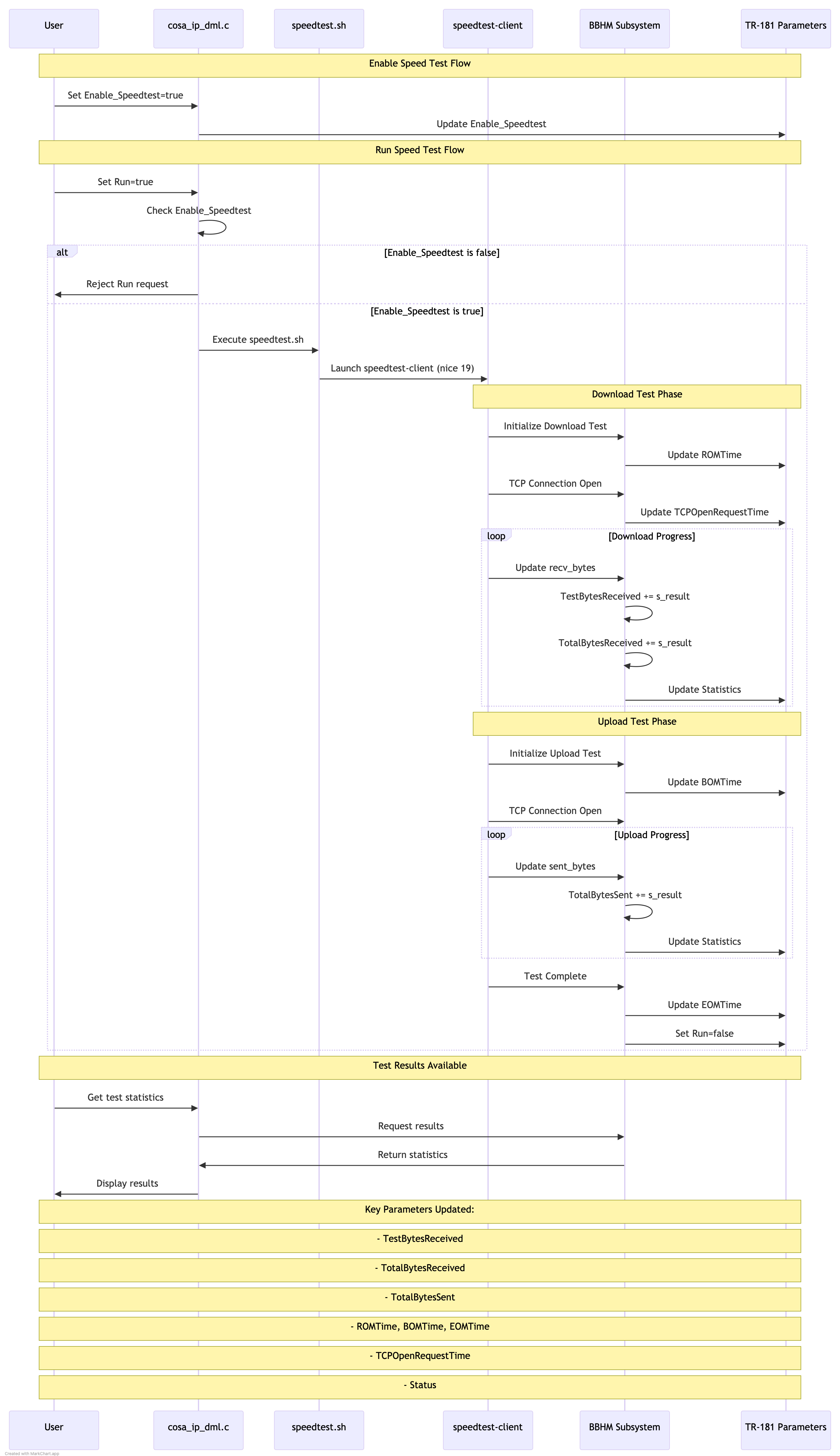
High level design
- Initial Setup:
- User enables speed test by setting Enable_Speedtest=true
- This is validated through cosa_ip_dml.c
- Parameter is stored in TR-181
- Test Execution:
- User triggers test by setting Run=true
- System checks Enable_Speedtest status
- If enabled
/usr/ccsp/tad/speedtest.sh # Launches with lowest priority
- Download Phase:
- speedtest-client initiates download
- BBHM updates tracked in real-time:
pStats->TestBytesReceived += s_result;
pStats->TotalBytesReceived += s_result;
- Timing parameters updated:
- ROMTime (start)
- TCPOpenRequestTime
- BOMTime (begin of measurement)
- Upload Phase:
- Similar flow to download
pStats->TotalBytesSent += s_result;
- Similar flow to download
- Completion:
- Final statistics stored in BBHM
- All parameters accessible via TR-181
- Run parameter set back to false
The entire process is managed by the Test and Diagnostics framework, with:
- Real-time statistics collection
- Proper error handling
- Persistent storage of results
- TR-181 parameter updates throughout the test
- Initial Setup:
Low level design
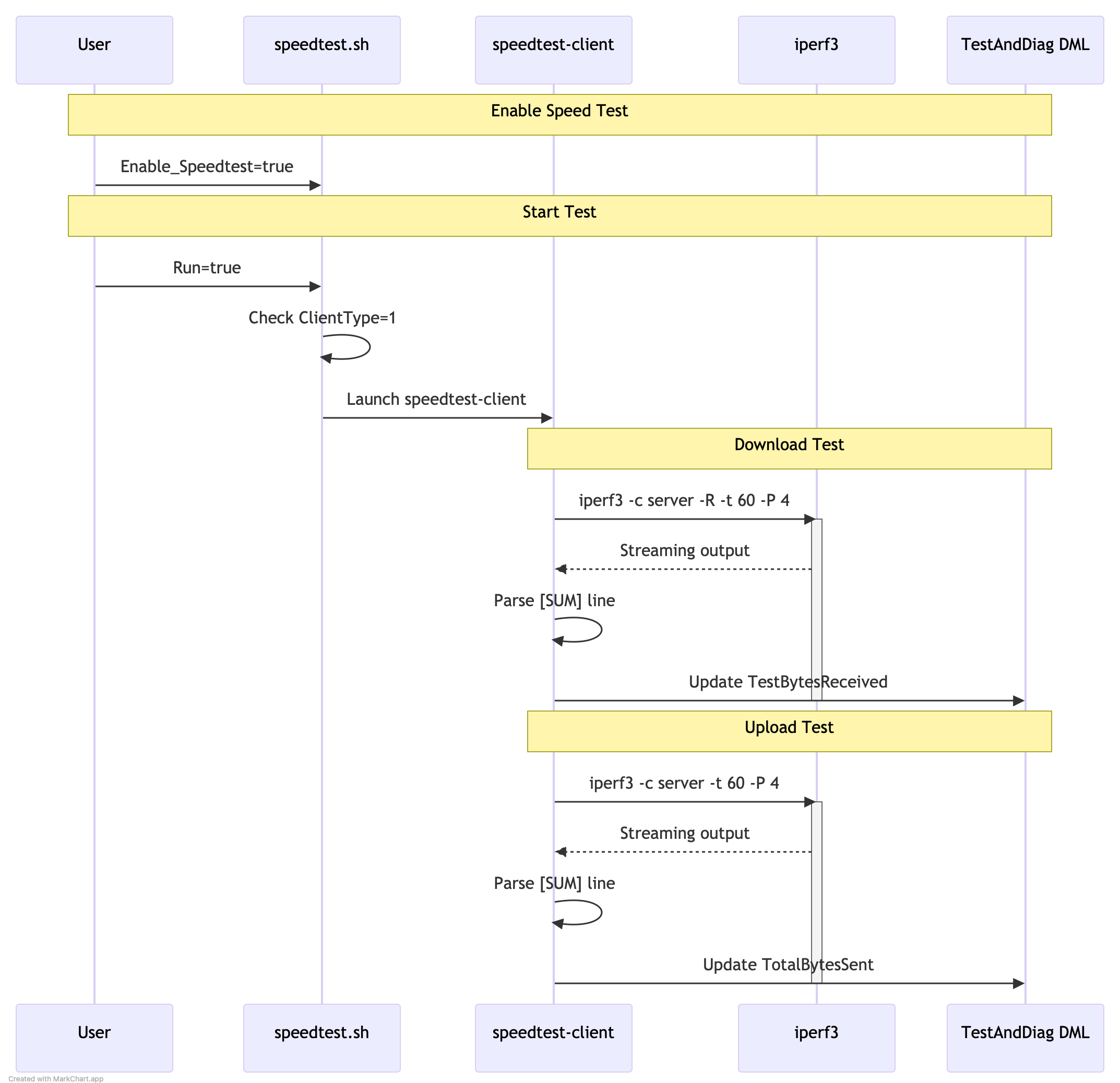
simple flow
Assumed output
iperf3 -c 192.168.2.151 -t 60 -b 100M -P 4
root@RaspberryPi-Gateway:/# tail -n 25 /var/log/iperf3log.log [ 5] 0.00-60.00 sec 169 MBytes 23.6 Mbits/sec receiver [ 7] 0.00-60.00 sec 173 MBytes 24.2 Mbits/sec 150 sender [ 7] 0.00-60.00 sec 173 MBytes 24.2 Mbits/sec receiver [ 9] 0.00-60.00 sec 167 MBytes 23.3 Mbits/sec 152 sender [ 9] 0.00-60.00 sec 167 MBytes 23.3 Mbits/sec receiver [ 11] 0.00-60.00 sec 164 MBytes 23.0 Mbits/sec 159 sender [ 11] 0.00-60.00 sec 164 MBytes 23.0 Mbits/sec receiver [SUM] 0.00-60.00 sec 674 MBytes 94.2 Mbits/sec 621 sender [SUM] 0.00-60.00 sec 673 MBytes 94.1 Mbits/sec receiver
supported speedtest dml's
Source code repo
- https://github.com/cpokuru/rdk-speedtest-cli
- https://github.com/cpokuru/yocto-staging/tree/main/recipes-benchmark
Reference
- Performance speed tests
- iperf3 application
- Reference comcast(Not to be shared with community) - https://etwiki.sys.comcast.net/display/SH/Gateway+Speedtest
Plan
Immediate
- Implement wrapper on top of iperf3 - rdk-speedtest-cli - https://github.com/cpokuru/rdk-speedtest-cli/tree/develop
- update speedtest.sh to invoke rdk-speedtest-cli : https://code.rdkcentral.com/r/c/rdkb/components/opensource/ccsp/TestAndDiagnostic/+/114513
- invoke speedtest using speedtest dml's in test and diag from webpa
- Store test results in file & upload file to remote machine using curl
- Update speedtest status & the corresponding dmls'
Next
- Investigate on upload/download dml's to update data.pls refer desig
Test Steps And Results
Pre test requirement : Ensure we have a iperf server on wan side in a ubuntu machine / windows machine.And is listening at port 5201
1. Using DMcli / webui set the Speedtest argument .In the string, give the server details used to send the Iperf server, port number ( ex: 5201) , bandwidth (ex 200), timeout (ex 15) details .Example as below
Ex: dmcli eRT setv Device.IP.Diagnostics.X_RDKCENTRAL-COM_SpeedTest.Argument string "-t 15 -b 200 -P 6 -p 5201 67.xx.xx.xxx"
2. Enable the speed test : dmcli eRT setv Device.IP.Diagnostics.X_RDKCENTRAL-COM_SpeedTest.Enable_Speedtest bool true
3. Enable the SpeedRun DM : dmcli eRT setv Device.IP.Diagnostics.X_RDKCENTRAL-COM_SpeedTest.Run bool true
4.Once we enable the Speedtest .Run DM ,we can see the iperf test has been intiated by through ps o/p , also we can see the packets being sent from server and received by the gateway in the console
root@Filogic-GW:~# ps | grep speed
392379 root 3236 S {speedtest.sh} /bin/sh /usr/ccsp/tad/speedtest.sh
392417 root 2180 SN /usr/bin/speedtest-client xx.xx.xx.xxx
5.In the TandD logs , we can see the iperf results as below :
2025-03-14 07:33:06 : Iperf test results: Sender 375000000 MBytes 200.000000 Mbits/sec sender Receiver : 375000000 MBytes 200.000000 Mbits/sec
6.Create a telemetry profile using the below link in Xconf server (First follow the log upload steps and then the telemetry profile creation)
https://wiki.rdkcentral.com/display/RDK/Feature+Validation+%3A+Xconf+Server
7.Telemetery profile has to be like below :
Telemtery profile:
"urn:settings:TelemetryProfile":{"id":"c8eb7b91-d982-4e08-97f8-20b2bc11d657","telemetryProfile":[
{"header" : "SPEEDTEST_IPERF_INFO_SPLIT","content" : "Iperf test results","type" : "TDMlog.txt.0","pollingFrequency":"0"}
],"schedule":"/5 * * *","expires":0,"telemetryProfile:name":"BPI-CIEC","uploadRepository:URL":"https://xconf.rdkcentral.com/xconf/telemetry_upload.php","uploadRepository:uploadProtocol":"HTTP"}
8.During log upload we wil be able to see the logs uploaded having the specific telemtery profile from TandD as well
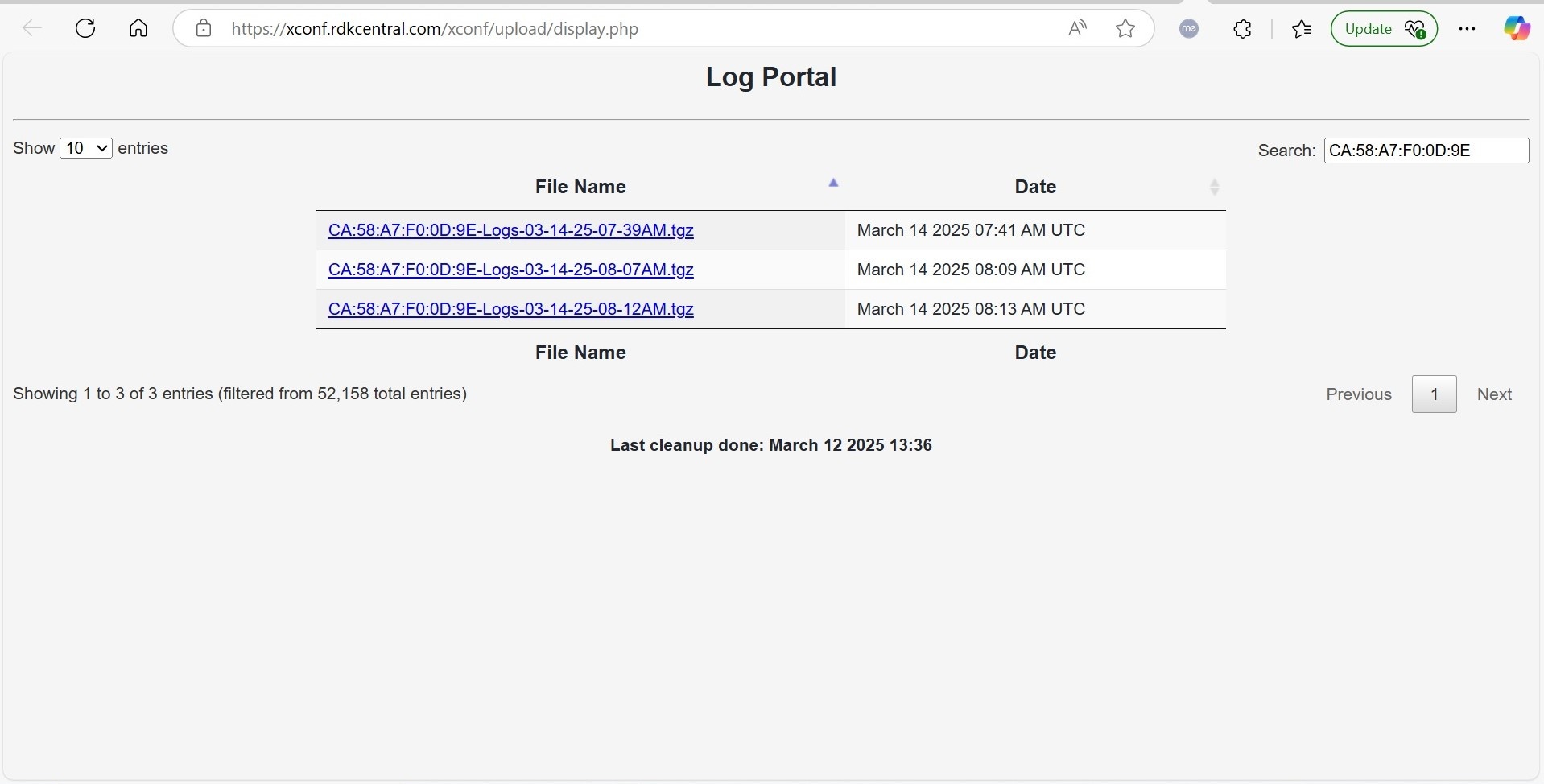
Logs can be downloaded and checked for the iperf results information
Code enhancement to match libiperf3
FAQ's
- TBD
Child pages
Overview
Community Forums
Content Tools
Tasks